
Delphi Prism - Part 1: Opening the "box"
All Prism related posts can be found in the tag Prism.
Hi, my name is Robert. I have been a closet Delphi fan for many years. <Hi Robert>. So when Borland, sorry Interprise, no I was right it’s Borland, sorry I forgot CodeGear, never mind I think it’s no Embarcadero said there was a super duper new version coming I got excited (maybe too much). So I have downloaded the trial and will blog about the experience.
Now note Delphi is NOT what I use day to day, in fact if I am choosing a language now it’s C# so don’t expect production evaluations but rather a hackers evaluations. First thing is downloading it (and finding my BDN CDN login) and waiting for the 4Gb to download to the slow internet of South Africa.
So lets see what’s in the box, or image:
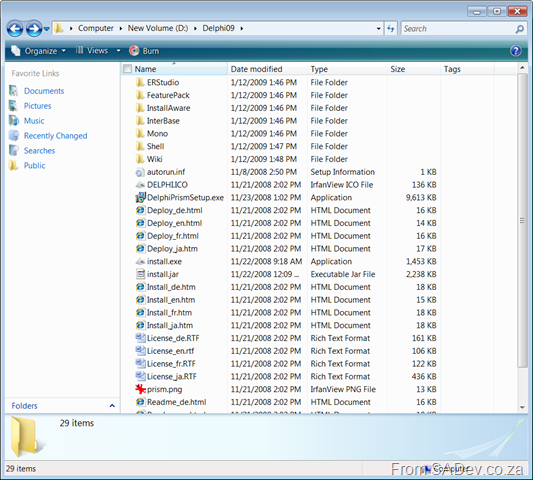
First is ER/Studio Developer Edition which is a database modeling tool from Embarcadero.
InstallAware Express CodeGear edition is an installer system, ala MSI/InstallShield/NSIS etc…
InterBase 2009 Developer Edition is next, no need to mention what that is (Delphi fans will just know)
Mono is exciting, in there is the Win32 GTK version of Mono :) Cross platform dreams are coming back.
Shell contains the VS 2008 shell install.
Wiki is interesting, as it looks like a dump (dated September 29, 2008) of the one from their site with anything other than read disabled. This makes sense and is actually very useful for us in the slow internet land who may battle to get to the wiki some times. So to who ever had this idea, well done! A few of the articles that jumped out at me are:
- Win32 Delphi vs. Delphi Prism
- Delphi Prism Syntax compared with Win32 Delphi
- Migration Tools: Oxidizer – ShineOn
There is also a good logo:

My first love came back - and she now drives a Ferrari!
Seriously I am grinning like mad this morning, because my first development love has returned: DELPHI! Many years ago it stopped being a good choice for work, if you could get any work, but that changed recently with the announcement of Delphi Prism. DP makes use of Visual Studio to host the Delphi language, that’s right all the power and beauty of VS! The language has been enhanced to support all the cool things that C# can do (LINQ, Silverlight)! So that is very cool, and using Oxygene Compiler you can target .NET, Win32, Mono (so you can run on Linux) with full GUI support for GTK#, and Cocoa for OSX (Tiger and Leopard)!
That’s right one fully featured language targeting 4 different platforms (Old Windows (Win32); New Windows (.NET); Linux; Mac OSX) right from within Visual Studio!
In reality though it has just been press announcements and demo’s at PDC so nothing for me to truly base this on… but hopefully soon.
InfoQ has a nice into article on the subject too: http://www.infoq.com/news/2008/11/Delphi-Prism
Random Tool Musings
First off is pptFlex which is an add-on for PowerPoint which provides a DeepZoom (those at the TechEd closing know what I mean) like experience with your slide deck. It's an Office Lab add-in so a prototype that will never see the main stream. After a touch of configuration (select backdrop, transition between slides, configuring sections) it appears to generate an XPS render of the slides with cool transitions but as XPS doesn't support animation that is the first (and biggest) loss in functionality when compared to normal PowerPoiunt. At the end of the day I doubt it will be shipped, but I think we may see these sort of transitions appearing in Office "13".
In my upcoming post on shrinking a VHD, I briefly mention that I reclaimed the disk space by emptying the SQL log file. That is a bad idea for most systems for many a reason beyond my non SQL guru mind, but if you are interested in how to do it anyway see the following article which is what I used my guidance: http://madhuottapalam.blogspot.com/2008/05/faq-how-to-truncate-and-shrink.html
Lastly there have been updates to some of my favorite tools, first from Microsoft namely StyleCop and FxCop which both are everyone. That’s very positive news especially since FxCop has been a bit stagnent but the news about another favorite tool, Reflector being taken over by RedGate (see here) does worry me. I do not think they will kill it or kill a free version but I am worried about two versions coming out (pay and free) with pay being all the features and new stuff and free being crippled or not getting enhancements. Only time will tell...
Team Foundation Server could not resolve the user or group
Next up was the migration of VSS to TFS, which was actually not a major requirement as it is just there for legacy projects. All active projects would have to check their code into new TFS projects planned to create in TFS. The key benefit of this is it would allow us to align with EPM better than the migration tool would allow us to. I created a project, and imported the 1.7Gb of source code into it! It took some time. Then I needed to add the users, and this is where I met a problem.
Regardless if I used the command line, or the TFS admin tool or the GUI I kept getting an error: Team Foundation Server could not resolve the user or group. <AD Distinguished Name of the User>. The user or group might be a member of a different domain, or the server might not have access to that domain. Verify the domain membership of the server and any domain trusts.

The AD issue and TFS issue both revolved around the fact that in our AD the Authenticated Users (AuthUsers) group does not have read permissions to our users and the containers they are in. This is odd to the outside person because when AD is setup the AuthUsers group does have permissions, so why would our AD be different and what are the implications of changing it. The reason there is a difference is because our AD is setup according to Hosted Messaging and Collaboration (you can read more about it here) which specifically removes the AuthUsers group permissions for security reasons (i.e. to prevent users from seeing other customers). Because of this change, the GPO could not access the users accounts and neither could TFS read from AD what it needed.
To solve this for TFS meant giving AuthUsers read permissions to the users who needed to access TFS and their immediate container while for AD/GPO it required just AuthUsers to have permissions on the container for the users (it doesn’t need the permissions on the actual users) and all it’s parent containers. Once those were done the group policies and TFS started to work 100%.
That’s great but what is the impact to the hosted environment and is this the best way to solve the issue? Well this does open up a security risk in that customers could see other customers, simply by logging into the domain. For us this is mitigated as we are not offering hosted TFS, this is just for our own internal staff who are aware of who our customers are and we aren’t worried if our customers know about our staff. It is also very difficult for a customer to see other customers as most applications don’t allow it and those that do allow it in their standard configurations, such as MSCRM, ignore it in a HMC environment.
In regards to is this the best way to solve the issue, my view is that it is not it. You should run a separate AD for each customer, this is a normal AD system which runs at the client premises and using the Customer Integration component of HMC (which is based on MIIS) sync the customer AD to the hosted AD. This means that you could run GPO’s and TFS on the customer site without the need to change anything in a hosted way.
IP Address Abstraction, should you use it?
In this case the biggest issue is that according to Common DNS Operational and Configuration Errors (RFC 1912, for those who care) states a few issues and many an admin may point out that this is the cause for all kinds of things like email breaking, but as we will see that may not be the case. But lets cover the highlights from RFC 1912 which will be pointed out to you:
A CNAME record is not allowed to coexist with any other data. However, DNS servers like BIND will see the CNAME and refuse to add any other resources for that name. Since no other records are allowed to coexist with a CNAME, the NS entries are ignored. Therefore all the hosts in the podunk.xx domain are ignored as well!That’s a big one since if you use IAA it will co-exist with MX, NS etc.. it also goes on to say
Don't go overboard with CNAMEs. Use them when renaming hosts, but plan to get rid of them (and inform your users). However CNAMEs are useful (and encouraged) for generalized names for servers -- `ftp' for your ftp server, `www' for your Web server, `gopher' for your Gopher server, `news' for your Usenet news server, etc.This basically goes against everything IAA identifies as a reason for using it :( Lastly it goes on to state
[RFC 1034] in section 3.6.2 says this should not be done, and [RFC 974] explicitly states that MX records shall not point to an alias defined by a CNAME. This results in unnecessary indirection in accessing the data, and DNS resolvers and servers need to work more to get the answer.
Also, having chained records such as CNAMEs pointing to CNAMEs may make administration issues easier, but is known to tickle bugs in some resolvers that fail to check loops correctly. As a result some hosts may not be able to resolve such names.Basically stating it may make administration issues easier, is kind of the point of all this. However there is a few things that the wiley admins may not point you to, first off this was published in Feb '1996! That’s 12 years ago, since then the superior DNS software like BIND, no longer has the issues that are stated, and to that point even the inferior DNS software like that which ships with Windows doesn’t show these issues. Basically that nulifies the first and last points but what about that bit in the middle pointing to RFC 1034 and RFC 974.
Having NS records pointing to a CNAME is bad and may conflict badly with current BIND servers. In fact, current BIND implementations will ignore such records, possibly leading to a lame delegation. There is a certain amount of security checking done in BIND to prevent spoofing DNS NS records. Also, older BIND servers reportedly will get caught in an infinite query loop trying to figure out the address for the aliased nameserver, causing a continuous stream of DNS requests to be sent.
Well RFC 974 deals with MX records and routing, so it is similar to the first point but does state:
If the response contains an answer which is a CNAME RR, it indicates that REMOTE is actually an alias for some other domain name. The query should be repeated with the canonical domain name.So basically even if you chain CNAME’s it should not break any email system. RFC 1034 is more about DNS (it’s actually called DOMAIN NAMES - CONCEPTS AND FACILITIES) and covers the overview of how should work without covering the technical details. However it was written in Nov of 1987 (so even older than RFC 1912) but is not obsoleted by any other RFC. It states:
Of course, by the robustness principle, domain software should not fail when presented with CNAME chains or loops; CNAME chains should be followed and CNAME loops signalled as an error.Basically that DNS should be robust and that the idea of IAA should work regardless. The one issue I cannot disprove is that it takes additional time and bandwidth to have lots of CNAMEs. Then again in 1996 56k was the blinding speed of the internet, now that is not the case. Bandwidth has increased and latency decreased so much since then, that it makes sense to utilize that additional power to make a more stable internet through the use of making administration easier. Hopefully we can soon get some tools to test for loops which are the biggest issue caused by this structure.
Looking at all of this I would state that IAA is worth implementing and there is not a significant reason anymore not to utilize it. Hopefully this document should help answer any questions or be of use when dealing with those admins who haven’t seen the light.
Taglocity review
ReviewTaglocity is a Outlook 2003/2007 plug in which gives the same idea is tags on blog (like on the right) but to email. Now this isn't really anything special for Outlook as you can get basically this same ability with flags in Outlook. There are three really good features in it though which help it stand out above just flags:
Anyway after using the professional trial for 14 days it expired and I now have the option to purchase or drop to personal edition. The personal edition has a tag cap which is a problem since I do need a lot of tags, and based on the negative points in the main features I can't agree to pay for it. So in the end it will go the way of the dodo and be uninstalled. |
Side BarDetails and downloads on Taglocity can be found at http://www.taglocity.com I used Taglocity 1.1 with Outlook 2007 on Vista. Outlook 2007 was patched with the performance hotfix. This ran on an Acer TravelMate 3270 laptop (Intel Core 2 1.67Ghz, 1.5Gb of RAM, 80Gb Hard drive) |