TCP servers with .NET: Scenario 3 & Non-blocking (Async) optimistic servers


This post is part of a series, to see the other posts in the series go to the series index.
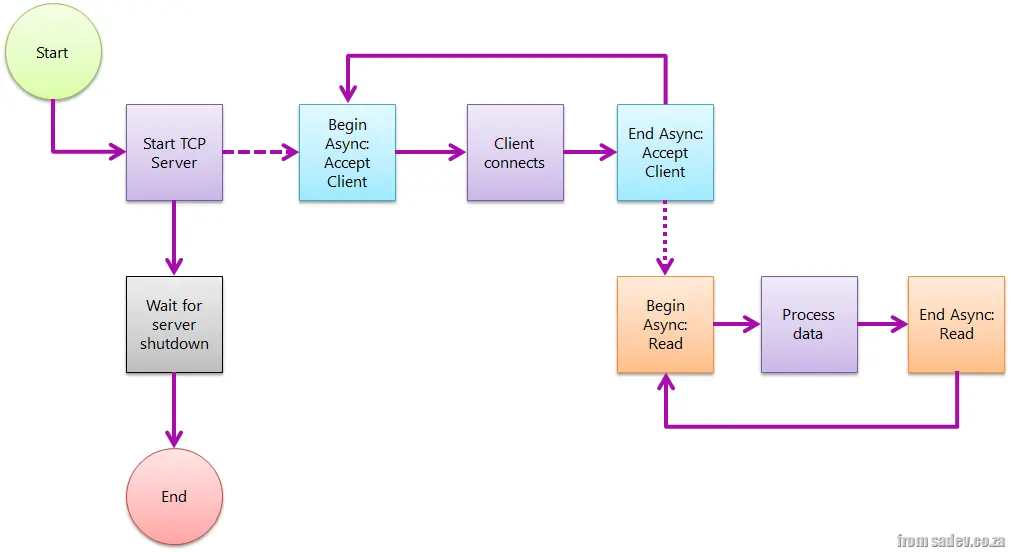 The first two posts (post 1, post 2) in this series were really just to set the stage and help explain problems with TCP servers that do blocking. The code and method aren't wrong—they work for some scenarios—but if you want a really robust model, a model that fixes these issues without adding any extra technical problems, you need to use a non-blocking server.
We start the server the same way, but instead of using the blocking _AcceptTcpClient method, we use the non-blocking method _BeginAcceptTcpClient, which implements the async (or begin/end) pattern—I’ll refer to it as async from here on. Mark Pearl has a great post explaining the async pattern.
When a client connects, it triggers the code set up in the async callback, where we call _EndAcceptTcpClient to complete the async process and retrieve the _TcpClient object.
We repeat this process for reading from the client by switching from _Read to _BeginRead.
The advantage of this model is that the only blocking point is ReadLine, making it easy to shut down the server. We also don’t have to worry about thread management (threads are still used internally, but we don’t need to manage them), and clients can now connect and send data at any time—it doesn’t matter!
This pattern requires significantly more code and is more complex to set up, but once you understand the async pattern (call begin > pass the state with necessary info > call end to retrieve more data), it becomes much easier.
class Program
{
    private const int BufferSize = 4096;

    static void Main(string[] args)
    {
        var tcpServer = new TcpListener(IPAddress.Any, 9000);
        try
        {
            tcpServer.Start();

            tcpServer.BeginAcceptTcpClient(ClientConnection, tcpServer);

            Console.WriteLine("Press <kbd>Enter</kbd> to shut down");
            Console.ReadLine();
        }
        finally
        {
            tcpServer.Stop();
        }
    }

    private static void ClientConnection(IAsyncResult asyncResult)
    {
        Console.WriteLine("Client connected");
        var tcpServer = asyncResult.AsyncState as TcpListener;
        var tcpClientConnection = tcpServer.EndAcceptTcpClient(asyncResult);
        tcpServer.BeginAcceptTcpClient(ClientConnection, tcpServer);

        var stream = tcpClientConnection.GetStream();
        var buffer = new byte[BufferSize];
        var clientData = new ClientReadData()
        {
            Buffer = buffer,
            Stream = stream
        };

        stream.BeginRead(buffer, 0, BufferSize, ClientRead, clientData);
    }

    private class ClientReadData
    {
        public byte[] Buffer { get; set; }
        public NetworkStream Stream { get; set; }
    }

    private static void ClientRead(IAsyncResult asyncResult)
    {
        var clientReadData = asyncResult.AsyncState as ClientReadData;
        var amountRead = clientReadData.Stream.EndRead(asyncResult);
        var message = Encoding.ASCII.GetString(clientReadData.Buffer, 0, amountRead);
        Console.WriteLine("Client sent: {0}", message);

        clientReadData.Stream.BeginRead(clientReadData.Buffer, 0, BufferSize, ClientRead, clientReadData);
    }
}