TCP servers with .NET: Scenario 2 - Optimistic Blocking Servers


This post is part of a series; to see the other posts in the series, go to the series index.
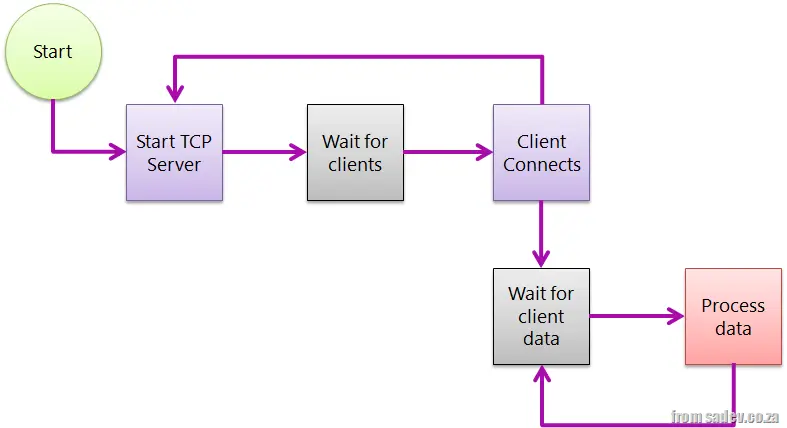 In the previous post, we looked at the simplest of all TCP server scenarios. But what about the third issue highlighted in that post: it assumes your clients will connect, pass data, and disconnect? What if clients connect optimistically so they can send data at some point in the future?
This is very common for games, where the client connection process is slow or even the smallest overhead should be eliminated.
In this mode, rather than read data and disconnect, we add a loop for reading and read until we get an end-of-message notice before ending the connection.
The problem with extending the simple model to this scenario is that we now have a blocking action: code cannot continue until something happens, in both the server thread and in all the client connection threads. So now shutting down the server isn’t just related to the server—we need clients to disconnect properly first.
What is common here is to send a message to all clients saying the server will shut down and then have them disconnect. This assumes we have smart clients and/or control them, but in scenarios where you don’t control the TCP clients, it could be problematic. We’ll look at a way to solve this in the next post. For now, the code below shows how this is implemented. Compared to scenario 1, it contains one small change:
class Program
{
    private const int BufferSize = 4096;
    private static bool ServerRunning = true;

    static void Main(string[] args)
    {
        new Thread(RunTCPServer).Start();
        Console.WriteLine("Press <kbd>Enter</kbd> to shut down");
        Console.ReadLine();
        ServerRunning = false;
    }

    private static void RunTCPServer()
    {
        var tcpServer = new TcpListener(IPAddress.Any, 9000);
        try
        {
            tcpServer.Start();
            while (ServerRunning)
            {
                var tcpClientConnection = tcpServer.AcceptTcpClient();
                Console.WriteLine("Client connection");

                // Spawn thread to deal with it
                new Thread(ClientConnection).Start(tcpClientConnection);
            }
        }
        finally
        {
            tcpServer.Stop();
        }
    }

    private static void ClientConnection(object state)
    {
        var tcpClientConnection = state as TcpClient;
        var stream = tcpClientConnection.GetStream();
        var buffer = new byte[BufferSize];
        while (ServerRunning)  // New in scenario 2
        {
            var amountRead = stream.Read(buffer, 0, BufferSize);
            var message = Encoding.ASCII.GetString(buffer, 0, amountRead);
            Console.WriteLine("Client sent: {0}", message);
        }
    }
}