Silverlight - When does it REALLY end?


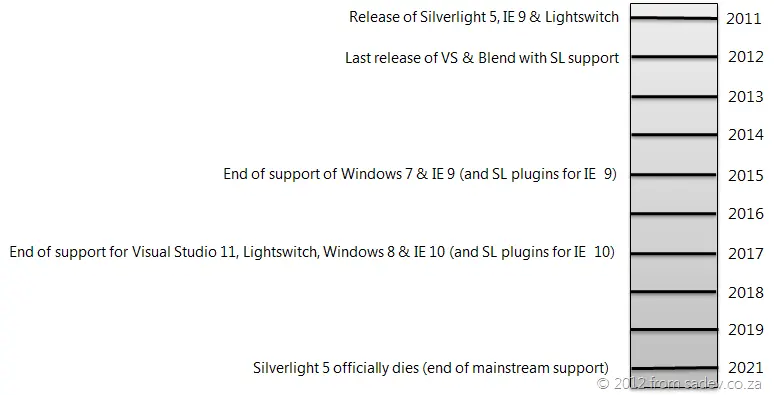 When you ask Microsoft, “Microsoft, WTF is going on with Silverlight 5? Is it the last version of Silverlight? Will you support more versions?”, you get given a link to the Silverlight Product Support Lifecycle Page (this has happened more than once to me). This page lists when Microsoft will support Silverlight, and you’ll see that for releases 1 through 4, support lasted between two and three years. For Silverlight 5, it’s a decade—this implies that this release will be with us for some time, so it’s a safe bet that it will be the last one. Before I continue: this post is about Silverlight on the desktop, not Silverlight on the phone, which is a different thing altogether. I have very different views on Silverlight on the phone.
So what does that really mean for us? Mainstream support will end in 2021. Does that mean browsers will work and Visual Studio will work? Maybe—that’s the real answer. Mainstream support (as defined on the Microsoft website) means:
- You can contact Microsoft for help, whether or not you pay for it. I’ve used this in the past to get hotfixes and installation help for other products—it’s great!
- Security patches.
- The ability to request non-security hotfixes (e.g., if you find a bug, log it with support, wait, and eventually get a fix).
But it does not mean tools or browsers will support it! Both are listed on the Silverlight page, so they’ve given us this info too. Tooling support is promised for at least 12 months post-release, meaning Visual Studio & Blend releases 12 months after Silverlight 5’s launch will support it. That means we can expect Visual Studio 2012 and Blend 5 (not VS 11) to support it. However, there’s no guarantee for further tooling updates—so VS 2012 & Blend 5 are likely the last releases to support Silverlight. Visual Studio typically follows a 5-year support trend, so expect tooling bugs to go unfixed after that. Another tool to consider is LightSwitch, which is based on Silverlight. Its lifecycle? 2017—so don’t expect current LightSwitch projects to continue until then!
In reality, those are just tools—we can keep using them long after their official end of life (as the SQL team will tell you if you try to create reports for SQL 2000 or 2005). The real concern is our customers’ interface with Silverlight: the browser. The support lifecycle page links to a list of supported browsers with an interesting caveat: support lasts until mainstream Silverlight support ends (2021) or until the browser’s own support ends—whichever is sooner. That means if IE’s support ends earlier, Silverlight support stops too. The latest browser listed is IE 9, and looking it up reveals nothing—IE is a component, so its lifecycle is tied to Windows 7, which ends support in 2015!
I’m running the Windows 8 beta and know Silverlight 5 works with IE 10, so if Microsoft follows the same lifecycle and this is the last release, we can expect browser support only until 2017.
The reality is: your OS, browser, and tools will all drop support in 2017—that’s the real end of life for me, and it’s five years away. Sure, you can get security hotfixes for another four years, but what good are they when your tools, OS, and browser can’t be updated? For me, 2017 is the real end-of-life date.
Finally, let’s be clear: these are assumptions and estimates based on past support cycles. Microsoft could be planning something else and just not communicating it—but since they’re not, this is all we have to go on. There’s another Silverlight—the one powering Windows Phone apps. I consider these two separate products (similar features but different tools and requirements), so my views here don’t apply to Windows Phone 7. I do believe Silverlight for Windows Phone will stick around much longer.