SFTPK: Tree


This post is one in a series about stuff formally trained programmers know—the rest of the series can be found here.
Trees
This post will look at the mighty tree, which is more a pattern than a specific data structure. The reason to understand the pattern is that so many of the data structures we will look at in the future use it—that a good understanding of it provides a strong basis to work from. As a computer user, though, you already have seen and used a tree structure—you may have just not known it. The most common form of it is the file system, where you have a root (i.e., / or C:\) and that has various folders under it. Each folder itself can have folders, until you end at an empty folder or a file.
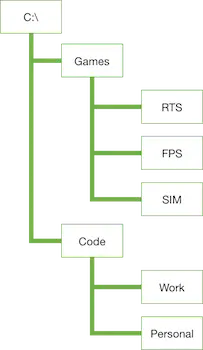
This is the way a tree structure works too: you start with a root, then move to nodes, and finally end with leaves.
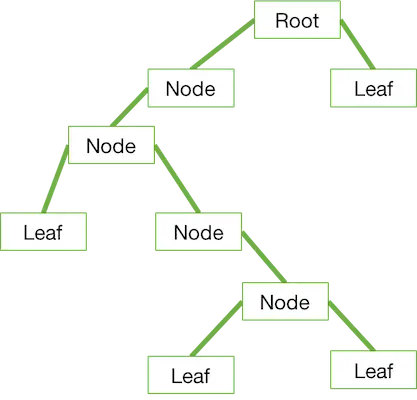
In the basic concept of a tree, there are no rules on the nodes and the values they contain—so a node may contain zero, one, two, three, or a hundred other nodes. What makes a tree really powerful is that it really is a collection of trees. That is, if you take any node, it is in itself a tree, and so the algorithms used to work with a tree work with each node too. This enables you to work with a powerful computer science concept: recursion.
Recursion
Recursion is a concept that lacks a real-world equivalent and so can be difficult to grasp initially. At its simplest, for these posts, it is a method or function that calls itself until instructed to stop. For example, you might write a function called getFiles that takes a path to a folder and returns an array of filenames. Inside getFiles, it loops over all the files in the folder and adds them to a variable to return. Then it loops over all the folders in that folder and, for each folder it finds, it calls getFiles again.
function getFiles(path) {
  var result = [];
  fs.readdirSync(path).each(file => result.push(file)); // get all files using Node, and push them to the result array.
  var directories = fs.getDirectoriesSync(path); // not a real Node call—for example.
  directories.each(directory => {
    var files = getFiles(directory); // calling itself.
    files.each(file => result.push(file));
  });
  return result;
}
IEnumerable<string> GetAllFiles(string path) // changed to GetAllFiles so it doesn't get too confusing with the built-in GetFiles
{
  var result = new List<string>();
  result.AddRange(Directory.GetFiles(path));
  foreach (var directory in Directory.GetDirectories(path))
  {
    result.AddRange(GetAllFiles(directory)); // recursively calling itself
  }
  return result;
}
Implementations
It doesn’t make sense to talk about coding implementations at this point since this is more a pattern than a structure—and we would need a lot more information on what we want to achieve to actually go through a code implementation. That said, it is interesting to see where trees are used:
- File systems
- Document Object Models (like HTML or XML)