SFTPK: Array


This post is one in a series about stuff formally trained programmers know—the rest of the series can be found here.
Array
This is the first in the data structure reviews and likely the simplest: the humble array. The first issue is the term array—it differs depending on who uses it 🙁, but we’ll return to that later.
Generally, I think of an array like this:
An array is a container object that holds a fixed number of values of a single type. The length of an array is established when the array is created. After creation, its length is fixed. — Oracle Java Documentation
Seems simple enough. There are two limits placed on our container: single type and fixed length, and both relate to how the array is handled in memory. When an array is created, it looks at the type and length to calculate how much memory is needed to store all of it. For example, if we had an array of 8 items, we’d get a block of memory allocated for the array like this:

In some systems, arrays can grow by allocating more memory at the end—these are called dynamic arrays. However, many systems do not allow this because the way memory is handled means there might not be any space after the last item to grow into. Thus, the array length is fixed as there isn’t any additional memory allocated for that array instance.
This has a major advantage for read performance, since I can quickly calculate where an item will be in memory—thus skipping having to read or navigate all other items. For example:
If my array’s values start at position 100 in memory and I want the 4th item in an int[], it would be 4 (for the position) multiplied by 4 (for the int size) plus 100 (for the start address), and boom—value!
This makes every read an O(1) operation!
Object[]
What happens when we can’t know the size of the items in the array—for example, if we created an Object[], which can hold anything?
In this scenario, when the array is created, rather than allocating memory based on length multiplied by type size, it allocates length multiplied by the size of a pointer. Instead of storing the values themselves in the array memory, it stores pointers to other locations in memory where the value is.
Obviously, this has a slightly worse performance than an array where we can store the values directly—but only slightly. Below is some output from BenchmarkDotNet comparing sequential reads of an int[] vs. an Object[] (code here)—and the difference is minimal:
| Method | Median | StdDev |
|---|---|---|
| IntArraySequentialReads | 52.2905 us | 4.9374 us |
| ObjectArraySequentialReads | 58.3718 us | 5.4106 us |
Associative Arrays/Dictionary
As mentioned above, not every array is an array—some languages (PHP and JavaScript, for example) do not allocate a block of memory like described above. These languages use what is called an associative array, also known as a map (PHP refers to it this way) or a dictionary.
Basically, these all have a key-value pair, and you can look up the value using the key. However, implementation details differ from platform to platform.
For example, in C#, Dictionary<TKey, TValue> is handled with an array under the covers, while in JavaScript, it is a normal object. When an item is added to the array in JavaScript, it merely adds a new property to the object, and that property serves as the index in the array.
Associative arrays do take up more memory than a traditional array (good example here of PHP, where it was 18 times larger).
Multi-dimensional Arrays
Multi-dimensional arrays also differ by platform. The Java version of them is an array of arrays, which achieves the same goal but is implemented similarly to how Object[] was described above. In C#, these are known as jagged arrays.
C# and other languages have proper multi-dimensional arrays, which work differently—they take all the dimensions, multiply them together, and use that for the length of an array. The dimensions simply provide different offsets.
Example:
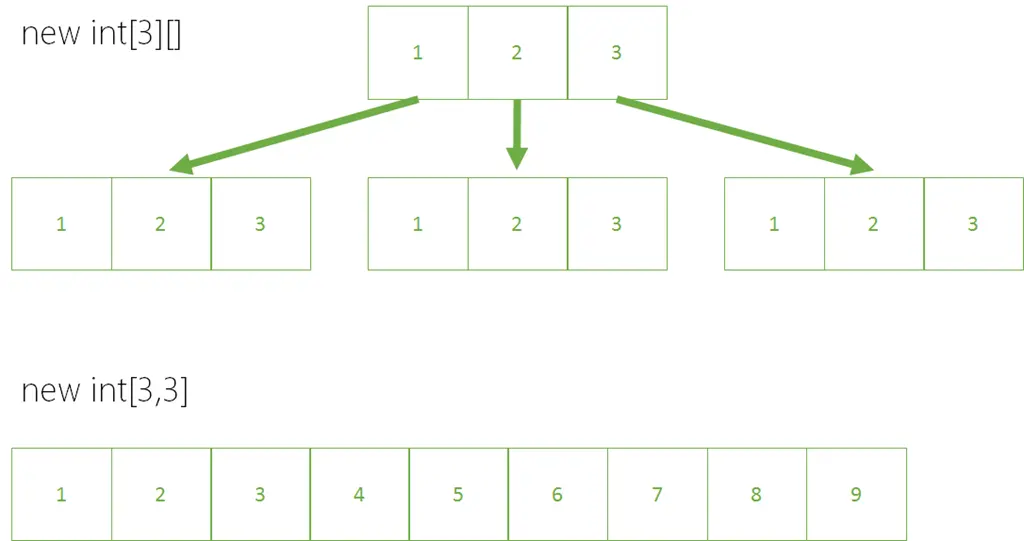
Jagged arrays do have one benefit over a multi-dimensional array: since each internal array is independent, they can be different sizes, whereas all dimensions in a multi-dimensional array must be the same size.
C# – List<T>
If you’re working in C#, you might be wondering what List<T> is and how it relates to an array since it can grow indefinitely. List<T> is essentially an array with an initial size of 4. When you call .Add to add a 5th item, it does the following:
- Creates a second array with a length double the current array.
- Copies all items from the first array to the second array.
- Uses the second array moving forward.
This is very expensive, which is why there’s an optional constructor where you can override the initial size, improving performance significantly. Once again, using BenchmarkDotNet, you can see the difference (code):
| Method | Median | StdDev |
|---|---|---|
| DefaultConstructorUsed | 701.7312 us | 38.5573 us |
| ConstructorWithSizeUsed | 548.5436 us | 13.1122 us |
JavaScript Arrays
As mentioned above, the standard JavaScript array is an associative array. However, JavaScript (from ES5) supports typed arrays. The supported methods differ, so this isn’t an easy replacement, and it only supports a limited set of numeric types. However, it might make sense to use these for performance reasons since they are implemented as actual arrays by JavaScript runtimes that support it.