.NET 4 Baby Steps - Part I: TimeSpan


 Welcome to part one of a new series of blog posts that will cover what’s new in .NET 4. To be different, I’m not looking at the big features, like WF 4 or the super cool parallel stuff. This series will focus on the smaller features—like new methods on existing classes or entirely new classes that have been added. As with all series I do, you can see the rest of the posts in the series on the series index.
We’ll start with TimeSpan, which has been around since .NET 1.0 and represents a time interval (duration of time or elapsed time) measured as a positive or negative number of days, hours, minutes, seconds, and fractions of a second. So what’s new in TimeSpan for .NET 4?
Parse & TryParse
Parse and TryParse are methods that have been around since the beginning and let you input a string in a specific format [-][d’.’]hh’:’mm’:’ss[‘.’fffffff] and get a TimeSpan object back. For example:
TimeSpan oneFractionSecond = TimeSpan.Parse("0.00:00:00.1");
TimeSpan oneHour = TimeSpan.Parse("1:00");
TimeSpan oneThousandDaysPast = TimeSpan.Parse("-1000.00:00");
Console.WriteLine(oneFractionSecond);
Console.WriteLine(oneHour);
Console.WriteLine(oneThousandDaysPast);
This produces: 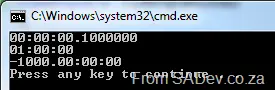
What’s new in parsing? The ability to add culture information through IFormatProvider. Why is this important? Because not everyone formats numbers the same. For example:
CultureInfo us = CultureInfo.GetCultureInfo("en-us"); // America
CultureInfo rm = CultureInfo.GetCultureInfo("rm");    // No idea, but it has my initials😉
CultureInfo za = CultureInfo.GetCultureInfo("en-za"); // South Africa

string usResult = string.Format(us, "{0:N}", 100000);
string rmResult = string.Format(rm, "{0:N}", 100000);
string zaResult = string.Format(za, "{0:N}", 100000);

Console.WriteLine("America:\t{0}", usResult);
Console.WriteLine("RM:\t\t{0}", rmResult);
Console.WriteLine("South Africa:\t{0}", zaResult);
Produces: 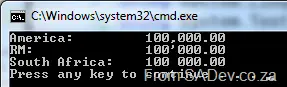
See how all three locations have different formats, and this is important because the old methods couldn’t handle these differences— they could only accept a single specific format.
Now we can do the following:
CultureInfo us = CultureInfo.GetCultureInfo("en-us"); // America
CultureInfo ru = CultureInfo.GetCultureInfo("ru-RU"); // Russia

TimeSpan oneFractionSecondUS = TimeSpan.Parse("6:12:14:45.3448", us);
TimeSpan oneFractionSecondRU = TimeSpan.Parse("6:12:14:45,3448", ru);

Console.WriteLine(oneFractionSecondUS);
Console.WriteLine(oneFractionSecondRU);
Note the comma in the Russian formatting. If you tried this in .NET 3.5 or before, you would have gotten a FormatException, but now it works!
ParseExact & TryParseExact
These are two brand-new methods that let us specify the format string to use. Until now, we had to comply with: [-][d’.’]hh’:’mm’:’ss[‘.’fffffff].
Now we don’t need to comply with a single format. We have two options with the format string: either a built-in one or a custom one. The built-in ones are:
c/t/T: These three do the same thing and represent what we’re used to currently:[-][d’.’]hh’:’mm’:’ss[‘.’fffffff].- Examples:
TimeSpan.Zero→00:00:00New TimeSpan(0, 0, 30, 0)→00:30:00New TimeSpan(3, 17, 25, 30, 500)→3.17:25:30.5000000
- Examples:
g: The culture-sensitive short format. This is basically the same asc, but the format provider supplied will be respected, whereascignores it:[-][d’:’]h’:’mm’:’ss[.FFFFFFF].- Examples:
New TimeSpan(1, 3, 16, 50, 500)→1:3:16:50.5(en-US)New TimeSpan(1, 3, 16, 50, 500)→1:3:16:50,5(fr-FR)New TimeSpan(1, 3, 16, 50, 599)→1:3:16:50.599(en-US)New TimeSpan(1, 3, 16, 50, 599)→1:3:16:50,599(fr-FR)
- Examples:
G: The culture-sensitive long format, in which there are no optional items except the negative symbol:[-]d’:’hh’:’mm’:’ss.fffffff.- Examples:
New TimeSpan(18, 30, 0)→0:18:30:00.0000000(en-US)New TimeSpan(18, 30, 0)→0:18:30:00,0000000(fr-FR)
- Examples:
We also have custom format strings now, so we can really tweak them—this will be great for interoperability. I won’t list all the components, but every individual part is covered. Here are some examples of what we can do now:
TimeSpan oneFractionSecond = TimeSpan.ParseExact("1", "%F", CultureInfo.CurrentCulture);
TimeSpan oneMinuteThirtySeconds = TimeSpan.ParseExact("1:30", @"%m\%:s", CultureInfo.CurrentCulture);
TimeSpan oneDay = TimeSpan.ParseExact("1", "%d", CultureInfo.CurrentCulture);
TimeSpan oneDayAndTwoHours = TimeSpan.ParseExact("1=2", @"%d\=%h", CultureInfo.CurrentCulture);

Console.WriteLine(oneFractionSecond);
Console.WriteLine(oneMinuteThirtySeconds);
Console.WriteLine(oneDay);
Console.WriteLine(oneDayAndTwoHours);
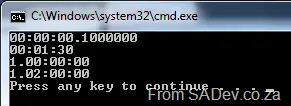
Which produces: