
Find Results Tweak - Now with less suck
 I posted the other day about a Visual Studio add-in which I developed. When developing it, I used the add-in model which has a nasty side effect, it needs to be installed with a MSI. Visual Studio 2010 can also be extended with packages and these can be deployed using the VSIX format.
What is this magical new VSIX format? It is basically a ZIP file which contains everything you need plus a manifest which tells VS how to use it. What makes this much better is that VS handles the install itself, so no MSI is needed. It is also then listed in the Extension Manager and so can take advantage of the features there by being disabled/uninstalled easily, not that you would want to.
A great side effect of this is that the new extension model let me add a little more error handling to the tool to help out debugging it. To get the new version go to http://findresultstweak.codeplex.com
Death of a SharePoint Developer
 I have had to explain many times in the last year why I, a normal developer, am involved with Information Worker which is (mostly) a SharePoint group? I am involved because I believe that the idea of a SharePoint Developer is a fast dying one and soon, people who call themselves a SharePoint Developer will be using it just as a way to justify higher consulting costs more than anything else.
I do not think this is because SharePoint usage is dying, rather the growth (maturity and adoption) of SharePoint is causing SharePoint developers to die off. This is not because SharePoint is so user friendly we no longer need custom code, because we still need custom code in SharePoint. The two reasons for my thinking this is based on two questions, “What SharePoint development really is?” and secondly “What Microsoft is doing about SharePoint development?”.
What is SharePoint development really? In SharePoint versions past (2007 and before) you would develop code for SharePoint using development concepts unique to SharePoint. Now that SharePoint has matured, development of the code for SharePoint involves concepts that are universal to development. There are two examples which come to mind which highlight the maturity of development concepts. First is web parts, which are now the same as ASP.NET web parts, and secondly is web services (and OData if you have SharePoint 2010). Both of these concepts are the exact same as used by many other products made by Microsoft and other companies. For example if you understand how to get data from Twitter, with OData in SharePoint 2010 you will understand how to get data from SharePoint. Yes, you will have some specific bindings/API’s/code that are SharePoint specific but the concepts, which is the difficult part to learn, are the same.
I mentioned two questions and the second is about Microsoft and it’s strategy for SharePoint development, in particular their 2010 strategy (Visual Studio 2010 + SharePoint 2010). A SharePoint developer used to have to go and download special files, install them, fixed issues, try installing again, fix more issues, have special machines or virtual machines to run SharePoint on and so on. The actual process of just writing code for SharePoint meant that you became elite because you had to go through a ritual of fire before you could start. Microsoft have really made SharePoint 2010 development simple and more importantly easy to start with, both by making SharePoint run natively on Windows 7 and also by including everything you need for development within Visual Studio 2010 from day one. It is as hard start wring code for SharePoint now as it is to make a WPF application!
What I am trying to convey is that previously a SharePoint developer had “paid their school fees” by learning so much that was so specific to the process of SharePoint development that they actually had earned a special title. Now that all those barriers have been removed, the title of SharePoint developer no longer applies, we are all just developers now!
Tweaking the Find Results window in Visual Studio 2010
Visual Studio is filled with goodness and happiness and a lot of that is available for tweaking, so you can get the maximum goodness, via the Tool -> Options menu. One of the things which doesn’t have any visible options is the formatting of the way the results are displayed:
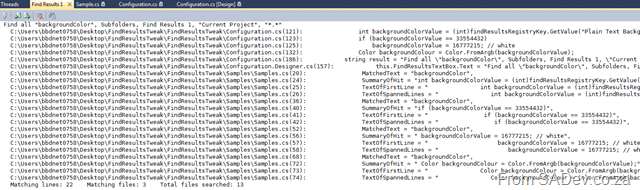
The problem, as indicated above, is a ton of white space, long file paths, no column information etc… Wouldn’t it be great to tweak how that can be displayed? Thankfully Sara Ford found a way to do exactly that via the registry. So you could tweak it to actually display the way you want it!
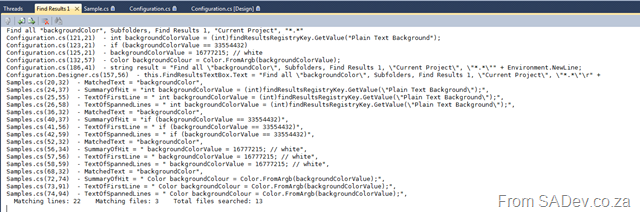
In my tweaked way it is far more condense with just the filename (no more path), less whitespace (since I am showing only a summary of results) and I also included the column info. The problem is that editing the registry is not user friendly :( This gave me a chance to write my first Visual Studio add-in, which gives you an option inside Visual Studio to set it.

What is really nice is that while you configure the format, the preview window will update and show you how it looks so you do not get any surprises when you save it! If you would like to find out more about it you can go to the site on CodePlex at http://findresultstweak.codeplex.com/
Installing TFS 2010 Basic on a Laptop
I decided that I would like show how easy it is to install TFS 2010 on a laptop in an upcoming presentation, but I also want to use that TFS installation for demo’s which is a worry – what happens if the install fails? So what I decided to do was create a video of me installing TFS, this way I can show the video and not worry about my demos not working because of some demo failure. As I am such as nice guy, I decided to share it with everyone on YouTube, so here is the video:
Free Visual Studio and TFS training?
 S.A. Architect will be offering FREE training covering Visual Studio and TFS in both 2008 and 2010 versions! This will be done in real life, so you will need to travel to somewhere in Johannesburg and so to figure out where, all you need to is click Yes on the S.A. Architect home page. Once some numbers have been worked out a venue can be found and it can be arranged!
The only catch is you will need to give up a Saturday for this, and myself and fellow Team System MVP, Zayd Kara, will be there to help or annoy you ;)
Presentation Data Dump
Over the last year I have done a number of presentations and recently some of uploaded them (unfortunately I cannot upload all, as some contain NDA information) to SlideShare so here is the collection of presentations from the last 15 months or so, in no particular order:
- ASP.NET Dynamic Data
- JSON and REST
- What’s Microsoft CRM all about?
- Source Control 101
- SQL Server Integration Services
- ASP.NET MVC
- What’s new in the .NET Framework 3.5 SP 1
Click the read more link to see and download them...
ASP.NET Dynamic Data
JSON and REST
What’s Microsoft CRM all about?
Source Control 101
SQL Server Integration Services
ASP.NET MVC
What’s new in the .NET Framework 3.5 SP 1
Dev4Devs - 28 November 2009
Well today is the day! Dev4Dev’s is happening at Microsoft this morning and I will be speaking on 10 12 new features in the Visual Studio 2010 IDE. For anyone wanting the slide deck and demo application I used you can grab them below.
The slide deck is more than the 6 visible slides, there is in fact 19 slides which cover the various demos and have more information on them so you too can present this to family and friends :)
VS2010/TFS2010 Information Landslide Begins
 Yesterday (19th Oct) the information landslide for VS2010 & TFS2010 began with a number of items appearing all over:
- First (and most important) is that BETA 2 of VS2010 is available for download to MSDN subscribers AND everyone else. For more information on that see http://microsoft.com/visualstudio/2010UltimateOffer
- Since not everyone will upgrade their development tools to VS2010 straight away, you may find yourself needing to connect VS2008 to a TFS2010 server. To enable that you need to install the forward compatibility update which you can get from: http://www.microsoft.com/downloads/details.aspx?displaylang=en&FamilyID=cf13ea45-d17b-4edc-8e6c-6c5b208ec54d
- The product SKU for Visual Studio 2010 is changing in a lot of ways to make it much simpler so make sure you are up to speed on it via the whitepaper and the Ultimate Offer site (see first link).
- New product logos for Visual Studio, you can see it above (no more orange?)
- MSDN has had a major over hall and now has information targeted for developers based on location. Oh and there is a new logo for MSDN too:

- John Robbins has a great series on the new debugger features available in VS2010 beta 2:
Two new Visual Studio snippets
 I’ve been working on an interesting project recently and found that I needed two pieces of code a lot, so what better than wrapping them as snippets.
What are snippets?
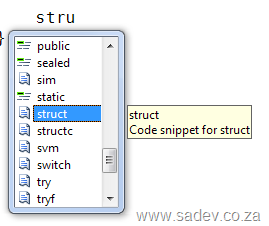
Well if you start typing in VS you may see some options with a torn paper icon, if you select that and hit tab (or hit tab twice, once to select and once to invoke) it will write code for you! These are contained in .snippet files, which are just XML files in a specific location.
To deploy these snippets copy them to your C# custom snippet’s folder which should be something like C:\Users\<Username>\Documents\Visual Studio 2008\Code Snippets\Visual C#\My Code Snippets
You can look at the end of this post for a sample of what the snippets create, but lets have a quick overview of them.
Snippet 1: StructC
Visual Studio already includes a snippet for creating a struct (which is also the snippet) however it is very bland:
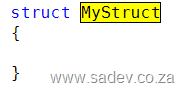
StructC is a more complete implementation of a struct, mainly so it complies with fxCop requirements for a struct. So it includes:
- GetHashCode method
- Both Equals methods
- The positive and negative equality operators (== and !=)
- Lots of comments
which all in all runs in at 74 lines of code, rather than the three you got previously.
Warning - the GetHashCode uses reflection to figure out a unique hash code, but this may not be best for all scenarios. Please review prior to use.
Snippet 2: Dispose
If you are implementing a class that needs to inherit IDisposable you can use the the option in VS to implement the methods.
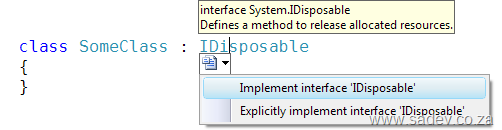
Once again from a fxCop point of view it is lacking since you just get the Dispose method. Now instead of doing that you can use the dispose snippet which produces 41 lines of code which has:
- Region for the code - same as if you used the VS option
- Properly implemented Dispose method which calls Dispose(bool) and GC.SuppressFinalize
- A Dispose(bool) method for cleanup of managed and unmanaged objects
- A private bool variable to make sure we do not call dispose multiple times.
StructC Sample
/// <summary></summary>
struct MyStruct
{
    //TODO: Add properties, fields, constructors etc...

    /// <summary>
    /// Returns a hash code for this instance.
    /// </summary>
    /// <returns>
    /// A hash code for this instance, suitable for use in hashing algorithms and data structures like a hash table.
    /// </returns>
    public override int GetHashCode()
    {
        int valueStorage = 0;
        object objectValue = null;
        foreach (PropertyInfo property in typeof(MyStruct).GetProperties())
        {
            objectValue = property.GetValue(this, null);
            if (objectValue != null)
            {
                valueStorage += objectValue.GetHashCode();
            }
        }

        return valueStorage;
    }

    /// <summary>
    /// Determines whether the specified <see cref="System.Object"/> is equal to this instance.
    /// </summary>
    /// <param name="obj">The <see cref="System.Object"/> to compare with this instance.</param>
    /// <returns>
    ///     <c>true</c> if the specified <see cref="System.Object"/> is equal to this instance; otherwise, <c>false</c>.
    /// </returns>
    public override bool Equals(object obj)
    {
        if (!(obj is MyStruct))
            return false;

        return Equals((MyStruct)obj);
    }

    /// <summary>
    /// Equalses the specified other.
    /// </summary>
    /// <param name="other">The other.</param>
    /// <returns></returns>
    public bool Equals(MyStruct other)
    {
        //TODO: Implement check to compare two instances of MyStruct

        return true;
    }

    /// <summary>
    /// Implements the operator ==.
    /// </summary>
    /// <param name="first">The first.</param>
    /// <param name="second">The second.</param>
    /// <returns>The result of the operator.</returns>
    public static bool operator ==(MyStruct first, MyStruct second)
    {
        return first.Equals(second);
    }

    /// <summary>
    /// Implements the operator !=.
    /// </summary>
    /// <param name="first">The first.</param>
    /// <param name="second">The second.</param>
    /// <returns>The result of the operator.</returns>
    public static bool operator !=(MyStruct first, MyStruct second)
    {
        return !first.Equals(second);
    }
}
Dispose Sample
#region IDisposable Members

/// <summary>
/// Internal variable which checks if Dispose has already been called
/// </summary>
private Boolean disposed;

/// <summary>
/// Releases unmanaged and - optionally - managed resources
/// </summary>
/// <param name="disposing"><c>true</c> to release both managed and unmanaged resources; <c>false</c> to release only unmanaged resources.</param>
private void Dispose(Boolean disposing)
{
    if (disposed)
    {
        return;
    }

    if (disposing)
    {
        //TODO: Managed cleanup code here, while managed refs still valid
    }
    //TODO: Unmanaged cleanup code here

    disposed = true;
}

/// <summary>
/// Performs application-defined tasks associated with freeing, releasing, or resetting unmanaged resources.
/// </summary>
public void Dispose()
{
    // Call the private Dispose(bool) helper and indicate
    // that we are explicitly disposing
    this.Dispose(true);

    // Tell the garbage collector that the object doesn't require any
    // cleanup when collected since Dispose was called explicitly.
    GC.SuppressFinalize(this);
}

#endregion
ASP.NET MVC Cheat Sheets
My latest batch of cheat sheets is out on DRP which are focused on ASP.NET MVC. So what is in this set:
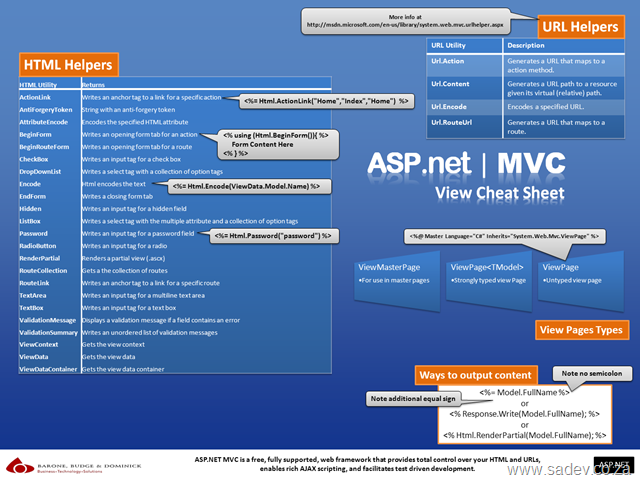
ASP.NET MVC View Cheat Sheet
This focuses on the HTML Helpers, URL Helpers and so on that you would use within your views.
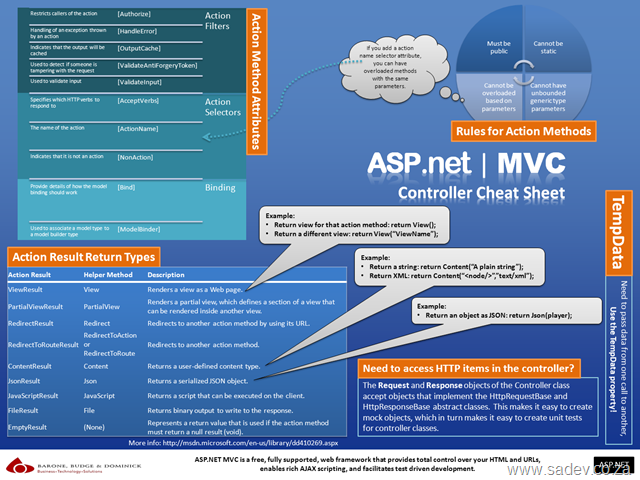
ASP.NET MVC Controller Cheat Sheet
This focuses on what you return from your controller and how to use them and it also includes a lot of information on the MVC specific attributes.
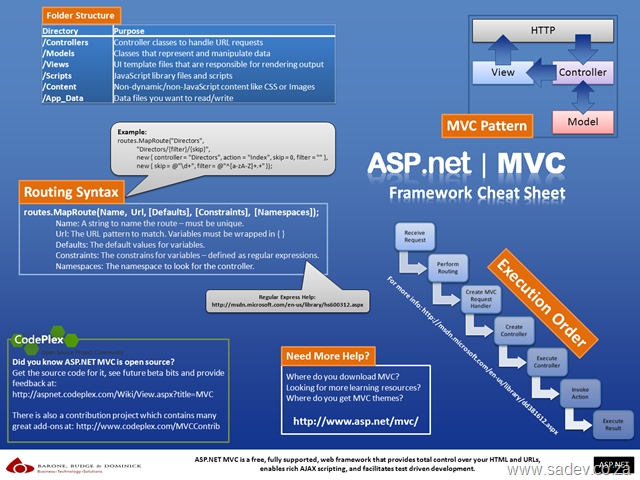
ASP.NET MVC Framework Cheat Sheet
This focuses on the rest of MVC like routing, folder structure, execution pipeline etc… and some info on where you can get more info (is that meta info?).
ASP.NET MVC Proven Practises Cheat Sheet
This contains ten key learnings that every ASP.NET MVC developer should know - it also includes links to the experts in this field where you can get a ton more information on those key learning's.

What are the links in the poster?
Think before you data bind
TinyURL: http://TinyURL.com/aspnetmvcpp1
Full URL: http://www.codethinked.com/post/2009/01/08/ASPNET-MVC-Think-Before-You-Bind.aspx
Keep the controller thin
TinyURL: http://tinyurl.com/aspnetmvcpp2
Full URL: http://codebetter.com/blogs/ian_cooper/archive/2008/12/03/the-fat-controller.aspx
Create UrlHelper extensions
TinyURL: http://tinyurl.com/aspnetmvcpp3
Full URL: http://weblogs.asp.net/rashid/archive/2009/04/01/asp-net-mvc-best-practices-part-1.aspx#urlHelperRoute
Keep the controller HTTP free
TinyURL: http://tinyurl.com/aspnetmvcpp4
Full URL: http://weblogs.asp.net/rashid/archive/2009/04/01/asp-net-mvc-best-practices-part-1.aspx#httpContext
Use the OutputCache attribute
TinyURL: http://tinyurl.com/aspnetmvcpp5
Full URL: http://weblogs.asp.net/rashid/archive/2009/04/01/asp-net-mvc-best-practices-part-1.aspx#outputCache
Plan your routes
TinyURL: http://tinyurl.com/aspnetmvcpp6
Full URL: http://weblogs.asp.net/rashid/archive/2009/04/03/asp-net-mvc-best-practices-part-2.aspx#routing
Split your view into multiple view controls
TinyURL: http://tinyurl.com/aspnetmvcpp7
Full URL: http://weblogs.asp.net/rashid/archive/2009/04/03/asp-net-mvc-best-practices-part-2.aspx#userControl
Separation of Concerns (1)
TinyURL: http://tinyurl.com/aspnetmvcpp8
Full URL: http://blog.wekeroad.com/blog/asp-net-mvc-avoiding-tag-soup
Separation of Concerns (2)
TinyURL: http://tinyurl.com/aspnetmvcpp9
Full URL: http://en.wikipedia.org/wiki/Separation_of_concerns
The basics of security still apply
TinyURL: http://tinyurl.com/aspnetmvcpp10
Full URL: http://www.hanselman.com/blog/BackToBasicsTrustNothingAsUserInputComesFromAllOver.aspx
Decorate your actions with AcceptVerb
TinyURL: http://tinyurl.com/aspnetmvcpp11
Full URL: http://weblogs.asp.net/rashid/archive/2009/04/01/asp-net-mvc-best-pract…