Note * Code for this Koan can be found here. * This is the 9th post in a multipart series. If you want to read more, see our series index
The goal of this Koan is to show how smart the Kotlin compiler is: when you use something like the is keyword to handle type checking, the compiler will then know the type later on and be able to use it intelligently. So if we want to check types in Java, we would use something like this, where we would use instanceof to check the type and then cast it to the right type.
public class JavaCode8 extends JavaCode {
    public int eval(Expr expr) {
        if (expr instanceof Num) {
            return ((Num) expr).getValue();
        }
        if (expr instanceof Sum) {
            Sum sum = (Sum) expr;
            return eval(sum.getLeft()) + eval(sum.getRight());
        }
        throw new IllegalArgumentException("Unknown expression");
    }
}
In Kotlin, by checking the type, the compiler handles the casting for us—but before we get to that, we also get to learn about the when, which is the Kotlin form of the switch keyword in C# or Java, and it offers similar functionality, as shown in this example:
when (x) {
1 -> print("x == 1")
2 -> print("x == 2")
else -> {
print("x is neither 1 nor 2")
}
}
It also supports multiple values on the same branch:
when (x) {
    0, 1 -> print("x == 0 or x == 1")
    else -> print("otherwise")
}
Where it gets awesome is the extra actions it supports—for example, when values can be functions, not just constants:
when (x) {
    parseInt(s) -> print("s encodes x")
    else -> print("s does not encode x")
}
You can also use in or !in to check values in a range/collection:
when (x) {
    in 1..10 -> print("x is in the range")
    in validNumbers -> print("x is valid")
    !in 10..20 -> print("x is outside the range")
    else -> print("none of the above")
}
It really is very cool, so let us see how we use Smart Casts and when together—and how it compares with the Java code above:
fun eval(e: Expr): Int = when (e) {
    is Num -> e.value
    is Sum -> eval(e.left) + eval(e.right)
    else -> throw IllegalArgumentException("Unknown expression")
}
Really nice—and, I think, more readable than the Java code.
Note * The code being referenced. * This is the 8th post in a multipart series. If you want to read more, see our series index.
The next Koan looks at how Kotlin handles nulls, and it does it wonderfully—Null is explicitly opt-in. For example, in C#, you can assign null to a string variable, but in Kotlin, unless you say you want to support nulls—by adding a trailing question mark to the class—you cannot. Their example in this Koan is a nice example:
fun test() {
val s: String = "this variable cannot store null references"
val q: String? = null
if (q != null)
q.length
val i: Int? = q?.length
val j: Int = q?.length ?: 0
}
Let’s dig into the Koan, where we’re given the following Java code:
public void sendMessageToClient(@Nullable Client client, @Nullable String message, @NotNull Mailer mailer) {
    if (client == null || message == null) return;
    PersonalInfo personalInfo = client.getPersonalInfo();
    if (personalInfo == null) return;
    String email = personalInfo.getEmail();
    if (email == null) return;
    mailer.sendMessage(email, message);
}
And we need to rewrite it using Kotlin’s nullable language features, which looks like this:
fun sendMessageToClient(client: Client?, message: String?, mailer: Mailer) {
    val email = client?.personalInfo?.email
    if (email == null || message == null) return
    mailer.sendMessage(email, message)
}
The big changes from Java:
- The
@NotNull attribute for mailer is no longer needed. - The
@Nullable attribute for the other parameters becomes the question mark. - We no longer pre-check
client before calling personalInfo, as you can use the null-safe operator ?. to ensure we only attempt the operation if the object isn’t null. - Unfortunately, the null-safe operator in Kotlin doesn’t support calling methods on
null objects as C# currently does with its Elvis operator.
This post is one in a series of topics formally trained programmers know—the rest of the series can be found in the series index. In this post, we will look at two related and simple data structures: the Stack and the Queue. The stack is a structure that can be implemented with either an Array or Linked List.
An important term for understanding a stack is that it is LIFO (last-in-first-out); namely, the last item you add (or push) is the first item you retrieve (or peek or pop). Let's have a look at what a stack looks like:
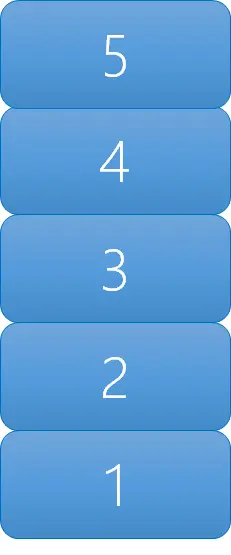
Here, we added 1, 2, 3, 4, and then 5, and when we read from the stack, we retrieve them in reverse order.
Implementations
Next is the queue, which is very similar to the stack—but whereas the stack is LIFO, a queue is FIFO (first-in-first-out). So if we put 1, 2, 3, 4, and 5 into the queue, we retrieve them in the same order: 1, 2, 3, 4, 5.
Implementations
C# has a queue implementation, and in JavaScript, an array can act as a queue when you use unshift to add to the beginning (the head) and pop to remove from the end (the tail).
Note * The code being referenced. * This is the 7th post in a multipart series. If you want to read more, see our series index.
WOW! Data Classes are awesome! I really like a lot of how classes are handled in Kotlin, but Data Classes are the pinnacle of that work. The effort for this Koan is to convert this Java class to Kotlin:
package i_introduction._6_Data_Classes
import util.JavaCode

public class JavaCode6 extends JavaCode {
    public static class Person {
        private final String name
        private final int age

        public Person(String name, int age) {
            this.name = name
            this.age = age
        }

        public String getName() {
            return name
        }

        public int getAge() {
            return age
        }
    }
}
and what does that look like in Kotlin?
data class Person(val name: String, val age: Int)
Yup, a single line. The data annotation adds a number of important functions (like toString() and copy()). We then declare the class with a constructor that takes two parameters, which both become properties. Another important aspect I learned with this one is that Kotlin has both a val and var keyword for variables. We’ve seen var already, and val is for read-only variables.
Note *
The purpose of this lesson is to demonstrate string templating. The Koan starts with some interesting examples:
fun example1(a: Any, b: Any) = "This is some text in which variables ($a, $b) appear."
fun example2(a: Any, b: Any) = "You can write it in a Java way as well. Like this: " + a + ", " + b + "!"
fun example3(c: Boolean, x: Int, y: Int) = "Any expression can be used: ${if (c) x else y}"
If you're familiar with string templates from C# and JavaScript, this should be fairly simple to understand. The fourth example is particularly interesting:
fun example4() = """You can use raw strings to write multiline text. There is no escaping here, so raw strings are useful for writing regex patterns—you don't need to escape a backslash by a backslash. String template entries (${42}) are allowed here."""
This introduced a concept I hadn’t heard of before—raw strings. Raw strings seem to function like the Python way of handling verbatim strings, which I didn’t realize was the official term.
The actual Koan here involves converting this:
fun getPattern() = """\d{2}\.\d{2}\.\d{4}"""
into a different regular expression using a string template:
fun task5(): String = """\d{2}\s$month\s\d{4}"""
It’s not especially interesting, and honestly—if you don’t already know regular expressions, this could be more challenging than it needs to be.
Note *
- This is the 5th post in a multipart series. If you want to read more, see our series index.
So, following C#, Kotlin has lambda support, with the change of => becoming ->. The koan starts with some nice examples at the start:
fun example() {
    val sum = { x: Int, y: Int -> x + y }
    val square: (Int) -> Int = { x -> x * x }
    sum(1, square(2)) == 5
}
Basically, though, the code that needs to be done is to check a collection if all items are even—which can easily be done with:
fun task4(collection: Collection<Int>): Boolean = collection.all { item -> item % 2 == 0 }
Note
Previously, we covered Named Arguments, and this is a small continuation of it. We start with a simple function:
fun foo(name: String): String = todoTask3()
and we need to make it call a single Java function while providing default values—resulting in:
fun foo(name: String, number: Int = 42, toUpperCase: Boolean = false): String = JavaCode3().foo(name, number, toUpperCase)
Note
On to our third exercise—and definitely, the difficulty curve has lowered again (or should it be steep?)—as we have a simple lesson: how to use named arguments. Not only is an example provided for how named arguments work:
fun usage() {
bar(1, b = false)
}
We also get an example of default values for arguments:
fun bar(i: Int, s: String = "", b: Boolean = true) {}
The problem we need to solve itself is simple too:
Print out the collection contents surrounded by curly braces using the library function 'joinToString'. Specify only the 'prefix' and 'postfix' arguments.
Which has this answer:
fun task2(collection: Collection): String {
    return collection.joinToString(prefix = "{", postfix = "}")
}
Not much to add to this lesson, unfortunately.
The second koan is meant as an exercise of the IDE and is targeted at those moving from Java; as such, it was a mixed bag for me. The goal is to get a Kotlin version of Java code by letting the IDE do the conversion, but I decided to tackle it myself. Initially, I thought I needed to do the entire file—not just the task function. So, what does the entire code look like when changed?
package i_introduction._1_Java_To_Kotlin_Converter;

import util.JavaCode;
import java.util.Collection;
import java.util.Iterator;

public class JavaCode1 extends JavaCode {
    public String task1(Collection collection) {
        StringBuilder sb = new StringBuilder();
        sb.append("{");
        Iterator iterator = collection.iterator();
        while (iterator.hasNext()) {
            Integer element = iterator.next();
            sb.append(element);
            if (iterator.hasNext()) {
                sb.append(", ");
            }
        }
        sb.append("}");
        return sb.toString();
    }
}
package i_introduction._1_Java_To_Kotlin_Converter;

import util.JavaCode
import kotlin.collections.Collection

class JavaCode1 : JavaCode() {
    fun task1(collection: Collection<Int>): String {
        val sb = StringBuilder()
        sb.append("{")
        val iterator = collection.iterator()
        while (iterator.hasNext()) {
            val element = iterator.next()
            sb.append(element)
            if (iterator.hasNext()) {
                sb.append(", ")
            }
        }
        sb.append("}")
        return sb.toString()
    }
}
The first thing you'll notice is that java.util.Collection is gone since Kotlin has its own implementation and is imported by default. Next is the code's lack of visibility modifiers. This is because everything is public by default. In addition to public, there are protected, private, and internal—which work the same as .NET’s modifiers.
The next change is the variables: you don’t need to define the type before the variable—you just define val for read-only variables or var for mutable variables. This is similar to C#’s var keyword.
The final change is the lack of semicolons. This doesn’t mean Kotlin doesn’t have them—it means they are optional. You can add them (as in Java or C#) without issue, but you don’t need them unless the compiler needs clarity.
This post is one in a series of stuff formally trained programmers know—the rest of the series can be found in the series index. Building off the Binary Search Tree, we get the red/black tree, which aims to solve the problem that a BST can become unbalanced. The short version of a red/black tree is that it is a BST with a set of rules that help us keep it performing well.
Thinking back to the BST, when we are doing inserts and deletes, at some point we need to rebalance the tree to ensure we keep that sweet O(log n) performance for searching. When is the right time to do that rebalancing?
A red/black tree extends a BST by adding one bit of information to each node; for those keeping track, our node now has the data, a key, and a flag. The flag is either red or black, and there are 7 rules for a red/black tree (there are 5 official ones that relate to the colors, the first five below, but there are two more for the BST itself):
- Each node is either red or black.
- The root node is black.
- All leaves are black. These leaves can be the null pointers off of a node or they can be explicit nodes.
- A red node can only have black children.
- Any path from a node to the leaves contains the same number of black nodes.
- New nodes added are always red.
- If the depth of a path is more than twice that of the shortest path, we need to do a rotation.
So with these rules, insert & delete get more complex because you need to check them and, if the rules are violated, you start to correct the issue. What’s great is that because of the rules, you become really efficient at correcting the problems.
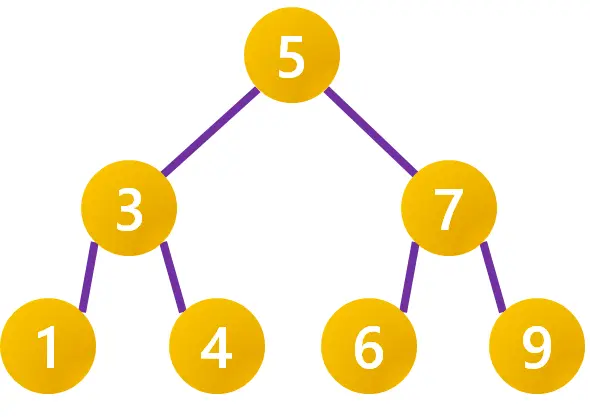
So let’s look at a really simple BST:
Next, let’s make it a red/black tree following our rules above. I am also going to add the leaf nodes in this image to help explain it but will remove them in the remaining ones.
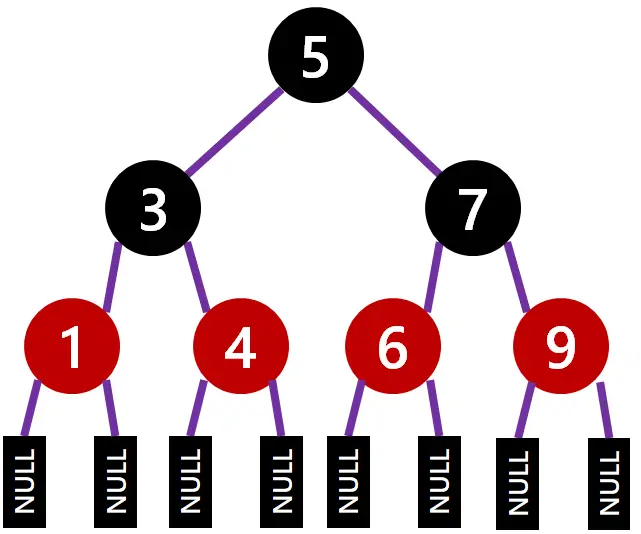
Note:
- From the root node, you need to go through 1 black node to reach a leaf node, regardless of path.
- All red nodes only have black children.
- A black node can have black children.
Now we are going to add a node with value 11. It is added in the correct place and as a red node.
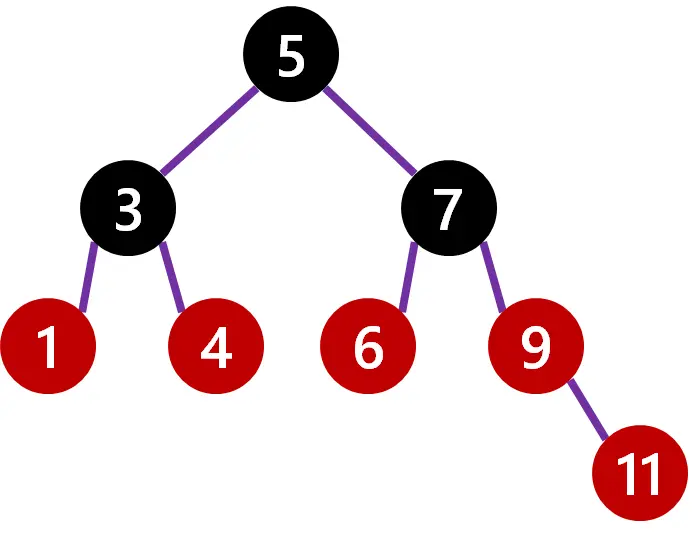
However, 9 is red and has a red child, so we need to trigger a repaint of 9 to black. That causes a new issue: from the root node to the leaves, you may go through 1 black node by going left or 2 black nodes by going right, so we need to paint the parent of 9 (i.e., 7) to red. Lastly, since 7 is now red, 6 must be repainted to black. Finally, we have a correct red/black tree again.
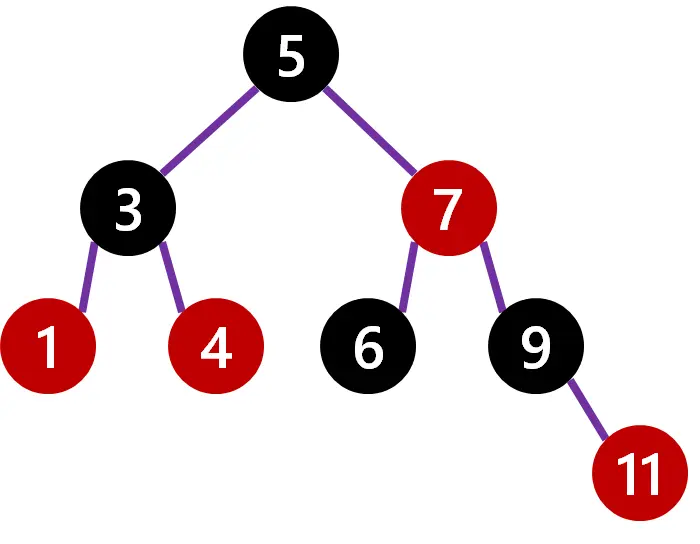
Lastly, let’s add 10, which goes under 11. Immediately, we note that the length from 5 to the leaf of 10 is 4 steps, while the shortest path (the left side) is 2. We know we need to do a rotation.
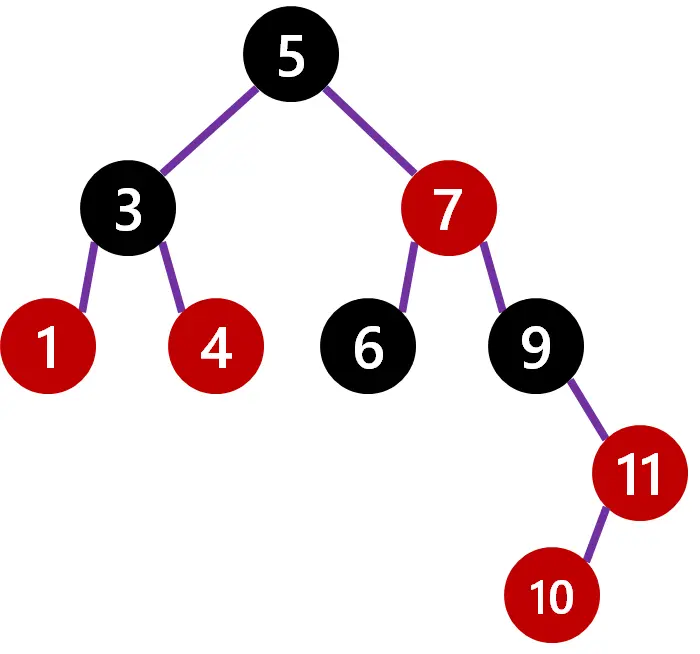
The rotation is easy: we take the child of the longer side (i.e., 7) and make it the root, and make the original root (i.e., 5) a child of it. Since 7 already has two children (5 and 9), its original child 6 moves under 5. Next, we just trigger a repaint, starting with the fact that 7 needs to be black, and you end up with the following:
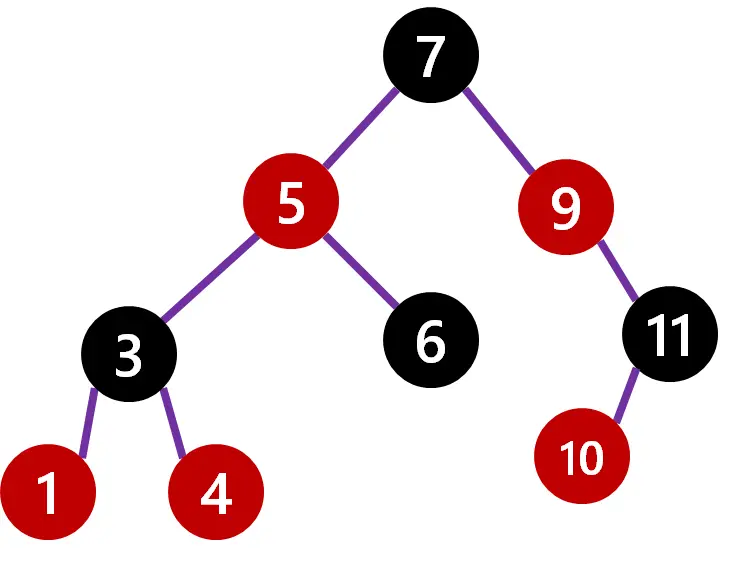
This might seem really expensive to do, but since you are just changing pointers and only a few of them, the performance of the insert becomes also O(log n).
Implementations
Unfortunately, neither Java, .NET, nor JavaScript has out-of-the-box implementations, but there are plenty available if you search for them.

