This post is one in a series of stuff formally trained programmers know—the rest of the series can be found in the series index. The hash table, like the tree, needs a key. That key is then converted into a number using a hash function, which results in the position in the array that is the data structure. So when you need to look up an item, you pass in the key, get the same hash value, and that points to the same place in memory, so you get an O(1) lookup performance. This is better than a pure array, where you cannot do a lookup, so you have to search through, giving an O(n) performance, and better than a tree, which also needs a search, so it ends at O(log n).
A hash table would be implemented with an array, which means that inserting is O(1)—unless the array is full, then it is O(n)—so this is a pretty good level of performance. An important note in comparing O(1) when adding to the end of the array and O(1) with a hash table is that the hash table has additional computation, so that while they have the same complexity, it is still slower to use a hash table; this is why big O notation is useful for understanding its limits on how it can help us choose what to use.
A hash table, in concept, is easy, but in practice, it is another thing altogether. First, you need a hash algorithm that ends up giving a value inside the bounds of the array—this is often done using modulus. For example, if we get a value of 14213 but our array is only 8 in size, we can do 14213 % 8 to get its position, 5. This converting of numbers brings a new problem: collisions; namely, we are taking a large number of possible numbers and converting them to a smaller number, so what happens when we get say 85? It also has a modulus of 5! Two items can't live in the same location. There is no single solution to collisions—there are many. One option uses linked lists in the items, so if there is a collision, then you can store it at the same index and then you only have to search the, hopefully, very limited set in the collision list. Others use offsets to shift collided items around the existing array. For this series though, a complete analysis of the options is beyond the scope.
Implementations
.NET has HashTable and Dictionary. Java comes with Hashtable and Kotlin has HashMap.
Note * This is the 15th post in a multipart series. If you want to read more, see our series index.
Our last post covered a lot of the awesome extensions to collections in Kotlin. As someone who comes from .NET and Java, I think about writing lambdas in a specific way.
val numbers = listOf(1, 5, 6, 8, 10)
val evens = numbers.filter({ num -> num % 2 == 0 })
println(evens)
In .NET/Java, we need a range variable—in the example above, it’s num—which refers to the item in the collection we’re working on. Kotlin knows you’ll always have a range variable, so why not simplify it and make it use a common name, it?
val numbers = listOf(1, 5, 6, 8, 10)
val evens = numbers.filter({ it % 2 == 0 })
println(evens)
Here, we’ve removed the num -> at the start of the lambda, and we can simply refer to the automatically created range variable it.
Note *
The Koans for Kotlin are broken into sections, and our earlier posts have covered the first section; this post is going to cover the entire second section. The reason we are not breaking this down as we did before is because the common theme here is working with the kotlin.collections and, in particular, the wealth of extension methods that exist.
| Koan | Functions | What it does? | C# Equivalent | Notes |
|---|
| Filter and Map | Map & Filter | Map is a projection—it allows you to take in a collection of items and change each one. It is useful for selecting properties of objects in a collection. Filter lets you filter a collection | Map is the same as select and filter is the same as where | |
| All Any And Other Predicates | any, all, count, and firstOrNull | Any returns true if it finds any match to the provided expression. All requires all items in the collection to match the provided expression. Count provides the size of the collection. firstOrNull returns the first item in a collection which matches the expression or, if nothing does, it returns null | any, all, count, and firstOrDefault | Any, all, and count work the same as in .NET. Count should be avoided when size exists, since Count could cause it to be an O(n) operation to determine the size, though it depends on the collection implementation. firstOrNull is similar to .NET’s firstOrDefault except that it returns null if there is no match, whereas .NET might return null (only for reference types, like classes) and defaults for value types (0 for int, false for boolean, etc.). |
| Flatmap | flatMap | Where map returns a collection that has the same size as the input, however flatMap the resulting collection can be a different size from the input | selectMany | |
| Max and min | max and maxBy | maxBy returns the largest value in the collection by letting you select which property to use for the ordering | Max | Interesting that .NET uses one function name to do what Kotlin does with max and maxBy. |
| sort | sortBy | sortBy lets you sort the collection with an O(n2) performance | orderBy | |
| Sum | sumBy | | sum | |
| GroupBy | groupBy | Returns a map (or dictionary) where the key is one provided by the expression and the value is the items from the input collection that match the expression | GroupBy | |
| Partition | partition | Partition returns a Pair with a list in both values, and the expression defines what goes into each value. Basically, you are splitting a collection | No direct option for this. You could use take if you only cared about half the collection. | |
| Fold | fold | Allows you to produce a single value from a collection; normally aggregation—for example, adding up all values in an array | Aggregate | |
Going through these exercises was really interesting, and I'm glad there is a lot of similar functionality to .NET’s LINQ functions.
Note *This is the 14th post in a multi-part series. If you want to read more, see our series index
The backtick in Kotlin is meant to allow Kotlin to use keywords or, since Kotlin is meant to interoperate with Java, allow Kotlin to call Java functions that might conflict with Kotlin keywords. For example, this won't work:
val class = "school"
println(class)
If we wrap class in backticks (as it is a keyword), then it works just fine:
val `class` = "school"
println(`class`)
This is nice... however, it can also be used for function names. For example, with tests, we might use underscores to make the name verbose:
fun should_return_true_for_values_of_one() {
}
But we could also do this:
fun `should return true for values of one`() {
}
Yes! That is a function name with real spaces in it. AWESOME!
Note This is the 13th post in a multipart series. If you want to read more, see our series index.
Continuing our break from the Koans today and looking at another cool trick I learned using Kotlin this week, focusing on the when keyword we covered previously. Let’s start with a simple function to return the text for a value using when:
fun step1(number: Int): String {
    var result = ""
    when (number) {
        0 -> result = "Zero"
        1 -> result = "One"
        2 -> result = "Two"
    }
    return result
}
The next evolution is avoiding the variable and returning directly (this is something I’d often do in .NET):
fun step2(number: Int): String {
    when (number) {
        0 -> return "Zero"
        1 -> return "One"
        2 -> return "Two"
    }
    return ""
}
And now we get to the cool part: returning the when directly:
fun step3(number: Int): String {
    return when (number) {
        0 -> "Zero"
        1 -> "One"
        2 -> "Two"
        else -> ""
    }
}
Yup, the when can return a value, which also lets us do one final trick:
fun step4(number: Int): String = when (number) {
    0 -> "Zero"
    1 -> "One"
    2 -> "Two"
    else -> ""
}
It’s so cool that your logic can just return from a condition—and it works with if statements too, even with the Elvis operator we learned yesterday:
fun ifDemo3(name: String?) = name ?: "Mysterious Stranger"
Note This is the 12th post in a multipart series. If you want to read more, see our series index.
We are going to take a short break from the Koans and look at a cool trick I learned today. Previously, we learned about the safe null operator, but that only helps when calling functions or properties of objects:
fun ifDemo1(name: String?) {
    val displayName = if (name != null) name else "Mysterious Stranger"
    println("HI ${displayName}")
}
In the above example, we have the name String which could be null—but the safe null operator (this needs a better name) can't help here. So let’s look at what Kotlin calls the Elvis operator ?: and what it gives us:
fun ifDemo2(name: String?) {
    val displayName = name ?: "Mysterious Stranger"
    println("YO ${displayName}")
}
This is really cool and reminds me of SQL COALESCE, where it lets you test the first value and, if it is not null, return the first value; otherwise, return the second value.
This post is one in a series of topics formally trained programmers know—the rest of the series can be found in the series index. Continuing on with more tree-based data structures, we get to the heap. If we look back at the BST and Red/Black trees, those trees ended up with the most average/middle value at the root node so that nodes which were smaller were on the left and larger nodes were on the right; the heap changes that.
There are actually two heaps: a minimum and maximum value heap, but they are very similar. The key aspects to know about either heap are:
- It is a binary tree. This is important for insertion and deletion and ensures the depth of the tree doesn’t grow out too far from the root node.
- In a minimum heap, the root node is the smallest value in the tree.
- In a minimum heap, any node should be smaller than all of its children.
- In a maximum heap, the root node is the largest value in the tree.
- In a maximum heap, any node should be larger than all of its children.
The advantage of a heap is as an implementation of a Queue, where you can control the order items appear in the queue rather than just relying on insertion order.
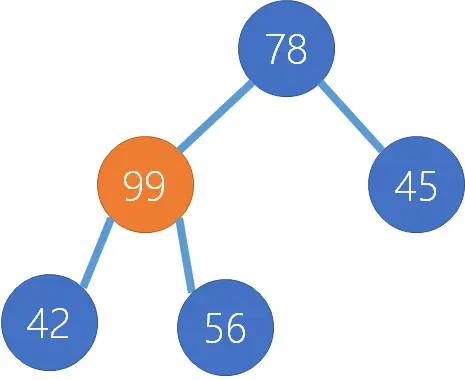
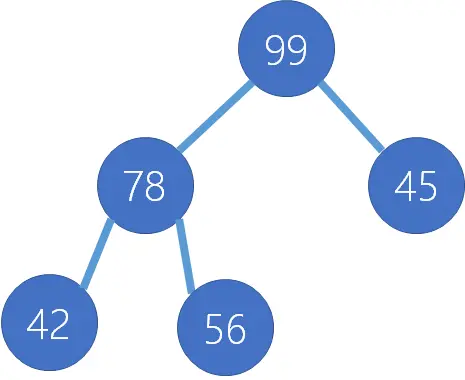
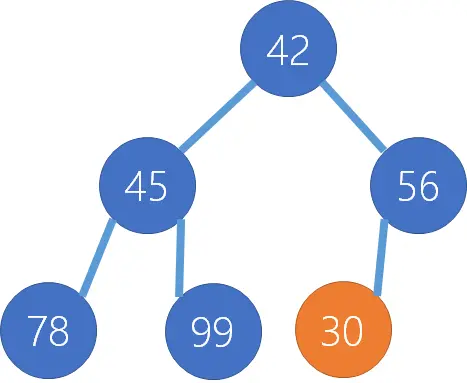
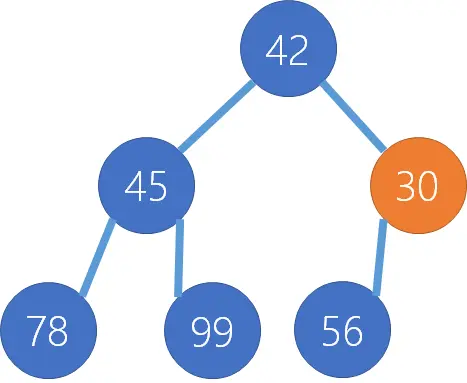
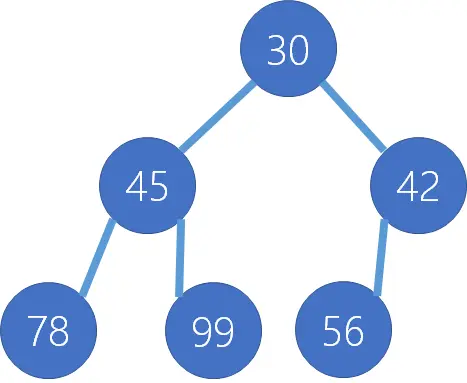
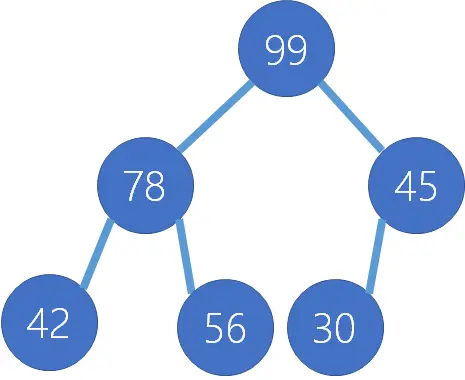
Let’s have a look at what these will look like when we have the following dataset: 45, 42, 56, 78, 99, 30
| Step | Minimum Heap | Maximum Heap |
|---|
| 1 | We add 45 as the root node | We add 45 as the root node |
| 2 | We add 42 as the first child, but it is smaller, so we will swap it with the root node | We add 42 as the first child node |
| 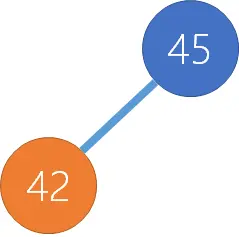 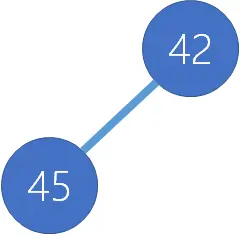 | 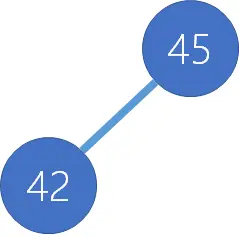 |
| 3 | We add 56 as the second child node | We add 56 as the second child node; it is larger than its parent, so we swap them. |
| 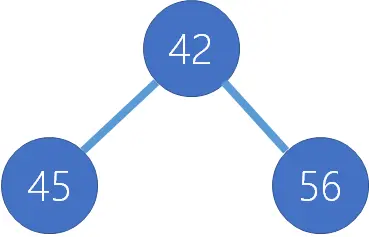 | 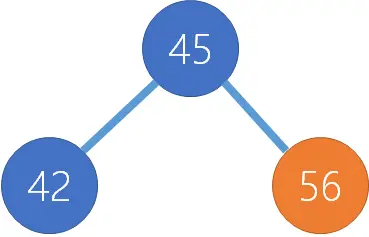 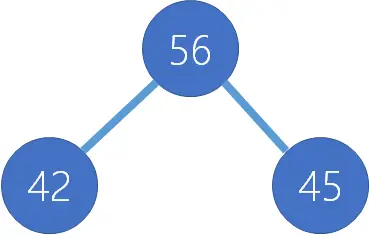 |
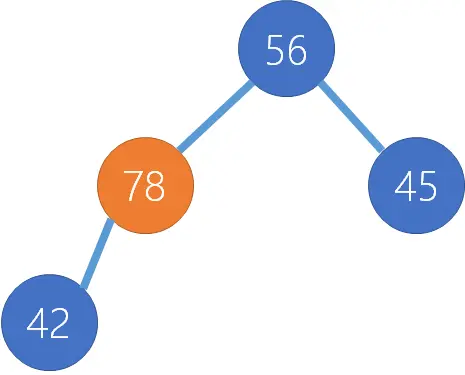
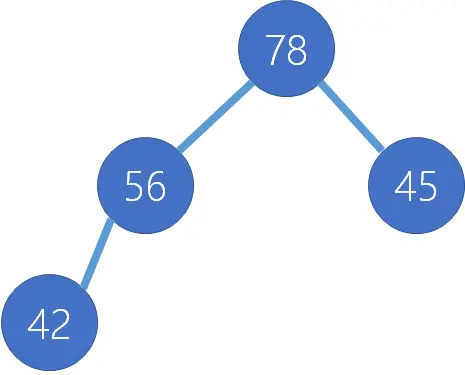
| 4 | We add 78 as a child of 45 | We add 78 as a child of 42, though it is larger, so it must be swapped. 78 is now a child of 56, which is still wrong, so we need to swap them too. |
| 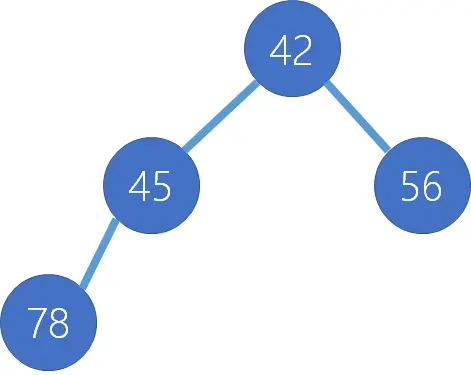 | 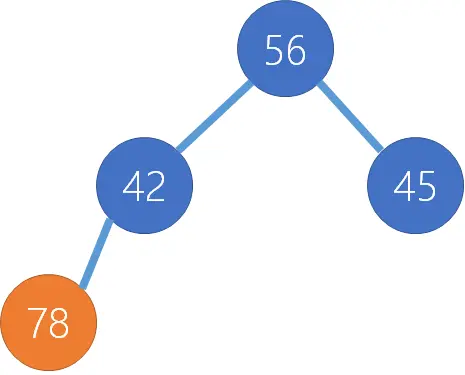   |
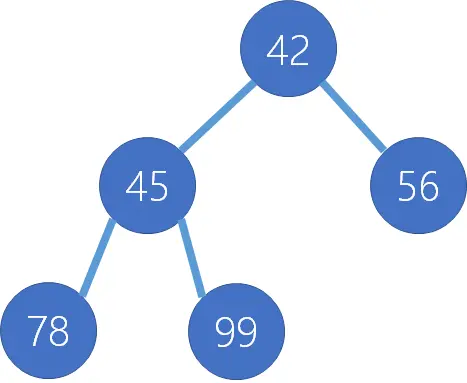
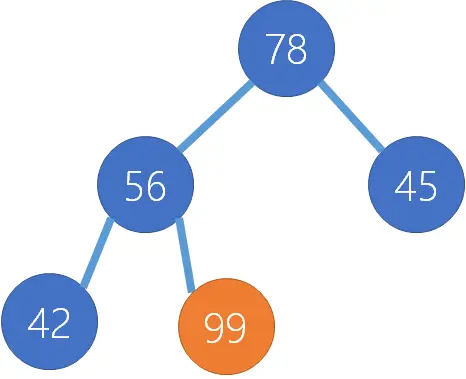
| 5 | We add 99 as a child of 45 | We add 99 as a child of 56. 99 is larger, so we swap 99 and 56. 99 is still larger than 78, so we swap those nodes too. |
|  |    |
| 6 | Next, we add 30 under 56. It is smaller than 56, so it must be swapped. Once swapped, its parent 42 is also larger, so they need to be swapped too. | Last, we add 30 under 45. |
|    |  |
Implementations
Java has a built-in implementation with the PriorityQueue, and unfortunately, .NET and JavaScript lack an out-of-the-box option.
Note
For the 11th post, we get something new to an old C# person—Object Expressions! Object Expressions are very similar to Anonymous Classes in Java, where you can declare a class inline rather than entirely separately in its own file.
In the first Koan, we need to implement Comparator inline:
fun task10(): List<Int> {
    val arrayList = arrayListOf(1, 5, 2)
    Collections.sort(arrayList, object : Comparator<Int> {
        override fun compare(o1: Int, o2: Int): Int {
            return o2 - o1
        }
    })
    return arrayList
}
You can see on line 21, we define the new object with the object keyword and then use : Comparator to state it implements that interface. The Comparator has a single function which needs to be implemented, done on line 22.
The second Koan takes this further: if there is a single method in an abstract class or interface, we can use SAM (Single Abstract Method) to avoid needing the class at all—just implement the single function. To achieve this with the Koan, we use an anonymous function that handles the compare function of the Comparator:
fun task11(): List<Int> {
    val arrayList = arrayListOf(1, 5, 2)
    Collections.sort(arrayList) { x, y -> y - x }
    return arrayList
}
And lastly, if we look back at our previous post, we can simplify it further using the extension method:
fun task12(): List<Int> {
    return arrayListOf(1, 5, 2).sortedDescending()
}
These Koans have given me more thoughts about the language than probably any previous ones:
Why do classes which implement an interface use override? In C#, when you implement an interface, you don’t need to state you’re not overriding the functions (see this example). In C#, you only specify override when inheriting from a function and actually overriding it. The reason? In Kotlin, an interface is closer to an abstract class than in C#—to the point it can have functionality (yes, interfaces can contain functions and logic!).
So why does Kotlin have interfaces and abstract classes? The key difference is that an abstract class can have state, while an interface must be stateless.
Why bother with SAM? As I worked on the Koan, I was delighted by the SAM syntax—then I wondered why I needed it at all? Why does Collections.sort take a class as the second parameter instead of just a function (since that’s all that’s needed)? Both C# and Kotlin support passing functions—but Java doesn’t! In Java, you must use Callable (a class) to pass functions.
Note
This post is the first to cover multiple Koans in a single post. The 10th in our series is very simple if you're coming from C#: because Extension Functions in Kotlin are identical to Extension Methods in C#, though they’re much cleaner in their implementation. In their example for the Koan, we add a lastChar and lastChar1 function to the String class:
fun String.lastChar() = this.get(this.length - 1)
fun String.lastChar1() = get(length - 1)
For the Koan itself, we need an r function for Int and Pair, which returns an instance of RationalNumber. Here’s how we implement it:
fun Int.r(): RationalNumber = RationalNumber(this, 1)
fun Pair.r(): RationalNumber = RationalNumber(first, second)
An additional takeaway was the Pair class, which is similar to the Tuple class from C#.
When we get into the second Koan, we’re exposed to some of Kotlin’s built-in extension functions, which come pre-packaged in the language—no setup required. Here, we use the sortedDescending extension method with a Java collection, making it a great example of mixing Java and Kotlin:
fun task12(): List<Int> {
    return arrayListOf(1, 5, 2).sortedDescending()
}
This post is one in a series of stuff formally trained programmers know—the rest of the series can be found in the series index. Today we look at trie, pronounced try, which is a type of tree structure; unlike a binary tree, each node can have many sub-nodes. Like many other data structures, it needs a key, and in the case of a trie, the key must be able to be split into smaller pieces. Strings, for example, can be a key by breaking them up into individual letters, and numbers could be split by digits. Let’s use strings for our keys and store the following data: abba, cat, also, car, & all.

