There is a scene in Jurassic Park where Ian Malcolm (if I remember correctly, he’s the mathematician/chaos theorist) criticizes Jurassic Park for not earning the right to clone the dinosaurs as they just "stood on the shoulders of those who came before them." Well, that may be true when working with millions of years old dinosaurs, but in development, standing on the shoulders of the giants makes life better for you as a developer and for your clients.
Being a .NET developer means that those giants include the Microsoft patterns and practices team. Well, what do they do?
We talk with a large number of Microsoft customers, partners, and consultants to understand the commonly occurring scenarios and the technical challenges associated with them. Then we discover and harvest the solution patterns and engineering practices (including anti-patterns) that have proved successful in addressing these scenarios. Once we understand the scenarios and technical challenges, we work with product and technology teams across Microsoft, industry experts, and with customers and partners, to build guidance that reflects both the current, practical state of the technology and is also aligned with future Microsoft technology plans. Often, the underlying scenarios and solutions guidance ends up influencing future Microsoft product direction. Most of our projects are conducted in CodePlex communities. This allows continuous input from the development community at large and keeps us honest. We call this approach, “customer-connected engineering,” and it ensures that what we deliver actually meets the needs of our customers. We also ship the source code to nearly everything we deliver, usually along with a license agreement that encourages source-level adoption and customization.
From http://msdn2.microsoft.com/en-za/practices/bb969103.aspx
That’s great for marketing, but for developers, it means they produce tools, frameworks, and documentation (guides, proven practices, etc.). My personal favorite from them is a set of components called Enterprise Library, which provides amazing code for logging (log4net, eat your heart out!), database access, exception handling, cache handling, cryptography, policy management (ala AD policies in your app), and validation. It really is amazing stuff.
Two nice examples are:
- The Database Application Block: You can connect to a database, run a query, and get the result in a result set, then close the database—all following best practices—with a tool to change the connection string (since it’s not hardcoded, so your users may need it)—all in two lines of code!
- The Validation Block: It provides attributes to decorate your classes with to enforce validation with no additional code.
You can get all of that from http://msdn2.microsoft.com/en-us/library/aa480453.aspx and much more from http://msdn2.microsoft.com/en-za/practices/bb969097.aspx.
There is the logical place on the Microsoft site, but if you installed Visual Studio 2008, you already have it (including 2.0 and 3.0) in both 32- and 64-bit versions.
In VS 2005, this was under the Visual Studio folder in Program Files. With VS 2008, it moved to being part of the Windows SDK, so now you can find it in (assuming you installed to default locations—otherwise, modify as needed): C:\Program Files\Microsoft SDKs\Windows\v6.0A\Bootstrapper\Packages
BTW, one nice feature of using this version is that you already have all 60 MB downloaded. So when you launch it and it says you need to download a bunch of data—well, just give it a second, because it doesn’t.
In my previous post on BioShock, I commented that the VitaChambers were a big gameplay issue for me since they made it far too easy. What I didn’t comment on was how they broke the story completely. Why am I the only person who can use them? I know my character is special, but if I am so special that makes me the only one who can use them, why are they scattered around Rapture like candy?
Thinking more into this, the answer to a lot of gameplay issues would actually be to drop the number of VitaChambers (maybe 2 per level) and drastically reduce the number of enemies. Then, enable enemies to respawn at the VitaChambers too—unless caught by a Little Sister (and thus drained of ADAM). This opens up some nice avenues of gameplay: it slows things down to let you be tactical, lowers enemy numbers to make them more distinct, and turns Little Sister harvesting into an interesting dilemma—do you kill them early to secure ADAM or let them act as cleanup crews before taking them out later?
Despite that unlikely dream, one nice thing has happened. A patch for BioShock was released that includes an option to turn off VitaChambers completely. More details on the patch are available at http://www.2kgames.com/cultofrapture/pcpatch.html.
This weekend I finished BioShock and, despite the 5-star review Gamespy gave it, I still fail to see it as the next level of gaming. Note: Spoilers exist below.
I’m nowhere near smart enough to grasp all the things going on in regards to objectivism—the way the Gamespy staff did—and, oddly enough, the target market for gaming (I assume, 13 to 25-year-old males) includes a large portion who wouldn’t get it either. Maybe this depth is needed as gamers age, but that doesn’t mean we’re getting smarter. Anyway, the story was very good—except for the inconsistencies. For instance, the way Little Sisters are immune to harm until you’re forced to protect one (adding just one line of dialogue to explain this would’ve fixed it). It feels like that scene from Thank You for Smoking where they have to justify smoking in space. These issues appear consistently in the game, done purely for gameplay sake—but for a game marketed as "for the thinking man," it really shouldn’t have happened.
The look of the game is amazing. It’s stylized perfectly, with a consistent theme across levels, but each area has its own unique feel. The design of the enemies is also brilliant. I mean, where else can you fight a giant in a 1940s deep-sea suit wielding a drill for a hand?
The gameplay is fairly straightforward for anyone who’s played a first-person shooter, with few new elements. The combination of abilities, skills, weapons, and mods harken directly back to Deus Ex (yes, and it copied from System Shock), but the games that pioneered this were slower, more cerebral. BioShock has no issue sending 10 maniacs of different types at you at once. That means all those abilities—using different ammo or powers—come down to whatever’s loaded at that moment, wasting what could’ve been a great system. The only difference is late in the game, when you lose control over your powers and they randomly switch (even introducing ones you never had before, breaking the story again). This does let you see what each power does, and maybe reconsider some choices late in the game. More of the game should work like this—especially the Big Daddy transformation, which basically just means the screen switches to a round shape and your footsteps get louder. 2K, take a hint from Halo or Riddick, where near the end you get a big, fun bonus moment (Halo has the Warthog drive, Riddick has the robot romp—and Riddick’s is better, since it’s the robot you’ve been fighting all game).
The gameplay has two standout elements. First, the camera acts like a weapon (ammo = film), and each successful shot at an enemy, turret, or drone increases your damage against that type—or makes them less effective or grants you a new ability. It rewards you for taking the time to do more than just spray-and-pray, or slowly stalk your target for that perfect shot before engaging. The second element isn’t so good: the vitachambers. These respawn you when you die—with more health than before and no penalty. They remove the primary risk of diving headfirst into battles and dying repeatedly. In fact, the AI is about as smart as a dog, since you can easily lead enemies to a vitachamber, turning combat into a mindless cycle: spawn → shoot → die → respawn → repeat.
The AI is smarter than a dog, but given that it’s built on the Unreal Tournament 2003 engine, I’d expect better. They attack recklessly (no squad control or use of cover), then flee to medics once wounded. If 2K had one person dedicated full-time to water effects, why not assign someone to AI?!
Anyway, it’s a much better game than Quake 4 or most of the garbage coming out of studios today—but it doesn’t raise any new bars.
Johannesburg International was a bloody joke. It's so tiny, and so many people. To get into the international waiting area took over an hour, and there were too many queues. Oddly enough, if anyone had thought about processes, the bulk of it could be done on a single queue, greatly improving the overall performance. Anyway, that will be the topic for another post soon enough.
Once on board the shaky plane, I had the usual crap airline food—and a bad landing in Malawi (Blantyre, to be exact, if anyone cares). So upon landing, I met the "new" baggage carousel, namely the ground next to the terminal building (glad I didn’t pack anything breakable)—and the most pointless forms ever: two forms, one for customs and one for immigration, both asking the same questions, but you had to fill in both. PHOTOCOPIERS, PEOPLE!!!
Anyway, from the airport, it was off to the local ex-pat/backpackers pub for drinks, food, and watching SA beat New Zealand in the cricket—all in all, a nice evening. The fact that all dogs wear a muzzle (it’s law here) is a little scary the first time you see it (Silence of the Hounds?).
The humidity is another issue altogether—I doubt I’ve sweated this much in years. My hotel room (at the nice Mount Sosche Hotel) thankfully comes with air conditioning. It didn’t come with water last night, due to an ongoing supply issue, but by this morning, there was at least cold water. The area is really beautiful, very tropical in nature (it reminds me of the north coast in Natal), and we’re surrounded by mountains on all sides.
The biggest fear people seem to have when coming here is malaria—but I’ve got a new one. I’m working for a telco here, and there’s a transmission station just 100m from my desk. It’s so powerful it kills car electronics if you park too near it—and here I thought only UFOs could do that. The scary part? That I hope my third arm grows out the front and not the back, like a weird tail.
Oh, and the bandwidth here? Killer. It’s like: "How fast would you like to go?" Telkom, you bunch of clowns, come to a real third-world country to learn some lessons.
In Vista there is the shiny new start menu with the shiny new turn-off options, and until recently I had been using the fly-out menu on lock to hit sleep, hibernate, or shutdown—etc. Thankfully, I have gotten over that through two dumb luck experiences.
Firstly, for my home box, I’ve been hitting the power button since it’s quick to resume and I don’t really worry about things. I always just thought it was putting it into sleep mode, well—this weekend I stumbled across a new feature in Vista (well, new to me) called help. It’s amazing; it’s like Google for Windows offline! 😂
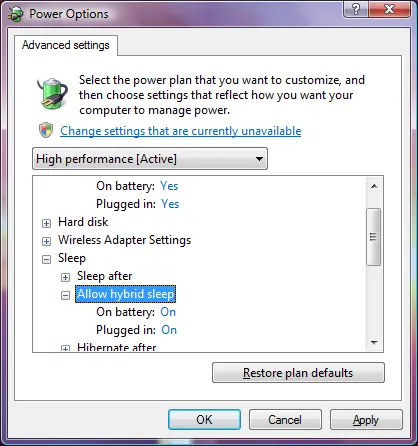
Seriously, in the Help feature, I found an article on what the power button does. Basically, if you have an older machine, the power button puts it into sleep. However, if you have a more modern one, it puts it into hybrid sleep. This new mode works like both hibernate and sleep in shutdown (i.e., it does both). Then, when it needs to start up again, it checks to see if memory still contains the information (i.e., sleep mode), and if it does, restores—damn fast—from that. If it doesn’t (say, due to power loss), then it restores from the hibernate information.
The power button is the ONLY way in the Vista interface to do this!
To check if you can use this or to turn it on/off, go to Power Options (either from the battery icon in the task tray or in the Control Panel), click Change Plan Settings on your selected power plan, then click Change Advanced Power Settings. Under Sleep, you’ll see the options.
I had an odd issue with trying to get the reportviewer control to work on some ASP.NET pages. I was using VS 2008 beta (but it was a 3.0 project, so it should be the same as what you get in VS 2005), and running the solution through the VS web server. When going to the pages—which used local reports—I got the error:
Server Error in '/ATL' Application.
Failed to map the path '/'. Description: An unhandled exception occurred during the execution of the current web request. Please review the stack trace for more information about the error and where it originated in the code.
Exception Details: System.InvalidOperationException: Failed to map the path '/'.
No idea what caused it, but the moment I changed to run it on IIS, it stopped. I did get an error on IIS about Reporting Services not being able to access the web.config file, which was fixed by giving Network Service access to it. That didn’t make a difference with the VS 2008 web server, but it did mean the reports worked. I suspect that it has to do with the way Reporting Services locates the web.config file, as VS 2008’s server runs it as http://localhost:<random port>/<project name>/ while IIS runs it as http://localhost/<random port>.
BizTalk Server 2006 R2 has a set of features that work great for doing what BizTalk is normally used for—integration. But these features are so powerful in themselves in a non-integration environment that I can see customers buying BizTalk just to use some of them. The first feature I want to look at is BAM (Business Activity Monitoring). This feature initially allowed you to see inside a running BizTalk orchestration, which is helpful in so many ways. But the real power comes through in R2, as it now also allows you to monitor Workflow Foundation (WF) processes, since R2 supports those.
Most of the time, IT thinks BizTalk = integration. But really, with BAM, it becomes almost an infrastructure tool as well—especially if you consider that the following products all have WF as a core system:
- Microsoft CRM 4.0 (formerly Titan)
- Microsoft Office SharePoint Server 2007
- Speech Server 2008
- Customer Care Framework 2008
Now how do you monitor what’s going on inside all of these without building your own tools or using Visual Studio? BAM can handle it! Also, think about developing a custom WF solution—you no longer need to spend time on a WF monitor; just use BAM for that.
The next feature is the rules engine. This engine takes data from a BizTalk mapping, a .NET component (basically anything), or a database and runs it through a set of rules. Rules are versioned, meaning items on one set remain until their end of life. Just think about how many applications I’ve written with tightly built rules engines (business rules) where you can only change parameters. Extending them to add or remove rules would be great. The rule designer also uses readable English instead of C# or some other obscure language—perfect for business analysts or customers to manage, not just developers. And the best part? You can integrate this engine into .NET in five lines of code or less! Imagine plugging in a full rules engine in five minutes (well, maybe not that easy, but still easier than building your own).
The last feature is Enterprise Single Sign-On (ESSO), originally developed to store credential mappings. For example, you might be MYDOMAIN\USER1 in Active Directory but ROBMAC01 in Siebel with password XYZ. BizTalk could use ESSO to authenticate you into these other systems because it knows your username/password and verifies your AD credentials. It’s also secure since your credentials are encrypted by your AD account, meaning no one can see others' details. There’s even a nice client tool users can use to manage password changes. This is great for applications, but many people inside and outside of BizTalk don’t use it for credentials. Instead, they use it to store configuration settings per user—since credentials can be any name/value pairs, you can store arbitrary values. Now you have a secure, accessible config system with a client management tool and a scriptable admin interface—all with minimal development.
Update: 16 October 2007—Thanks to Ryan for pointing out that BAM stands for Business Activity Monitoring, not Business Automation Monitoring.
Update (2nd October 2007): The VC guys have been responding to the issues raised on the forums at http://forums.tidemedia.co.za/nag/showpost.php?p=21642&postcount=22. I recommend having a look since it does clear up some issues.
Yesterday was my once-a-year weekend of nothing but gaming and computers (actually, that’s a lie—I do it more than once a year, but it’s the special one 😂. For those who don’t know, it was the Nag LAN at the Rage Expo. Now, I’ve been attending this since its inception, so I classify myself as someone who has some crazy understanding of the event. Let me run through the expo to begin with.
I didn’t pay to get in—being that all the lanners get in free—so I can’t comment on the value for money. But it was definitely smaller than last year and far more commercial. A lot more stalls were just shops selling stuff, with very few people showing anything special or new. This includes the competitions at stalls, which seemed to have every second stall giving away an Xbox. The Wii was launched, and Halo 3 was at the expo, but with little fanfare. The Wii stand was tiny and had just four consoles to play on (so the queue was to forever and back), and not the really interesting Wii games—just Wii Sports. Halo 3 was equally bleak, with just two or three consoles at the Microsoft stand showing it and someone dressed as Master Chief walking around. The Project Gotham console at the Xbox stand got more attention than Halo 3 due to the chair, pedals, and steering wheel. This is all in comparison to last year, when the Xbox was launched with a massive area, plenty of consoles, amazing giveaways, and a show that night, etc.
It wasn’t all doom and gloom for the expo: the booth babes were the best ever (quality and quantity), and the sound was better. Let me explain that last one—previous years had more of a loud-talking atmosphere with sound effects from games in the background. This year, the games were more evident, thanks mostly to the two or three stands running Guitar Hero 2 and 3. It just made the whole event feel far better. In reality, though, if you missed the expo this year, pop round to Zaps on a Saturday and imagine more people.
Next, the LAN! It has grown to 1,500 people this year, with the extra 300 taking up the space used by the expo last year. The most popular games (based on looking at other people’s screens) seem to be Warcraft 3 and Counter-Strike. A lot of Unreal Tournament 2004 and Supreme Commander were also played. This year also showed more female attendees—which is great for gaming—and the file-sharing on DC++ peaked at a whopping 44TB (that’s terabytes) shared!
The network was once again run by the VC crew, who did an okay job. The electrical setup was perfectly done (I keep wondering if someone from VC isn’t an electrician), but the network was lagging and showing its age. The network consisted of 100Mb with a 100Mb backbone and non-managed switches. Considering the LAN was split into two distinct areas (upstairs and downstairs), the lag was occasionally very bad, to the point of losing the connection. VC definitely needs to upgrade to 1,000Mb and consider managed switches next year. Their admin was as good as always. A downside? Unless you play a game the VC plays, getting a server is impossible. We tried to set up a UT 2004 server for an informal tournament and were successful. However, it wasn’t patched (remember, the latest patch is over two years old now) and was missing files, so no one could connect—which meant the UT 2004 tournament flopped. The VC staff were unable/unwilling to help with this 🙁.
However, the biggest downside to the LAN was the venue. The dome isn’t the right place for this anymore. Remember, a large part of those 1,500 stayed for all three days and nights. The toilets were shocking by Saturday night—most were blocked, there was no toilet paper, and the floors were messy, etc. If the dome wants to keep hosting it, they need 24-hour cleaners for the entire LAN. The security was also horrible: it was far too easy to take equipment out while it was impossible to get food or snacks in. This is because the dome has its own (crappy) fast food and doesn’t want competition from Northgate next door. However, at a LAN, energy drinks and 2L Cokes from fast food don’t cut it. I had to make a trip back to my car to drop off items I’d bought the day before. Unfortunately, security (dome management) doesn’t care about the equipment—once again, there were items stolen, and no one bothered to check properly. Also, the dome has no designated relaxing area, so most people slept under their desks and the lights stayed on all night. (Thankfully, I live just a few kilometers away and drove home each night.) For a three-day LAN, chill/sleep areas are essential.
I’ll be back next year, provided I still live nearby. However, if I had to spend all my time there or live far away, I wouldn’t attend. The venue just ruins the experience of a great event too much for me.
Something which, in my mind, was missing from Guitar Hero 2's box was a book with the lyrics in it. As a spectator—or if you believe that some tips sites suggest singing along helps—it’s far more fun to have the lyrics and sing along with the music while someone else plays.
In addition, some of those metal bands are so hard to understand that you’d want to have a reference so you have an idea of what you’re playing.
That said, here is a nicely compiled 71-page document with all the lyrics!

