Next up on the technology list I want to profile in the series is Microsoft Office SharePoint Server (MOSS), which you may think is easy since HMC supports its little brother, Windows SharePoint Services (WSS). Unfortunately, the added complexity MOSS brings adds significant challenges to the mix, and the first question is: How do you deal with users in MOSS while keeping customers separate? Dealing with users means that you must provide all the functionality of the authentication system—and any web part in MOSS (like the People Picker)—while making sure one customer doesn’t see anything or anyone from another customer.
Well, the answer is easy: use a custom authentication provider. Out of the box, the AD provider is not up to the task, as it means all users can see everyone else. The next thought might be to use the forms-based one, but that means additional replication of users from AD to a database, which is also a pain. MOSS also includes a generic LDAP provider, which seems like the perfect fit—you can specify the root OU to start from (thus limiting what each site can see)—but this provider is very error-prone due to the HMC structure/properties, so in the end, you’re better off building your own LDAP provider. So all you need to do once the custom authentication provider is built is to create a custom provider for HMC, which sets up and manages site creation and feeds the information on what a customer has directly to HMC.
A great example of how this is done is one of our first customers, who got their own mini-environment within our hosted environment. So they don’t sit on our big MOSS farm; they have their own one and have some special customizations to it—but the principles of their solution and the HMC one are very similar. The customer is South African Tourism (SAT), and their website is www.freesatsite.co.za. One of the special changes is the use of a specialized custom authentication provider, which was switched from an LDAP one to one that uses Windows Live! (so your MSN login becomes your website login—how cool is that?). It also includes a full self-provisioning system, which allows SAT members to log in and provision a new site in seconds. Rather than being completely separate domains, each new website is a sub-site of www.freesatsite.co.za.
Please don’t think I suddenly became a great MOSS expert—I really just provided servers and the environment for this brilliant solution. The team that built this solution are the guys from Blacklight, who designed the UI and all the theme support, and Mark Lenferna de la Motte and his team, who did the bulk of the heavy lifting configuration to make MOSS do its magic.
So in the first five parts we have looked at the standard stuff, now let’s dive into a real product and we’ll tackle the one I am most familiar with: Microsoft Dynamics CRM 4.0. Thankfully, MSCRM 4.0 is the first version of the product to really support a hosted model. Somehow, MSCRM 3.0 could do hosted, but based on the architecture, you would have ended up hacking a lot to get it to work. I never did hosted MSCRM myself in version 3.0, so that thinking is just based on my understanding of the architecture of MSCRM 3.0.
So how is MSCRM 4.0 different from 3.0—and how does that allow it to be easily hosted? Well, firstly, you can now have a single deployment with multiple databases, one for each organization. This means that each organization’s data, settings, and customizations are completely separate! This is great if every machine is on the domain, but in hosting, you need a way to provide a login over the web or via a special client. This is because, in a hosted model, despite the fact that you have a domain, your end users may be on a separate domain. Thankfully, MSCRM 4.0 provides both!
This is configured using the IFD tool, which actually enables MSCRM to look at the source IP address. If it’s a local network IP, it uses standard NTLM authentication. However, if it sees an external IP address, it presents form-based authentication, which the user can use to log in. This means that not only does the web interface work over the Internet, but the Outlook client works too.
If you’re a regular MSCRM user, you likely love the dynamic export to Excel—and for those who don’t know what it is, let me explain briefly. In MSCRM, you can export almost any data to Excel, and it can be updated dynamically live from within MSCRM. This works by creating a dataset in the Excel spreadsheet and putting the SQL for your query in the dataset. The problem with this scenario is that Excel uses direct connections to SQL to do this, so does this mean you need to expose your SQL server? Not at all—if you’re running the Outlook client, a button is added to Excel that actually reverses the SQL and uses the normal MSCRM web services to get the data! So you can still just expose MSCRM to the net, keeping security high and lowering administrative overhead. Note: This is only available if you’re using IFD deployments.
If you’re planning to do hosted MSCRM, you may find the hosted deployment guide interesting, as it explains how to set up MSCRM 4.0—however, it’s not the most logical guide, as it’s broken into three sections. The first section explains how to configure your environment for hosted MSCRM, but this is exactly the same information as included in the HMC guide for configuration of the environment, which brings us to the second section: how to use HMC with MSCRM. So not only do they repeat what’s in the HMC guide, but they then tell you to go through that guide. It’s pointless—and a massive waste of space. The only advantage is that if you’d never heard of HMC, this might point you in the right direction. The last section, in contrast, has some interesting and useful information on the additional steps for MSCRM to get it to run in IFD mode, like how to edit the install configuration file to set up IFD from the install (though the easier and less error-prone route is to use the IFD tool) and any extra configuration needed for hosting, such as changing the security of the website in IIS to anonymous.
Something that’s vital for a happy hosting environment for MSCRM is making sure the async service is running all the time. This is vital not only because it manages workflow (and what good is MSCRM without workflow), imports, and background processes, but also in a hosted scenario—it handles logins done via form-based authentication.
Really, MSCRM is pretty easy to host and set up, and while the demo HMC web console doesn’t provide automatic provisioning tools, a lot of third-party ones do have options for MSCRM. Something I’ve learned is that when you deploy MSCRM 4.0, even if it’s not a hosted deployment, it’s worthwhile to make every MSCRM deployment IFD. My reasoning for this is twofold:
- Authentication is handled in a superior way, as you have normal NTLM and form-based options. This can give you a way to solve those complex Kerberos-based issues caused by problems in AD without needing to mess around with AD.
- At some point in the near future, someone in your business will want to work from home or while on a business trip. You can save them from messing around with VPNs and just point them to the same URL they normally use—provided you’ve set up your DNS and firewall correctly—so you’ll save some headaches for you and your users.
If this has interested you, make sure you go to TechEd Africa—there’s an IFD Tips and Tricks session for Microsoft CRM!
A little note from the editor (he he—like I have an editor). The previous post was late due to circumstances I can’t even explain, sorry about that (to make it up, I’ve posted this a few hours earlier). Also, if you’ve been reading on the site, the formatting has been slightly off due to security permissions, which I’ll remember to fix in the future. Anyway, hope you enjoy the posts, and now back to the regular scheduled (he he) broadcast.
So part 4 was a really massive post because there’s so much that HMC does for AD, but this post is a lot shorter because HMC provides similar functionality for Exchange as AD. The primary similarity is that it uses properties in AD to completely separate companies so that even on a GAL level you cannot see other companies’ email addresses (see the end of part 4 about the security issues).
Exchange management is also an area where I learned not to trust that the management web interface is showing me everything HMC could do, because in reality, it’s just a subset. For instance, if you want to create a distribution group, there’s no option in the interface—or even in the samples. However, if you dig through the SDK, you’ll find the details of how it can be done, and the SDK has a sample in the documentation that you can copy, paste, and edit to use.
The biggest headache with the Exchange deployment for me wasn’t HMC, which was really easy in comparison, but setting up the auto-discover system and the certificates for that. At the end of the day, there were three critical things I used to get it sorted:
- Making sure DNS was correctly set up. I’ll cover DNS issues in part 11 (yeah, I’ve written that far in advance).
- Using http://www.testexchangeconnectivity.com—a prototype website from the Microsoft Exchange team—which allows you to run tests of common Exchange systems over the internet.
- Lastly, setting up the auto-discover redirect, which isn’t normally needed but is essential in a hosted environment. The reason it’s so essential is that unless you’re going to automate your DNS provisioning (which you should anyway—and HMC doesn’t do this out of the box) and automate the purchasing of SAN (Server Alternative Name) certificates—which are extremely expensive and I wouldn’t know where to start with that (BizTalk, maybe?!)—you’re going to have to set up a single certificate and direct all customers through one interface. The easiest way to do it is from an article I found on the Exchange team blog: More on Exchange 2007 and certificates—with real-world scenarios (search for The Other Method).
In part 2, I started to write about Active Directory and how to get a single domain to work with multiple organizations, so let’s get back to AD and look at how HMC helps with it. Well, what HMC does to AD is that it gives you a way to set up the OU structure and sets up a number of properties on the AD object.
One of the great things about the OU structure is that it allows you to have a top-level organization (which is called the hosting company), second-level organizations (the resellers), and third-level organizations (the customers). The second level is very exciting, as this is actually the level at which sales are done. Due to the structure, multiple resellers can exist and work with their customer bases while being secured from other customers and resellers. If you’re thinking of white-boxing a hosting solution, this is how it’s done.
Security is obviously taken into account by the HMC engine, which lets an administrator on a hosting company level manage anyone within the system. On the reseller level, you can add accounts to your own account and those of your customers via the web interface. But does this mean you’ll spend your admin days in the web interface? Definitely not! Your AD skills still apply, and you can still manage users, computers, set group policies, and reset passwords, etc. But you should be doing provisioning (creation of items) through the web interface or the engine, as it will save you from having to edit AD properties manually later—for instance.
If you aren’t looking at white-boxing, then you would just have your hosting company and one reseller, followed by various organizations as customers.
You may have picked up that I said you can use the engine to provision, and you may have thought that meant you needed to use the SDK and write code. Well, you don’t have to! Microsoft has actually included a tool called Provtest, a command-line tool on your HMC server. You pass it an XML file, and it parses the file, pushes it to the engine, and displays the result. This is actually the same way the SDK works—in that you pass XML to the web services or COM+ object to perform tasks. Microsoft also includes many samples with HMC, and even more in the SDK. So what you may find yourself doing a lot of is, especially when you get to Exchange management.
One of the ways HMC also modifies AD object properties is by setting the login name in such a way that it allows each customer to have their own domain name (sort of). However, it’s just on the AD account name. This isn’t an easy concept to grasp without an example, so let’s say the hosting company domain is Contoso.local, and let’s say a customer named Northwind signs up with one of their resellers (who the reseller is doesn’t matter). The Northwind team decides they want their domain to be Northwind.com, so via the web interface, they add Fred and set his login to be fred@northwind.com.
What HMC does is set the AD account name to fred@northwind.com, but in the background, it sets the SAM account name (or the pre-Windows 2000 name) to contoso.local\fred_northwind. Yes, it should be fred..northwind—the first dot for the SAM account and the second for grammar. So all customers are on the same domain at the core, but the account name is what they would use to log in to OWA, their machine, or an application like MSCRM.
The SAM account name is still vitally important, as most applications don’t like using account names internally. For example, MSCRM allows you to log in with the account name, but when adding users individually, you cannot use the account name—you must use the SAM account name. Oddly, though, the multiple-user add option does work with the account name. This is an annoying problem, as it means you need to expose the (ugly) SAM name to your customers. If you’ve named your hosting level with something distinctive, it could limit your white-boxing ability!
This disconnect between account name and SAM account is a massive pain for service accounts too, as I lost way too much time during deployment on many services just retyping passwords and resetting them—only to realize that the application didn’t like something in the username and wanted the SAM account name. The worst experience I had with passwords during all of this was with Forefront, where it not only didn’t like the account name but also didn’t like the fact that the domain name (on the hosting company level) had a dot in it.
The security isn’t perfect, though, as there are times when you can see all users in the system. In an earlier version of HMC, there was a problem with the address books where everyone could see everyone, but that has been corrected. For MSCRM, though, the add-multiple-user interface shows all users when you hit the lookup if you haven’t configured MSCRM correctly. I’ll come back to this point later in the series when I talk about MOSS.
In part 2, I wrote about this technology called Hosted Messaging and Collaboration (HMC) and that it is delivered as a guidance package, but what is a guidance package? Well, for HMC, it is a package with a number of components. First off, there is a central management and configuration system. This system is made up of an engine—based on a COM+ object—along with a set of web services and a number of MSI files that get deployed to various other servers and handle interaction with those servers.
Next is a web-based management console for the system; however, the web-based management console is a prototype and comes with no official support from Microsoft. The advantage of the web-based management console is that all the source code is provided, so you can either use it as a base for building your own or as samples to build integration into your existing management system. As a side note, there are a number of third-party management consoles out there, which I would highly recommend looking into if you are reading this for building your own system.
The last part of the package is documents—documents and more documents. The SDK provided goes over all the systems in the engine and how to expand it and is really useful (I’ll cover why in part 5). However, more useful than that is the deployment guide, which takes you step by step through how to deploy the solution for a sample company. The only piece of documentation I would add to those is the unofficial consolidated deployment guide, which is additive to the actual guide but provides details on how to do HMC without the 20+ servers you normally need and only use 8!
To deploy HMC, you really just step through the guide; however, it will take a number of days and a lot of diverse skills to get it right (expect to need a .NET developer, an AD expert, an Exchange expert, and someone with clustering experience at a bare minimum). You should end up with a working system that is the same as all others.
Expect severe punishment, though, for not following the guide word for word. For example, we initially tried to set up a pure Windows Server 2008 x64 environment despite what the guide said, and we were punished. Unfortunately, all that work had to be scrapped as HMC did not work. In the end, the call to change the servers to match what the guide said enabled a semi-normal sleep life again.
Another example of not following the guide is that HMC is built on .NET 2.0 RTM. However, a fix included in 2.0 SP1 actually breaks HMC. That means you cannot install .NET 3.0 or 3.5 on any key HMC server—because they will install the service pack for you—and break HMC. Patches do exist for this bug, but it may be worthwhile to wait for the upcoming 4.5 release of HMC if you are thinking about deploying this anytime soon.
I had a great chance to write some kick-ass Silverlight code last week as a proof of concept for a potential new business venture the company I work at is thinking about, and hopefully in six months to a year, I'll be able to talk about it. The final solution won’t be Silverlight-based, but for the POC, it provided the delivery method, functionality, and UI to get the message across.
[ ]
]
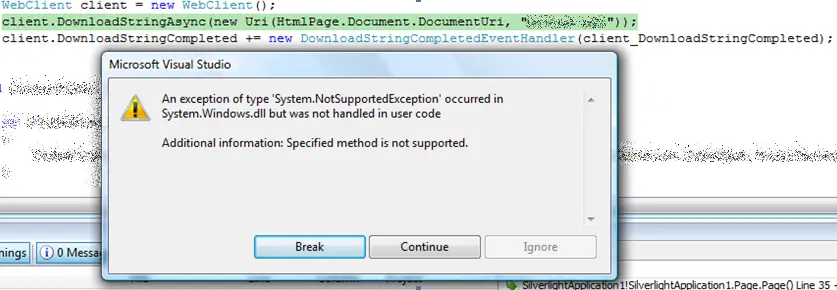
Part of that POC was to load and parse a local XML file (local as in on the server) when the application was open. The only way to do that is by using the WebClient class and calling the DownloadStringAsync method with the URI to the XML file, then parsing it into an XDocument. Not rocket science at all—but when I tried it, I kept getting the message:
An exception of type 'System.NotSupportedException' occurred in System.Windows.dll but was not handled in user code Additional Information: Specified method not supported.
No matter what I tried, I couldn’t get it to work. Eventually, I figured out that it was only happening when debugging or running from within Visual Studio. Publishing it to an actual web server and running it as a user worked perfectly fine. This is a big issue for me, since it makes ad-hoc testing and debugging very difficult. Thankfully, it was just a POC—but this could be a major pain for serious projects.
So if you are an IT pro or developer worthy of that title, you must have seen the stuff Mark Russinovich and his team built—Sysinternals—and if you’ve been around long enough, you’ll have them. Well, I keep my favorites on my flash drive, but sometimes I’ll forget it or get roped into a situation where I wasn’t expecting to need them.
There’s a solution for that now—besides going to the website and downloading them—it’s called Live! Yes, Microsoft’s hosted solution comes in two forms. Firstly, there’s a file listing page http://live.sysinternals.com, which just lists all the files so you can grab the tool you need in one click.
So part 1 was the reasoning and the bulk of the non-technical part in the series; this post is about the high-level view of the architecture. At its core, a hosted network is just a normal network—except that it needs to service not only one organization but multiple organizations. The biggest problem with this is that most networking technologies aren't designed for handling multiple organizations. A core strategy for VirtualBox was to use Microsoft technologies (we are a Microsoft Gold Partner, and that’s where our strongest skills lie as an organization). So let’s look at what that could mean:
- User Management: Active Directory
- Email: Microsoft Exchange Server 2007
- Portal/Intranet: Microsoft Office SharePoint Server
- CRM: Microsoft Dynamics CRM
- Database: Microsoft SQL Server
- ERP: Microsoft Dynamics GP
This shouldn’t be a shock—it’s almost the standard shopping list for any Microsoft-based solution. But the problem is that some of these products don’t easily allow multiple organizations to use them. Let’s start with the most commonly used item on that list: Active Directory, which, in my view, is also the least able to cope with multiple organizations.
Based on what I’ve seen, most large companies that need to host multiple organizations in a single deployment tend to set up a forest and trusts, connecting multiple domains within the forest. This lets each domain be individually named and managed, provides centralized security, and prevents any domain from interfering with others. The problem is that it’s still multiple domains—meaning administrative overhead becomes very high. I’d likely need a server per domain, but I really only want one because I don’t want to deploy everything multiple times. Each service should be deployed once and used many times.
Well, Microsoft has actually solved this with an interesting solution named Hosted Messaging and Collaboration (HMC), which is currently in version 4.0. HMC is developed by the same division behind another favorite technology of mine—Customer Care Framework (CCF). HMC shares the same forward-thinking approach as CCF: taking new or different ideas and turning them into practical solutions. The HMC solution is delivered the same way as CCF—in a guidance package.
Next time, I’ll dive into what HMC is and then we’ll revisit how it lets us take one Active Directory domain and host multiple companies within it.
So if you follow all the posts on this site, you’ll know that I’m involved with a hosted MSCRM system. This is a great system, as it allows multiple customers to share a single deployment, and while it has separated most of the functions so that each customer is separated nicely, there are a few that aren’t. Developer errors are one of those: if you enable them, you enable them for all customers.
As a hosting provider, I do not want to have to enable them globally—it means that the user interface for an error is ugly, and I do not want to have to take individual support calls for customers to turn them on and off all the time.
Found the best little tip for workflow creation in MSCRM 4.0. See, there’s a loop detection in the system that detects if the same workflow rule is called 8 times and, if it is, stops the workflow from running with the message: "This workflow job was canceled because the workflow that started it included an infinite loop." This happens even when there’s no infinite loop (i.e., when you’ve accounted for it). Well, until today, when I stumbled across a post on the news groups that clarifies it’s only 7 times per hour. If you stay under that—so once per day or once per year—it won’t fail.
You can read the actual post at: http://forums.microsoft.com/Dynamics/ShowPost.aspx?PostID=3021749&SiteID=27.

