With the countdown clock at T-minus 10 days to my sabbatical trip, an email popped into my inbox—it was an email from Microsoft congratulating me on getting the MVP (Most Valuable Professional) award for my work with Team System!
What is this MVP Award?
The Microsoft MVP Award is an annual award that recognizes exceptional technology community leaders worldwide who actively share their high-quality, real-world expertise with users and Microsoft. With fewer than 5,000 awardees worldwide, Microsoft MVPs represent a highly select group of experts. MVPs share a deep commitment to community and a willingness to help others. They represent the diversity of today’s technical communities. MVPs are present in over 90 countries, spanning more than 30 languages, and across over 90 Microsoft technologies. MVPs share a passion for technology, a willingness to help others, and a commitment to community. These are the qualities that make MVPs exceptional community leaders. MVPs’ efforts enhance people’s lives and contribute to our industry’s success in many ways. By sharing their knowledge and experiences, and providing objective feedback, they help people solve problems and discover new capabilities every day. MVPs are technology’s best and brightest... —Richard Kaplin, Microsoft Corporate Vice President
So this is a great honor for me to be welcomed into a group of people who I look up to and respect 😊 You can see my new MVP profile here.
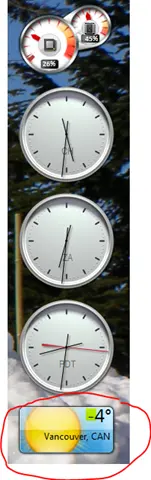
This morning I got up for a quick cycle, and as I rode up the last big hill before getting home, the sun really started to beat down on me. The sweat changed from cooling moist to dripping. This is all at 6 a.m., which is normal for a South African summer day—in fact, our winters in Johannesburg aren’t too bad either. It’s normally around single digits at night in winter, and the days go up to 14 or so degrees. I guess that’s why Willy-Peter decided to send me this picture—it’s a warning: better go shopping for a jacket or nine.
In 40 days, I’ll be starting a very exciting adventure—that being flying to Canada and the United States for 3 weeks of what’s being referred to as the Rangers Sabbatical. The what? you may be asking—well, I’ve posted previously about my involvement in the Microsoft VSTS Rangers project.
In January, I’ll head to hang out with Willy-Peter Schaub at the MCDC (Microsoft Canada Development Centre) in Vancouver, Canada, and then with Chuck Sterling at Microsoft Corp HQ in Redmond, USA.
I’m hoping to blog a lot about this trip, although I doubt I’ll be allowed to share photos of that central server Microsoft runs that all internet traffic passes through—which, for those without a sense of humor, is built on Linux (just kidding). Since this will be my first time in North America, it’s going to be an exciting adventure.
Well today is the day! Dev4Dev’s is happening at Microsoft this morning, and I’ll be speaking on 10–12 new features in the Visual Studio 2010 IDE. For anyone wanting the slide deck and demo application I used, you can grab them below.
The slide deck has more than the 6 visible slides—in fact, it contains 19 slides, which cover the various demos and provide additional information so you too can present this to family and friends! 😊
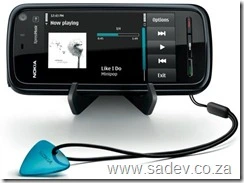
The Nokia 5800 I have runs on the Symbian S60 5th Edition operating system, and it seems to be a decent OS—but built into it is the most interesting anti-piracy system I’ve seen. So how does it work? Note: I am not an expert in this; this is my view after a few weeks of looking into it, so I may be wrong.
First, every application needs to specify what features it uses, and based on that, it can be flagged into one of three categories:
- Unprotected
- Protected
- Testing
Testing has no security and is just for testing. However, for the other two categories, applications must be signed with an SSL certificate. For unprotected applications, you can self-sign them—in other words, using the certificate on the phone to sign the app. For protected apps, you’ll need a certificate from a certificate-signing website—there are only a few of these, and these sites also require you to sign up as a publisher, which costs $200. So once you pay $200 and go through the process, you can sign an application—but it is locked to the IMEI of the phone. This means the application can only ever run on that specific phone.
Now, the security model falls apart if you go out and obtain publisher details, since you could take someone else’s application, strip out its existing certificate, and sign it with your own—but that still costs $200 (and you’re logging with a central company what software you’re signing, so they may be able to track it). Why I think this works is because almost every single application out there is far cheaper than $200. In fact, for $200, you could legally buy so many apps that I question who would pay $200 if they weren’t a legitimate publisher.
I think this process is far better than the iPhone’s app store—since you don’t need a company’s permission to sell software. You can build it, host it anywhere, and—voilà—it’s available.
A similar process is available in Windows Vista+ x64 for drivers, which must also be signed in a similar way. I’m wondering if this shouldn’t apply to all applications in Windows as well—but that would require many changes to be implemented.
[ ]
]
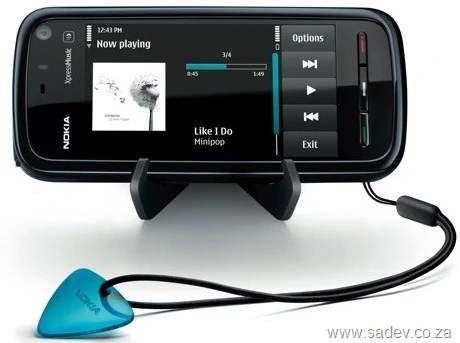
In the last few weeks, I got a Nokia 5800 XpressMusic phone, which has been brilliant. As the geek I am, I have been playing around and trying out many of its functions. One area that has been an absolute fail is the GPS software: Nokia Maps. The phone comes with a 6-month license to get directions or have it speak to you as you drive, but at the end of the 6 months, you need to pay for these premium services.
I have no problem paying for it, but the pricing model is stupid. This is what the pricing looks like when you select it from within the phone:
- 1 day: R19.99
- 30 days: R20.00
- 30 days with automatic renewal: R66.00
- 1 year: R512.99
I cannot imagine who would choose 1 day, when 30 days is just 1c more expensive. However, what confuses me is that it is over three times more expensive for the same 30 days—just because you tell Nokia you want to keep up to date with it. The yearly option is also odd: if you purchase each month separately, it costs R240, which is less than half the yearly subscription!
[ ]
]
All of this screams that Nokia South Africa has zero clue about what they’re doing to promote people to:
- Buy in bulk (or put another way, pay more)
- Set up a “contract” that will cause people to pay more
In fact, it seems they don’t want the business—because you can also purchase this via your browser online from Nokia Europe, which is a little more work than doing it on your phone. But their pricing makes sense (see how it makes sense to buy the bigger packages or renewal options):
- 1 day: €1.59 (~R17.90, or 10% cheaper)
- 30 days: €5.99 (~R67.45, or 237% more expensive)
- 30 days with automatic renewal: €5.19 (~R58.44, or 11% cheaper)
- 1 year: €39.99 (~R450.33, or 12% cheaper)
When my subscription ends, I’ll be sending money out of the country and helping Europe meet their sales targets—which just feels wrong. 😢
I have been very focused during the day on a project, and my evenings have been taken up a lot with VSTS Rangers work, so the blog has lagged a bit. Here are some things you should be aware of (if you follow me on Twitter, then you’ve probably already heard these in 140 characters or less):
I was awarded the title of VSTS Rangers Champion – this is a great honor since it’s a peer vote from VSTS External Rangers (no Microsoft staff) and MVPs for involvement in the VSTS Rangers projects.
The VSTS Rangers shipped the alpha of the integration platform for TFS 2010 – this is important for me because it means some of the bits I’ve worked on are now public, and I’m expecting some feedback to improve them for beta and release next year. It’s also important since my big contribution to the integration platform, which is an adapter I’ll cover in future blog posts, has a fairly stable base.
Dev4Dev’s in coming up in just over a week. This is one of my favorite events because it really is an event for passionate developers – they even have to give up a Saturday morning for it (no using an event to sneak off work). I’ll be presenting on Visual Studio 2010! Based on my first dry run to an internal audience at BB&D last week, it should be great. Two more of my BB&D team mates will be presenting: Zayd Kara on TFS Basics and (if memory serves me) Rudi Grobler on Sketchflow!
The Information Worker user group is really blowing my mind with its growth – on Tuesday, we had 74 people attend our meeting. For a community that had only around 100 people signed up on the website at the beginning of the year, that’s brilliant. Thanks must go to my fellow leads: Veronique, Michael, Marc, Zlatan, Hilton, and Daniel. We’ll be having our final Johannesburg event for the year on December 2nd (corrected from "the 2nd"), and it will be a fun Ask the Experts session.
I received a free copy of NDepend a few months back, which was timed almost perfectly with the start of a project I was going on to. However, before I get to that, what is NDepend?
NDepend is a static analysis tool—meaning it looks at your compiled .NET code and runs analysis on it. If you know Visual Studio code analysis or FxCop, you’re thinking of the right thing—except this isn’t about design or security rules but is more focused on the architecture of the code.
Right back to the field—the new project has gone through a few phases:
- Fire fighting: There were immediate, burning issues that needed to be resolved.
- Analysis: Now that the fires were out, we had to determine what caused them and how to prevent them going forward.
- Hand over: Getting the team who will maintain the project up to speed.
So how did NDepend help? Well, let’s look at each phase since it proved useful in different ways.
Note: The screenshots here are not from the project, since that is NDA—these are from the application I’m using in my upcoming Dev4Dev’s talk.
Fire Fighting
The codebase has over 30,000 lines of code, and the key bugs were subtle and nearly impossible to reproduce. How could I understand it quickly enough? First, I ran the entire solution and started exploring it in the Visual Explorer:
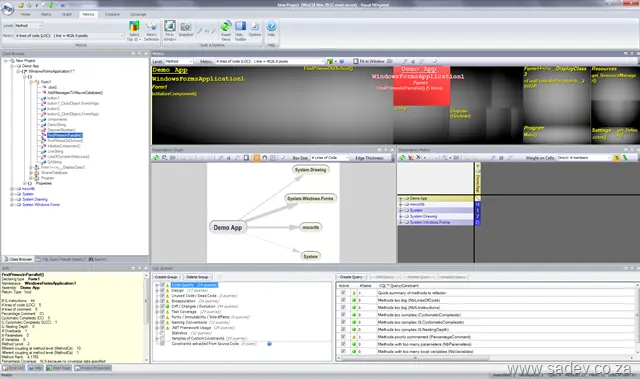
The first thing it helps with is the dependency graph in the middle, which visually shows what depends on what—not just one level, but multiple levels deep. On a large project, this could look like:

This may look overwhelming at first, but you can interact with it—zoom, click, and manipulate it—to understand what’s going on.
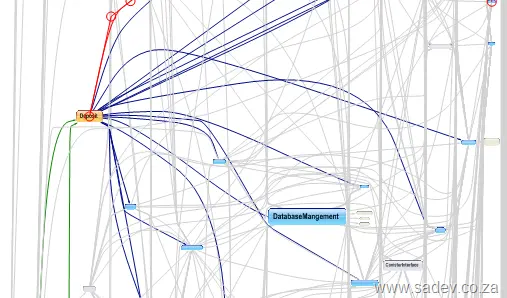
For debugging, I could sit with the customer team and quickly identify potential impact sources. That narrowed it down to libraries, but how could I refine it further? I used the metrics view (those black squares at the top of the image above). I could adjust what they represented—say, making the larger the square, the bigger the method, class, or library. Using the logic that at a certain point (around 200 lines, as per Code Complete by Steve McConnell), the bigger the method, the higher the chance of bugs. This helped prioritize where to look first, making it easier to find and resolve issues faster.
Analysis
Now that the fires were out, we moved on to analysis to prevent recurrence. When NDepend analyzes a project, it generates an HTML report with the data above—and much more—like this helpful chart showing how assemblies are used (horizontal axis) vs. how changes might affect other parts of the code (vertical axis):
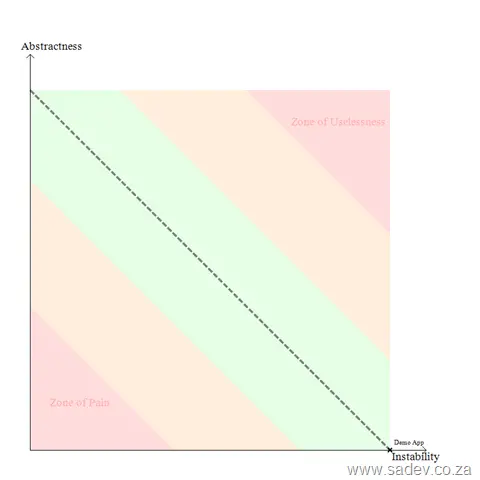
This is great for identifying refactoring priorities—or what to avoid—but there’s another powerful feature: the CQL language (like SQL for code). For example, you can query methods longer than 200 lines:
_WARN IF Count > **0**
IN SELECT TOP **10** METHODS WHERE NbLinesOfCode > **200**
ORDER BY NbLinesOfCode DESC_
Some results appear in the report, but there’s far more in the visual tool—and you can write your own queries. I even created a few to track deep inheritance in exception handling. The visual tool makes this interactive: when you run a query, it highlights the dependency tree and squares to pinpoint problem areas and hotspots.
Hand Over
In the final stages, I needed to get the long-term maintainers up to speed—without a line-by-line code review. Easy: project this on a screen and use NDepend as a presentation tool. Custom CQL queries work as slides or key points. What makes it shine is its interactivity: during discussions or Q&A, you can instantly navigate to other parts and highlight them.
All Perfect Then?
No—there are minor UI quirks (e.g., labels not showing correctly in ribbon mode, or needing to specify a project extension), but they’re manageable. The bigger issue? This isn’t a tool you can pick up and run with. I tried NDepend years ago and gave up quickly. Without immediate need or experience forcing me over the steep learning curve, I never would’ve realized its power.
That curve is steep—especially if you’re not used to metrics or architectural thinking. This isn’t a tool for every team member; it’s for architects and senior developers.
Update 1 October 2010: If you want FULL sync, then Google has updated its sync tool to support Outlook 2010—please go to the Gmail blog for more info. Comments on this post will also be disabled, as there is nothing left to say.
If you are using Google Calendar and want to use it with Outlook 2010, you will find that the Google Calendar Sync tool no longer works  .
.
So what can you do? Well, Outlook 2010 supports the iCal format, and so does Google Calendar—so you can use that to get a basic sync between the two.
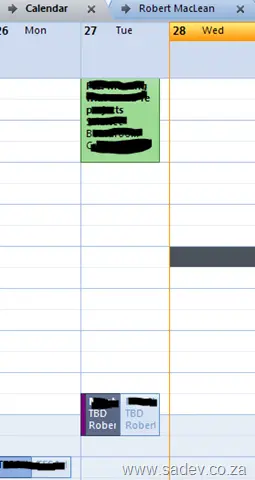
To set this up, go to your calendar details page in Google Calendar (Settings link at the top of the window, then Calendars, and finally click on the calendar name). At the very bottom of the page, there are two sets of icons: one public and one private. Right-click the iCal icon from the private section and select Copy URL.

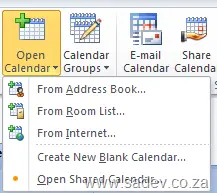
Now, in Outlook, go to your calendar and click the Open Calendar button, then select From Internet. Paste the URL into the text box and click OK.
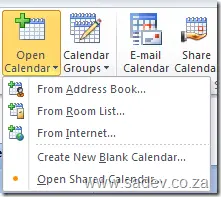
There you go—your Google Calendar is now in Outlook 2010.
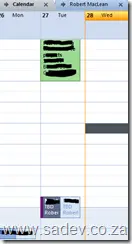
Downside: You now have two calendars in Outlook to work with, but if you click the little arrow next to the calendar name:

you can have them display as one and can easily copy/paste between them.

Two months after the event, I finally got around to posting a commentary on an aspect of Tech-Ed Africa that was so understated that I’m wondering if I attended the same event as everyone else. This year, Tech-Ed Africa really decided—maybe intentionally, maybe not—to be a very green event. By "green," I mean the whole environmental aspect. Here’s how they did it:
Delegate bags – One of the highlights of Tech-Ed has always been the delegate bag, which I generally use for the whole next year. They’re always great quality, but this year’s bags were made by Owl, and almost everything that made up the bag was from recycled materials.
Paperless – Missing from the bag was the usual pad of writing paper. Yes, less paper saves trees.
Presentation CDs/DVDs – At the end of the event, you used to get a CD/DVD with all the slides on it. Not this year: all had to be downloaded later. This is great for the environment, as it means fewer disks need to be made—which generally don’t get used much. As a speaker, it’s also great because it extended the deadline for submitting final slides to staff, meaning those last-minute tweaks now make it into the downloadable version.
Very interesting approach—would love to know if more was done and why it wasn’t pushed more.