Note: This post is part of a series and you can find the rest of the parts in the series index.
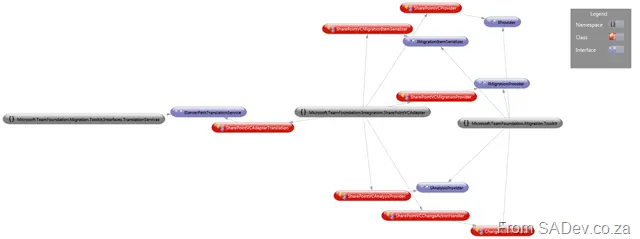
_IProvider_ is the first class we will look at implementing for both adapters (WI and VC) as it provides the core information for the platform to talk to our adapter. The first thing your provider needs is the _ProviderDescriptionAttribute_, which has three properties: ID, Name, and Version.
[ProviderDescription("{7F3F91B2-758A-4B3C-BBA8-CE34AE1D48EE}", "SharePoint TIP Adapter - Version Control", "1.0.0.0")]
The ID must be unique, and you will need to record it somewhere as it is used in the platform's configuration. The name and version can help users, though I have not seen them used in practice (they might appear in future or different tools).
The only method in the provider is the _GetService()_ method, which the platform uses to retrieve implementations of the interfaces/classes you will build later. In other words, this method allows the platform to request a class that implements a specific interface:
object IServiceProvider.GetService(Type serviceType)
{
    TraceManager.TraceInformation("WSSVC:Adapter:GetService - {0}", serviceType);

    if (serviceType == typeof(IAnalysisProvider))
    {
        if (analysisProvider == null)
        {
            analysisProvider = new SharePointVCAnalysisProvider();
        }
        return analysisProvider;
    }

    if (serviceType == typeof(IMigrationProvider))
    {
        if (migrationProvider == null)
        {
            migrationProvider = new SharePointVCMigrationProvider();
        }
        return migrationProvider;
    }

    if (serviceType == typeof(IServerPathTranslationService))
    {
        if (trans**a**lationProvider == null)
        {
            trans**a**lationProvider = new SharePointVCAdapterTranslation();
        }
        return trans**a**lationProvider;
    }

    return null;
}
Above is the implementation from the SharePoint VC adapter. The WI adapter follows the same pattern, except it does not include the server path translation service at the end.
Power Tip: Using Visual Studio 2010’s new “Generation from usage” feature makes this stage of development much easier.
Note: This post is part of a series and you can find the rest of the parts in the series index.
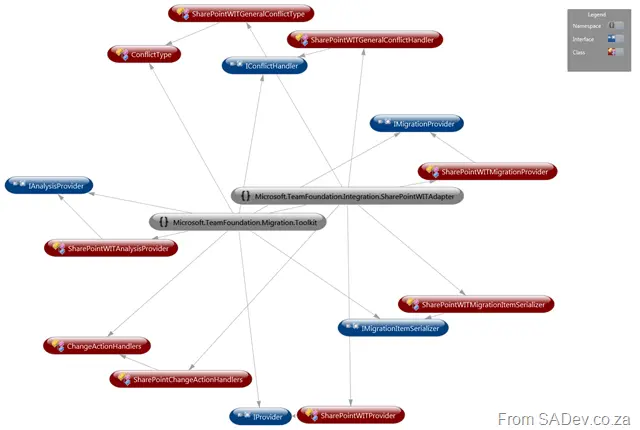
The TFS Integration Platform has two types of adapters—a WI (for work items, tasks, bugs, etc.) and a VC (version control) adapter—and they are nothing more than .NET assemblies made up of a number of classes, which you will mostly inherit from interfaces in the Toolkit project. For both adapters, the key interfaces you need to implement are:
- IProvider: Gives the platform a way to invoke your adapter.
- IMigrationProvider: Used for writing to the adapter’s source system (e.g., SharePoint for me).
- IMigrationItemSerializer: Provides support for converting items to XML.
- IAnalysisProvider: Used for reading from the adapter’s source system.
As well, both require implementing the ChangeActionHandlers abstract class.
The VC adapter also requires:
- IServerPathTranslationService: Used to translate paths (i.e., directories and such) between adapters.
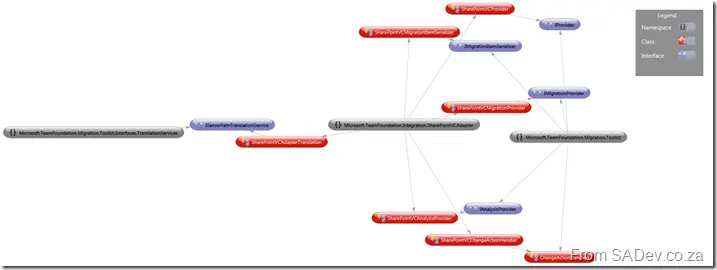
While the WIT adapter requires:
- IConflictHandler: Provides support for handling conflicts during migration.
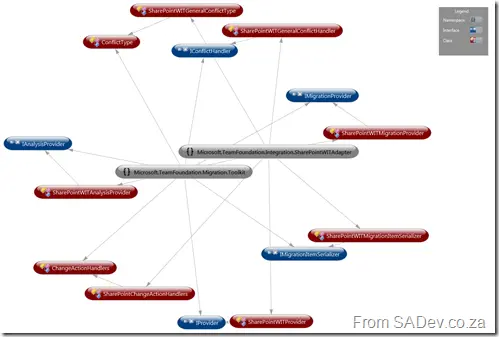
Thus, in both adapters, you’ll need to implement at least six classes (excluding any extras required by your specific needs). The core concepts of the adapters are all explained in their respective interfaces, making them appear simple to implement—and, indeed, they are. However, there are some quirks that might catch you off guard, which we’ll cover in detail in future posts.
TraceManager
Something very nice about the platform is the TraceManager class—a wrapper around System.Diagnostics.Trace—that adds extras like logging to console windows and log files. You’ll see it sprinkled throughout my code because it’s invaluable for debugging later on.
Power Tip: The TraceManager logs all written information to log files, so never include sensitive data there.
Note: This post is part of a series and you can find the rest of the parts in the series index.
Getting started with the adapter development isn’t the easiest task—you’re a little in the wild—but this part will serve as a quick-start guide to help you get what you need to become a TFS Integration Platform developer.
SQL Server
The TFS Integration Platform requires Microsoft SQL Server, so you’ll need to install an instance.
TFS
It goes without saying (or maybe it doesn’t) that if you plan to write an adapter to integrate with TFS, you’ll need TFS itself. Even if you don’t care about TFS, you’ll want it for testing—the TFS 2010 adapters are of the highest quality, making them a great test target (e.g., testing between your adapter and TFS). Thankfully, with TFS 2010, you can now install it natively on Windows 7, meaning developers can easily set up a great environment.
Target System (SharePoint for Me)
Since I was developing for SharePoint, I needed a SharePoint installation—which meant a 20GB Windows 7 virtual machine. Hopefully, for you, this won’t be as much of an issue.
TFS Integration Platform
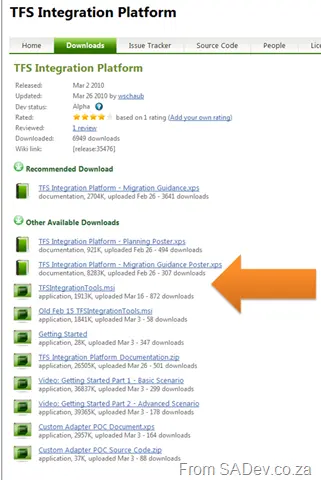
The TFS Integration Platform is a software component and database that runs on your machine and handles data movement. You can download it from http://tfsintegration.codeplex.com/releases, though choosing the right version may not be obvious due to the many options. You want the tools package:
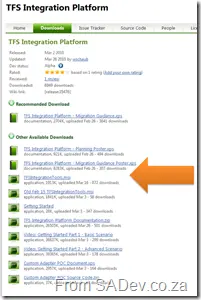
During installation, you’ll have the option to install the service, which is recommended for production environments to keep synchronization running continuously. For development, this isn’t required.
Power Tip: Once the tools are installed, go into SQL Server and back up the TFSIntegrationPlatform database immediately. The platform is still in beta, so there are bugs that may require a restore—plus, a restore is quicker than a reinstall if you want a clean testing environment.
Platform Source
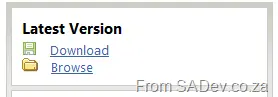
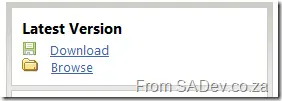
To build adapters, you’ll also need the TFS Integration Platform’s source code, available on CodePlex. Grab the latest version from the Source Control page by clicking the Download link in the latest version box on the far right.
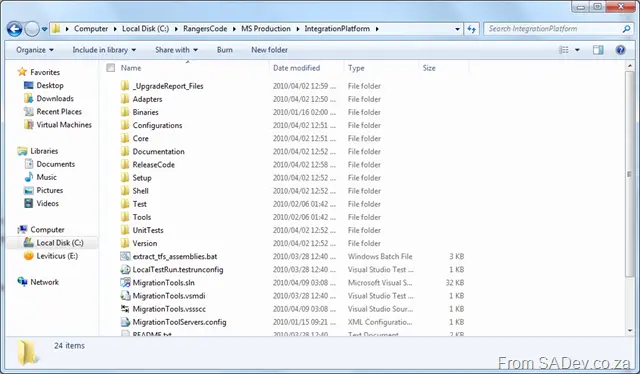
Inside, you’ll find the IntegrationPlatform folder, which contains all the Microsoft code.
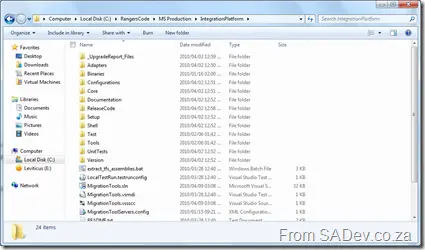
Power Tip: Create a common root folder for the TFS code and yours (I used RangersCode) and then add subdirectories for the platform and your code (e.g., My Production and MS Production under RangersCode). This keeps things organized, makes navigation easier later, and helps distinguish between yours and Microsoft’s code.
The code itself targets Visual Studio 2008, but—like me—you can use Visual Studio 2010 with no issues. Once you’ve done all this, you’re finally ready to write your adapter!
Note: This post is part of a series, and you can find the rest of the parts in the series index.
Since September 2009, I have been engaged in an ALM Rangers project—the TFS Integration Platform. It is:
The TFS Integration Platform is a project developed by the Team Foundation Server (TFS) product group and the Visual Studio ALM Rangers to facilitate the development of tools that integrate TFS with other systems. Currently, the scope of this project is to enable TFS to integrate with other version control and work-item/bug-tracking systems, but the eventual goal is to enable integration with a broader range of tools/systems (e.g., build). This platform enables the development of two major classifications of tools: those that move data unidirectionally into TFS, and those that synchronize data bidirectionally.
So, in short, it is an integration system, like BizTalk or SSIS—but specially built for version control and work items. I haven’t said "TFS" here because it can work to migrate between other source control and work-item systems provided adapters exist. Adapters are the logic that allows the TFS platform to connect to a variety of technologies, and my goal has been to build two of them—one for SharePoint lists and one for SharePoint document libraries.
You may have noticed that SharePoint isn’t a version control or work-item system, so why integrate? Well, lots of companies do use it for ALM-related items, such as lists for tracking work items and document libraries to store content that should be in a source-control system. This is the first post in a series that will give you an idea of what’s involved in building adapters, show you what to avoid, and—hopefully—give you a few laughs at my expense.
Now, I want to be clear: this series will not cover the usage of the platform or any of its core concepts. For those, see the links below—particularly Willy-Peter’s blog. You do need to understand a bit about how the platform works before attempting to build your own adapter.
As all my work was done for the ALM Rangers, the source code for my adapters is included in the code, which can be obtained from the CodePlex site.
To help you along, let’s list a few key links:
This page provides an index of all the parts in the series. Parts which are not linked yet indicate that they are still coming, and you should subscribe to my RSS feed to get notified as soon as they are published.
 Note: This post is part of a series and you can find the rest of the parts in the series index.
There are a few tiny additions in .NET 4 that I have not covered yet. This post provides a quick hit list of some of the new and improved features:
New
- [
 ] StringBuilder.Clear: Quick method to clear a
 StringBuilder. - [] Stopwatch.Reset: Quick method to reset a stopwatch timer.
- [] IntPtr & UIntPtr: Both have had two new methods added—one for addition and one for subtraction.
- [] Thread.Yield: Allows yielding execution to another thread that is ready to run on the current processor.
- [] System.Guid: Now includes two new methods—
TryParse and TryParseExact—to allow testing of parsing. - [] Microsoft.Win32.RegistryView: This allows requesting 64-bit or 32-bit views of the registry.
- [] Environment: Now contains two properties to identify 64-bit scenarios:
Is64BitOperatingSystem: Identifies whether the OS is 64-bit.Is64BitProcess: Identifies whether the process is 64-bit.
- [] System.Net.Mail.SmtpClient: Support for SSL.
Improved
- [
 ] Path.Combine: A new method overload allows combining file paths.
 - [] Compression.DeflateStream & Compression.GZipStream: Improved to avoid attempting to compress already compressed data.
- [] Compression.DeflateStream & Compression.GZipStream: The 4 GB size limit has been removed.
- [] Monitor.Enter: A new overload allows passing a reference boolean that returns
true if the monitor was successfully entered. - [] Microsoft.Win32.RegistryOptions: Now includes an option to specify a volatile key, which is removed when the system restarts.
- [] Registry keys are no longer limited to 255 characters.
- [] System.Net.Mail.MailMessage: Support for new headers:
HeadersEncoding: Sets the type of text encoding used in the mail header.ReplyToList: Sets the list of addresses to use when replying to a mail, replacing ReplyTo, which only supported one email address.
- [] System.Net.NetworkCredential: For improved security, passwords can now be stored in a
SecureString. - [] ASP.NET Hashing: The default value has been changed from SHA1 to SHA256.
- [] ASP.NET Output Caching: Previously, setting the output cache to
_ServerAndClient also required calling _SetOmitVaryStar to ensure it would be cached on the client. From .NET 4, _SetOmitVaryStar is no longer needed. - [] TimeZoneInfo.Local & DateTime.Now: Both now follow OS daylight saving settings rather than using .NET Framework settings.
- [] When running on Windows 7, locale info is retrieved from the OS instead of being stored in the framework.
- [] Support for all 14,000 characters of Unicode 5.1.
- [] ServiceInstaller.DelayedAutoStart: On modern OSes (Vista, Win 7, etc.), services can start as Automatic (Delayed). This means they start after system boot, allowing users to log in quickly. This is now possible for .NET apps using the
DelayedAutoStart property.
 Note: This post is part of a series and you can find the rest of the parts in the series index.
A new namespace has arrived in .NET 4 for those who spend a lot of time with numbers: System.Numerics, which has two classes—BigInteger and Complex—and they are exactly what they sound like. BigInteger is for big integers, and Complex is... complicated😉
BigInteger
BigInteger is a class (not a type, like float), allowing you to create an integer with no theoretical upper or lower limits! Why is that useful? Consider Int64, which maxes out at 9,223,372,036,854,775,807. If you assign this value to an Int64 and add 1, it overflows and becomes -9,223,372,036,854,775,806. But with BigInteger, this is impossible—it has no upper limit!
Being a class means it includes useful methods and properties, such as:
IsZero: Checks if the value is 0.IsEven: Checks if the value is even.
Here’s an example of its usage:
BigInteger firstBigInt = new BigInteger(Int64.MaxValue);
BigInteger secondBigInt = new BigInteger(Int64.MaxValue);

Console.WriteLine("First BigInteger is even? {0}", firstBigInt.IsEven);
Console.WriteLine("First BigInteger = 1? {0}", firstBigInt.IsOne);
Console.WriteLine("First BigInteger is a power of two? {0}", firstBigInt.IsPowerOfTwo);
Console.WriteLine("First BigInteger = 0? {0}", firstBigInt.IsZero);
Console.WriteLine("First BigInteger is positive (1), zero (0), or negative (-1)? {0}", firstBigInt.Sign);
Console.WriteLine("{0} multiplied by {0} is {1}", Int64.MaxValue, BigInteger.Multiply(firstBigInt, secondBigInt));
You can also use standard arithmetic operators (+, -, *, etc.) with it.
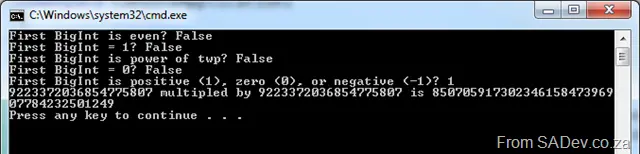
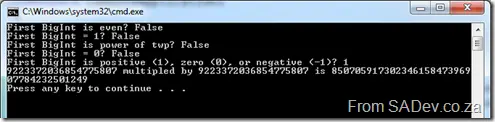
Here’s the output (notice the size of the result from multiplication!):
BigRational
If you need to work with rational numbers (fractions) without limits instead of integers, check out the BigRational class—available from the BCL team at http://bcl.codeplex.com/.
Complex
A complex number is a number consisting of a real part and an imaginary part. Typically written as z = x + yi, where x and y are real numbers, and i is the imaginary unit satisfying i² = −1.
(This definition is borrowed from the System.Numerics.Complex documentation.)
Who benefits from Complex numbers?
- Electrical engineers: Use them to calculate impedance (Z) from resistance (R) and reactance (X).
- Mathematicians: Apply them to vector calculus and graph theory.
- GIS/mapping professionals: Use them for X, Y coordinates in 2D planes.
For a quick example, here’s some code from MSDN:
Complex c1 = new Complex(12, 6);
Console.WriteLine(c1);
Complex c2 = 3.14;
Console.WriteLine(c2);
Complex c3 = (Complex)12.3m;
Console.WriteLine(c3);
Complex c4 = Complex.Pow(Complex.One, -1);
Console.WriteLine(c4);
Complex c5 = Complex.One + Complex.One;
Console.WriteLine(c5);
Complex c6 = Complex.FromPolarCoordinates(10, 0.524);
Console.WriteLine(c6);
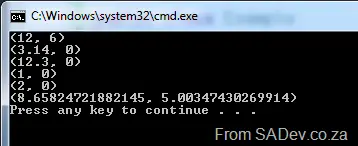
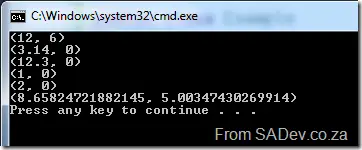
The output would look like this:
(Additional info from: http://www.dotnetspider.com/resources/36681-examples-on-complex-class-c-new-feature.aspx)
 → This post is part of a series—see the rest of the parts in the series index.
Environment.SpecialFolder
If you are building an application that takes advantage of special folders in Windows (e.g., My Documents), you’ll be happy to know that .NET 4 expanded the number of supported special folders with 25 new options in the Environment.SpecialFolder enum:
- AdminTools
- CDBurning
- CommonAdminTools
- CommonDesktopDirectory
- CommonDocuments
- CommonMusic
- CommonOemLinks
- CommonPictures
- CommonProgramFilesX86
- CommonPrograms
- CommonStartMenu
- CommonStartup
- CommonTemplates
- CommonVideos
- Fonts
- LocalizedResources
- MyVideos
- NetworkShortcuts
- PrinterShortcuts
- ProgramFilesX86
- Resources
- SystemX86
- Templates
- UserProfile
- Windows
Usage:
Console.WriteLine(Environment.GetFolderPath(Environment.SpecialFolder.MyVideos));
GetFolderPath Method
The GetFolderPath method has also been updated with a new overload, accepting a second parameter: SpecialFolderOption, which offers three behaviors:
None: Returns the path without verifying its existence. Useful for network paths to reduce lag.Create (default): Verifies the folder path. Returns an empty string if the folder doesn’t exist.DoNotVerify: Forces creation of the folder if it’s missing.
Super-fast network example:
Console.WriteLine(Environment.GetFolderPath(Environment.SpecialFolder.MyVideos, Environment.SpecialFolderOption.None));

I am a proud contributor to the Microsoft Visual Studio ALM Rangers (see this post for who they are), and each year, the Rangers have a vote for who they believe are helping their initiatives the most. The top four from the votes are honored with the title of Champion!
I was honored in 2009 to be included in the list of the four champions and even more honored that I was again listed in the top four!
Congrats to the other three champions, and especially to Mathias Olausson, who was also re-awarded!
For more details on the latest Rangers champions, see: http://blogs.msdn.com/willy-peter_schaub/archive/2010/05/12/external-visual-studio-alm-rangers-the-votes-have-been-tallied-and-the-2010-champions-are-have-been-known.aspx.
I had a great time in Durban this week presenting at the DevDays event. I was a bit nervous for my first keynote, but calmed down once I was up there. I was much less nervous for the sessions, and they turned out to be great fun.
Knowing is half the battle
As part of my prep, I fully scripted the demos, and those scripts are included in hidden slides in the slide shows—so if you're looking to recreate the demos, please download the slides and have a look.
For both my sessions, I made use of the excellent (but I’m biased) Rule 18 tool. So if you're looking for the actual code—which I referred to in my scripts with Rule 18 key presses—you should really download that too.
All the demos were done using Visual Studio 2010.
What’s new in ASP.NET 4?
- Websites and tools mentioned in the talk:
Tour of .NET 4
- Websites and tools mentioned in the talk: