[ ]
]
Note: This is part of a series; you can find the rest of the parts in the series index.
I’ve mentioned previously about Pull's support for protocol handlers (see part 4), which enables the application to subscribe to a feed easily just by clicking a link. Today I will look at how to register protocol handlers.
Protocol Handlers
Registering a protocol handler is one of the simplest things I did in Pull because it is merely a registry key that needs to be added to the system. The registry key follows the pattern below.
Key
- blue = registry key
- orange = key/value setting
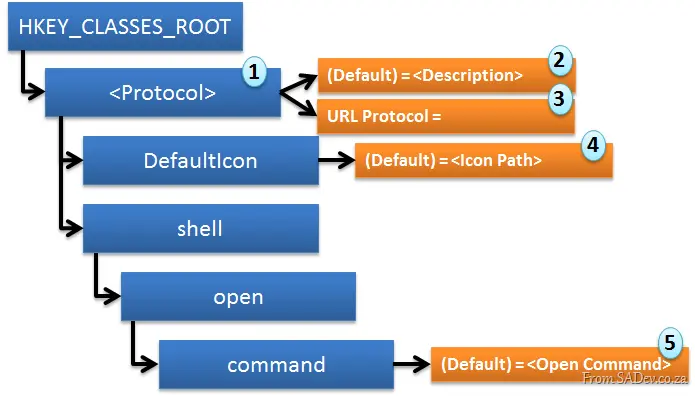
The important points (numbered above) are:
- This is the protocol you want to register, so if you want to register, say, zune://, then this is zune.
- This is a useful description for the default key.
- This is a setting named URL Protocol, but the value must remain blank.
- This is the path to the icon. For Pull, I just use the default program icon by setting the value to: E:\PortableApps\Pull\Pull.exe,1
- This is the command to execute when the URL is clicked. In Pull, this is (note the
%1 for the URL parameter): "E:\PortableApps\Pull\Pull.exe" "%1"
The code to do this is rather simple:
public static void Register(string executablePath, string uri)
{
    if (!OurProtocolHandler(uri))
    {
        return;
    }

    using (RegistryKey uriKey = Registry.ClassesRoot.CreateSubKey(uri, RegistryKeyPermissionCheck.ReadWriteSubTree, RegistryOptions.None))
    {
        uriKey.SetValue(string.Empty, Pull.Properties.Resources.PullPodcastURIHandler);
        uriKey.SetValue("URL Protocol", string.Empty, RegistryValueKind.String);

        using (RegistryKey iconKey = uriKey.CreateSubKey("DefaultIcon", RegistryKeyPermissionCheck.ReadWriteSubTree, RegistryOptions.None))
        {
            iconKey.SetValue(string.Empty, string.Format(CultureInfo.CurrentCulture, "{0},1", executablePath));
        }

        using (RegistryKey shellKey = uriKey.CreateSubKey("shell", RegistryKeyPermissionCheck.ReadWriteSubTree, RegistryOptions.None))
        {
            using (RegistryKey openKey = shellKey.CreateSubKey("open", RegistryKeyPermissionCheck.ReadWriteSubTree, RegistryOptions.None))
            {
                using (RegistryKey commandKey = openKey.CreateSubKey("command", RegistryKeyPermissionCheck.ReadWriteSubTree, RegistryOptions.None))
                {
                    commandKey.SetValue(string.Empty, string.Format(CultureInfo.CurrentCulture, "\"{0}\" \"%1\"", executablePath));
                }
            }
        }
    }
}
Being a Good Citizen
Pull is aware that some people may have other podcatchers installed, and to ensure it does not steal their protocol handlers, it includes a simple method, OurProtocolHandler, which checks if the protocol is in use. If a protocol is already in use, it does not override it.
private static bool OurProtocolHandler(string uri)
{
    using (RegistryKey uriKey = Registry.ClassesRoot.OpenSubKey(uri))
    {
        if (Registry.ClassesRoot.OpenSubKey(uri) != null)
        {
            return uriKey.GetValue(string.Empty).Equals(Pull.Properties.Resources.PullPodcastURIHandler);
        }
        else
        {
            return true;
        }
    }
}
Final Thoughts
This is one of the easiest parts to get working, but incorporating it into the application is not as simple—something I will cover next.
[]
Note: This is part of a series, you can find the rest of the parts in the series index.
PLINQ, which is Parallel LINQ—or the ability to run LINQ queries with parallel extensions in .NET 4—is supposed to magically parallelize queries by appending .AsParallel(). Here’s my infamous "insane solution" to Fizz Buzz:
var result = from i in Enumerable.Range(0, 1000).AsParallel()
             where (i % 3 == 0 || i % 5 == 0)
             select new { value = i, answer = i % 3 == 0 ? i % 5 == 0 ? "Fizz Buzz" : "Buzz" : "Fizz" };

foreach (var item in result)
{
    Console.WriteLine("{0} gets a {1}", item.value, item.answer);
}
If you’ve attended one of my What’s New in .NET 4 talks, you might have seen me demo this—and for that, I am VERY VERY SORRY, because I was wrong. 🙁
In Pull, I used this exact approach to parallelize podcast updates. It wasn’t until I implemented a status view that I realized—two weeks and 46 check-ins later—it wasn’t actually parallel.
The issue? .AsParallel() alone does little more than setup. For true parallelism, you need .ForAll(), as shown below (note the processing change on line 5):
var result = from i in Enumerable.Range(0, 30).AsParallel()
             where (i % 3 == 0 || i % 5 == 0)
             select new { value = i, answer = i % 3 == 0 ? i % 5 == 0 ? "Fizz Buzz" : "Buzz" : "Fizz" };

result.ForAll(item =>
{
    Console.WriteLine("{0} gets a {1}", item.value, item.answer);
});
Now Pull truly runs in parallel. Problem solved? Wrong again. Further research led me to a white paper by Pamela Vagata (Microsoft’s Parallel Computing Platform Group). It clearly explains when to use PLINQ vs. Parallel.ForEach:
| Action | PLINQ | Parallel.ForEach |
|---|
| Simple Data-Parallel Operation with Independent Actions | ✅ | |
| Ordered Data-Parallel Operation | ✅ | |
| Streaming Data-Parallel Operation | ✅ | |
| Operating over Two Collections | ✅ | |
| Thread-Local State | | ✅ |
| Exiting from Operations | | ✅ |
My mistake? I used PLINQ for a Simple Data-Parallel Operation with Independent Actions—a perfect case for Parallel.ForEach. Why?
While PLINQ’s ForAll exists, parallel loops are often more intuitive for independent actions. PLINQ’s overhead can be excessive for simple tasks. With Parallel.ForEach, you control thread count via MaxDegreeOfParallelism, adapting to system resources. PLINQ, however, requires exact thread counts via WithDegreeOfParallelism(), locking in resource usage.
Final Thoughts
.NET 4 made parallelism too easy—so easy that wrong choices still appear to work. Research matters. Don’t assume.
[]
Note: This is part of a series. You can find the rest of the parts in the series index.
A podcatcher, like Pull, really is just an RSS reader with a download manager built in to download RSS enclosures. This means that both parts should work—and work very well. The RSS reader side is fairly easy to implement, however the downloader is anything but.
WebClient
Initially, I thought about using a simple download manager and built it around a .NET class called WebClient. This has a nice async method (DownloadFileAsync) and several events you can subscribe to, making it easy to download files:
WebClient webClient = new WebClient();
webClient.DownloadFileCompleted += new System.ComponentModel.AsyncCompletedEventHandler(webclient_DownloadFileCompleted);
webClient.DownloadProgressChanged += new DownloadProgressChangedEventHandler(webclient_DownloadProgressChanged);
webClient.DownloadFileAsync(episode.EpisodeUri, this.Episode.Local_Path);
However, in exchange for this simple implementation, you lose a ton of features that a more powerful download manager may offer—particularly in error handling. For me, living in South Africa where bandwidth isn’t great, dealing with errors during downloads is essential. So, I eventually dropped WebClient as the system I used.
HttpWebRequest
.NET also includes a fully featured HTTP request/response system built around HttpWebRequest and HttpWebResponse. These classes offer many features that WebClient lacks. However, using them requires more code. Below is the code I use, along with some key details:
- Lines 2 & 3: Setting a connection group name and
UnsafeAuthenticatedConnectionSharing to true allows the system to reuse an existing connection to the server, improving performance during handshakes. - Line 4: Setting a user agent helps stats programs identify your client specifically.
- Line 8: Changing the range enables me to resume downloads by starting from a different point in the file—critical if errors occur or the application is closed. Notably, some web servers dislike the start point being set to
0 (the beginning), which is why I perform a check. - Line 15: Fetches the server’s response but not the actual data.
- Line 25: Begins retrieving the data.
- Line 37: Writes the data to disk.
HttpWebRequest webRequest = (HttpWebRequest)WebRequest.Create(uri);
webRequest.ConnectionGroupName = "Pull (pull.codeplex.com)";
webRequest.UnsafeAuthenticatedConnectionSharing = true;
webRequest.UserAgent = "Pull (pull.codeplex.com)";
if (startPointInt > 0)
{
webRequest.AddRange(startPointInt);
}
webRequest.Credentials = CredentialCache.DefaultCredentials;
HttpWebResponse webResponse = null;
try
{
webResponse = (HttpWebResponse)webRequest.GetResponse();
}
catch (WebException err)
{
return;
}
Int64 fileSize = webResponse.ContentLength;
webFileStream = webResponse.GetResponseStream();
if (!fileInfo.Exists)
{
localFileStream = new FileStream(fileInfo.FullName, FileMode.Create, FileAccess.Write, FileShare.None);
}
else
{
localFileStream = new FileStream(fileInfo.FullName, FileMode.Append, FileAccess.Write, FileShare.None);
}
int bytesSize = 0;
byte[] downBuffer = new byte[2048];
while ((bytesSize = webFileStream.Read(downBuffer, 0, downBuffer.Length)) > 0)
{
localFileStream.Write(downBuffer, 0, bytesSize);
onUpdate(Convert.ToInt32((localFileStream.Length * 100) / (fileSize + startPointInt)));
}
As you can see, it’s more complex but far more capable—for example, it supports resuming downloads.
Final Thoughts
I want to point out an article by Andrew Pociu, who wrote an excellent guide on building a download manager that inspired much of my code.
In the end, switching to HttpWebRequest was a much better decision—but this is an area where new error types still emerge, and robust error handling remains a challenge given the wide variety of issues that can arise on the web.
[]
Note: This is part of a series, you can find the rest of the parts in the series index.
One of the design decisions for Pull is that it should run without needing an install. This requirement meant that everything it needed to run should always be available, and this presented an interesting design problem: I needed a database to store all the information Pull uses (podcasts, episodes, etc.) but couldn’t require users to install SQL Server Express or PostgreSQL.
The solution was to use a file-based database called SQLite, which only requires a few DLL files to provide full database functionality without needing a database server. Since this is a .NET application, I used one of the wrappers for .NET called System.Data.SQLite. Usage with System.Data.SQLite can be done via ADO.NET-like code or through the Entity Framework.
I initially used EF for development, but it caused significant issues due to its assumptions about when to open and close connections. While these assumptions make sense for a DB server, they backfired when dealing with a file accessed by multiple threads, leading to stability problems.
To address this, I built my own ORM. It uses reflection for class mapping—similar to EF—but avoids connection issues by using a static instance and aggressively closing file connections. These changes resolved major stability problems while still delivering a solid developer experience.
Mapping
Mapping between my classes and the database uses a simple attribute with a name and a primary key indicator. For example, the Log class looks like this—note that I reuse the same attribute for both columns and tables, assuming Class=Table and Property=Column. While property names often match database column names, this isn’t a requirement.
[DataStore(Name = "Log")]
internal class Log
{
    [DataStore(Name = "PK", PrimaryKey = true)]
    public Guid PK { get; set; }

    [DataStore(Name = "Source")]
    public string Source { get; set; }

    [DataStore(Name = "Occurred")]
    public DateTime Occurred { get; set; }

    [DataStore(Name = "StackTrace")]
    public string StackTrace { get; set; }

    [DataStore(Name = "Message")]
    public string Message { get; set; }
}
Using this metadata, I generate SQL dynamically via reflection. For example, here’s how I build an update command:
private static SQLiteCommand ConvertToUpdateCommand<T>(T item)
{
    SQLiteCommand command = new SQLiteCommand();
    string updateCommandText = string.Format(CultureInfo.CurrentCulture, "UPDATE [{0}] SET ",
        ((DataStoreAttribute)typeof(T).GetCustomAttributes(typeof(DataStoreAttribute), false)[0]).Name);
    int parameterCounter = 0;

    object PKValue = null;
    string PKColumn = string.Empty;

    GetAttributedProperties(typeof(T), (property, attribute) =>
    {
        if (!attribute.PrimaryKey)
        {
            updateCommandText += string.Format(CultureInfo.CurrentCulture, "[{0}]=@A{1}, ",
                attribute.Name, parameterCounter);
            command.Parameters.AddWithValue(string.Format(CultureInfo.CurrentCulture, "A{0}", parameterCounter),
                property.GetValue(item, null));
            parameterCounter++;
        }
        else
        {
            PKValue = property.GetValue(item, null);
            PKColumn = attribute.Name;
        }
    });

    updateCommandText = updateCommandText.Remove(updateCommandText.Length - 2);
    updateCommandText += string.Format(CultureInfo.CurrentCulture, " WHERE [{0}]=@PK", PKColumn);
    command.Parameters.AddWithValue("PK", PKValue);
    command.CommandText = updateCommandText;

    return command;
}
Final Thoughts
I’ve been very happy with SQLite as a database, though the learning curve was steep coming from a database-server background. Once I grasped its limitations and differences from server-based databases, it became a great choice.
The ORM I built has been a major success, making development much easier by working with objects while abstracting database logic. There are performance optimizations I could make—such as:
- Implementing batch transactions (currently, each podcast episode creates a new command and transaction).
- Adding object-tracking to avoid updating all fields when only some have changed.
However, these issues aren’t urgent, as Pull’s initial data volume is lightweight. Overall, I’m satisfied with both the database choice and the ORM implementation.
[]
Note: This is part of a series. You can find the rest of the parts in the series index.
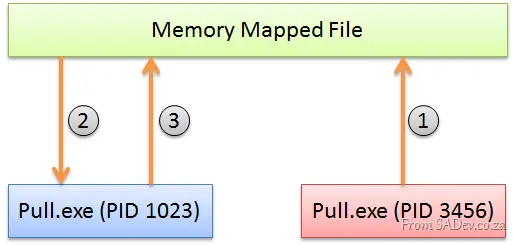
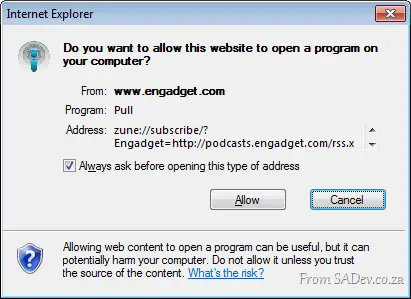
One of the special features of Pull is the ability to handle special protocol handlers for podcasts—for example, if you click the iTunes Podcast link (itpc://) or Zune Podcast (zune://), it should add the podcast to Pull. In Windows, this works by registering an executable with a protocol. When a user clicks such a link, it launches the associated executable and passes the URL as an argument. However, it will launch a new instance of the executable even if another instance is already running.
This could lead to a scenario where two instances are running simultaneously, with the second instance containing the new feed data while the original does not.
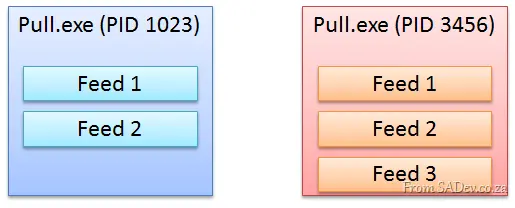
To solve this, two problems needed addressing:
- Check if an application is already running.
- If an instance is running, instruct the existing one to process the new feed.
Solving Problem 1: Check if an Application is Already Running
This is a well-known problem, solved using a mutex. Below is the key logic in the application’s Main method:
- Line 1: Generates a unique mutex name from the executable path (removing symbols for uniqueness). This allows multiple instances if running from different paths.
- Line 5: Attempts to open an existing mutex with that name. If it fails, no instance is running.
- Lines 19–20: Creates a new mutex if none exists and ensures cleanup in a
try…finally block. - Line 40: Releases the mutex when done.
string mutexName = Regex.Replace(Application.ExecutablePath, @"\W*", string.Empty);
try
{
Mutex.OpenExisting(mutexName);
if (arguments.Length > 0)
{
IPMF.SendMessageToServer(mutexName, arguments[0]);
}
return;
}
catch (WaitHandleCannotBeOpenedException)
{
}
Mutex mut = new Mutex(true, mutexName);
try
{
Application.EnableVisualStyles();
Application.SetCompatibleTextRenderingDefault(false);
Database.ConnectionString = "data source=pull.sqllite";
MainForm launchForm = new MainForm();
if (Properties.Settings.Default.FirstRun)
{
Application.Run(new SettingsForm());
Properties.Settings.Default.FirstRun = false;
}
launchForm.StartupArguments = arguments;
using (IPMF ipmf = new IPMF(mutexName, message => { Bus.GetBus().Broadcast(DataAction.ParseFeed, message); }))
{
Application.Run(launchForm);
}
}
finally
{
mut.ReleaseMutex();
}
Solving Problem 2: Communication with the Existing Instance
Once we know an instance is running, we need inter-process communication. Options include:
- Monitoring a special folder.
- Using named pipes.
- Writing to a shared database table.
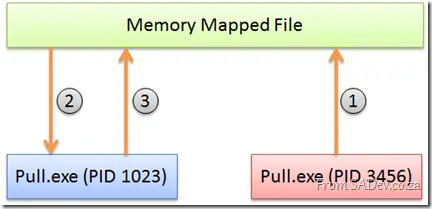
However, I chose .NET’s MemoryMappedFile—a lightweight, high-performance solution that works entirely in memory (no disk I/O). It’s also uniquely named to avoid conflicts with mutexes (a pitfall I discovered after turning gray!).
How it works:
- The new instance writes arguments to the shared MemoryMappedFile.
- The existing instance reads and processes them.
- The existing instance clears the file after handling.
Implementation via IPMF (Inter-Process Messaging Framework):
serverMemoryMappedFile = MemoryMappedFile.CreateNew(
instanceName,
maxSize,
MemoryMappedFileAccess.ReadWrite,
MemoryMappedFileOptions.DelayAllocatePages,
null,
HandleInheritability.None
);
using (MemoryMappedViewStream stream = serverMemoryMappedFile.CreateViewStream())
{
using (BinaryReader reader = new BinaryReader(stream))
{
string data = reader.ReadString();
}
}
public static void SendMessageToServer(string instanceName, string message)
{
instanceName += ".memoryMappedFile";
using (MemoryMappedFile clientMemoryMappedFile = MemoryMappedFile.OpenExisting(
instanceName,
MemoryMappedFileRights.Write,
HandleInheritability.None))
{
using (MemoryMappedViewStream stream = clientMemoryMappedFile.CreateViewStream())
{
BinaryWriter writer = new BinaryWriter(stream);
writer.Write(message);
}
}
}
Final Thoughts
Memory-mapped files are exceptionally versatile—ideal for partial file loading, IPC, or zero-copy data sharing. Their simplicity and performance make them a standout tool in .NET, and well worth mastering. (Wink: Part III covers the "bus" system used here.)
[](/files/onebit_26_1.webp)
Note: This is part of a series. You can find the rest of the parts in the [series index](/content/pulled-apart-series-index).
One of the aspects of [Pull](https://pull.codeplex.com) is that it had to be multi-threaded—because things like downloading a massive podcast shouldn’t lock up the UI. Threading has become pretty easy in .NET 4 thanks to things like PLINQ or Parallel Extensions. However, cross-thread communication hasn’t gotten easier in .NET 4.
My idea to solve this was to create an *internal bus*—which is just an implementation of the pub/sub pattern. A bunch of subscribers register with the bus for a specific message type, and when a message is given to the bus, it passes it to the correct subscribers.
[](/files/image_36.webp)
First, I created a simple singleton instance of my bus class:
```csharp
internal class Bus
{
private static Bus bus = new Bus();
private Bus()
{
publisher = new Publisher();
}
public static Bus GetBus()
{
return bus;
}
This ensures that all threads get the same instance. Inside my bus class, I implemented the new .NET 4 IObserver/IObservable interfaces, which gave me all the pub/sub magic. This is all internal to the bus class so that usage in my application is straightforward—for example, the methods for registering a subscriber hide the pub/sub concept completely:
public void Register<T>(DataAction actions, Action<T> method, Control control = null)
{
    publisher.Subscribe(new Subscriber<T>(actions, method, control));
}

public void Register(DataAction actions, Action method, Control control = null)
{
    Action<object> fakeMethod = value => { method(); };
    this.Register(actions, fakeMethod, control);
}
One of the options when registering a subscriber is passing in a control, which I use for handling objects owned by other threads—making it very easy to update the UI.
Broadcasting to all subscribers who have registered for a message type is handled by a very simple method:
public void Broadcast<T>(DataAction action, T data)
{
    publisher.Update(action, data);
}

public void Broadcast(DataAction action)
{
    this.Broadcast<object>(action, null);
}
To identify the type of message, I used an enum—which I don’t feel great about. The advantage of using enums is that there’s no magic strings (the compiler can’t identify them, e.g., if I mistype a message) and I can use flags to broadcast multiple messages at once. However, the downside is that adding a new message requires editing the enum list, which isn’t ideal.
Final Thoughts
Overall, I’m exceptionally happy with the bus—it solved so many problems I’d had with multi-threaded applications and should be a standard in application design in the future.
Note: This is part of a series, you can find the rest of the parts in the series index.
[]
Some people see learning as a side effect of software development, while others believe that all must be known upfront—so no learning occurs. The reality is that learning during software development is a core part, and you should embrace it. One of the things I’ve done with Pull is to host the code with CodePlex. CodePlex offers two ways to store source code—you can use TFS/SVN or you can use Mercurial.
In the past, I have always used TFS because I’m comfortable with it—it’s a tool I know well and like to use. However, to embrace learning for Pull, I decided it could be a Mercurial project. That brought me to my first issue: I didn’t have any Mercurial tools, so I went off to find a set I liked.
Since I didn’t want to install anything—my machine is so lightweight and fast—many of the packages out there were not an option (TortoiseHG, I’m looking at you). In the end, I chose the Mercurial Cmd Portable from PortableApps.com, which gave me a lightweight option but meant no GUI—which, honestly, isn’t a bad thing.
Comparing it to TFS is a two-part comparison:
- If I compare it to the full GUI TFS inside Visual Studio, I prefer the Mercurial experience—working disconnected from the server and coming online is easier.
- There are TFS Power Tools, which provide a command-prompt tool called
tfpt.exe; it has an online option that makes the whole experience just as good as what Mercurial offers.
One of the biggest differences between how TFS and Mercurial work is branching/merging/labels/forks, etc.—which I haven’t experienced yet.
Some of the things I did in my Mercurial setup that may help others:
.hgignore
My ignore file for C# projects done in Visual Studio, with CodeRush installed.
syntax: glob

*.csproj.user
*/[Oo]bj/*
*/[Bb]in/*
*.suo
*DXCore.Solution
hgignore[.-]*
[Tt]humbs.db
*.user
*.bak.*
*.bak
*.[Cc]ache
*/[Pp]ublish/*
*.vssscc
*.vs10x
hgrc
My config was fairly straightforward: I set up auth so that my CodePlex details are remembered and created an alias called codeplex. This lets me just type hg codeplex, and it prompts for my password—and that’s it: one line gets the repo pushed to CodePlex. I also set up WinMerge as the diff tool, because I’m a WinMerge fan, and this just lets me keep using it easily.
[auth]
codeplex.prefix=hg01.codeplex.com/pull
codeplex.username=rmaclean
codeplex.schemes=https

[alias]
codeplex=push https://hg01.codeplex.com/pull

[ui]
username=Robert MacLean <robert@sadev.co.za>

[extensions]
; must uncomment this line
extdiff=

[extdiff]
cmd.winmerge=E:\PortableApps\WinMergePortable\App\WinMerge\WinMergeU.exe
opts.winmerge=/r /e /x /u /wl
Note: This is part of a series, you can find the rest of the parts in the series index.
[]
I have needed software that the available implementations of that type don’t solve (due to cost, features, experience, etc.). Thankfully, I like to write code and I like to share. This means I’m often writing small applications to solve problems. My current one is a podcatcher—a program that downloads podcasts, called Pull.
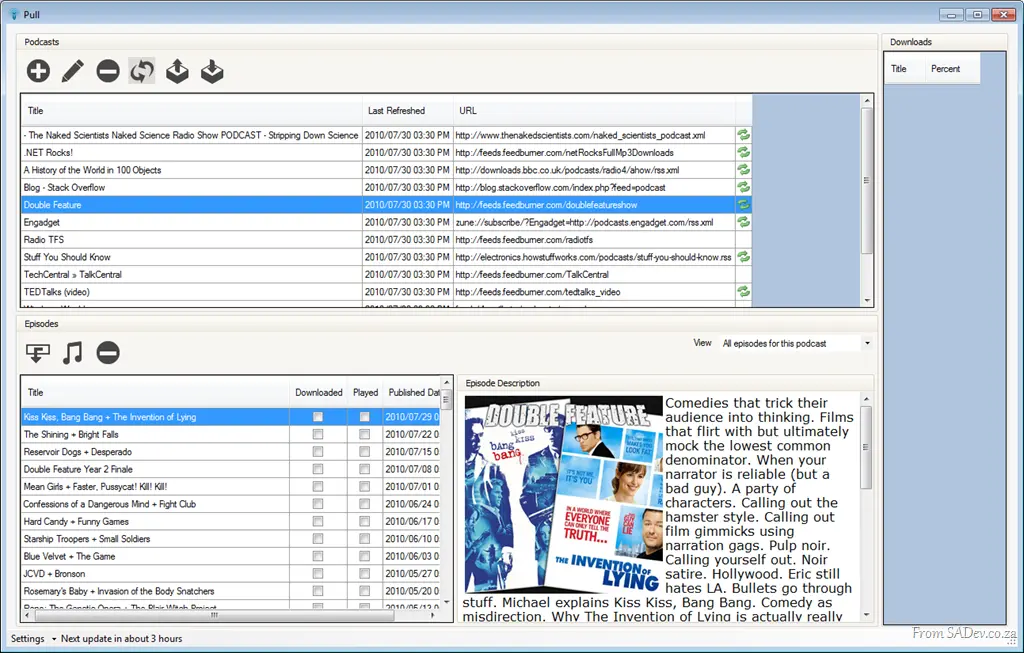
Pull is designed with the idea of being just a podcatcher, because all the media players out there with bundled podcatchers are either very heavy or just crap. My solution to that? Just build a tool that does one thing and does it well.
The second major design feature is that it must be portable—assuming .NET 4 is installed, it should just run without an install. 😊
Lastly, it should be quiet and just get on with the job of pulling down podcasts. I do not need to be annoyed with pop-ups and sounds all the time. My view is: I’ll deal with you when I have the time, else sit in the corner and do your job.
I thought I’d blog a series on some aspects of the development—both code and technology—as I’ve learned a ridiculous amount during the initial development. Check the series index at the top for a preview of what I have in mind or to find more parts in this series.

At the Visual Studio & TFS event, we had a few machines complaining that the Test Manager license was invalid and that a new one was needed. Those same machines also said Visual Studio’s license was corrupted and that Visual Studio needed a reinstall.
To make this more odd, we were using virtual machines—every machine was identical—yet only some machines had this problem.
The cause was the host OS date was wrong (the year was 2008), and so the virtual machines were set to 2008. In the eyes of the virtual machine, this meant that the license was installed magically in the future.
We turned off the VM, deleted its state, fixed the date, and started again—and it was solved!

A recent Saturday (31 July), we ran a free day of Visual Studio 2010 and Team Foundation Server 2010 hands-on labs. This event took place at the Bytes training facilities in Midrand, who provided us with 50 machines for attendees to use. BB&D stepped in to help with snacks—and gave me and Zayd some time during work to plan this.
Together with Brent from Bytes and Zayd, we helped attendees troubleshoot and got a ton of setup work done! The turnout was fantastic—we had 70% to 80% attendance—with plenty of hallway conversations about everything from licensing and Microsoft to Visual Studio.
We were deeply honored when three attendees flew up from Cape Town just to join the event. Their effort really underscored the value of the event, and we were all incredibly proud.
We also encouraged attendees to bring their own laptops to copy files from the Microsoft Community Drives, which was a huge success. With only two drives available, there was a line for them! One of my personal highlights was seeing someone use one of my quick reference posters as a desktop wallpaper while copying files—what a sight! 😊
Lastly, and not least in importance, DevExpress generously provided two CodeRush licenses for a raffle—both went to winners, and we’d like to congratulate them again.
A huge thank you to everyone who attended! We’ll be keeping an eye out for ways to expand this, and we’re already planning to run it again soon.