Microsoft has some awesome guidelines on how to publish directly from Visual Studio to Azure, however, if your IT department has installed Squid, the open-source proxy server, you may be out of luck as recent versions only support HTTP/1.0, and publishing requires 1.1.
Through some testing with the IT department at BBD Software, we’ve found that you need to be on Squid 3.1 or later; otherwise, you won’t be able to do it automatically.*
*You can still publish to a local file, then upload via the Silverlight-based admin console—but that’s too close to FTP to be cool! 😉
Not being on a social network is like having a company that doesn’t appear in your favorite search engine—it’s just a requirement of being online in our era. For a long time, I tried to reach the utopian world of an integrated social experience where everyone was everywhere, and my updates, posts, and pictures trickled across all social networks. That way, no matter what I did, you could hear what I had to say or was doing.
This was a stupid idea, and I thought I’d share my learning’s → learnings about that process.
Problem 1 – He with the Most Friends Wins
With Facebook, I fell into the trap of accepting every friend request, loading my address book into it, and basically using any other “tricks” I could to increase my friend count. This meant logging onto Facebook became a stream of noise from people I really didn’t care about, and over time, I moved away from Facebook as the value I took out of it was low.
The solution was to create a set of guidelines for people to be my friends on Facebook. I’m not going to cover all of them—I’ll just focus on two, but I had about five or six rules that helped me decide who to keep or accept:
- Time span rule – If I hadn’t seen you or had more than a Christmas email in five years or more, you were out.
- Override – I could keep anyone for any reason, breaking any other rule.
😉
Using my rule set, I trimmed from over 300 friends to fewer than 90, and Facebook is now a daily visit because I actually care about the thoughts of those 90 people.
Summary: Be very selective about who you follow on your social networks.
Problem 2 – The Right Tool for the Right Job
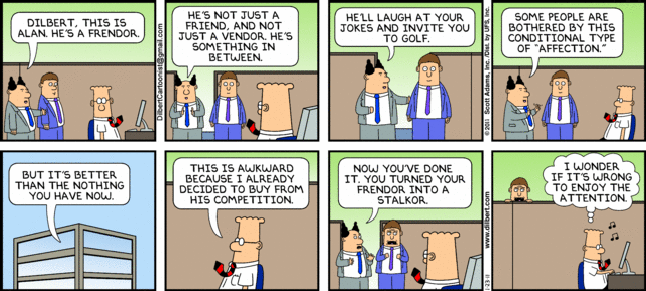
One of the problems with Facebook friends is that many of them were “frendors” or people I’d just seen in the halls at work. Facebook isn’t meant for great communication around work, though, so there are better options for them:
- LinkedIn – Best for business partners, frendors, business contacts, and key direct coworkers. This ensures higher-value conversations because they’re more business-focused, and people care deeply about their careers there.
- Yammer – For coworkers, regardless of anything else. It’s also great because it’s a walled garden, allowing private conversations that are company- or team-specific.
- Twitter – If we met at an event and want to hear from each other but don’t need deeper engagement, Twitter is a great place to start. Many people begin here and may later move to other networks.
A few people do appear on multiple networks, but those are exceptions. Most end up in one place.
Summary: Use Facebook for friends & family, LinkedIn for your professional career, Yammer for coworkers, and Twitter for everything else.
Problem 3 – Auto-Post Is Not Your Friend
I personally spend more time on Twitter than any other network and eventually set it up so that every tweet automatically posted to Facebook and LinkedIn. The problem? Twitter is unfiltered—I post a lot of jokes or half-baked ideas that detract from my professional image on LinkedIn or confuse my friends and family on Facebook.
Thankfully, this can be fixed: Don’t auto-post. LinkedIn supports this with a setting you must enable, Yammer does this by default, and for Facebook, instead of using the standard Twitter app, you can use the Selective Tweets app. All these require tagging a tweet with a special hashtag for it to auto-post, like #fb for Facebook, #yam for Yammer, and #li for LinkedIn.
So if I post something on Twitter and want it on Yammer and LinkedIn, I append the tags, and it appears on all three networks—but not on Facebook.
Summary: Post selectively to the right social networks.
There are many ways to debug in Visual Studio. Normally, you just hit F5, compile, and run the code with debugging. However, sometimes you need to debug an executable you have already built or debug on another machine. I mentioned this previously: you can use the Attach to Process option to debug MSCRM assemblies that exist on other machines and/or run by an executable you do not control.
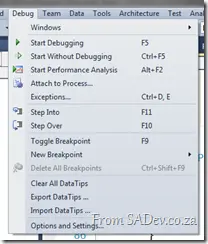
This works great, but recently I had an issue where the application would start and (silently) die within seconds, but only in test (never in dev). It happened so quickly that I couldn’t attach the debugger in time. So how can you debug that scenario?
Thankfully, this is very easy: just go to your Visual Studio project settings and switch the Start Action to Start External Program, set the path to the executable, and then hit F5!
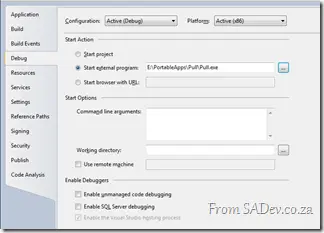
What this does is start the executable, attach the debugger, and work with your code—so no more racing against the Attach to Debugger options! 😊
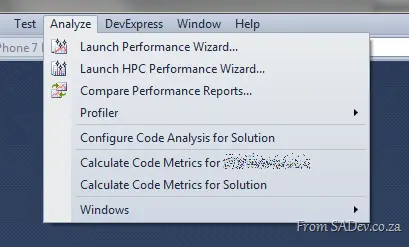
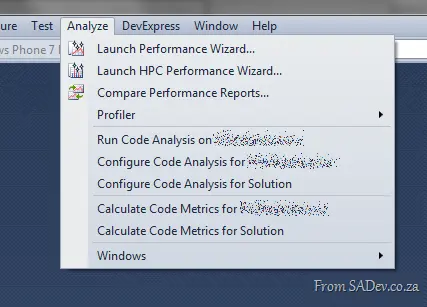
If you have Visual Studio 2010, you may be annoyed when you want to run code analysis, and it just isn’t there! You can configure it, but can’t run it?
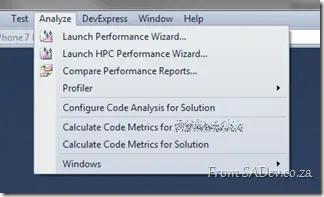
The reason is that code analysis is only available for the selected project, and you likely have the solution selected in the Solution Explorer (or Solution Navigator). You’ll need to select the project first, and it will appear.
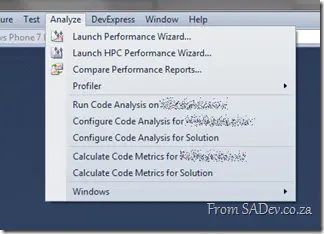
There’s still no solution-wide code analysis, though. However, I believe these annoyances will be corrected in the next version of Visual Studio 😉
Update: This has changed with version 3.8—read the awesome news at A follow-up to my NDepend pro tip....
I am a big NDepend fan—I can’t imagine doing analysis or taking over new projects without it! If you have not heard of NDepend, then have a look at: NDepend – The field report.
I feel stupid for not finding this power tip before, but recently I had about 20 projects to analyze—a situation that seemed painful because it meant creating NDepend projects for each one.
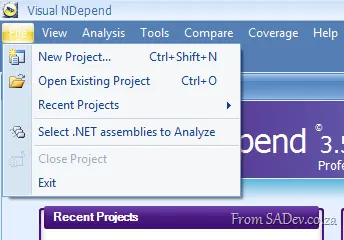
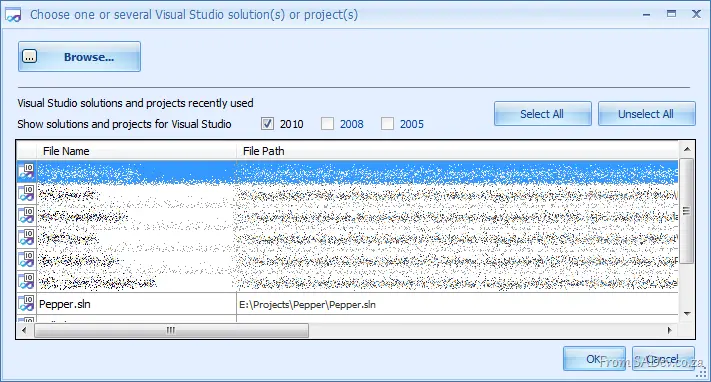
Thankfully, I stumbled on the terribly named Select .NET assemblies to Analyze option in the file menu. This option is actually a way to create a quick temp NDepend project!
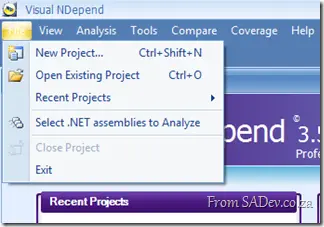
Once you have clicked that, you should click the Choose VS solutions option and you get another great dialog showing you a list of your Visual Studio recent solutions! This is great because I would load the code in VS, build it (to make sure it can build) and run code metrics against it, and having this quick selector linked to VS meant that I do not need to browse for the solution in NDepend again!
Possible bug in it though, where it doesn’t show web projects; WinForms, console apps, etc.—all fine—just not web projects?!
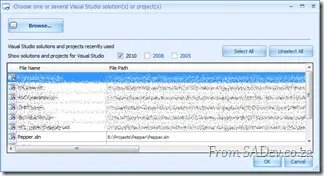
Select the one you want, hit OK twice, and analysis starts!
Happy analyzing!
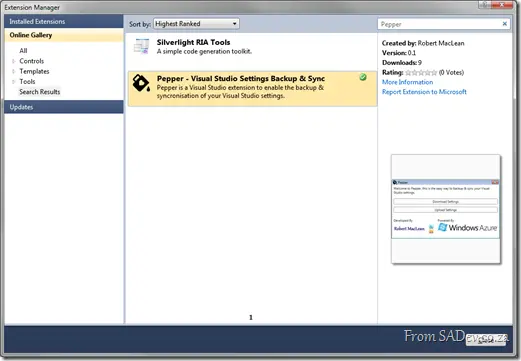
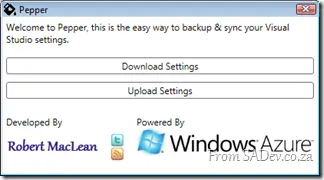 Pepper is a new free extension for Microsoft Visual Studio 2010 that I have created to solve a major pain point I’m calling SLM (setting lifecycle management 😜). The problem is that settings inside Visual Studio are vast and complex, and configuring your IDE is a labor of love—taking years of fine-grained tweaks. I can personally trace back my settings to sometime in 2005 and have been tweaking and fiddling ever since.
Once, when I moved jobs, I forgot to copy my settings, and VS felt broken until an ex-colleague was able to restore a backup from my old laptop and send me the file. Wouldn’t it be great to have a backup system in the cloud—say, on Azure?
This brings up another interesting scenario: what if I have multiple machines? Can I back up on one machine and restore on another? Giving me a synchronization system for Visual Studio settings?
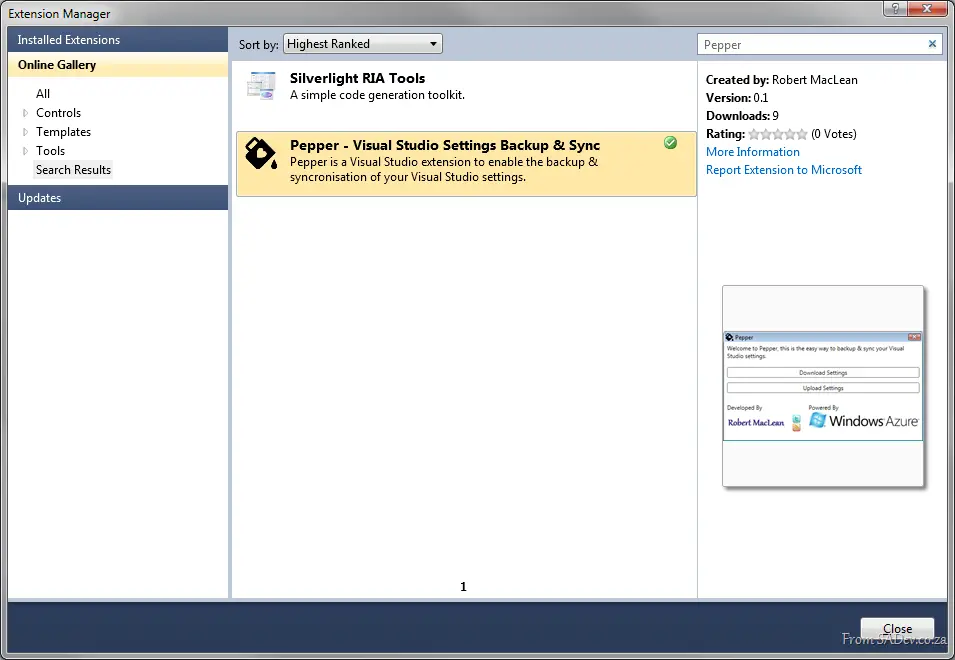
Pepper does exactly that. It automates the export and import of settings and allows you to store them in a SQL Azure database!
This is the first release, and while it has had some beta testing, it’s not perfect. So please, if you try it and it fails, let us know in the discussions.
Pepper is available in the Visual Studio Gallery, meaning you can install it and keep it up to date inside Visual Studio!
MVP Summit is over for 2011 for me; in less than a few hours I board a plane and start the ~23-hour trip home. This was an awesome trip, filled with learning—both about Microsoft and personally—and the experiences here rank among some of the best in my life:
Being able to attend a special dinner with various Microsoft technical fellows and vice presidents was amazing. My hero, Anders Hejlsberg, was there, as were many other geek rock stars (Hanselman, The Gu, and so on). What inspired me was the humility they all showed. The whole dinner was amazing.  02032011598 by Robert MacLean, on Flickr
Shooting real guns for the first time was ridiculously fun, and I thank Martin, Mike, & Chris for offering me that unique experience.  28022011557 by Robert MacLean, on Flickr
Then came the snow (the real stuff this time—not the ice version Canada gave me)—and snowboarding. I even threw snowballs!  photo4 by Robert MacLean, on Flickr
In South Africa, we drink what we call beer, and we don’t think much about it—but here in America, they care. They have hundreds of microbreweries and so many technical terms for beer. It’s just staggering! It’s also a lot of fun to go and sit in a brewery and drink the freshest of fresh beer! 😊  03032011630 by Robert MacLean, on Flickr
  04032011640 by Robert MacLean, on Flickr
Then the Museum of Flight was just geek paradise for someone like me who loves the idea of flying (I do not think of 23 hours in economy class as flying) and space. Even the 4D simulator, where you could go inverted and upside down, was awesome. I even found time to be President of America for a few seconds.  05032011668 by Robert MacLean, on Flickr
  05032011727 by Robert MacLean, on Flickr
  photo9 by Robert MacLean, on Flickr
But most amazing were the new friends I made and the old friends I met up with. It was just awesome in every aspect, with special mention going to Rudi Grobler, who left SA with me, shared rooms, and did all the awesome things above (except the special dinner; next year, he’ll be there) and Rein Hillman, who put me and Rudi up at his house, opened his home to us, and shuttled us all around Seattle.  Group by Robert MacLean, on Flickr
  04032011645 by Robert MacLean, on Flickr
  photo2 by Robert MacLean, on Flickr
Oh, and if you wanted to know how many Dr Pepper I consumed—17, excluding how many I could get on the planes! 😉
As I sit on the couch of the place I have called home for the last 5 or so days—with my bags packed, Rudi trying to cheat at chess, and the children of the house going to bed—it is insane to think that it was almost 2 weeks ago I was in South Africa trying to find enough clothes to bring and now it is over 😒
The first rule of being an MVP is: don’t talk about fight club (NDA material), and unfortunately, a lot of amazing—and even some boring—news we learned this week was under NDA.
 28022011563 by Robert MacLean, on Flickr
So what can I share with you?
- Microsoft is listening—I’ve mentioned this before, but the sheer volume of input sources to Microsoft is staggering. Some don’t always have good things to say, but Microsoft does factor that in, and it’s important. If you want Microsoft to change, tell them—just don’t insult them when you do.
- Microsoft is a business—it’s there to make a profit. So when it pumps hundreds of millions of dollars into research, expect it wants a ROI. Being that this is a technology blog, what does that mean? WATCH MICROSOFT RESEARCH.
- MVPs are smart—I’ve said before that being an MVP is an award for community work, but it’s not until you sit in a room with some of them that you realize how smart they are—and how well they can shoot:
 28022011559 by Robert MacLean, on Flickr
To everyone at Microsoft who made this week special and for trusting us with information on Project Double Rainbow Unicorn*, thank you for all of it—it has been AMAZING! 😊
If you have no sense of humor, Project Double Rainbow Unicorn is a joke—no such project exists, or at least none I know of.
What I learned at MVP Summit today:

It’s COLD—really, really cold. It’s raining and windy, which makes it even colder.
This explains a lot about Microsoft & Seattle:
- Lots of microbreweries—because beer helps with the cold
- Lots of coding—because it’s too cold to go outside
- Lots of awesome friends—because nothing beats chatting with a friend by a fire in Starbucks

Day 2 of Summit has been a blast as Rudi Grobler (friend of The Show) and I spent the day seeing a different side of Seattle and its surroundings as we were shepherded about by Rein Hillman, a local to these parts. Having a local with a car makes a huge difference—you eat and see things that no tour guide will ever tell you, like:
All in all, a lot of fun and food! 😊
In the evening, we headed down to Kent and the ShoWare Center to watch ice hockey—an insane sport where I don’t understand a thing that happened except goals. The rest was just too fast and complex for my brain. I wish I had half the skills and reflexes those guys have.
 26022011515 by Robert MacLean, on Flickr
Time to hit the pillow—tomorrow is all starts, and I need my energy!


 26022011500 by Robert MacLean, on Flickr
 26022011498 by Robert MacLean, on Flickr