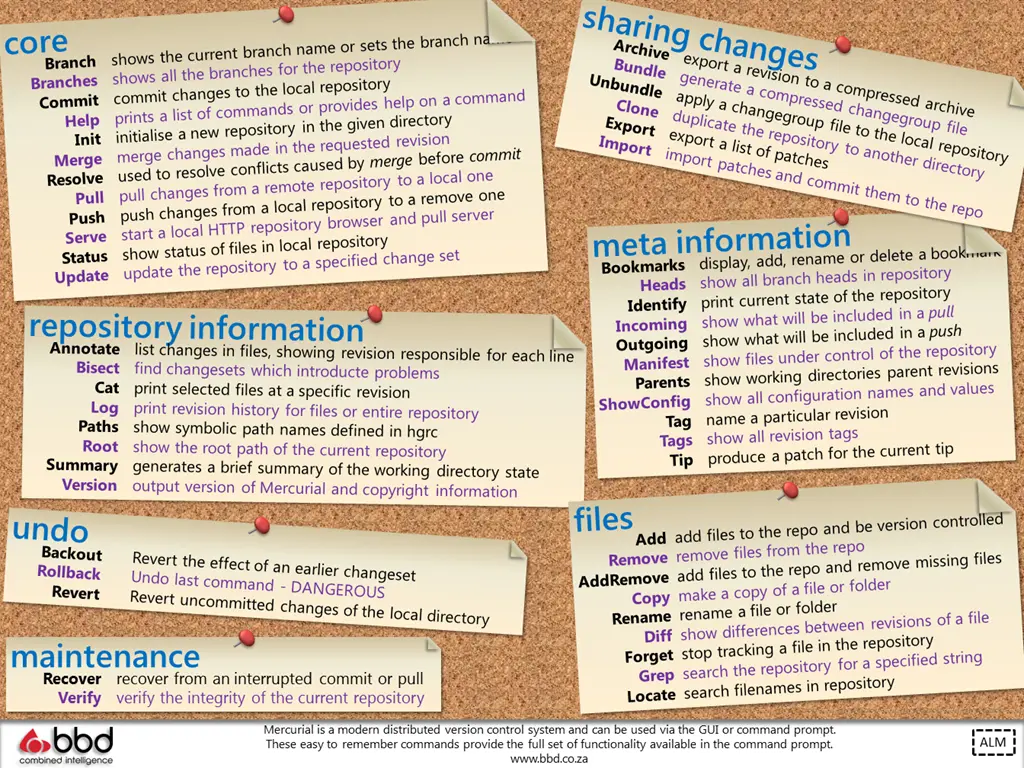
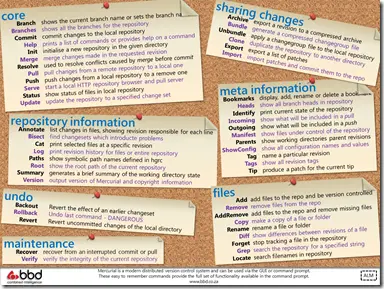
I am a fan of ALM (application lifecycle management) and an awesome source control tool is Mercurial. It has plugins for VS, Windows (TortoiseHG), and a command line. I use the command line a lot but can’t remember all the commands, so below you can find an easy cheat sheet for all the Mercurial commands:
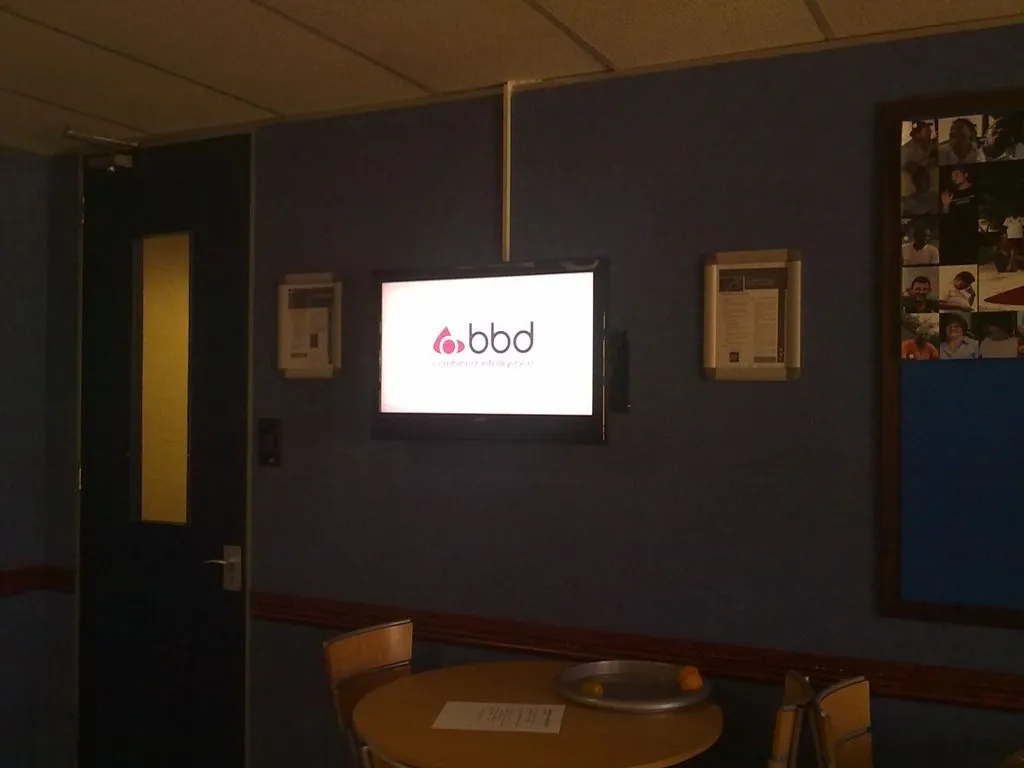
 I tweeted yesterday that my job can be a little weird because I had to sit in the kitchen at the BBD office and watch a TV for a while. This generated some confused discussion, so what was I doing?
Our team is experimenting with the idea of putting screens around the company to share content and information, and I had to sit in the kitchen to make sure it worked by watching the content loop for a bit 😊
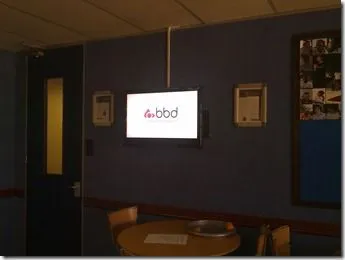
This is also a great opportunity to share some learnings from this with you:
TightVNC is still the best VNC option
Remote Desktop from Microsoft is THE best way to remotely connect to another machine, but it has one downside: it locks other users out. For our screen, we can’t have the login shown—and I don’t even know where to log in manually—so we need to see the content on the machine. We dropped to an older technology: VNC.
There are a lot of options in the VNC space, but we ended up with TightVNC as it actually runs as a service on a Windows 7 machine, whereas other VNC clients run in user space.
Auto-login to Windows
The login screen is also an issue when the machine boots, and I don’t want to remotely log in every time—so we configured Windows to auto-login to a specific account. This is thanks to the folks at Channel9—in particular Sarah Perez & Bradley Ward:
- Change the following registry key to
1: HKEY_LOCAL_MACHINE\SOFTWARE\Microsoft\Windows NT\CurrentVersion\Winlogon\AutoAdminLogon - This enables the feature in Windows.
- Then run the following command:
control userpasswords2 - In this UI, untick the option "Users must enter a username and password to use this computer" and click OK.
- It will then prompt you for the username & password to use. Done! Note: This is a security risk and not recommended, but sometimes it’s needed.
Open & Play Slideshow
We are using Microsoft PowerPoint for the content and needed to auto-run a slideshow at login. So, we created a shortcut to run PowerPoint with the /S switch (see this for info on switches) and the filename: PowerPnt.exe /S c:\demo.pptx
That opens PowerPoint and starts the presentation!
Insert Web Content into PowerPoint
Lastly, we wanted to include some live web pages in it, which PowerPoint doesn’t support out of the box. MVPs to the rescue! Some MVPs created an add-in that allows it: http://skp.mvps.org/liveweb.htm
Really awesome!
Update 6 June 2011 15:30 (GMT +02:00): All is working now. Post left for archival purposes.
Pepper, everyone’s favourite Visual Studio add-in for synchronisation of Visual Studio settings, is currently DOWN 🙁 and attempting to use Pepper will cause it to crash Visual Studio 🙁.
Something has gone seriously wrong in the SQL Azure database that powers it, and I’ve logged a call with Microsoft to have it investigated and repaired.
As soon as I have any updates, I will update this page. Thanks for your patience.
Updates:
Update 6 June 2011 13:45 (GMT +02:00): Testing is showing the database issue is resolved, however, I am awaiting confirmation from Microsoft Support before I sound the all clear. Update 6 June 2011 15:30 (GMT +02:00): All clear. The cause was the database disappeared! Seriously, just gone. Couldn’t see it in SQL Management Studio or in the Azure Management Portal, and the web services Pepper uses couldn’t connect to it either. During the Microsoft investigation, the database reappeared, and unfortunately, support has been unable to identify what happened (or they’re not telling me... but I’m paranoid).
It is often the case that I need to set up training machines, and sometimes I get VirtualBox images that I need to deploy to the machines. I tend to avoid virtualization on the training machines because of driver-related issues—especially with graphic cards and things like WPF (which powers Visual Studio). If you have a good graphics card and good drivers, you can get a decent performance improvement with WPF apps, but unfortunately, some virtualization drivers are too poor.
So how can I take a virtual hard disk created in VirtualBox and easily convert it to a physical disk so it can just run?
Process:
It is possible, but it is not easy to convert it to a real disk. Here’s how:
Step 1: You need to use a tool from Microsoft called SysPrep to unload the drivers. Basically, this means it strips all the driver info out and puts the image in a clean state so that the next time it boots, Windows searches for the hardware again. If you do not do that, Windows will freak out because the hardware it expects does not exist.
Step 2: Then you use a tool designed for disk imaging to create an image. Tools like Norton Ghost (paid) or CloneZilla (free) are designed for this purpose, and the image they create is portable—unlike the VDI (VirtualBox hard drive) format, which can't do this well.
Step 3: You then restore that image to the real disk using the same tool, and you are done.
Slightly more work than you would expect, but that is a solution that always works.
Caveats:
I have not tried this with Hyper-V or VirtualPC disks (VHD) yet, but I suspect VirtualPC will work fine. Hyper-V has an additional hypervisor layer, and I suspect SysPrep will not remove that, causing the restoring process to fail.
Finally, you also want to be careful with SysPrep, as it can have some undesired effects with certain software—for example, SQL Server. There are specific steps to follow if you want to use SysPrep with SQL Server: Microsoft Docs.
So make the time to have the first few attempts fail and learn the nuances of the software you work with.
WOW! Microsoft DevDays 2011 in Cape Town & Johannesburg was fantastic—my fellow speakers rocked, the venues were brilliant, and most importantly you, the audience, was amazing!
Thank you to everyone who attended my talks, especially since they were at the end of a very tiring day. I hope I delivered value to you, and if you have any questions or comments on them, please feel free to get in touch with me.
I promise the slides & demos would be made available—so here they are:
Let’s get ready for the cloud: Building your applications so they are cloud-ready
Lightswitch basics: Building your first Lightswitch Application
I posted in March that despite using NDepend for over a year, I had missed an awesome feature of the product. Not even a day later, I received an email from Patrick (creator of NDepend) about it, and we discussed it over a few emails—why I had never found it, and what could be done to improve it.
Recently, Patrick released NDepend 3.8, and took specific notice of that discussion—and many other discussions with “enthusiast users” (as he calls us)—into the design, so it is significantly better! 😊
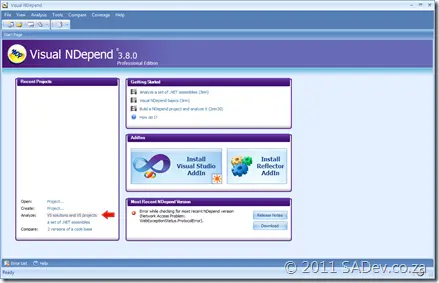
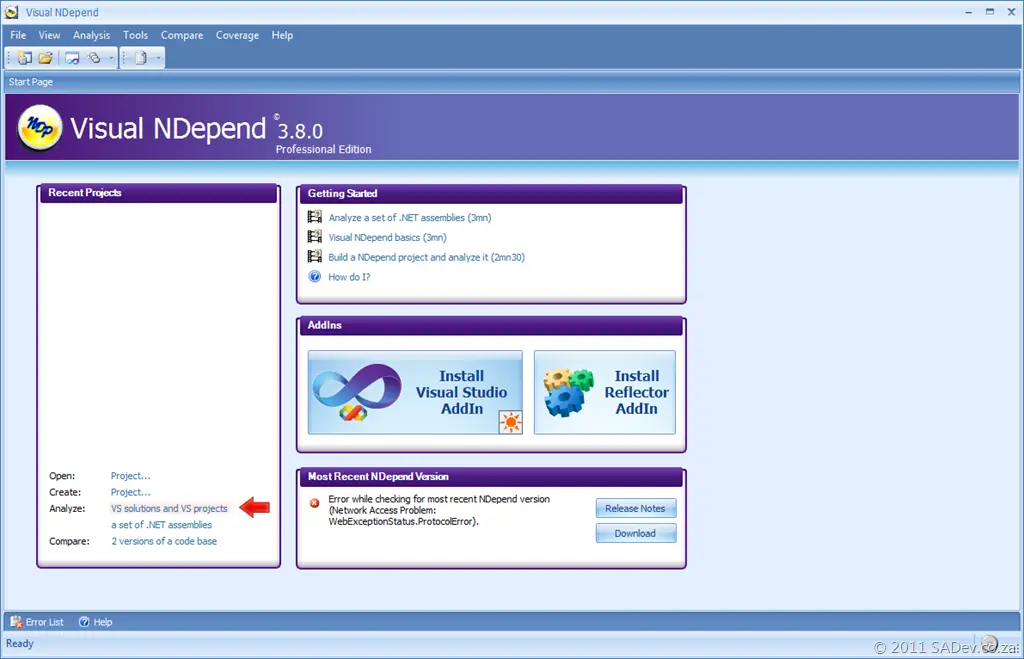
Check out the new landing page in the app! Note the option I “found” is front and center—and even has a helpful arrow to point it out!
In addition to that, there are many new features I can’t wait to try out:
- A new menu in the Start Page: Select VS Solution(s) to Analyze
- Enhanced ergonomics in the 'New NDepend Project' dialog.
- In the Build Comparison Settings form, there is now a new button: “Browse VS solutions” to easily fill the assemblies list.
- On multi-monitor machines, all NDepend dialogs and forms now appear on the screen containing the mouse cursor.
- The Dependency Matrix and Graph now support mouse back/forward buttons.
- Support for Reflector v7.X
- The default rule “Fields should be marked as ReadOnly when possible” now discards fields generated for events (i.e., fields where “IsEventDelegateObject”).
- The Concurrent flag is now implemented by the MSBuild and NAnt tasks.
- In the CQL Explorer panel, it is now possible to export a group of queries to XML.
I just wanted to post this to share the excellent news—and also point out how awesome Patrick is at incorporating feedback from everyone. This is why NDepend is such an awesome product!
Pull, a popular podcatcher I develop in my free time, has seen a long delay (78 days in fact) since the last release. What’s new, and why did it take so long?
Release 2—the most popular version to date—was great but also one of the buggiest releases we’ve ever had. While there were no show-stopping issues, just some weird quirks, the delay was necessary to go back and fix, fix, fix, and fix even more. Loads of bugs were squashed, and I’ve been running release 3 for a little while now—it’s solid. I’m very happy with this release.
Meanwhile, along with the bug fixes, some great new features were added.
Forced Refresh Option
 View full image
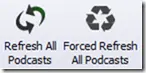
Next to the Refresh All Podcasts button is a new Force Refresh All Podcasts option. The first refreshes intelligently—doing checks to boost speed and minimize bandwidth—but sometimes you need a force refresh when the server is flaky. That’s where the new button comes in.
New Web Browser
 View full image
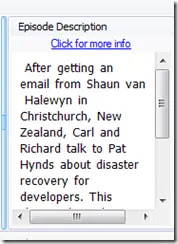
I’ve never been happy with the built-in browser option. For a long time, if you clicked a link, it would reuse the browser window—leading to a poor experience. Then we tried to fix that, but pop-ups could jump out of Pull without warning. 🙁 Worse, it used 40 MB of memory—very expensive in terms of performance.
I finally replaced it with a proper HTML parser, offering a clean browsing experience where links open in your default browser. No more annoying pop-ups, and memory usage is now minimal! 😊
Welcome Back to Single Folders
Metrics showed that very few users relied on the single folder option (all downloaded files in one folder), so I removed it to simplify other scenarios. But those few users spoke up—loudly—explaining why it was a killer feature for them. So, I had no choice but to bring it back!
Error Reporting Improved
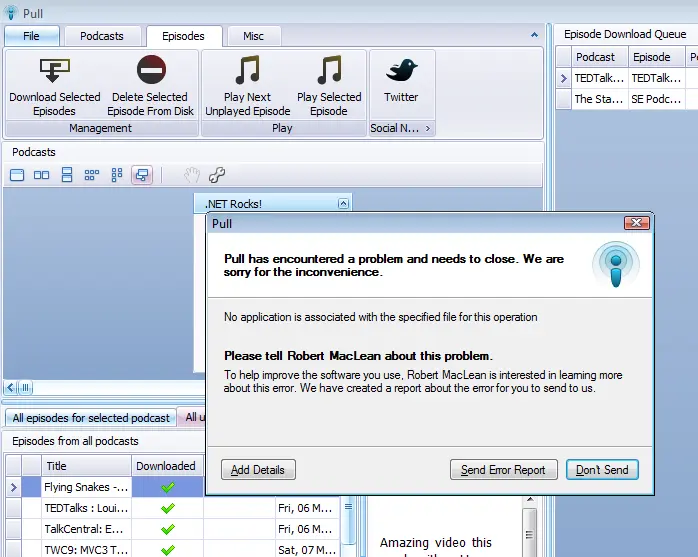
Bugs always hide in plain sight, but we’ve introduced a sleek new error reporting dialog. It sends all necessary info to fix issues and lets you add your email address, extra details, or both if you press Add Details.
I’m excited to get plenty of feedback with this! 😊
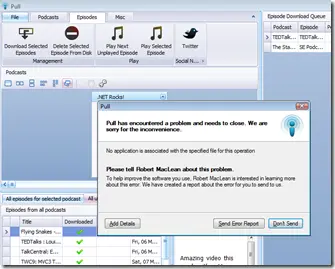 View full error dialog
So go ahead—enjoy your podcasts—and please share your experiences with us on the website!
Statistics
Bruce Kyle, a Microsoft evangelist, wrote an article recently about the “Powered By Microsoft Azure” logo and how you can earn the right to display that.
That may sound odd to some people—why can’t you simply say you use Azure if you do? Of course you can, but if you jump through a few hoops with Microsoft, you can use the official logo 😊.
But that’s not all! Doing this also helps toward an ISV competency with Microsoft, which gets you great assistance, free software, the opportunity to receive $250 for marketing, and other useful tidbits. One of those tidbits is a press release template, which is odd for me to see—I’m not in marketing, press, or any related field—so lower down you’ll find mine 😉.
Now, about those hoops: you might be wondering how hard or easy this is? I took Pepper through the testing for both SQL Azure and Windows Azure, and it took about 30 minutes—reading Bruce’s article and watching a video. It is ridiculously easy to do once you have your application built. So go. Do it. Be Powered By Windows Azure!
Enjoy reading my first press release 😜.
For Release 22:00 SAST
4 May 2011
Robert MacLean Becomes a “Front Runner” With the Release of Its Latest Application, Pepper
Johannesburg, South Africa — 4 May 2011 — Robert MacLean today announced that it will launch a new application using the Windows Azure Platform: Pepper, in combination with the Windows Azure platform, helps enable customers to backup, share, and synchronize your Visual Studio 2010 settings between multiple machines directly from inside Visual Studio 2010—with no costs or requirements. The Windows Azure platform, Microsoft’s cloud services platform, provides Pepper with the ability to build, manage, and deploy cloud-based applications.
“Through the technical and marketing support provided by the Front Runner program, we are excited to see the innovative solutions built on the Windows Azure platform by the ISV community,” said Doug Hauger, general manager for Windows Azure at Microsoft Corp. “The companies that choose to be part of the Front Runner program show initiative and technological advancement in their respective industries.”
“The Windows Azure platform provides greater choice and flexibility in how we develop and deploy applications—for all developers, whether on-premises or in the cloud,” said Robert MacLean, developer of Pepper.
Pepper automates critical processes such as synchronization and backup of settings to the cloud, eliminating the need for local storage and lowering the chances of losing them.
Product or service names mentioned herein are the trademarks of their respective owners.
For more information, press only:
Robert MacLean, robert@sadev.co.za
In this post I am going to look at comparing four technologies that can be used to build business applications easily. This post was inspired by how similar a number of products have become over the last few years—and more importantly, how the new kid on the block Visual Studio LightSwitch, which is a specialized rapid business tool development platform built on top of Visual Studio, is going to affect this ecosystem. It is important to also remember that this is being written in the LightSwitch Beta 2 timeframe, so some details may change by launch.
LightSwitch feels very similar to me to another product I have worked with in the past: Dynamics CRM, which is a Customer Relationship Management tool from Microsoft. CRM does very well in the xRM (x = extensible) scenario, where I think it will come up against LightSwitch a lot. I haven’t had an opportunity to use the latest CRM release yet, so I have had to rely on the help of experts to fill in my gaps!
SharePoint 2010 is another product I have worked with and, of course, can be used for building business applications quickly because it is the “operating system of the enterprise” and has good features for these types of applications.
Finally, while watching Scott Hanselman do the ASP.NET MVC 3 demo in the MIX 11 Keynote, I was struck by how that is very close to a rapid business-user development tool with all the new scaffolding features. ASP.NET MVC is a real outsider in this group because it is first a development toolset for web development and, maybe, a rapid tool second—where the rest are rapid development platforms or tools first.
I think the differences between these four are very interesting, and while each has its strong and weak points, this should definitely not be looked at as a “pick one only” post. There are many scenarios where you want to combine them for even better experiences.
I have broken down the issues into twenty-one(!) aspects (key points we can compare them against each other), which are grouped into six scenarios to make it easier to digest. Each scenario starts with a list of the aspects and a brief description, followed by a comparison table of those aspects.
Starting
- Ready to go out of the box: Once installed, can it do anything? Seems silly, but quick turnaround at the start—even if actual development is longer—is important, as it helps with prototyping, shows some rapid development, and hints at how hard it is to learn (for me at least, if it does something, I find I can experiment and learn quickly). It is important to note that we are not looking at making it align with your company needs here; we just want it to do something. Eating CPU cycles and RAM is not something we want either.
- Northwind Style Sample development costs: This aspect looks further than the above and examines how much more it would take to get it tailored for a company, like the fictional Northwind, to have a xRM-type system, as it can be done across all four. Fewer $ signs mean less time and/or resources for the functionality.
| Lightswitch (LS) | Dynamics CRM | SharePoint 2010 (SP) | ASP.NET MVC | My Thoughts |
|---|
| Ready to go out of the box | Fast | Fastest | Fast | Slowest | LS and MVC need development, while SP needs at least 5 minutes of tailoring. CRM, however, is ready to go once installed. |
| Northwind Style Sample development costs | $ | $$ | $$ | $$$ | ASP.NET MVC has the highest development costs, as so little is out of the box. LightSwitch excels in this scenario. |
Finishing
- Cost for on-premise deployments: This looks at the money cost for licensing to get the solution up and running on-premise (i.e., in your company). Licensing is, of course, flexible, and this will vary based on who you are—so this is not indicative for all. It does not include such things as server hardware or common costs, for example, operating system licensing.
- Deployment Complexity: Getting a solution up and running shouldn’t be difficult for an organization, and a lot of time can be lost (and costs incurred) changing, upgrading, and troubleshooting systems that do not want to be deployed.
- Deployment Documentation: When it happens that you need to deploy, having a wealth of documentation (be that videos, best-practice guides, troubleshooting material) is vital and plays a large part in getting a solution up that works every time.
| Lightswitch (LS) | Dynamics CRM | SharePoint 2010 (SP) | ASP.NET MVC | My Thoughts |
|---|
| Cost for on-premise deployments | $$$
Unknown. Likely cost per developer seat. No per-user costs. | $ to $$$
Cost per user and cost per server. Visual Studio only if you are doing integrations or custom workflows. | $$$$ to $$$$+
Cost per user and cost per server. Visual Studio licenses for any serious work. | $$
Visual Studio licenses. No per-user costs. | CRM on a small scale with low development is very cheap, but since you pay per user, it can get expensive. LS and MVC only have development software costs, which is more expensive up front but does not increase as you add users to the system. |
| Deployment Complexity | Medium | Hard | Hardest | Easy | LS, CRM, and SP all have requirements for them to work, in increasing deployment complexity. However, CRM and SP are significantly harder than LS, due to their more complete product nature. MVC is easy because there are no constraints (other than a web server). |
| Deployment Documentation | Yes | Yes | Yes | No | Only MVC has no official documentation, which makes sense as it is a development tool. All four have great communities to help as well! |
User Experience
- Front End Technology: A good-looking, feature-rich UI can seriously ease adoption, and what we are looking at here is the richness level of the technology used for the out-of-the-box front-end user interface.
- How good the standard UI looks: Completely subjective, and really this is based on what I think looks best.
- Flexibility of out-of-the-box front end: Here we are concerned about how easy it is to adjust and tweak the out-of-the-box front end.
- Themability: Corporate branding is massive business, and making sure the application out of the box looks like it is part of your business is important. It is important to note that both CRM and SharePoint can have custom front ends built, which enable this scenario—but that requires extra development. We are focusing on the out-of-the-box options here and assuming you have the theme built already.
| Lightswitch (LS) | Dynamics CRM | SharePoint 2010 (SP) | ASP.NET MVC | My Thoughts |
|---|
| Front End Technology | Silverlight. Supports out-of-browser (desktop) and in-browser | Web. Just ASP.NET | Web. ASP.NET under the covers, with sprinklings of Silverlight | ASP.NET | LS clearly excels here, as it gives the richest UI out of the box. ASP.NET MVC’s out-of-the-box scaffolding isn’t pretty but can easily be improved. |
| How good the standard UI looks (very subjective) | Low | Medium | Very low | Depends on your web designer | This is the most subjective aspect: LS and SP both have a fairly plain out-of-the-box UI, but SP has a bad UX to go with it. CRM is much better out of the box, and if you are going down the MVC route, you will likely take advantage of the best UI thanks to complete flexibility—but that depends on how good your designers are. |
| Flexibility of UI development in the tool | High | Medium | Medium | High | MVC and LS can almost do anything on the front end, especially if you combined MVC with Silverlight. SharePoint and CRM also have lots of options and work with Silverlight. |
| Themability | Medium | Low | Medium | High | The flexibility of MVC is highest, as it is pure programming, with LS following thanks to its strong theme support. SharePoint can be themed, but not at the same level as LS. CRM will always look like CRM! |
Extensibility
- API for integration: In the short term, having an API means it is easy to get data into your new solution; in the medium term, it means more ways to sync data and mash up your systems; and in the long term, it gives you a way to get your data out. It is vital to have an API.
- Marketplace: Apple kicked the idea of having an App Store into reality for many of us, and now having a marketplace to get extensions, customizations, or themes is an important aspect. I am ignoring public sites like CodePlex and focusing only on official marketplaces. Galleries are just marketplaces with no vetting, meaning they are bigger but the quality bar is not guaranteed.
- Additional Authentication Options: Only your employees or customers (which may be everyone if you are lucky enough) should access your solutions. What do we get out of the box to limit access to the system? All four systems support Windows and forms-based authentication, so I am only listing other options available.
- Permission Structure (Authorization): Being able to control what parts of a solution you can access once you have logged in is also vital, and having a lot of flexibility in this space is important, as very seldom will one structure work for everyone.
| Lightswitch (LS) | Dynamics CRM | SharePoint 2010 (SP) | ASP.NET MVC | My Thoughts |
|---|
| API for integration | Yes | Yes | Yes—at least 5 of them | N/A | In MVC, you could build one (e.g., oData), but it does not have one out of the box. LS creates a WCF RIA Service for us. CRM and SP both have APIs, but SP is more complex, as it supports so many different APIs with different subsets of features supported. |
| Marketplace | Once it is released, a gallery will exist | Yes | No | Gallery available | CRM leads here in a big way with a real marketplace. ASP.NET MVC has its own gallery plus a strong third-party marketplace ecosystem. |
| Additional Authentication Options | Anonymous and more available through custom development (e.g., Windows Live). Claims-based authentication (custom development required) | Claims-based authentication via STS | Anonymous and more available through custom development (e.g., Windows Live). Claims-based authentication (custom development required) | Anonymous and more available through custom development (e.g., Windows Live). Claims-based authentication (custom development required) | |
| Permission Structure (Authorization) | Very basic and really just a half-step ahead of editing XML that MVC needs | Fantastic out of the box option, plus plenty of extensibility if needed | Good structure with many levels of customization. Out of the box is very simple | Basic support for it but can be extended through development. A lot of XML work may be needed | LS and MVC are the lightest here; both support authorization options, but enforcing them is up to the developer. LS is better at guiding the developer and requires no XML editing. SP’s authorization is as varied and powerful as what CRM offers. However, SP can easily get messy—users can break permission inheritance, while CRM enforces authorization all the time, making for a better-structured environment. |
Information Worker Features
- Offline support: Being able to work when you are not in the office is a vital need for many people. So how do these platforms enable that scenario? In theory, it is always possible to build this, so we are just looking at the out-of-the-box offering.
- Easily import data: How do we get information into the solution besides the API? Does the product make this easy with out-of-the-box tooling?
- Printing: Despite the promise of a paperless office, it still is not the case, and being able to print is important—even if it is just to XPS or PDF for invoicing.
- Office Integration: Integration into Microsoft Office products (Word, Excel, Outlook, PowerPoint, Access, Publisher, InfoPath, and OneNote) means that your IWs will be able to work in the tools they are comfortable with, easing adoption and productivity.
| Lightswitch (LS) | Dynamics CRM | SharePoint 2010 (SP) | ASP.NET MVC | My Thoughts |
|---|
| Offline support | No | Yes | Yes | No | Being able to work offline is important if you are a roaming user. LS and MVC offer nothing in this space, while CRM and SP both offer offline via Outlook. |
| Easily Import Data (out of the box) | No | Yes, from CSV | Yes. Multiple options | No | In all cases, there are tools and other ways to import data, but CRM and SP have out-of-the-box options. |
| Printing (out of the box) | No | Yes | Yes—poor | Browser level | LS and MVC can have custom development solutions for printing. Other than that, they offer nothing out of the box. As browser printing has improved, MVC has a slight advantage, being HTML-based normally. SP has printing, but it is very poor. CRM leads here with a great print scenario. |
| Office Integration | Low. One-way export to Excel. Others can be custom-developed | Medium. One-way to Excel. Mail merge with Word and Outlook. Deep integration with Outlook is available too. | High. Only Publisher doesn’t have integration with SharePoint. Every other Office product does; some like Excel are one-way, while others like Access are two-way. SP internally has features that understand Office files too, e.g., PowerPoint Libraries show thumbnails | None. Can be custom-developed | |
Other
- Databases Supported: Where the data can come from for your application is a critical piece of the puzzle because it means the difference between building ETL solutions to handle moving it around if the source is supported or having it just work.
- Minimum Skills for Tailoring: Tailoring refers to customization of a system without needing a programming language. At some point, you will need a developer, but how far away that is, and what can be done by an analyst or superuser early on, is important from a time-to-solution and cost perspective. Lower is better here.
- Can run in the cloud?: If you are not thinking about how you can leverage the cloud, you are not thinking. Making sure the solutions can cater for the cloud is an important consideration. All four solutions can run in the cloud, but how they run is also important.
- ALM Experience: How does this tool work with a full ALM experience? Can I unit test it easily? Will it go into source control easily, and what happens when multiple developers are updating the same files? How about build server and development tool integration? All important questions in understanding the complete picture of what these tools cost or what you sacrifice with some of them.
- Requires Silverlight: Despite decent market penetration and ease of deployment in corporate scenarios, the requirement for Silverlight can be a deterrent to businesses, especially those where the CEO uses an iPad2 😜. This is not answered in the table, as only LightSwitch requires Silverlight. CRM has no dependencies, SharePoint has a fallback mode, and if you used Silverlight with MVC, it would be possible to have a fallback mode—provided you developed it.
- Data performance: This is not in the table, as it only applies to LightSwitch. For CRM, MVC, and SharePoint, I assume your frontend (web) is always close enough to the database (e.g., the same LAN), but in LightSwitch, you can really separate them. Here, it is important to note that LightSwitch is not great with data performance between backend and frontend—it sends massive amounts of data around. In my view, it really does not feel optimized for WAN scenarios.
| Lightswitch (LS) | Dynamics CRM | SharePoint 2010 (SP) | ASP.NET MVC | My Thoughts |
|---|
| Databases Supported | SQL Server, SQL Azure, SharePoint, or anything supported by WCF RIA services | SQL Server | SQL Server normally. With advanced skills, can use external data sources | For scaffolding, anything supported by LinqToSQL or Entity Framework | LS and MVC feel very close here, but LS has its own object model (OM), whereas MVC uses established ones, meaning more options in the MVC camp. |
| Minimum Skills for Tailoring | Intermediate | Lowest | Low | Highest | Being able to tailor with less skill is a big plus for CRM and SP. MVC doesn’t have tailoring—it’s all development. LS is stuck in the middle here: for setup, I suspect nothing more than a power user, but that ends much sooner and moves to needing a developer sooner than with CRM and SharePoint. |
| Can run in the cloud? | Platform as a service using SQL Azure for the database and compute instances for the frontend | Software as a service: Can get it from Microsoft and Partners at a cost per user per month | Software as a service: Can get it from Microsoft and Partners at a cost per user per month. Recently launched in beta with Microsoft | Platform as a service using SQL Azure for the database and compute instances for the frontend | |
| ALM Experience | Medium | Low | High | Highest | ASP.NET MVC is a pure development experience and so works well with ALM. SP2010 plus VS2010 is a great ALM experience (though mocking is difficult). LS and CRM are oddly very similar, with customizations in XML, so expect some source control pain. Plugins for CRM and LS extensions are a great ALM scenario. CRM falls short in the unit-testing scenario, though. |
Special Thanks
A post this in-depth could not have been done without input from my “brain trust,” and I thank each one of you for your help:
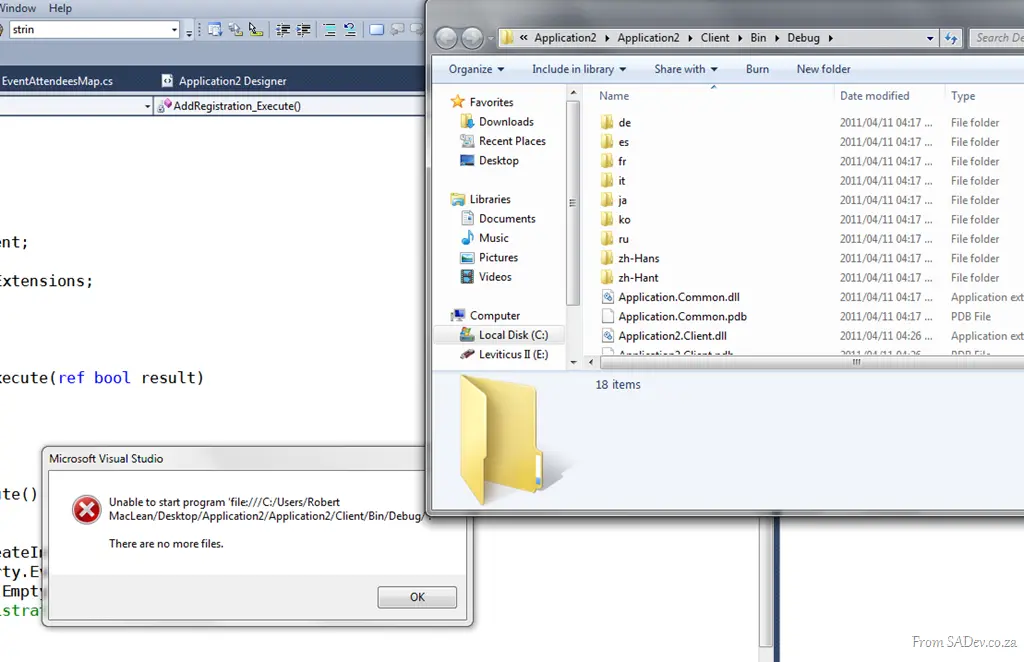
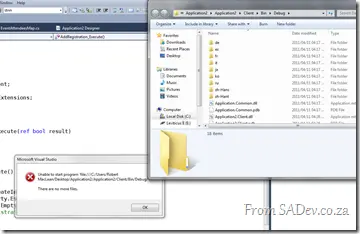 If you are working with the Visual Studio LightSwitch beta and you hit F5, you may sometimes get the useless error “There are no more files.”
This will appear shortly after an Explorer dialog opens, showing you files. I like to think this is LightSwitch’s way of mocking you: “Look, files—now there are no more files. Hahahaha!”
The cause of this is that you’ve edited code and something internally gets wonky. Thankfully, the workaround is simple: just open a screen or data source and hit F5 again, and it will work!
I’ve logged a bug on this, so if you have this issue too, please head over there and vote on it!
UPDATED! Info below...
Got to love Microsoft—it took 18 minutes, and they responded that this is a known bug! Here are the details on how to fix it:
This is a known issue. There is a setting under Tools | Options | Projects and Solutions | Build and Run called “For new solutions, use the currently selected project as the startup project”. If this option is enabled when you are using a LightSwitch project, you will see this behavior.
The problem is that, if this option is enabled when the LightSwitch project is created, the project associated with the code file will be used for the debugging startup project. For LightSwitch, the root project should always be the startup project.
This option is automatically enabled for the Web and Web Code VS profiles. By default, it is turned off for the General, VB, and C# VS profiles.
We have a fix that will be included in the RTM release, where we will ignore this option when a project is created and use the root LightSwitch project as the startup project instead.
To fix existing projects, you can right-click the root LightSwitch project and select “Set as Startup Project” in the context menu.