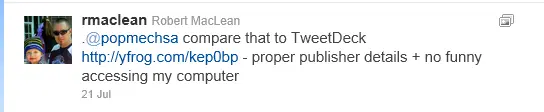
I was put onto this interesting feature of Twitter by Scott Hanselman, where it needs repeating. When you use Twitter to send a tweet, all of your followers will see it, unless you start the tweet with a name (called an @reply). For example:
The above tweet would have been seen by everyone who follows me!
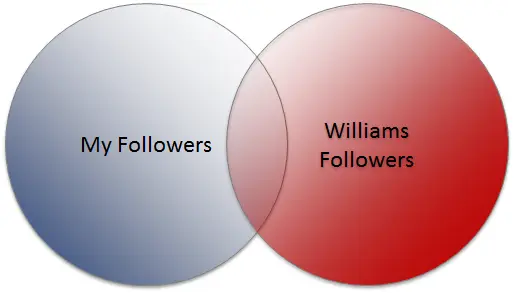
This second tweet starts with William Brand's name, so only people who follow both of us will see it. In other words, it’s only that group in the middle of the following Venn chart that will see that tweet!
So how can you send a tweet starting with someone’s name and have all of your followers see it? Start the tweet with a dot, like in the example below.
A final point to note about starting a tweet with a name: those tweets are still public. Even though your followers don’t automatically see them, they could still browse to the Twitter website and find them that way. If you want a tweet that is private, you need to use a direct message.
If you walk into any store to buy a game or movie, you’ll find a little blue triangle sticker containing the age restriction from the Film and Publications Board, who review and rate content.
Since I created a game recently, I decided to check what the classification process for a game is—and learned some interesting things for developers.
Put simply, only games/films sold or hired require classification—so if you’re developing a game or film that will be available for FREE, you don’t need classification! Below is the email from the head of the classification unit confirming that!
GREAT NEWS for hobbyist developers!
If you do plan to sell your game, you’ll need to:
Complete the forms on the website (game submission form)
Provide a disc with screenshots and videos of your game
Submit a game synopsis
Pay the registration fee (currently R1 508.64)
Then wait for classification.
Microsoft has confirmed—and I’ve tested—that the forced requirement for FPB certification in the marketplace no longer exists. You can submit a certification, but you’re not forced to.
The only downside at the moment is Windows Phone 7: when you submit a game for the South African market—regardless of price—they incorrectly require certification. I’ve submitted a request to Microsoft for clarification and will update you as soon as I have details.
This past weekend, I had the opportunity to present at a fantastic event: Dev4Devs, which is a free event where anyone can present on anything (software-developer related) for 20 minutes. It’s a lot of fun because of the variety of talks, the mix of people (some new speakers and some experienced speakers), and the brutal 20-minute timeline.
This time, I presented on a topic I’m very interested in: Codenamed Roslyn, which is the next version of the C# & VB.NET compilers—fully managed code (the C# one written in C#, the VB.NET one written in VB.NET).
Since no public builds were available yet, I used the compiler from Project Mono—which has had similar features (the REPL environment and hosted compiler) for years.
As with all presentations here, you’ll find my slides, and demo notes below!
During my research and prep, I found a bunch of interesting posts and information about Roslyn, so here are the resources I gathered. I’ve bolded the ones I think are especially interesting:
16 November 2011: This application has had a major update—see the details in this post.
Following the same idea as my AA Rate WP7 app, another very popular spreadsheet I built is one that verifies South African ID Numbers, so I also decided to build a Windows Phone 7 app to do that.
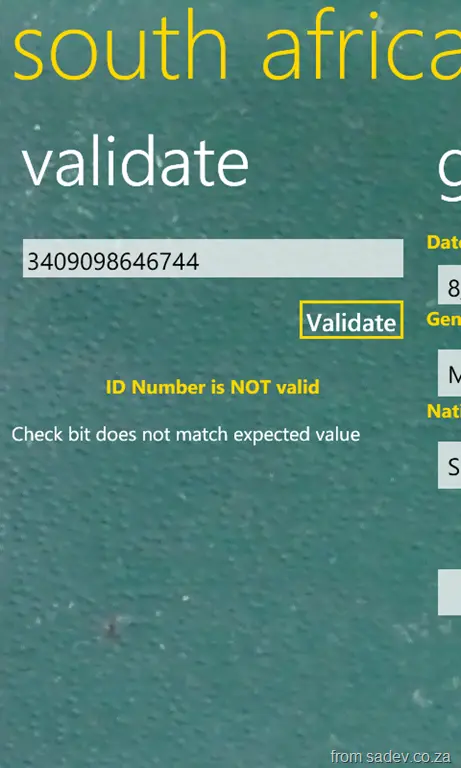
This does a little more than the spreadsheet could—it has lots of info about what in an ID number doesn’t verify, which is very useful.
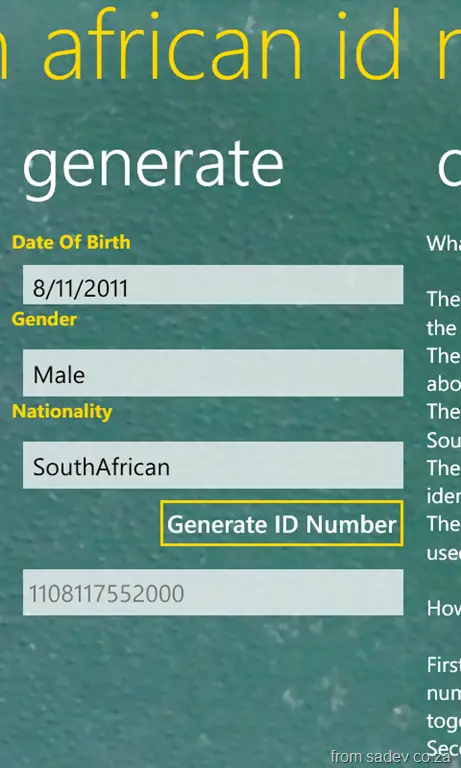
In addition, it includes an awesome new feature: a South African ID Number Generator! With this, you put in a few required details, hit a button, and BOOM!—an ID number that will validate.
Important to remember: validation of a number doesn’t mean it actually exists—just that the math works. So please don’t use this for anything except interest or development!
(btw, screenshots are from v1.1, which is soon to be out—so if you download and it looks different, give it a day or two)
16 November 2011: This application has had a major update—see the details in this post.
One of the most popular posts on my website is the AA Rate calculation spreadsheet I built in 2008. The goal of the spreadsheet is: you provide the details about your vehicle, and it tells you what the AA Rate for your vehicle is. So I decided to rebuild this for Windows Phone 7!
This was a lot of fun because it has some complex issues—matrices of values—which had to be solved, so that tickled my developer brain.
This also allowed me the opportunity to update the calculations since they change every so often—which is important for you!
An interesting thing I learnt with this release is that the official/documented calculations are not equal to what the AA online calculator does. So there is now an option called "quirks mode"—which runs it equal to the online calculator. If you turn it off, it runs using the documented mode!
Update: This application has been retired—it was my first game (ever) and my first WP7 app, so it was for my son and for my own learning and experimentation. My son has moved on to Angry Birds, I have more impressive apps, and as a game, well, it wasn’t going anywhere. With all that, I’ve retired it.
Kicker is my first WP7 application and is a simple time-waster. I don’t want to use the term game, because there are no challenges—just touch the screen, and unless you’re unlucky, you score a goal.
This was written mainly for my young son, who had a game like this on my old Nokia 5800 and loved it. So, I just ported it across.
Found this little C# compiler optimisation which is really cool. Here is the start code:
int y = 0;
int x = 10;

if (x * 0 == 0)
{
    y = 123;
}

Console.WriteLine(y);
If you know a bit of math, anything multiplied by 0 always equals 0 (line 4). So the compiler optimises that out, and then because x is never used, it’s also optimised out, and you end up with:
int y = 0;

if (0 == 0)
{
    y = 123;
}

Console.WriteLine(y);
Not talking about the technology but various identifiers in the .NET world are often abused. I know this is SUPER pedantic of me, but it is something I come across watching lots of presentations. Getting this right shows a level of polish and knowledge, and getting it wrong shows that either you weren’t paying attention, don’t know what you’re talking about, or just don’t care.
Here are some brand/naming problems I see:
.NET – I often see people use .net or .Net, but the correct capitalization is ALL CAPS. There is NO excuse for this one—just do it right.
.NET Framework 4 – With .NET 4, the marketing team dropped the .0 (like in 2.0 or 3.5), so stop saying “four-oh”—it’s just 4.
Windows Phone 7 – It is Windows Phone 7, not Windows Mobile 7 (no such product) or Windows 7 Phone.
Microsoft Visual C♯ 2010 – I often just say C♯ 4, but the actual name is Microsoft Visual C♯ 2010.
Should you use ♯ or # with C♯? – Either is acceptable. However, Microsoft recommends the Music Sharp Sign (♯) for marketing material.
Microsoft Visual Studio 2010 Ultimate – That’s the full product name. The issue I see is people putting .NET in it, like Microsoft Visual Studio .NET 2010. There is NO .NET in the name. The 2002 release called Visual Studio .NET was a specific version, but it’s not the product name.
Microsoft SharePoint Server 2010 – Many still use MOSS for SharePoint Server, but that’s incorrect for 2010. In 2007, it was Microsoft Office SharePoint Server (MOSS), but the Office part was dropped in 2010, along with the acronym.
Microsoft SharePoint 2010 Foundation – Like MOSS above, people love using WSS for SharePoint Foundation. But in 2010, there’s no "W" in the name—it’s just Foundation.
Microsoft Visual Studio 2010 Documentation – A bad habit (guilty here too) is calling this MSDN. MSDN is not the help installed with Visual Studio! It’s a Microsoft website for developers, offering documentation, legal dev software, and a subscription service—not the local help files.
MacLean – Thought I’d throw this in—it’s my surname. It has an ‘a’ in the second position and a capital L. It’s notMclean, McLean, Maclean—or, for that matter, “Hey, you, stop kicking my dog…” 😜
Microsoft used to be a horrid company with regards to security—we do not ship if security is wrong. How do they know what’s wrong? A 24-page guideline with 68 bullet points? Perfect holiday reading 😜
The security development lifecycle team has recently tried to help us developers improve our applications, so we don’t become the next company with bad security issues. They’ve introduced two acronyms to improve security notices to our users: NEAT & SPRUCE
What is NEAT?
N: Necessary – Only show messages that you need. If you can take a safe action automatically or defer the message, do that!
E: Explained – If you do interrupt the user, explain everything to them. EVERYTHING? Yes—and the SPRUCE acronym will help explain what everything is.
A: Actionable – A message should only be presented to the user if there are steps they can take to make the right decision.
T: Tested – A security message needs to be tested. TDD, usability testing, visual inspection—every test.
So, we need to show the message now—what do we put in there? SPRUCE:
S: Source – Why are we showing this message? Did a website, file, or user action trigger it? Tell the user.
P: Process – Give the user the steps they need to follow to make sure they make the right decision.
R: Risk – Explain what the consequences of getting the decision wrong are.
U: Unique – If your software can handle it automatically, do so. If you’re showing the message, it means the user has unique information needed to make the decision. Explain what that information is (slightly similar to P).
C: Choices – Show the user all the options and recommend the safer one.
E: Evidence – Provide any additional information that may help them make the decision.
Now that the training is done, let’s look at real implementations:
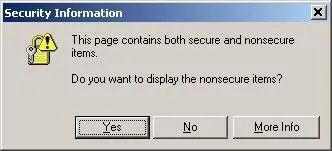
A web page contains secure & non-secure content
Here’s what the dialog looked like in the bad old days of IE6:
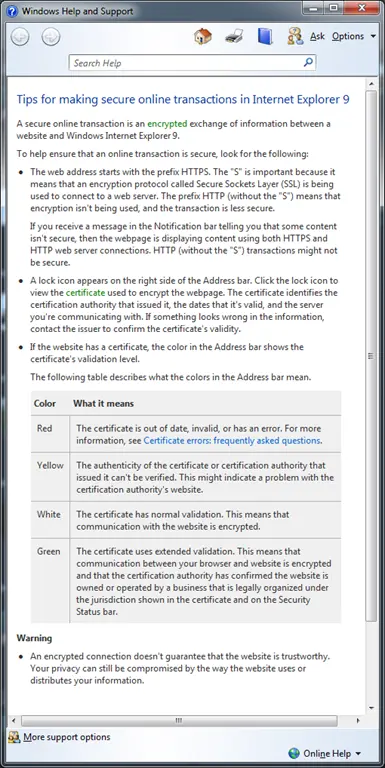
In IE 9, where this logic has been applied:
Let’s look at the differences:
N (Necessary) – Previously, this was a blocking UI where users had to deal with it. Today, it appears discreetly at the bottom, only if the user needs to work with it; otherwise, they can ignore it.
E (Explained) – What’s the risk? shows the dialog below. It isn’t perfect (it hasn’t fully followed SPRUCE), but it’s a good improvement.
A (Actionable) – Previously, there was a Yes & No option; now, the only action is Close or Ignore, and nothing happens otherwise.
T (Tested) – The old version had weird language issues, especially for non-native English speakers (e.g., unclear Yes/No). The new dialog has a single, clearly labeled button.
Takeaways
Now that we’ve seen how this works, here’s a nice, simple [3-page document](link not provided) with more details and reminders. GO IMPROVE YOUR APPLICATIONS!
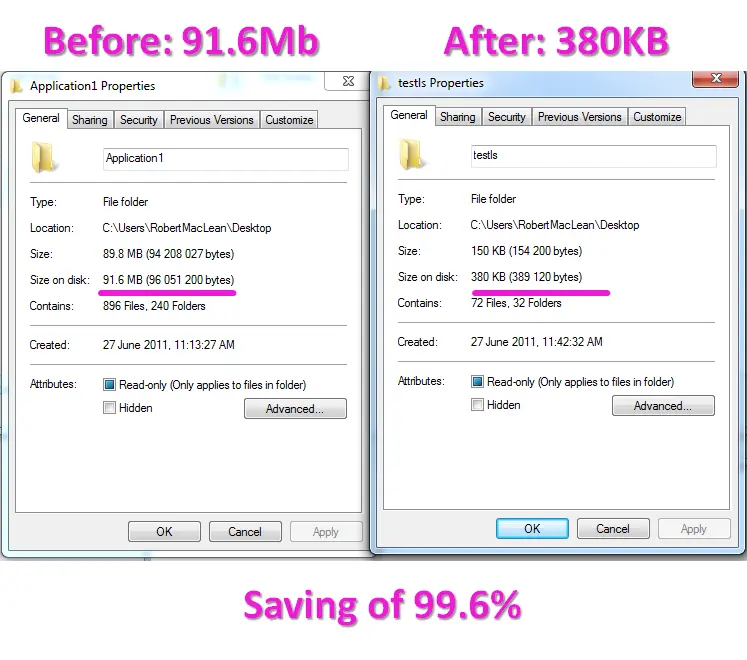
LightSwitch is a fantastic tool but has a major downside—it eats disk space like no one’s business. A simple test project with 1 table, 1 screen, and some code on the client side and server side is over 90 MB of space!
If you are a developer, you’ll have some sort of version control system in place and should be following some best practices in version control. For this post, the one I want to look at is to only check into the repo what actually needs to be in the repo. A polluted and huge repo is not only hard to work with—it puts people off and lowers adoption 🙁.
I’ve been using Mercurial a lot recently, and for a new LightSwitch project, I took the time to look at how much of the project needs to go into the repo—and you know what… it’s very, very little—in fact, it’s about 0.4%!
Mercurial, for those new to it, has a .hgignore file which uses a regular expression-like language to tell it what files to ignore, i.e., don’t commit those files to the repo. Below is what my .hgignore file looks like. The first four lines are LightSwitch-specific, while the rest are for general Visual Studio projects:
It’s important to note that when you pull from the repo (or checkout, for TFS/VSS/SVN folks), you’ll get the disk savings—until you open it up, that is. Once opened, LightSwitch will regenerate everything, and the size on your machine will be back to the massive 90 MB+, but the repo will remain small, commits will remain small, network traffic will remain small, and performance will improve—just what we wanted from following those version control best practices.