When Tasks were introduced in .NET 4, one of the fantastic abilities was to be able to pass in a CancellationToken and use that to cancel or break out of tasks (think like a cancel button on a file copy).
So in the following code, we create a cancellation source and pass the token to the task. It will output the date/time until you press Enter. Then we call the Cancel() method, and it stops.
var cancelTokenSource = new System.Threading.CancellationTokenSource();

Task.Factory.StartNew(() =>
{
    while (!cancelTokenSource.IsCancellationRequested)
    {
        Console.WriteLine(DateTime.Now.ToLongTimeString());
        Thread.Sleep(1000);
    }
}, cancelTokenSource.Token);

Console.WriteLine("Press any key to cancel");
Console.ReadLine();
cancelTokenSource.Cancel();
Console.WriteLine("Done");
Console.ReadLine();
What is new in .NET 4.5?
.NET 4.5 adds a fantastic new feature to this: the ability to cancel automatically after a set timeout! All we need to do is change the constructor and set the timeout. In the demo below, it is set to three seconds.
It is also important to note that it is time from when you create the token source—not when the task starts.
var cancelTokenSource = new CancellationTokenSource(TimeSpan.FromSeconds(3));
Below, in the screen capture, see how the word Done does not appear but the processing stops? That is because it is cancelled (processing stopped), but I never pressed any keys—so it is still waiting for the ReadLine() above Done.
Other posts in this series can be found on the Series Index Page. # Introduction
ThreadLocal<T> was introduced in .NET 4 and didn’t get much attention because it didn’t do much over the ThreadStaticAttribute, which we’ve had since version 1 of the framework. So let’s review what it does. In short, it gives every unique thread that uses it its own global field. Let’s look at this code:
static ThreadLocal<int> balances = new ThreadLocal<int>(() =>
{
return10;
});
staticvoidMain(string[] args)
{
for (int i = 0; i < 10; i++)
{
new Thread(AddMoney).Start();
}
Console.ReadLine();
}
staticvoidAddMoney()
{
Console.WriteLine("Before {0}", balances.Value);
balances.Value += new Random().Next(0, 1000);
Console.WriteLine("After {0}", balances.Value);
}
Which produces:
Note that every "Before" is set to 10, and that’s because the lambda method that we pass to the ThreadLocal<T> constructor is run for each unique thread.
What’s new in .NET 4.5?
.NET 4.5 improves its usefulness by including the .Values property, which allows you to list the results from each thread. To make use of this, you need to opt in to the feature in the constructor by passing true:
This past weekend was the ever-fantastic JavaScript in South Africa (JSinSA) conference. This year’s focus was on HTML5, JavaScript, and CSS3—easily some of the most important topics for developers, regardless of platform, to know about.
It was its second year, and while I was very lucky to attend as an attendee in the first year, this year I was even luckier to be a presenter at the conference. I was also very lucky to present on a topic I am passionate about: Windows 8.
The talk provided an introduction to Windows 8 and how development works. In the 45 minutes I had, we built an application that could take a photo from a webcam and send it to Twitter (the actual photo is to the below).
You can get the slides and bits from the talk below.
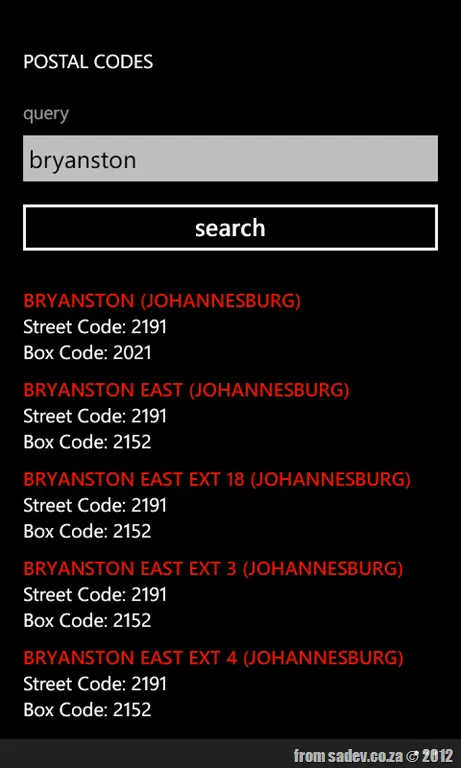
I can never remember the postal code for where I work or where I live—that little four-digit number just eludes my brain. So, to solve that, I thought: Why can’t I have every postal code with me always? And that’s exactly what I made happen with this simple Windows Phone application: Postal Codes!
It’s dog-simple: one input the name of what you want, then hit search, and—boom—results. It includes both street and box codes. 😊
Last night I presented on Windows 8 for the .NET developer at the fantastic Developer User Group! We had a bumper crowd—great—and had some interesting discussions during and after the talk. Thank you to all who attended!
For those looking for the slides, and demo script... they’re below!
This change in licensing may seem to put IntelliTrace in direct competition with another great tool, PreEmptive Analytics (PA). I’ve mentioned this amazing tool before, and with Visual Studio 11, it is included “in the box”—so there seems to be a conflict brewing—but there isn’t.
Two sides of the same coin
These two tools are both part of the collect information so you can react to it later and fix bugs set, but they have very different use cases. IntelliTrace is specific to the scenario of replaying an application for diagnosis and debugging purposes. It is not meant to be an always-on tool, and it writes to a local file that needs to be collected somehow.
PA, on the other hand, is a tool to always have on. It captures error information but nothing more than the simple Exception + Stack, which is not as useful, detailed, or integrated into VS when compared to IntelliTrace. In addition, PA allows for a lot of analytics on my application that are not possible in IntelliTrace:
What features are people using?
Where in the world are they?
When are they using it?
What are their machines like?
In addition, PA reports get automatically sent to a server (one that they run or that you can run if you have privacy/security concerns), so there’s no need to wander around collecting files.
I can also see scenarios where these two work hand in hand—PreEmptive gathering higher-level info that shows many users having issue X, then support reaching out to some users and doing a more detailed capture of the issue with IntelliTrace.
The second last number used to be a racial identifier but now means nothing.
But I never went into the topic, so let’s dive into the options—today it is for almost everyone 08 (I suspect a 09 or two may be floating around) but in the "bad old days", there was a variety of options:
Population Group
S.A. Citizen
Non-S.A. Citizen
White
00
10
Cape Coloured
01
11
Malay
02
12
Griqua
03
13
Chinese
04
14
Indian
05
15
Other Asian
06
16
Other Coloured
07
17
For my non-South African readers, the use of Coloured as a group here is not the same as the American racial slur—in South Africa, we have a population group called Coloured.
How did we change from the old to the new?
So what happened to those bits as we no longer have them? In 1986, a new law was introduced: Identification Act No. 72, which repealed the law that made classification (and a horrible concept where every Black person had to carry a "Pass Book") illegal.
So over the course of 1986 and 1987, everyone in South Africa was issued a new ID number, and somewhere inside the government, there is a database that maps old ID numbers to new ones for people born before 1986! I can’t remember what the process was like, since I was about four years old at the time. This means I have a different number on my birth certificate from what I use now!
Installing it could cause issues for .NET 4.0, but this is very unlikely and likely indicates your app is using undocumented features or features incorrectly.
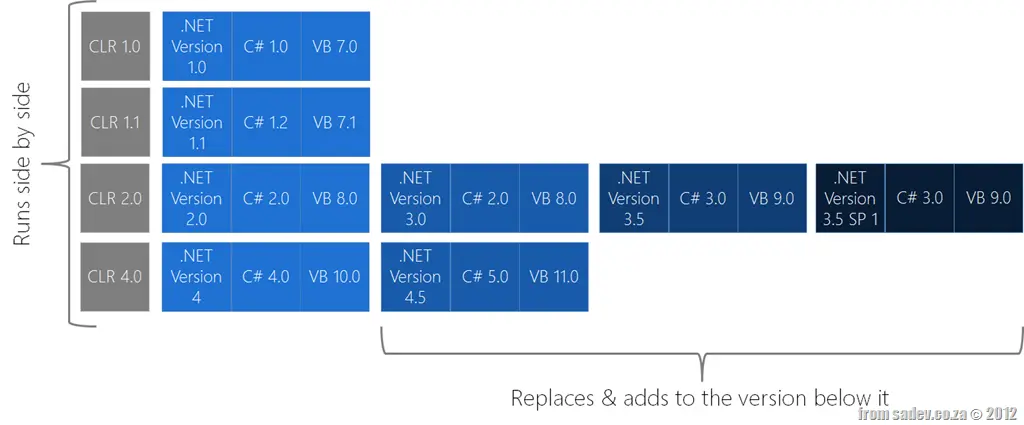
.NET versions, CLR versions, and language versions are not in sync.
There is an awesome chart below that makes it easy to see the relationships in the ecosystem.
Introduction
.NET 4.5 is the next release, and it is important to understand how it fits into the .NET ecosystem. This is the 8th major release of .NET! What do I mean by major release? I mean any release that is not a patch or support-only release, or, put another way, a major release includes major new features in the CLR and/or new language options.
SxS vs. Replacement
In .NET, we are lucky that many versions can run side by side (SxS) as long as they have different versions of the CLR. However, if a new major release shares the same CLR, it is a replacement/additive version. For example: .NET 3.0 used the same CLR as .NET 2.0 (CLR 2.0), and when installed, it replaced many of the files in .NET 2.0 with new versions. Only via compiler directives are some things turned on and off. The advantage of the SxS model is that installing a new version doesn’t influence apps on the previous version in any way (i.e., if the app is 1.1 and works fine before .NET 2.0 was installed, it will keep working fine after .NET 2.0 is installed).
The problem with the replacement model is that there is a chance installing a new version breaks apps on the original version—however, Microsoft does a ridiculous number of tests to ensure this doesn’t happen, so that chance is very small. In fact, if you encounter such an issue, the chance is higher that you are using undocumented features or using features incorrectly.
The reason for explaining SxS vs. replacement is that .NET 4.5 is an in-place replacement for .NET 4.0.
Version Naming
Part of the confusion I suspect arises from my claim that .NET 4.5 is the eighth release, considering Microsoft’s naming of versions is about as far from logical as it gets. The worst examples include:
.NET Version 3.5 SP1—a major release labeled Service Pack 1?
The fact that we do not have a version 3 of the CLR; it was just skipped?
Another aspect is that versions of the CLR, versions of the framework, and versions of the languages are completely out of sync. For example, .NET 4.5 runs on CLR version 4, and we write code in C# version 5.0 or VB version 11.0—because that makes sense. :S
Awesome Poster
Here is an awesome poster to help remind you of all the above!
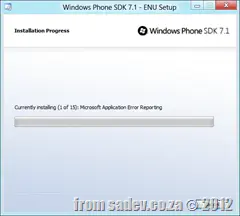
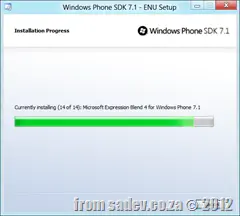
The joys of being on the bleeding edge are we are sometimes bleeding—such as the fact that the Windows Phone Developer tools have not worked on Windows 8… until now. However, the steps to get this working are not easy and are spread out a bit on the internet, so this post aims to give you a one-stop, quick reference on how to get it done in five steps.
If you installed the Phone SDK first (step 4 before step 1, madness), then you need to do a repair of the Windows Phone SDK after you install this.
Step 3 – Install .NET Framework 3.5
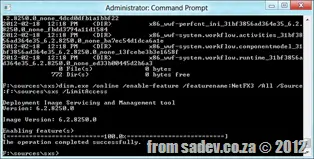
Now pop in your Windows 8 DVD (or mount the ISO), then open a command prompt as an administrator and navigate to the \sources\sxs folder on the DVD. Run the following command—my DVD was mounted on drive F, so you may need to change the underlined part to match your drive:
If you get any errors about installing some components, try copying them from the disk to the desktop—if you get an invalid MS-DOS function error, then you have a corrupt ISO and need to download it again.
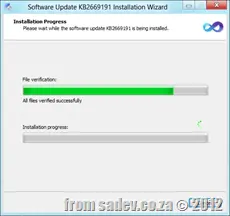
Step 5 – Install Windows Phone SDK update
Almost there—just the Phone SDK update to install!
Done!
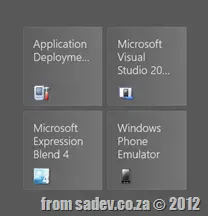
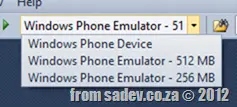
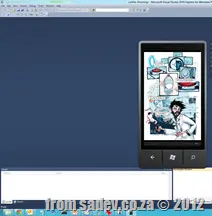
And there we are: the tiles are on the start screen, Visual Studio 2010 launches (and hurts my eyes with all those colors 😄), the new emulator options are all there in the dropdowns, and the emulator works!
If you have a CPU that supports SLAT (for example, a Core i7), you can run Hyper-V on Windows 8, which hurts emulator performance. Turn it off if you can.
If you created Metro style (WinRT) projects in Visual Studio "11" Developer Preview (alpha) and you try to open them in the beta, you’ll have a few load issues. These are the ones I’ve found in my apps—it’s not exhaustive, but they seem to be the most common.
Projects will not load
The projects themselves will not load, with the following error:
The imported project "C:\Program Files (x86)\MSBuild\Microsoft\WindowsXaml\v1.0\Microsoft.Windows.UI.Xaml.CSharp.targets" was not found. Confirm that the path in the <Import> declaration is correct, and that the file exists on disk.
To fix this, open the project file and navigate to the <Import> node. Change the path from v1.0 to v11.0 (see the highlighted extra 1 in the image below):
Compiler Directive
If you used the compiler directive WINRT, it has been changed to NETFX_CORE, so you’ll need to update your code.
Package fails to build
The package fails to build/deploy and complains about an InitialRotationPreference attribute. To solve this, open the Package.appxmanifest file and find the <VisualElements> node. You’ll find a line similar to this:
<VisualElementsDisplayName="AtomicMVVM Metro Style App Demo"Logo="Images\Logo.png"SmallLogo="Images\SmallLogo.png"Description="AtomicMVVM Metro Style App Demo"ForegroundText="light"BackgroundColor="#000000"InitialRotationPreference="portrait" />
Remove the InitialRotationPreference attribute, so it ends like this:
<VisualElementsDisplayName="AtomicMVVM Metro Style App Demo"Logo="Images\Logo.png"SmallLogo="Images\SmallLogo.png"Description="AtomicMVVM Metro Style App Demo"ForegroundText="light"BackgroundColor="#000000" />


![CropperCapture[2]](/files/CropperCapture2_thumb.gif)




![CropperCapture[2]](/files/CropperCapture2.gif)