This page is used to list the parts of my series on how to pass data between screens. Some of these aren’t up yet, so they are not linked. As soon as they are available, they will be linked here!
As with all posts in this series, you can get the code for this from GitHub.
The question I always ask for a review is: Is this the book for me? The answer is YES! This book is for everyone! However, let’s dig into some more details on the book.
Newbies to LightSwitch
If you are new to LightSwitch—or new to the HTML client—then the book covers a lot of what you need to think about. Each chapter covers in a very practical way how to implement what it’s showing, and it is very visual in how it covers the material. What’s great is that this book doesn’t shy away from the developer aspects, and there is plenty of coverage on JavaScript development models and how to put them together.
This is so good for newbies that I think Michael should license it to Microsoft so they can build training material around it!
LightSwitch Professionals
I have done LightSwitch for years—from the smallest projects to massive things and everything in between—and even I saw and learned things. A lot of what I personally gained was ideas on how to structure content and insights on JavaScript libraries. I literally went to work the next day after reading the book and submitted a list of ideas inspired by it!
Where the Book Is Weak
The book isn’t perfect, though—where it falls short is in the later sections, most glaringly a section on using a WCF RIA Service with it. RIA Services, with the zombie-ness of Silverlight (in my view), and since LightSwitch does support WebAPI—which ASP.NET is pushing and is the future (in my view)—there is no Web API material.
The only other issue is that the images are in grayscale. While reading it didn’t annoy me, but when I closed it and realized the final example image is the one on the cover, I realized how much I missed not having color images.
Last night I had the absolute joy of spending a little more than an hour talking about Visual Studio 2013 & (more importantly) Visual Studio LightSwitch at the Developer User Group. It was great to have a standing-room-only session with loads of participation, and hopefully I got to show off why I love LightSwitch.
This talk was mostly just me doing massive demo fun and running all over the place. We covered:
And so much more. This was really a session driven by the audience, so it was great fun for me. The slides (which likely won’t be of much use) are below.
Thank you everyone for making it a super special evening for me!
Visual Studio is The Best IDE for JavaScript. I’ve said that many times before, and it remains true that as a JavaScript developer on any platform, Visual Studio will make your life easier than any other IDE. So all good JavaScript developers know that fact now, and those same good JavaScript developers also know you alwaysuse strict in your code.
While it is trivial to type the thirteen keystrokes (I just did that to count how many there were—sigh—thirteen fewer from my allotment of keystrokes), you may want to make it even easier by using a great feature in Visual Studio called snippets. Since Visual Studio 2010, we’ve had support for JavaScript snippets.
So I’ve created a simple, free snippet for you to use: the "use strict" snippet. Once added to Visual Studio, the snippet will let you type use and hit Tab to get the "use strict" line in your JavaScript! Yay for simple things!
For most of the software development projects in the world, GitHub is the wrong choice for their hosting needs. This is because for most of the world, they are not developing open source software, and thus the pricing model for GitHub works against them, as it is designed to charge the daylights out of those who do not develop open source software.
To help me explain this, let’s look at two examples.
An open source example
We will use Git itself as our example for open source. Here is a project that is open source and uses three public repositories. Looking at the Git repository, there have been 702 contributors to it.
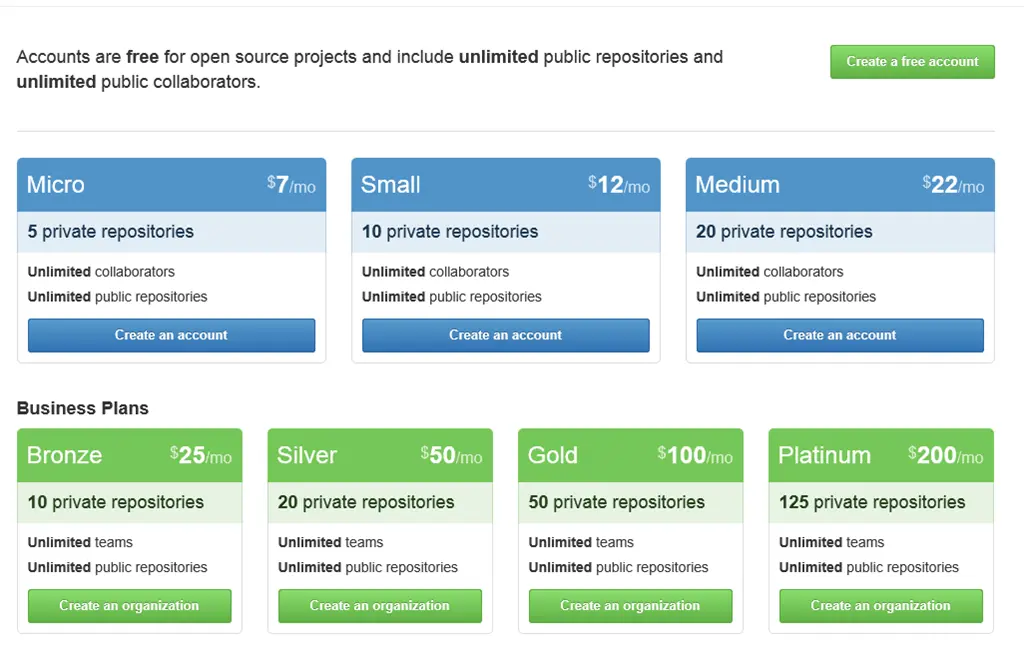
When you examine the GitHub pricing model, this could be run on any plan, including the free one, since we are only constrained to have no private repositories on GitHub (you can have unlimited public repositories) and unlimited contributors—which makes it perfect for open source.
When you apply the recommendation I mentioned in yesterday’s post about lightweight repositories to this model (with free, unlimited public repositories), it makes even more sense for open source projects.
A corporate example
The other side of the coin is a company doing consulting or in-house development work that needs storage, and (for whatever reason), that work cannot be open sourced. Thus, you will need private repositories—and a lot of them if you follow lightweight repository principles. Even if you don’t intend to follow those principles, splitting up your repository in an organizational way might still create a lot of repositories.
For example: I worked at a small company (< 30 developers) that deployed and developed on top of Microsoft CRM & SharePoint. There, we split things by customer (so each customer got a repository), and after three years, we had nearly 200 repositories. For them to use GitHub simply by moving over would mean negotiating a custom price with GitHub, as GitHub doesn’t offer standard pricing at that level. If they had restructured to properly follow the lightweight repository principle, they could have easily tripled the repository count!
So if not GitHub, then who?
In a company, you need to view the issue from a different angle—you need many repositories. However, you also have another key difference from open source: you have limits on something open source doesn’t—and doesn’t want to limit—contributors. In a company, you’ll only have staff or project contributors, so limiting the number of people involved is useful. It also makes costing hosting easier, as it boils down to per-head pricing.
So who offers Git hosting with unlimited private repositories and charges per head? There are two main players in this space, and I’ve used both—both are great solutions. BTW, I also use GitHub and think it’s great—just more suited for open source collaboration.
BitBucket
BitBucket, which started as Mercurial hosting to GitHub’s Git hosting, now offers Git as well. Their model is straightforward: unlimited private repositories at $1 per user per month. Simple.
TF Service
Who expected Microsoft to excel at Git hosting? They’ve done it well with their TF Service offering, which provides unlimited private Git repositories. TF Service is currently free, but that won’t last—my gut tells me Microsoft can’t compete with BitBucket’s $1 per user cost.
The reason it can’t compete is that TF Service offers more than code hosting—build servers, work item tracking, and more! Plus, if you have Visual Studio Premium or Ultimate, you likely have an MSDN subscription, which may cover TF Service costs, making it free.
Summary
This post isn’t about criticizing GitHub—it’s an amazing service that has revolutionized how the world interacts with code. What it aims to show is that, despite its popularity, GitHub may not be the best solution for everyone.
The real number one issue to avoid GitHub
While this discussion focuses on pricing (often overlooked when choosing a platform), the top blocker for GitHub—and for TF Service & BitBucket—is my customers. Many won’t allow hosting outside the company or in a foreign country, so we must run our own infrastructure to accommodate them.
I have had the joy of working with some great teams and learning how they use Git, but I have also seen it misused. The number one issue I’ve helped teams resolve when using Git is what I call the Fat Repository. The fat repository—not to be confused with the funny & NSFW Fat Git Enterprises—is an especially easy trap to fall into for teams who have come from the client/server source control world (SVN, TFS, CVS, etc.). In their world, a fat repository isn’t harmful and may even be a good thing—but in the DVCS world, the fat repository is a major problem.
Fat Repository
A fat repository can have one or both of the following characteristics:
Characteristic One: Multi-tasked Repository
A multi-tasked repository is a single repository with multiple root folders, each for a different customer or project. This is common with internal-focused items. For example, a consulting company may develop a set of common libraries used across projects, storing them all in one repository for easy access. Another case: a department might have all its projects in a single repository.
Many developers—including myself—have multiple Visual Studio projects in one repository, which is fine unless those projects are unrelated from a delivery perspective. They’re often grouped only because they share a common organizational structure.
This is called a multi-tasked repository because a single repository handles multiple unrelated deliverables.
Characteristic Two: Multi-focused Repository
Even if a repository avoids the multi-tasked trap, it can still become fat when used to handle requirements beyond a single deliverable’s core code. A common example: including a documents folder or database backup folder in the code repository. While everything is technically related to software development, not everything contributes to building the code.
This is called a multi-focused repository because its focus splits between specs, backups, virtual machines, and code. I see this issue not just in repositories but also in tools like Dropbox, where a shared folder for one document syncs hundreds of unrelated files—backups, installers, and more—that no one needs.
Fat Repository – Summary
In short, a fat repository contains more than just the code needed for a single project or deliverable. A simple test: Is everything here vital to my deliverables? If not, it’s a fat repository.
Client/Server and the Fat Repository
In traditional client/server source control (SVN, TFS), fat repositories aren’t an issue—in fact, they’re common and even advantageous since there’s one place to find everything needed.
The key differences (compared to DVCS) are:
You work with a working set, not the full repo. Initially, you pull down only what you need, rather than the entire history.
In client/server systems, you can checkout a single subfolder or file without downloading the rest.
DVCS and the Fat Repository
DVCS tools like Mercurial and Git differ fundamentally from client/server systems:
Repositories are cheap to create (git init is all it takes). No server admin is needed, so teams create many repositories—some temporary, others long-lived.
When you clone a DVCS repo, you get everything: every folder, file, and all history—whether you need it or not.
This is where fat repositories cause pain: Multi-tasked or multi-focused repos force you to pull down unwanted content, slowing down development.
Issues a Fat Repository Causes
Slow initial checkouts. Even if this is a one-time pain, it’s still frustrating. I once helped a team where each project was in a separate multi-focused repo. While working sets were small, senior devs floating between teams struggled—their repos were so large that most couldn’t keep more than two checked out at a time, even though their working sets were under 1 GB.
Disk space waste. Developers (especially those with SSDs) care about space. DVCS repos include all history, meaning a 1 GB database backup checked in (then deleted) still occupies space for everyone.
Solution: The Lightweight Repository
For DVCS, the solution is simple:
Keep repos lightweight—check in only what’s needed. Use .gitignore and staging to control what’s committed.
Create many repositories. Have one for code, one for docs, one for artwork—teams can cherry-pick what they need.
Avoid the Law of the Instrument. Just because you can put everything in a repo doesn’t mean you should. Database backups? A file share or Dropbox may suffice. Word docs? Tools like SharePoint (or TFS’s built-in SharePoint integration) work better for versioning and search.
In short: A happy repository is a lightweight repository.
Tomorrow, July 31st, will mark an aphelion in my career—I am leaving BBD today after 5 fantastic years in the ATC team.
BBD
This was not a simple decision to make. BBD is not only an amazing company but also home to some of my best friends. The ATC team enabled me to do a very special job: desk research, guidance for many customers & teams within BBD, key customer engagements, and promotion of the company—all of which was amazingly fun and grew me in the most wondrous ways (including growing my waist—damn you, free vending machines).
So if everything is awesome there, why leave? Because I have a unique and amazing opportunity to build something on a scale that being in a team focused internally would never enable me to achieve.
Aphelion
Where am I heading? Aphelion (see what I did there—loads of jokes you didn’t get until the end. Now re-read this from the start and laugh heartily with me… sigh, that joke isn’t as funny as I hoped, and doesn’t make much sense).
I’ll talk more about the company and the work I’m involved in at a later date.
It doesn’t—that all remains the same! In fact, the people at Aphelion are regular speakers at events, run their own user groups and there’s already an MVP working there, so I expect to feel very much at home there!
This week’s award for more ungrateful behavior goes to Greg Young, who seems to think that being a speaker at an event makes him special. The story is that Greg went to TechEd North America as a speaker, with multiple talks to present. His wife joined him on the day of his first talk, but the organizers wouldn’t let her in for free—she was only supposed to take photos of him. He then canceled all his talks at TechEd NA and also canceled his talk at TechEd Europe in response to the on-the-ground staff not accommodating him.
All that is right
I fully agree with him that the TechEd NA people on the ground could have—and should have—handled it much better (I would have just let his wife in). His suggestions on how they could have improved—such as finding his wife and taking her to the speakers’ room or Starbucks for example—are completely correct.
As he said in his post, this was the final straw in a series of bad experiences as a speaker:
Problems with flights (costs & timing)
Booking for other events that didn’t account for flights, etc.
And so on—and, you know what? He’s right. That was a bad experience, which no one—speaker, delegate, or staff—should have to endure. It seems that TechEd NA was poorly organized, and I believe he is correct in his assessment that this was due to the conference having many disjointed departments that lacked the authority to make decisions without layers of bureaucracy. His first three points are spot-on, and all conferences should learn from him.
All that is wrong
If I agree so much with him, why do I have an issue with his behavior? It’s four key points:
Greg says, “Speakers are not commodities—they are people who give much to help the conference.” I’m sorry, Greg, but speakers are commodities. We are there to help the conference succeed and serve the audience. Nothing is more important than serving the audience—and cancelling your talk shows that you think your situation is more important than that. And if you’re not willing to do that? Tough. You’ll be replaced—just like a commodity.
Speaking at an event like TechEd NA, plus appearing on Channel 9, is an honor and should be treated as such. Hundreds, if not thousands, of speakers would tolerate far worse to have that opportunity. Wasting it is a slap in the face to the many who would have done the talk—and didn’t get the chance.
Being a speaker is about planning. Most failed talks stem from poor preparation. Greg had a responsibility to ensure his planning included his family’s location during his talk—long before arriving on-site. He should have discussed this well in advance with the right people, not with on-the-ground staff at the last minute. Planning is the foundation of professional speaking. I’m sure someone knew his wife was coming (they booked her flight), but that doesn’t mean everyone did—a conference this size has hundreds of moving parts. Staff may have assumed his wife joined him in the city but wasn’t attending the conference. Ultimately, it’s his responsibility to plan ahead with the right people to make sure everything runs smoothly.
Now, the most critical point of this post: Let’s assume his only choice was to cancel that talk—because he had to prioritize his wife (leaving her alone for two hours would have been difficult). In that case, I wouldn’t see the canceled talk as an issue, and I wouldn’t have written this. The real reason his behavior is deserving of an award is that he canceled all his remaining talks—not just the one. There was no valid reason for that, other than stamping his authority and reinforcing his sense of entitlement. He even canceled his talk at a different Microsoft conference! Who does that hurt? The people measured for success—and the staff—at TechEd NA and Europe are separate entities. That behavior is unprofessional and entitled, and it deserves criticism. The right approach? Cancel one talk, resolve things with his wife, and then serve the audience—that’s what he should have done.
Final Thoughts
I speak at Microsoft events all the time, but I’ve never spoken at TechEd NA. I’ve never met Greg and only know him from a few tweets, his amazing CodeBetter posts, and this story. I think he must be exceptionally bright if he gets the chance to speak at TechEd. I’m not suggesting otherwise—I’m only addressing his behavior in this situation.
I’m not even implying this is his normal behavior; maybe he was grumpy and irrational from jetlag or sleep deprivation (as he mentions at the start of his post). But if that’s the case? Admit it. Don’t write a public blog post making excuses for poor decisions.
When the Windows 8.1 Preview came out a few weeks ago, I was in no place to test it because I needed my machine stable for a bunch of conferences I was speaking at. However, that didn’t stop a lot of amazing users of the Amazing Lock Screen app from trying it out—and finding that it did not work!
Since then, I’ve gotten VS 2013 and Windows 8.1 and started digging into the issue, which has confused me for days on end. But yesterday, I found out that Microsoft has acknowledged a bug in lock screens with Windows 8.1. This bug directly breaks Amazing Lock Screen’s ability to change the lock screen.
Unfortunately, until Microsoft issues a patch or the RTM comes out, there’s very little I can do to correct the issue. This bug is not stopping development on Amazing Lock Screen, though—the next release will be the biggest in a long time, with a couple of brand-new features!
In summary: There’s a bug in the OS, Microsoft will fix it, the app is still being worked on, is not forgotten, and will work on Windows 8.1 in the near future!
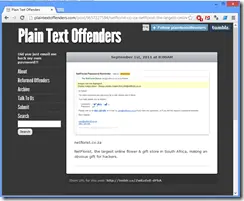
Two years ago I used Netflorist to buy some flowers, but first I needed to log in. I had forgotten my password, so I used the "Forgot Password" option.
In the email I got was my actual password—which shows a MASSIVE problem in the design of the system that Netflorist uses. The password is either:
stored in plain text,
encrypted.
Why am I talking about this now? Because two years later, Netflorist still hasn’t fixed it! They’ve had the time to do so—so let’s call them out, and if this helps some unethical person hack them (and I’m not encouraging anyone to do so), then tough luck for them.
What is plain text?
This is plain text—just the raw text. Why is this a problem for passwords? Because if someone gains access to the database (physically, remotely, via hack, or restoring a backup), they can see all the passwords.
The sad truth is that most people are lazy and reuse the same password across multiple websites—which means the details from Netflorist could be used to commit fraud and theft elsewhere.
Scenario
Netflorist, being a responsible company, keeps five years’ worth of backups offsite. If someone at the offsite company accesses those files, restores the database, and retrieves all email addresses and passwords, they could then log in to TakeALot using those details. Since TakeALot’s credit card provider stores card numbers, the criminal could purchase tons of stuff!
Just imagine the damage if someone uses the same password for their email and their bank’s second-factor authentication sent via email—all your money could be stolen… thanks to Netflorist’s poor security practices. And if that happens—and the bank wasn’t at fault—you wouldn’t get your money back!
Encryption is enough! Right?
Now we’re getting a little technical. There are many types of encryption (two-way, public/private key), but the core issue is this: in all cases, encrypted data requires a salt (or key or password—they’re all synonyms) to decrypt it.
If we store a password encrypted in the database, we also need to store the key somewhere so it can be decrypted when sending an email. But if someone gains access to the database, they’ll likely get the salt too. Once they have the data + salt, the password is effectively in plain text.
Yes, this is harder to exploit than plain text—but harder isn’t the same as impossible.
So how should Netflorist fix this?
This isn’t simple because we’re dealing with security, and doing it right isn’t easy. Fortunately, OWASP has created guides to help:
In short, they should do three things (this is a super simplified version—read the guides for full details):
Don’t store passwords in plain text or encrypted. Hash them instead. Hashing is like one-way encryption—you can take the password + salt, generate a hash, but you can’t reverse it to get the original password.
The hash relies on a unique salt per user, preventing rainbow table attacks.
For the "Forgot Password" system: since you can’t recover a password from a hash, don’t send it in an email. Instead, implement a password reset flow where users input unique info via a secure channel to set a new password when they forget theirs.
What can you do?
First, contact Netflorist (Twitter, email) about this risk—hopefully, they’ll fix it. Second, reduce your own risk by never reusing passwords across sites. You can use tools like LastPass (which manages passwords and enforces strong, unique ones) or create memorable passphrases, like:
Netflorist:"This is netflorist222"
TakeALot:"This is takealot222"
It’s easy to remember, unique, and strong. (Just tweak the example to suit your own style!) Be sneaky!