In .NET, we have a GAC (Global Assembly Cache)—which you might assume describes it well, hence the name "GAC." But that isn’t true. One of the many things I’ve learned since joining Microsoft last year is the real story behind the GAC’s name and the fact that the acronym was chosen after the name to appease legal. Think about it: the GAC is neither a cache (it’s really a repository—a cache implies a temporary nature to its contents) nor is it global (it’s local to the machine). That acronym just doesn’t make sense.
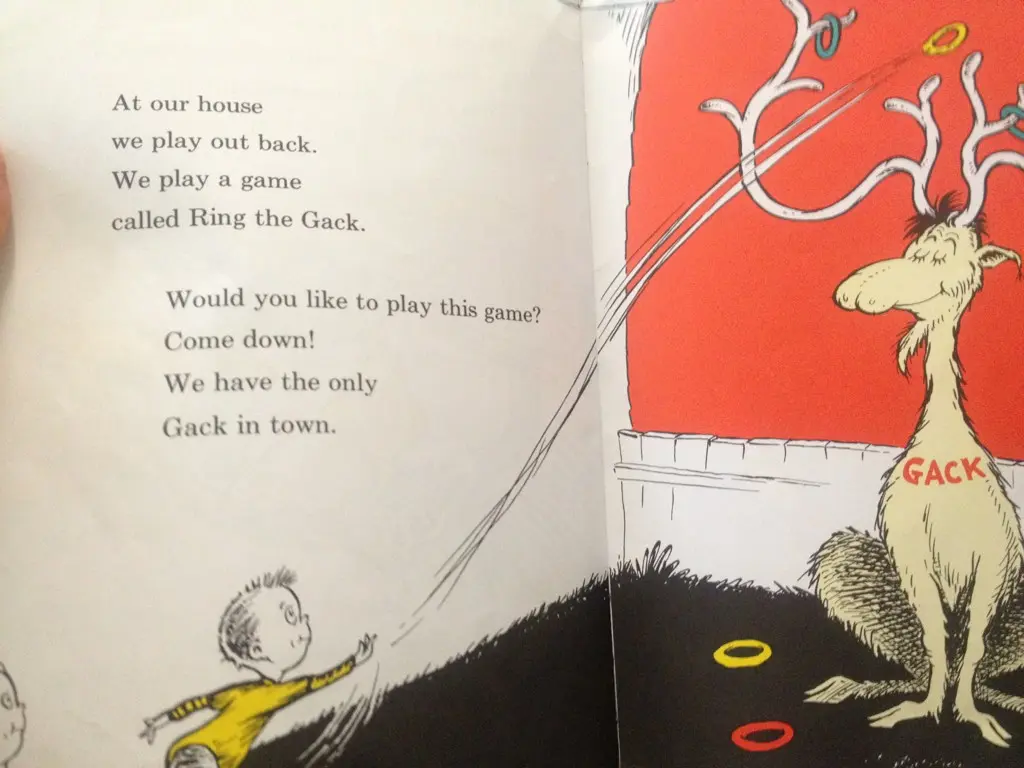
The origin of the name is that Anders Hejlsberg, when naming it, wanted something to represent the only location on the device for assemblies. Additionally, Anders is a massive Dr. Seuss fan and chose the name from The Cat in the Hat (emphasis below is mine):
"At our house we play out back. We play a game called Ring the Gack. Would you like to play this game? Come down! we have the only Gack in town."
The name was used in the team until legal got involved and worried that Microsoft might get sued, so it was shortened and an acronym retroactively made up to explain it. The original name does appear in the original beta documentation for .NET 1.0, which you can find here(Note: Wikipedia link removed—replaced with official MS source where applicable).
At the last developer user group, a discussion around .NET and the community arose where an issue was identified: because Microsoft does such a good job of communicating around .NET, anything outside their purview is pretty much ignored. The example given was that open-source initiatives don’t receive enough coverage at major events. My response was: Why doesn’t the community run its own .NET event?
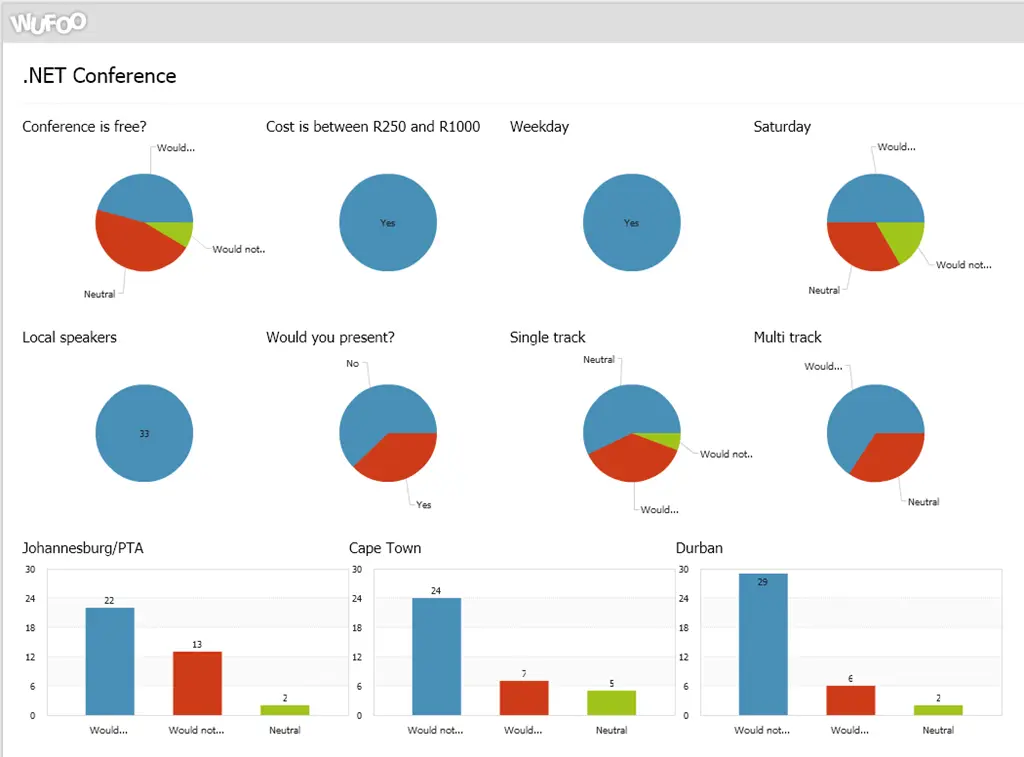
The idea would target a .NET audience but not limit content strictly to .NET—meaning you could present on Perl, for example. However, as the audience is .NET-focused, it would make sense to tailor the talk to topics relevant to their interests and address their concerns. I ran a small poll to gauge the response.
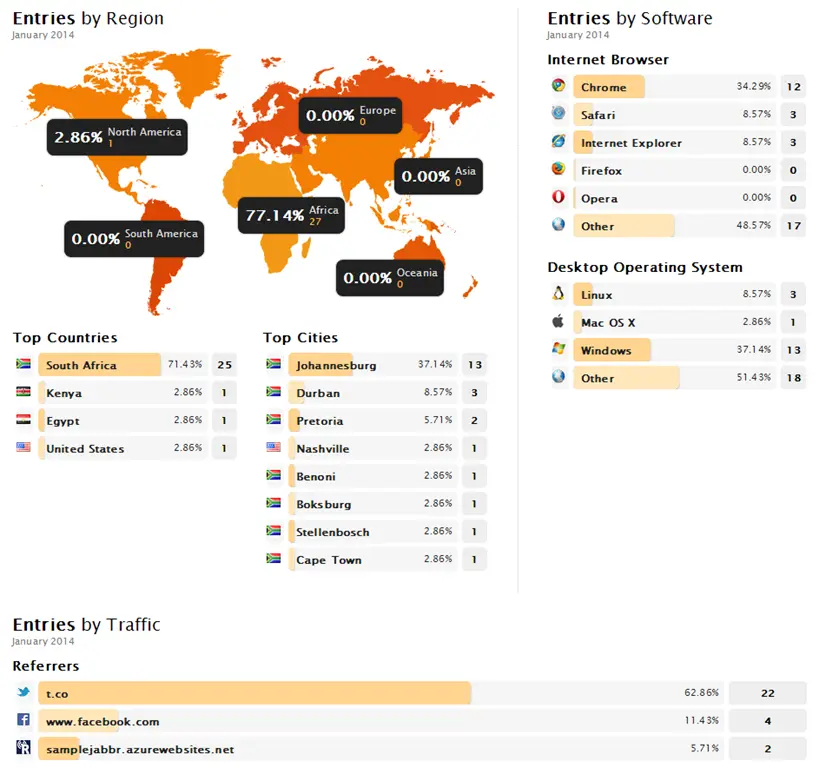
425 people viewed the poll, but only 35 completed it 🙁.
Looking at the data (hint: that link takes you to the live report), it seems that:
Free vs. cost isn’t a major issue—I think the key factor is whether there’s perceived value; if people see it as worthwhile, they’ll pay.
Weekday vs. Saturday: A weekday seems far more popular than a Saturday.
Multi-track vs. single-track: A multi-track format is significantly more popular than a single-track event.
Location: Johannesburg is overwhelmingly favored—Cape Town and Durban trail by a fraction (though the chart colors don’t align logically—biggest is always blue, which doesn’t make sense).
So what’s next? I’m uncertain—the numbers are surprisingly low, which suggests either that we, as a community, are poor at promoting such events, or that there may not be enough demand. Your thoughts?
I am very proud to make a short announcement: I have moved to join Microsoft, and specifically the AppFactory. The AppFactory is a group of people—mostly consisting of interns—who are gaining real-world experience in software development.
So what is this real-world development focused on? Locally relevant apps that provide all users with a rich and meaningful experience on Windows 8.1 and Windows Phone.
I am joining as a senior developer, with my focus on both development and skilling up those involved!
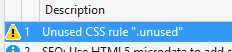
At TechDays in Johannesburg, I showed a lot of cool stuff, but this post is about two specific pieces of awesome technology—Browser Link & LESS. In my talk (you can watch a video of it here)—I showed off how you use Browser Link with Web Essentials—it can detect unused CSS. A rather sharp attendee came up to me afterward and asked me, what happens with LESS? Does it do the same thing?
I went back and experimented with it—first was to set up some CSS that wasn’t used and test. Everything worked as expected.
Step two was to use LESS directly, so I set up the HTML with:
And I ran the app again. You know what happened? It all just worked—Browser Link’s CSS logic detected the unused class in the LESS file, and when I clicked it, it took me directly to the class in the LESS file 😊
I you couldn’t make TechDays in Johannesburg or Cape Town (or maybe you did—and you went to Dave Russell’s awesome MVVM talk, which was at the same time as my LightSwitch talk), then you can watch a recording of my LightSwitch talk, which I did recently.
If you want to get the slides, the completed demo, or the script, you can find all of that in my earlier post.
Did you miss the awesome TechDays events in Johannesburg and Durban? Fear not—I recorded my ASP.NET talk for you! This is in no way as good as being there (the excitement and energy from the event help a lot), but it’s still a great talk to watch!
All the slides, assets, demo bits, etc. can be downloaded in this post.
I had an awesome time recently at the Microsoft TechDays events in both Johannesburg and Cape Town, where I presented on Visual Studio LightSwitch and ASP.NET! Below, you can find the slides (SlideShare does a poor job with them, but if you go to the website, you can download the original PowerPoint), and the demo script used in the demos!
In both Johannesburg and Cape Town, we had the awesome Microsoft TechDays events! I was lucky enough to present two talks: LightSwitch and ASP.NET. Below, you can find the slides for ASP.NET (SlideShare does a poor job with them, but if you visit the website, you can download the original PowerPoint)—see more at: https://www.sadev.co.za/content/techdays-2013-lightswitch, the completed demos, my demo script, and the assets I used!
The final part of this ASP.NET talk was a streamlined version of my Visual Studio is awesome talk I did at JSinSA—I recommend checking it out for even more awesomeness (I have even more cool demos there).
Update: The Pro Power Tools for 2013—which includes PresentOn—is now out!
A mere seven months ago, I wrote about an awesome trick in Visual Studio 2012: PRESENTON. This trick optimizes a bunch of fonts really quickly to make them look good on stage—not just the text editor but the IDE too!
However, this relied on the Pro Power Tools extension, which doesn’t exist for Visual Studio 2013 yet. So how can you achieve the same results? With just some manual settings in the IDE.
Backup
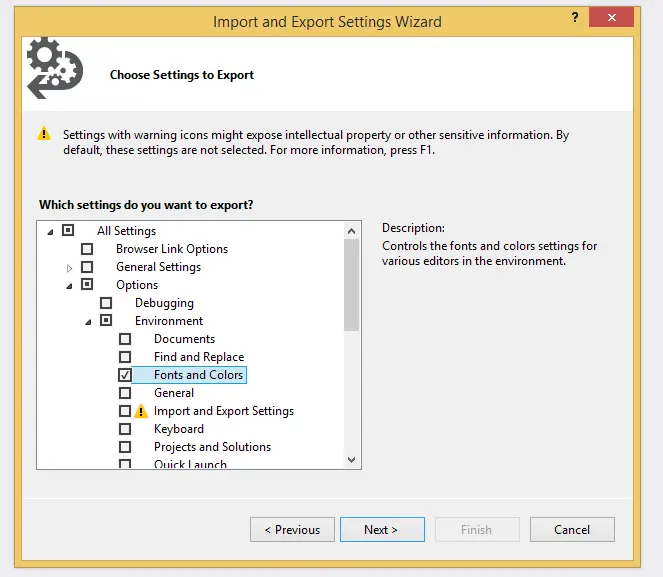
Before you start, make a backup of your current settings by going to the Tools menu, then Import and Export Settings. In the next dialog, all you need to export is the Fonts and Colors option (see image below). This will ensure that after your presentation, you can roll back to your normal experience. It is also a good idea to do this again after you’ve set up for your talk, so that next time you can just import it in minutes—and be ready (in fact, I did that—and you can grab mine below).
Changing the settings
Step one: get to the font settings—which is really easy. Hit Ctrl+Q, which takes you to the Quick Launch, and type in font.
Now you’re in the font dialog, and you can change all the settings in here. The key ones I find are listed below.
Text Editor: Naturally, this is the text that appears on the screen!
Environment Font: This badly titled item affects the IDE, all menus, and readonly text rendered in the IDE. This makes your IDE much easier to see.
Code Lens: For VS 2013 Ultimate*
Statement Completion: This controls IntelliSense—since I use it a lot, I find it helps the audience see better what I’m doing.
Editor Tooltip: If you’re showing off the editor (which may include tooltips), you can make them larger**.
Package Manager Console: If you’re demoing NuGet and/or Entity Framework Migrations, this is very useful to increase**.
Output Window: Always worth increasing, since compilation is a big part of any talk.
Locals Window: Another great option for IDE demos or presentations focused on debugging**.
JavaScript Console: Lastly, for JS demos—a must-have**.
Font Choice
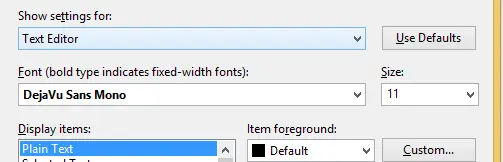
Something to consider: what should this look like? For nearly a decade, I’ve followed the advice from Don Box on what goes into a great technical presentation, which recommends a minimum font size of 14pt (I use 16pt). While I agree with his font choice, nowadays I use a different font called DejaVu Sans Mono, which I think looks amazing.
At TechDays in Cape Town, I was asked an interesting question: how do you force an Update Panel to update from JavaScript? The asker was using SignalR to trigger it, but really, that isn’t important—JavaScript is just JavaScript.
The first part is the code behind—I’m using a static integer to update a value, so every time we refresh the text, it changes. The only interesting thing to remember is that the Update Panel causes a partial postback, so you can’t rely on the Page_Load event here. In the example, I used the Update Panel’s OnLoad event to update the text.
A minor detail: since we’ll be calling the Update Panel from JavaScript, we need to give it an ID. Additionally, we can use the ClientIDMode property, introduced in .NET 4, to set it to Static so we can easily reference it in JavaScript.
Finally, here’s the JavaScript. For this example, we’re using setInterval to trigger the call every 500ms. The code to update is just the __doPostBack function, passing the Update Panel’s ID. That causes the panel to refresh!
Note: If you’re using .NET 2 or .NET 4, you might encounter a bug with __doPostBack—fortunately, this is fixed. You can read about the issue and get fixes from Scott Hanselman’s post.


 In .NET, we have a GAC (Global Assembly Cache)—which you might assume describes it well, hence the name "GAC." But that isn’t true. One of the many things I’ve learned since joining Microsoft last year is the real story behind the GAC’s name and the fact that the acronym was chosen after the name to appease legal. Think about it: the GAC is neither a cache (it’s really a repository—a cache implies a temporary nature to its contents) nor is it global (it’s local to the machine). That acronym just doesn’t make sense.