You want to code in TypeScript. You want to code with Sublime Text. Today, that is really easy to do, thanks to Package Control and Microsoft, which now provides a first-class plugin for Sublime Text to enable and light up TypeScript.
Step 1: Install Package Control
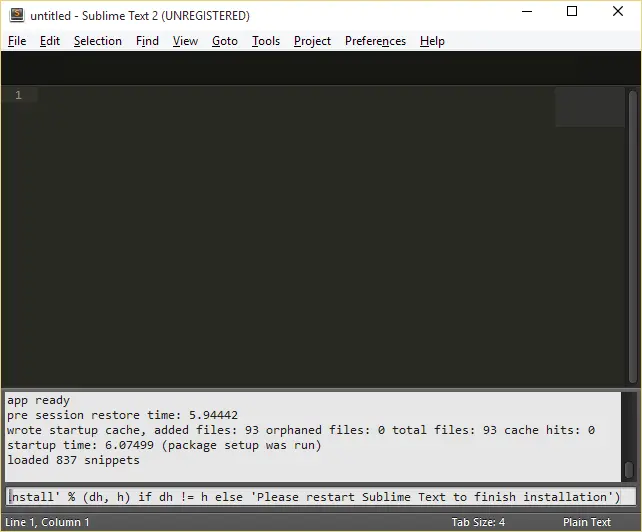
The installation instructions can be found here, but in summary, press Ctrl+` and then paste the following code (for Sublime Text 2; for 3, see their website) into the text box and press Enter:
import urllib2,os,hashlib; h = 'eb2297e1a458f27d836c04bb0cbaf282' + 'd0e7a3098092775ccb37ca9d6b2e4b7d'; pf = 'Package Control.sublime-package'; ipp = sublime.installed_packages_path(); os.makedirs( ipp ) ifnot os.path.exists(ipp) elseNone; urllib2.install_opener( urllib2.build_opener( urllib2.ProxyHandler()) ); by = urllib2.urlopen( 'http://packagecontrol.io/' + pf.replace(' ', '%20')).read(); dh = hashlib.sha256(by).hexdigest(); open( os.path.join( ipp, pf), 'wb' ).write(by) if dh == h elseNone; print('Error validating download (got %s instead of %s), please try manual install' % (dh, h) if dh != h else'Please restart Sublime Text to finish installation')
It takes a few seconds, during which nothing happens, and then the message window will display: “Please restart Sublime Text to finish installation” — so do that.
Step 2: Add the TypeScript package
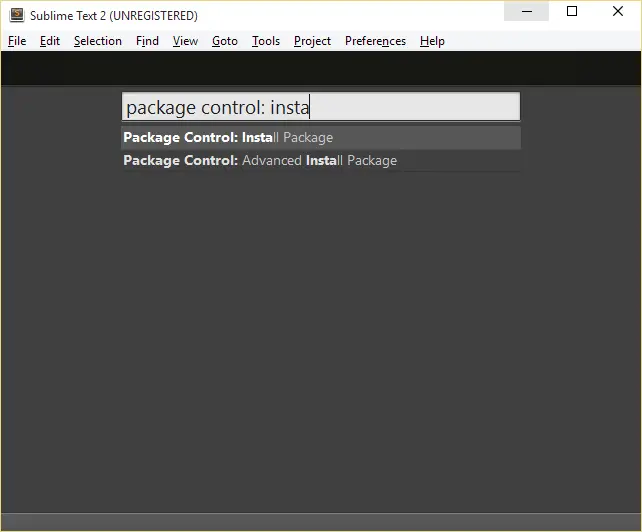
Press Ctrl+Shift+P to bring up the command palette, type Package Control: Install Package, and press Enter.
You can use the arrow keys to navigate the list more efficiently and select the correct item instead of typing everything.
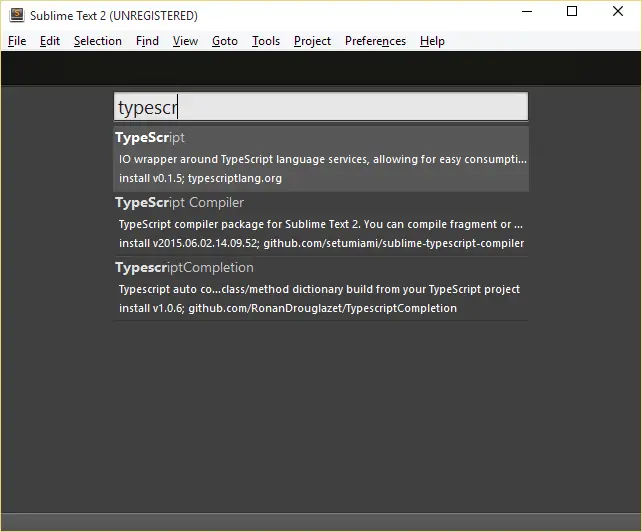
In the next command palette window, type TypeScript and hit Enter.
In the status bar, the plugin will start downloading and installing TypeScript:
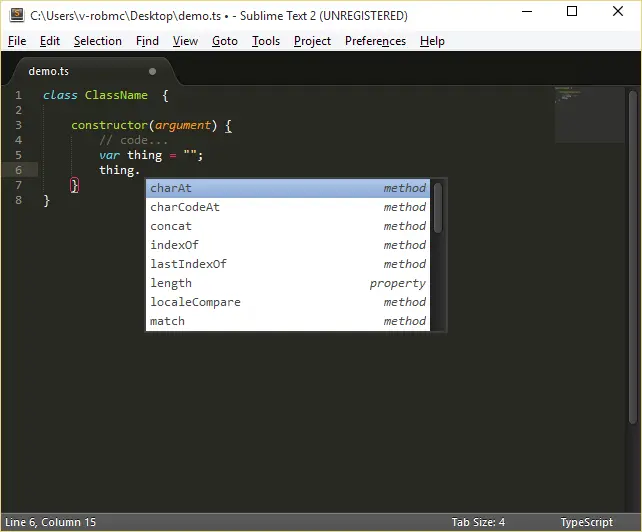
Once that’s complete, you’ll have glorious TypeScript in Sublime!
Part 2 is here, click that now (it will open in a new window) so you can continue when you’re done here.
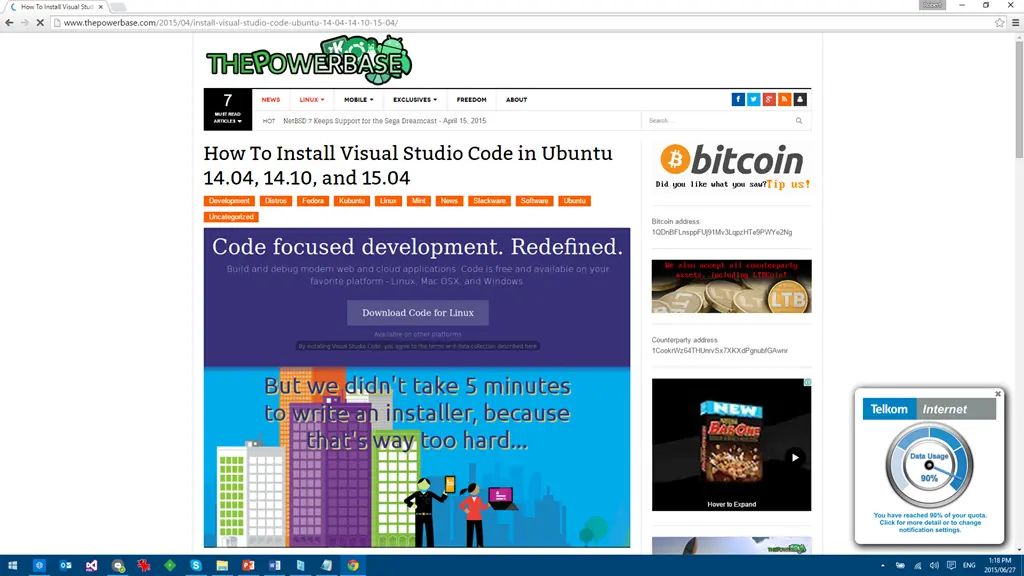
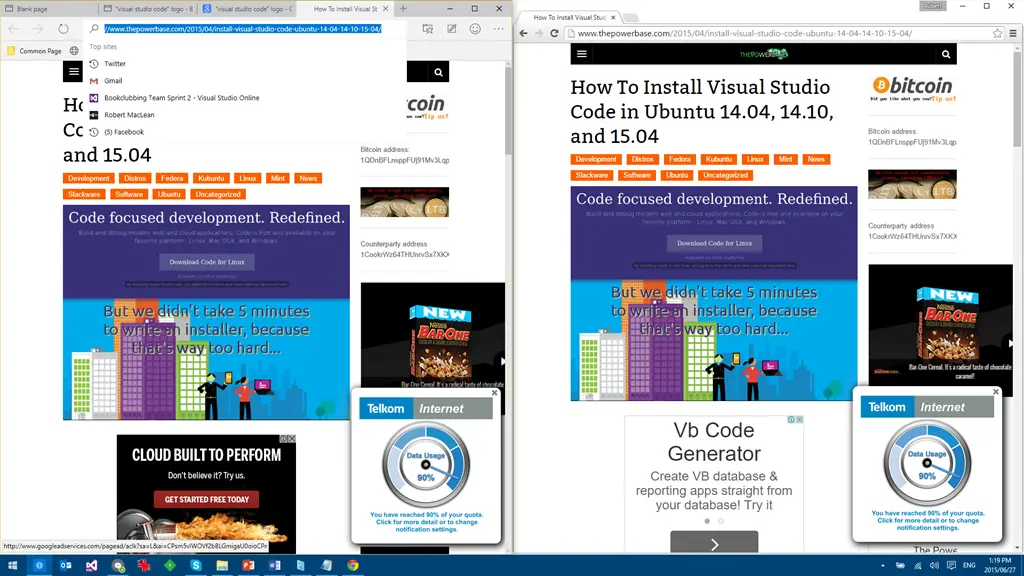
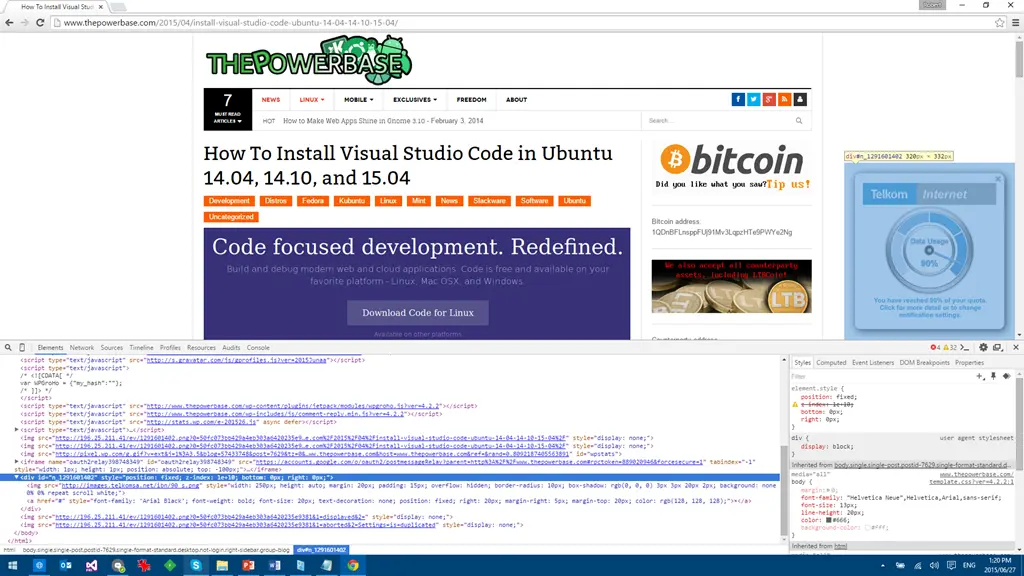
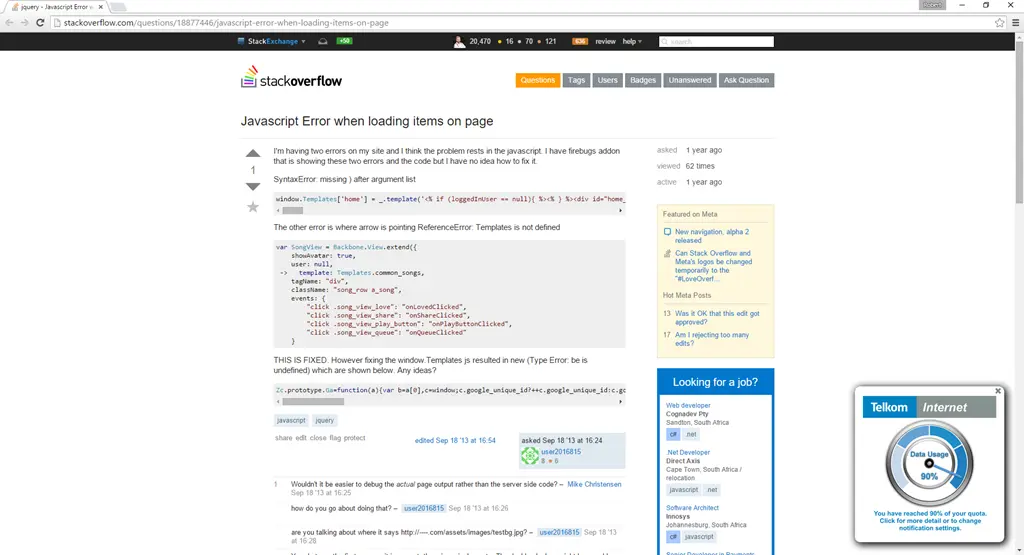
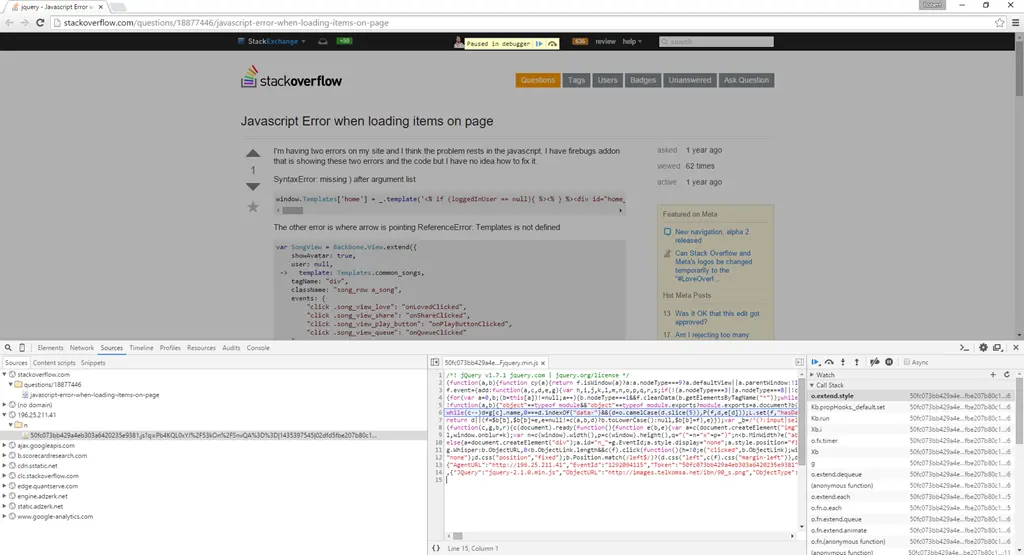
The following is a screenshot I took of a webpage in Chrome. If you visit that same website, you’ll experience a different result because Telkom is using techniques similar to a man-in-the-middle attack to modify the website’s code and inject its own content.
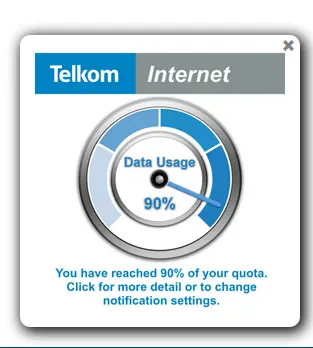
The key addition—visible in the lower right corner of the page—was inserted by Telkom without the website owner’s or Telkom ISP customer’s permission.
While this seems harmless—even potentially useful—it’s deceptive. Even this seemingly minor change could cause major issues.
Breaking websites
Telkom cannot predict how this injection will affect every website on the web. While I’ll explain the technical details below, the core issue is that they’re injecting JavaScript into every page. This extra code could conflict with existing scripts, leading to unpredictable behavior and broken websites. Given the internet’s scale and complexity, it’s impossible to guarantee that no website will be disrupted.
Exposing security risks
The second major issue is the security vulnerability this creates. Telkom may argue their code is secure now—and it’s true for now—but security is never static.
They’re using an outdated version of jQuery (version 1.7.1), which has no reported vulnerabilities yet. But security flaws can emerge at any time. If a vulnerability is discovered in this library or in Telkom’s injected code, attackers could exploit it to launch attacks against users. Do you trust Telkom’s developers that much to have no security flaws?
A second risk: Telkom must host the servers and systems running this injection. If those servers are compromised—by hackers or even a disgruntled employee—they could be used for XSS attacks or key sniffing. As awareness grows, these servers will become prime targets. It’s only a matter of time before they’re breached.
Violating net neutrality and privacy
While ISPs should monitor traffic (with oversight), this practice makes it far too easy for Telkom to intercept and manipulate your data in ways you won’t even notice.
Telkom claims they handle this responsibly—but what prevents executives from using this to block unwanted content (e.g., MTN ads) or suppress websites critical of them (like those supporting the EFF or DA)? Without transparency or consent, do you trust them not to abuse this power? Their actions violate a core principle of the internet: net neutrality.
Performance impact
Lastly (though least concerning), Telkom forces users to download ~84.8 KB of extra JavaScript (see data here) and ~120 KB of extra images. This manipulation also slows down page rendering, increasing load times and bandwidth usage. They introduce unnecessary network hops, further degrading performance.
Technical details
Telkom only targets HTTP traffic—not HTTPS, which is encrypted. While HTTPS should be secure, it’s not impossible to bypass (as seen in the Superfish controversy). While unlikely, they could extend this to secure sites if motivated.
How it works
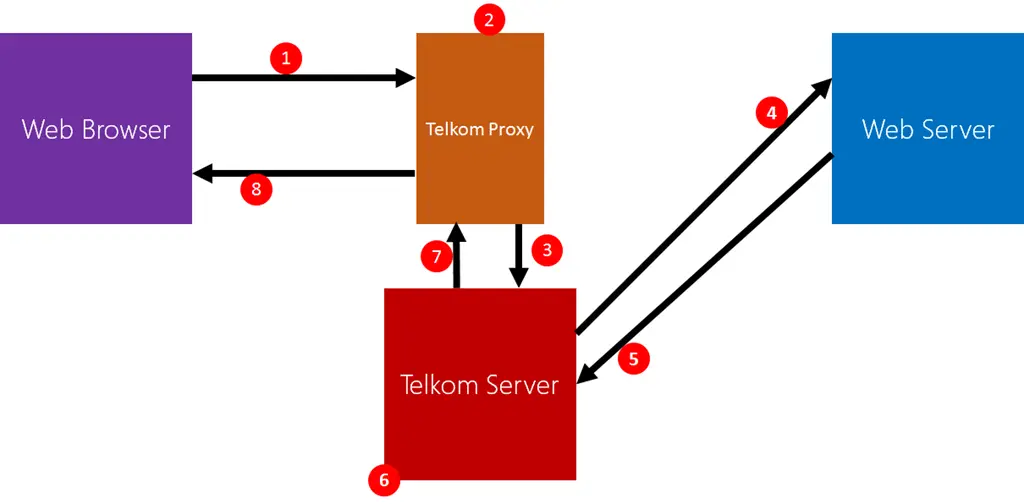
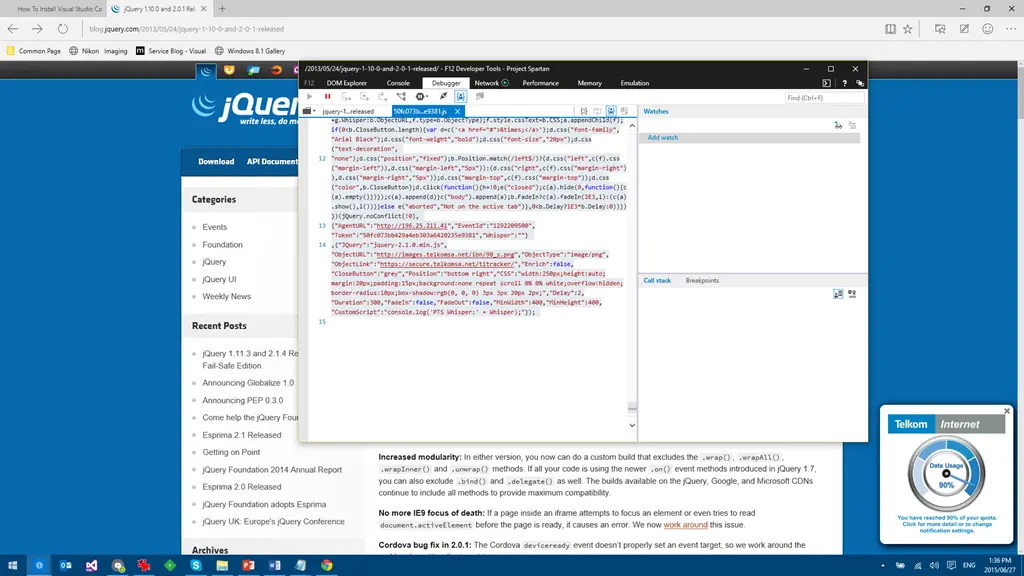
Telkom doesn’t alter the original HTML—they inject JavaScript after it loads. Here’s how:
A website loads a JavaScript file (e.g., jQuery).
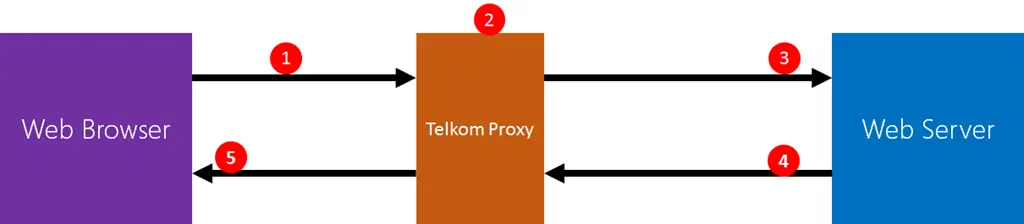
Instead of fetching it directly, Telkom’s proxy intercepts the request.
If the file is JavaScript, Telkom reroutes it to their server.
Their server fetches the original file from the real website.
Telkom appends their own code (including jQuery 2.0.1 and custom scripts).
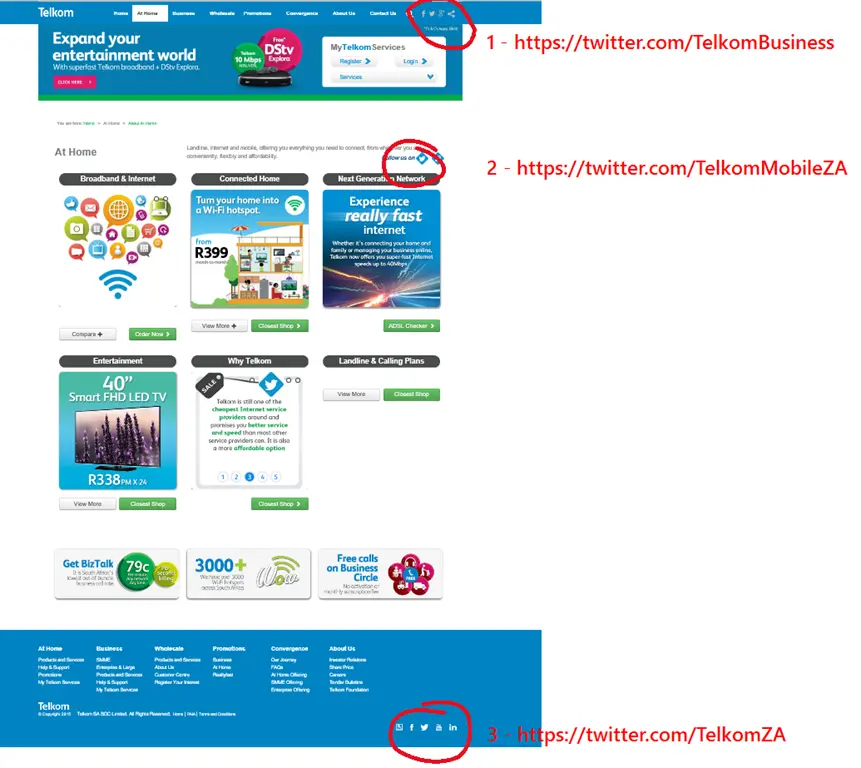
I try not to rant on my blog and mostly I succeed. Today, though, I wanted to complain to Telkom about them inserting content into web pages on Twitter, so I head to their website to find their Twitter account. I don’t find one—I find three different Twitter accounts, and a situation so bad I cannot keep quiet!
It isn’t ideal to have three, and I can understand that different components might need their own accounts. In fact, they look like a business account (1), their cellphone brand (2), and a general one (3). The part that baffles me is what happens when I checked them.
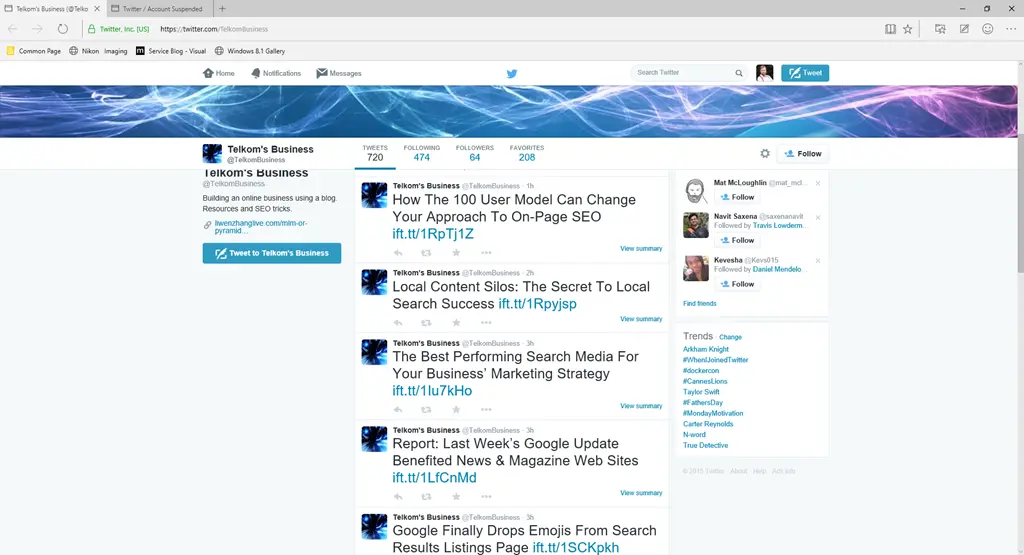
The business account
This account has been taken over by spammers. :facepalm:
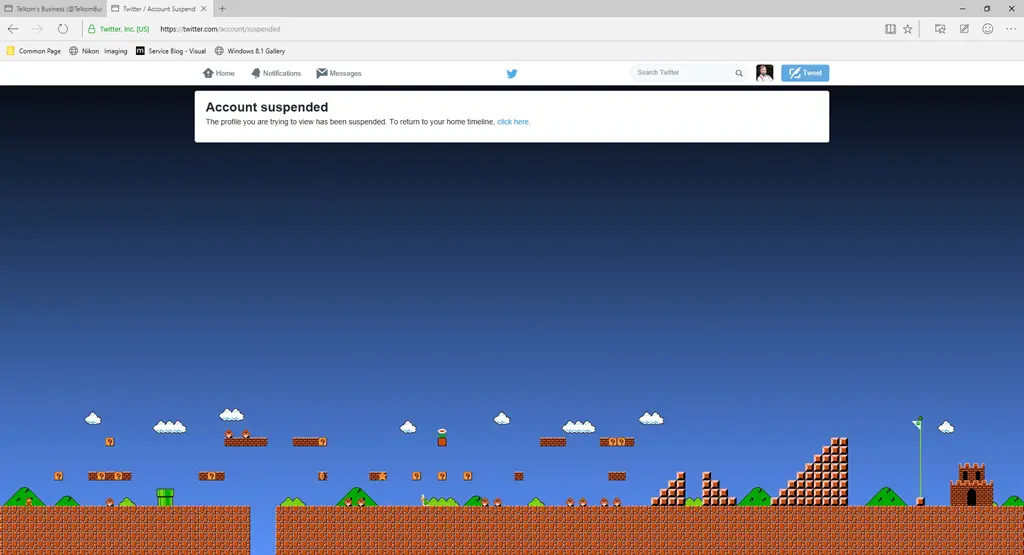
The mobile account
That account is suspended. :facepalm:
In fact, only the general account works! Mistakes happen—people mess up, accounts get suspended or lost—but it isn’t ideal or professional. The damage could have been mitigated by removing those links from your website. The fact that Telkom can’t or won’t speaks volumes about their lack of care. There is no acceptable reason for those bad links to remain, and whoever runs their website should hang up their HTML spurs and find a new career.
Let them know
Want to help let them know this isn’t acceptable? Here’s the form for the webmaster, and here’s a handy link to tweet to them quickly.
Yesterday in Johannesburg, we had an amazing //Build Tour event! We had top international speakers—like Pete Brown—join us and wow the audience with Windows 10, IoT, Edge, and more! Unfortunately, the international speakers faced flight issues, and we had a one-hour-and-a-half gap before we could kick off. So, a bunch of local Microsoft people got together to provide a bit of local flavor in a pre-keynote event.
I was very excited to share my talk about Visual Studio 2015, but it got cut at the last minute as the presenters arrived. Part of my prep was to create a video of my talk, and you can watch this content now:
With an agile team, you should meet daily for a quick meeting. Normally, that takes the form of each person answering a three-question status update (What did I achieve? What will I achieve? What is blocking me?). For a team working together, it means these steps:
Team arrives at the shared team board
Team goes around and gives a status update
Team goes back to work
Just because your team is distributed doesn’t mean this shouldn’t happen—it just means you’ll find a few extra steps:
Team members who work together go to a booked meeting room (you need a meeting room so those remote can hear over the normal work environment noise)
You’re surprised to find someone in the room
Explain that you booked the room
Wait for them to leave the room
Connect the projector
Realize you left your microphone in your laptop bag, return to your desk, get it, and return to the meeting room
Plug it in
Open the digital scrum board
Start the meeting software and join the meeting
See one remote team member is already there—apologize for being late
Wait for a response
Wait for a response again
Realize they can’t hear you
Both the remote team member and you try to figure out what’s not working
Figure out that there’s a mute hardware button that—today (and today only)—is turned itself on
Try again—success! They can hear you now
Wait for the product owner to join
Give up waiting and kick off the meeting (everyone is seated now because no one’s legs last that long)
Go around the team and give status updates
The product owner joins during the second-to-last team member’s status update
The product owner starts sharing a bunch of bugs and task updates that someone else is now capturing live
Finish the status updates
The team decides to use this time—while they’re all here—to discuss technical info around the new stuff from the product owner
The product owner is late for the meeting and has to disconnect
Someone walks into the meeting room and asks if this is the meeting for organizing the year-end party
Silence
No one answers
Silence
The Scrum master answers
The team discusses technical issues. Half of them are marked as needing more info and will be discussed with the product owner in tomorrow’s meeting
The call ends
The team goes to get coffee (they need it) and says how glad they are using agile—because they save so much time with fewer meetings
Two hours later
Another team member joins the call alone because the time zone they’re in changed to daylight savings today
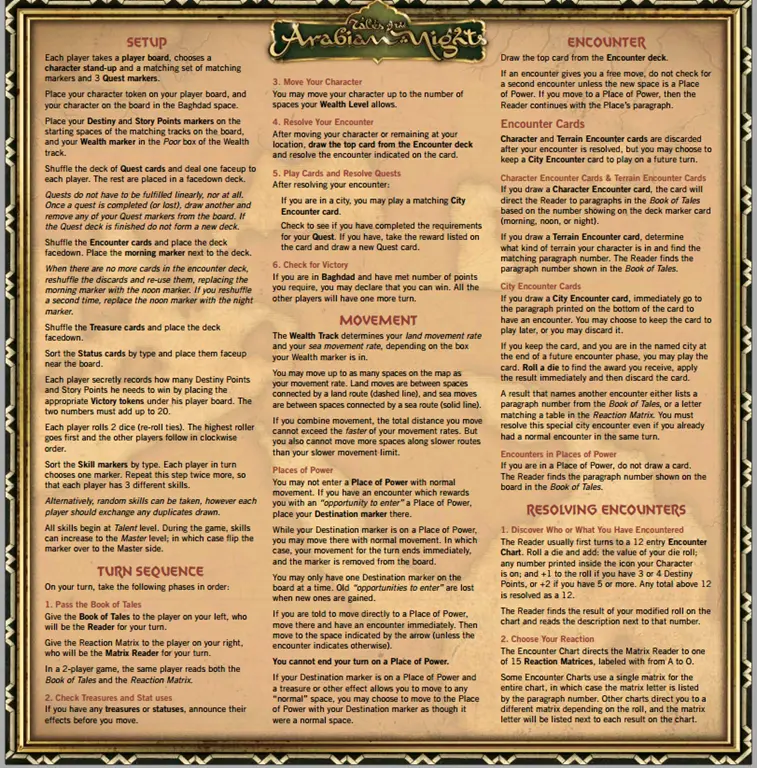
Sometimes I get a PDF I want to print, but there’s a background image or color that will eat too much ink, and I’d like to remove it. The example I’m going to use is the rules reference for Tales of Arabian Nights from The Esoteric Order of Gamers, which has a very bold parchment background.
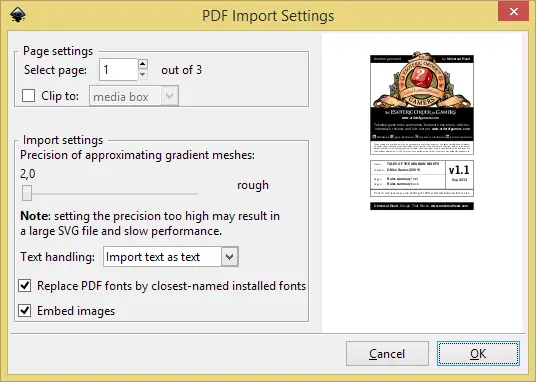
This is a fairly simple job—you just need the right tool, and that tool is the FREE (and open-source) Inkscape. Once you’ve downloaded and installed it, browse to your file and open it. Being a PDF, you’ll be presented with a dialog asking you to convert it. You’ll need to do one page at a time, so select the page at the top.
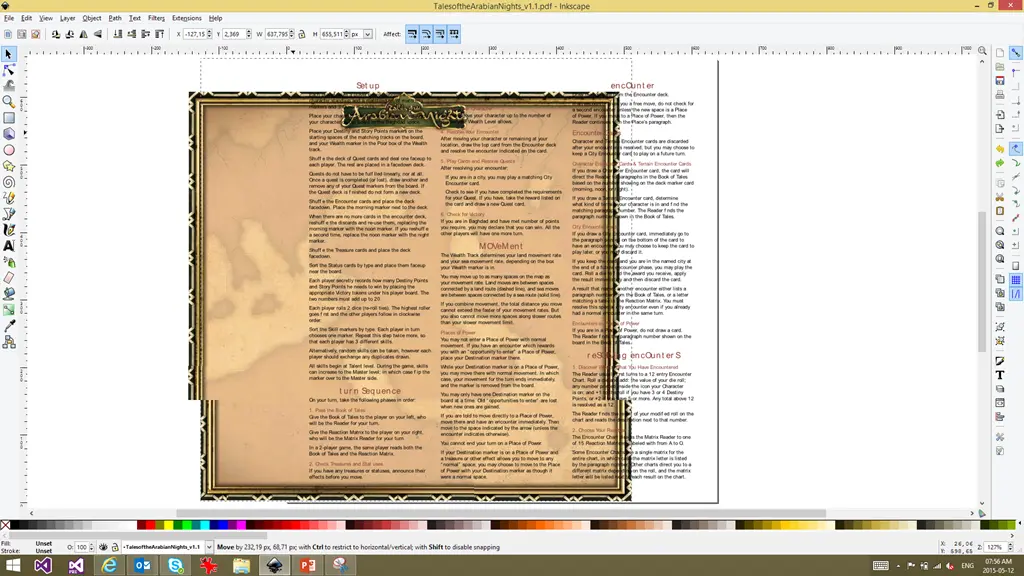
Once you hit OK, it will import the file, and you can then select the background image and delete it. You’ll note that some of the text is in the wrong font—that’s because I don’t have the right font installed. Often, you’ll need to do cleanup like this (and possibly re-add logos), but that’s up to you depending on how polished you want the final result to be.
Once done, use File → Save As to save it back as a PDF. The biggest pain is that you’ll need to repeat this process page by page, ending up with numerous files (one for each page). But since the goal is to print it, it isn’t a big deal.
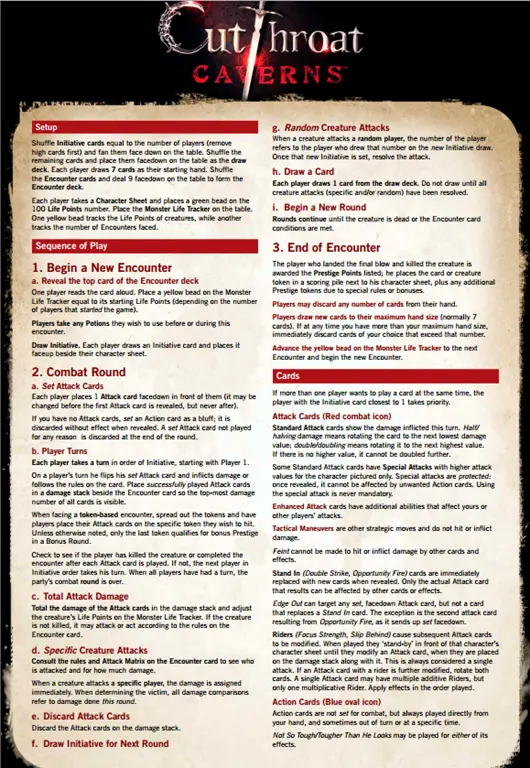
Here’s the before and after for another one I did:
Someone who attends the awesome developer user group (DUG) is 26–35 years old, a senior C# developer, not looking for a new job, and works on websites or mobile apps at a company of 10 people or less—statistically speaking. This is what came out in the recent DUG annual survey. This was the second time we ran the survey (2014 results can be found here), and we tried to keep the questions similar so we could compare. The goal of the survey is ultimately to understand the audience better so we can give it a better event.
Satisfaction
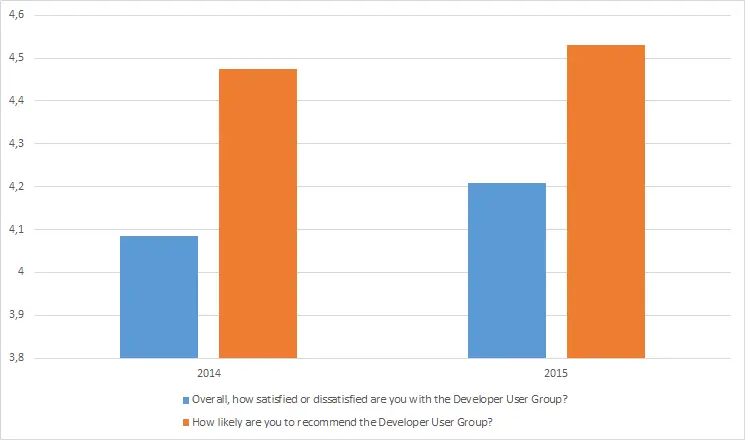
For us, as the leads of the group, the satisfaction numbers are very important, and we’re very happy to see a small uptick in them.
As for the complexity of sessions, it’s still near the middle but slightly higher, meaning they’re a bit more complex than last year.
Start Time
Going into last year’s survey, the start time for Johannesburg was a big discussion point: What time should the group start? Last year, 49% of people wanted it to remain as-is, 6% wanted it earlier, and 45% wanted it later. This year, those numbers have shifted: 57% want to keep it the same, none want it earlier, and 43% prefer a later time.
This year, we also have Pretoria data, and the picture is very different: only 37% are happy with the current time, while 63% want an earlier one. There’s no clear winner for the earlier time—16h30, 17h30, and 18h00 all received the same number of votes. Moving forward, this group will shift to an earlier time, so we hope to see an improvement next year.
Why Do You Attend?
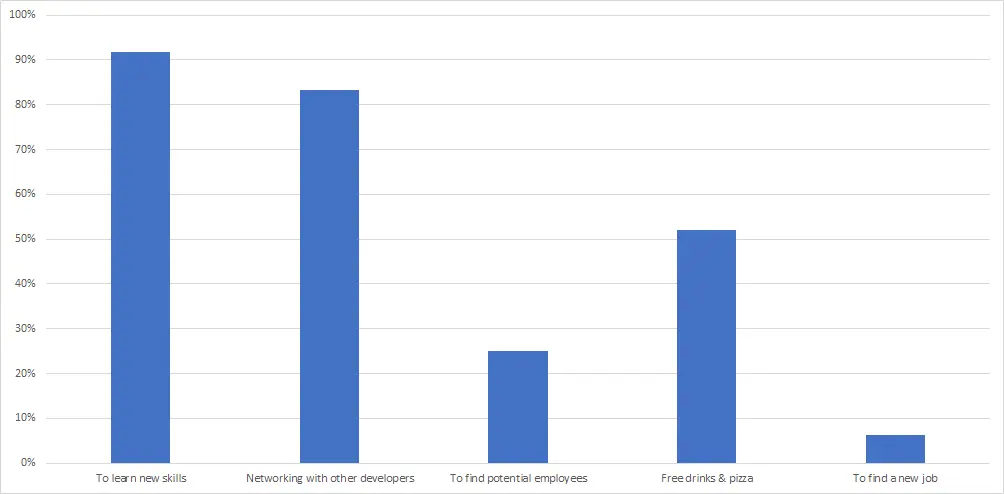
Attendance is largely about skill development and networking, and for the most part, these numbers are similar to last year. The only interesting changes are around employment: those not looking for a job have decreased by 6%, while those looking for work have increased by around 5%.
Demographics
Breaking down the details of the group, starting with age:
18–25: 10%
26–35: 58%
36–45: 26%
46–55: 4%
56–65: 2%
Skill level:
Senior: 67%
Intermediate: 18%
Junior: 14%
We’ve seen an increase in juniors since 2014—great trend!
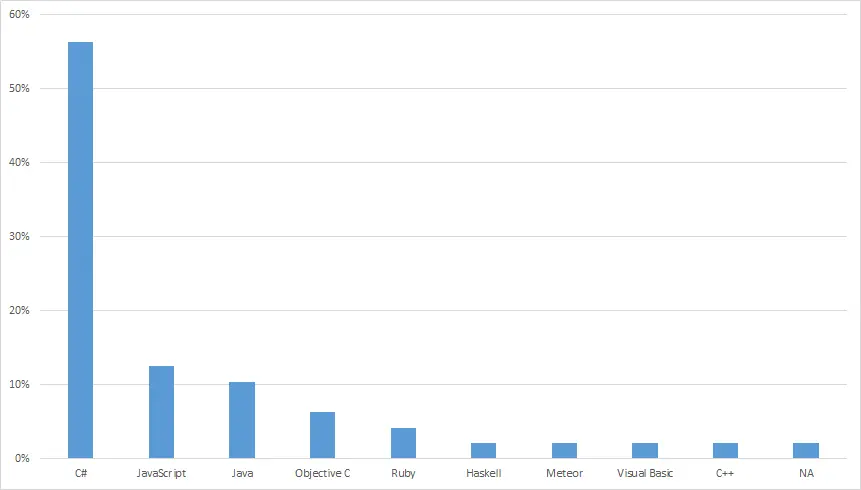
Languages:
Compared to 2014, the declining languages are:
C# (down 3%)
C++ (down 1%)
Python, PHP, Scala, SQL (each down 1%, now dropping away completely)
The rising languages are:
Java (up 1%)
JavaScript (up 9%)
Objective-C (up 5%)
VB (up 1%)
Ruby, Haskell, and Meteor (all new at 2% this year)
What work are we doing?
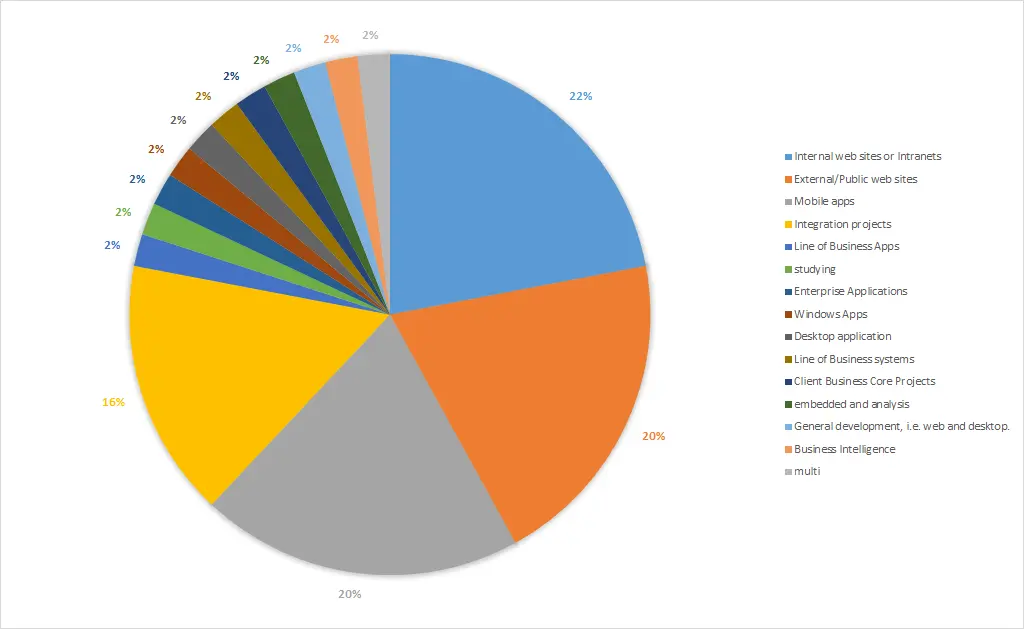
There’s a trend away from web technology: internal websites are down 8%, public-facing websites 7%, while mobile development is up 9%.
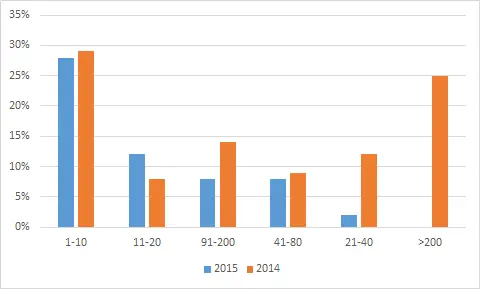
Company size:
1–10 employees: 28%
11–20 employees: 12%
91–200 employees: 8%
41–80 employees: 8%
21–40 employees: 2%
>200 employees: 0%
Role in purchasing:
Can suggest/influence purchases: 40%
None: 42%
Final say: 18%
Comments
Most comments were positive and supportive—thank you! One trend that stood out was video recording the sessions. This is something we’re investigating, and we want to offer these videos with a reliable system. It’s not an easy problem to solve, but we’re working on it.
Raw Data
If you’d like to explore the data yourself, you can find it below.
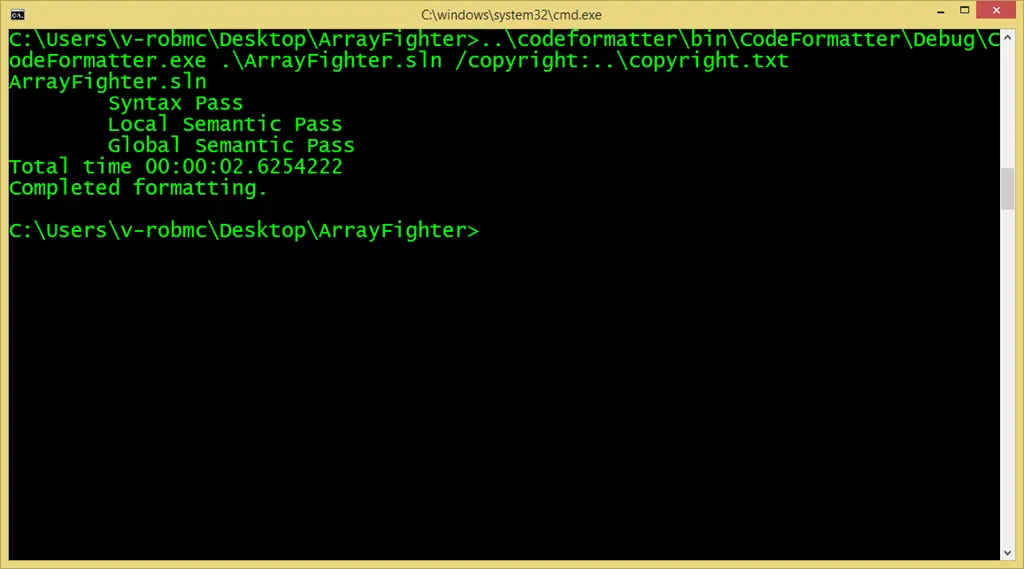
If you want to commit to the .NET open source code, you need to follow the coding style that the teams use—and to assist with that, there is a helpful tool you can run over your code called Code Formatter. It’s a simple command-line tool that you can run over your code to fix up the style.
Ultimately, I think this is a great tool and something that can easily be added to your build process to keep the code clean. I’d love to see someone like Steve Cadwallader, who made CodeMaid, start to introduce this tool so it can become part of Visual Studio.
A quick test
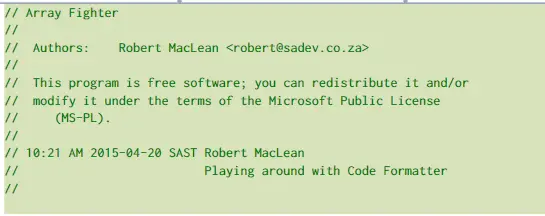
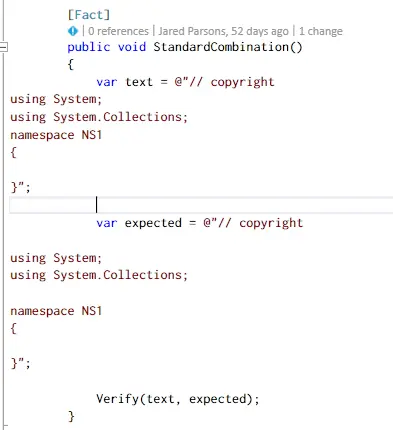
I decided to take it for a spin over my array fighter code, since it is a fairly messy piece of quick code I wrote, to see what would change—and it was really minor. First up, copyright headers were added, and I played with that to tweak the header a bit, which was a great option.
Second, all my items had accessors placed on them, and my fields were changed from starting with a capital to starting with a lowercase and underscore.
A bigger test
For a second test, I ran it over a HUGE project—which is frankly a disaster—and it took less than 10 seconds to handle just a few thousand files. Some things I noticed were:
The removal of blank lines:
Changing the copyright symbol to a Unicode number:
Prefixing static fields with s_:
Adding spaces in auto-properties and between member names and getters/setters:
I don’t personally like all of these changes, but they make sense—and it’s configurable.
Looking at the code
Since this is an open-source tool, we can look through the code for some interesting bits. The first area I examined was the unit tests, since they are all unit-tested using XUnit, and I really like how they structured them—simple to read and work with.
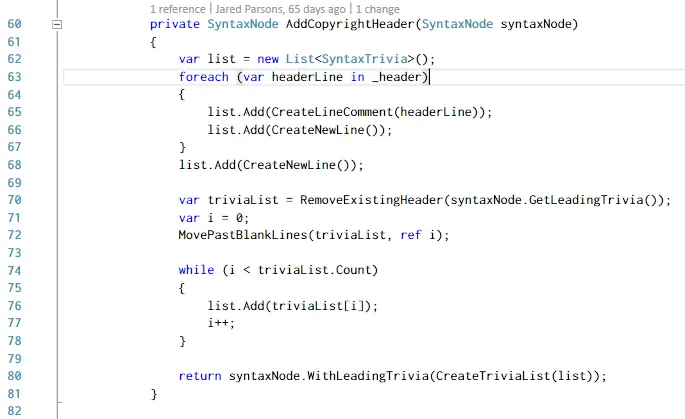
Nice to see someone using System.ComponentModel.Composition for a lightweight DI framework, since it’s been talked about so often but rarely seen in practice. The most interesting part, though, is that this is built with Roslyn—and it’s amazing how readable the code is. For example, here’s the code to insert the copyright header in about 20 lines:
If you’re looking for Roslyn examples, this is a great place to start.
Dead Regions
Hidden inside the solution is a second tool named Dead Regions, which finds and potentially edits conditional compiler blocks of code that are always TRUE/FALSE. It’s interesting, but I’m not sure it has as broad use as the formatter. Check out the readme.md for a good write-up on it.
In our code today we often work with strings and want to mix code with it. The simplest version of this is just concatenation of strings:
// it is okay when it is smallvar result = "Hello " + Name;
// it looks messy when it gets longvar result2 = "You " + SubjectName + " must be the pride and joy of " + SubjectHomeTown;
// and when you take it across multiple lines... it is uglyvar result3 = @"This was a " + TestResult + @". I am making a " + ReminderTool + @" here: " + SuccessRating;
[String.Format](https://msdn.microsoft.com/en-us/library/system.string.format(v=vs.110).aspx) is a potential help here:
```csharp
// multiple data slugsreturnstring.Format("{0} is {1} years old and their favourite animal is {2}",
Name,
Age,
AnimalsOrderedByFavourite().First());
// using string.format for formattingreturnstring.Format("Hamsters cost {0:0.00}", 14.22);
The problem with string.Format is that it is possible to make mistakes with the format items, for example:
// this line works but outputs the wrong data. There is no way for the compiler to identify this, and you get no exceptions when you run it.string.Format("{0} is {0} years old and their favourite animal is {2}",
Name,
Age,
AnimalsOrderedByFavourite().First());
// this line compiles fine, but it will raise an exception when run, as there are only three parameters and you are asking for a fourth.string.Format("{0} is {3} years old and their favourite animal is {2}",
Name,
Age,
AnimalsOrderedByFavourite().First());
String Interpolation to the rescue!
String Interpolation aims to make these scenarios easier by allowing you to have blocks of code directly inside the string itself. To achieve this, we need to tell the compiler that the string may contain blocks of code, and we use the $ symbol prefixed on the string to do that. We can then insert blocks of code using the same braces we normally use for blocks of code. This allows us to change the code in the above examples to:
var result = $"Hello {Name}";
var result2 = $"You {SubjectName} must be the pride and joy of {SubjectHomeTown}";
var result3 = $@"This was a {TestResult}.
I am making a {ReminderTool} here:
{SuccessRating}";
return$"{Name} is {Age} years old and their favourite animal is {AnimalsOrderedByFavourite().First()}";
return$"Hamsters cost {14.22:0.00}";
In the above examples, it becomes clear what members we are working with, and it is no longer possible for us to make mistakes as the compiler will run and identify the issues at compile time—problems it can also simplify, as with the third line where we use a continuation without having to scatter multiple @ symbols around.
This is Code
This isn’t just a way to insert properties into strings; it is a way to insert code, so you can do all kinds of interesting things with it:
// concat inside the code blockvar example1 = $"Hello {Name + LastName}";
// calling methodsvar example2 = $"Your home town is in {LookupProvinceState(SubjectHomeTown)}";
// async works toovar example3 = $"The temp is {await GetTemp()}";
// strings inside strings with interpolationvar example4 = $"Inception is {Rating + $"Inception is {Rating}"}";
// LINQ works, and multi-line works if you add an @var example5 = $@"LINQ works too {from a in AnimalsOrderedByFavourite()
where a.Length > 20select a}";
// we can do string formattingvar example6 = $"Your balance is {Balance:C}";
The limitation here is that it must be a single statement. You cannot type a semicolon (;) inside the string interpolation.
Syntactic Sugar
This, like so many C# 6 features, is just syntactic sugar. Under the hood, it converts to using string.Format. For example, our first example above becomes:
string text = string.Format("Hello {0}",
    this.Name + this.LastName
);
What about Cultures? The Answer Is IFormattable
Looking at example six in the This is Code section, you can see we use string formatting for currency but cannot specify culture information. So how do we format it specifically?
The result of the interpolated string is a string that also implements IFormattable, and you can create a method to set the correct culture very easily:
staticvoidDemo()
{
// formatting as South Africanvar example1 = en_za($"Your balance is {Balance:C}");
}
publicstaticstringen_za(IFormattable formattable)
{
return formattable.ToString(null, new CultureInfo("en-za"));
}
In .NET 4.6, the string will also support System.Runtime.CompilerServices.FormattedString, enabling additional formatting options.
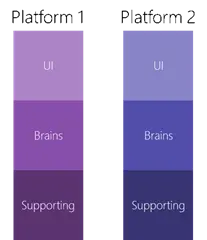
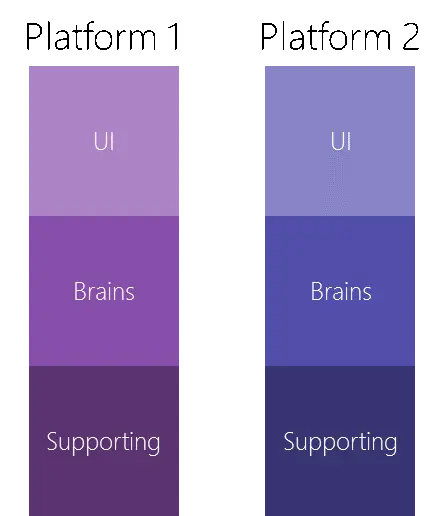
A universal app (in regards to the Microsoft platform—as Apple uses this same term for something similar but different enough) is made up, at a very high level, of three areas. The first area, the User Interface (UI), is what you see, and for a universal app, it is built either with XAML or HTML. The second is the logic that powers the UI—the logic can go by many names (code behind, controller, view model, and more), and we will refer to the logic in this document as the brains. The UI and brains work together: the brains provide the raw data to the UI, which handles laying out and styling the data, and the UI provides input to the brains in the form of user interactions. The third piece is supporting code that the brains and UI use—for example, code that talks to an API or a database. This third piece is sometimes very separate and sometimes tightly mixed with the brains.
Traditionally, if you wanted to build an app that targets multiple platforms, you had to create a custom UI for each platform, and traditional software development tied the brains and the UI tightly together, meaning you often had to rewrite the brains or copy and paste code between different platforms. This leads to duplication in everything: cost, time to add features, bugs, etc.
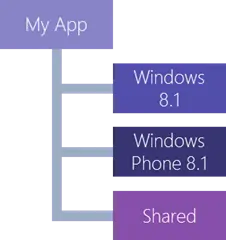
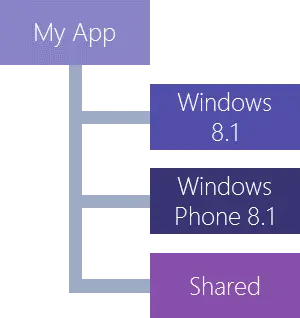
Microsoft has introduced a concept called Universal Apps, which allows for creating a single core app that can run on Windows Phone 8.1, Windows 8/8.1/10, and Xbox One (coming soon). The way this works is by partitioning the app into multiple pieces—one for each target platform and an additional Shared piece. For this article, we’ll focus on building an app for Windows Phone 8.1 and Windows 8.1, meaning we’ll have three pieces in our project.
Microsoft does offer other technologies for greater code reuse, such as Portable Class Libraries (PCL), and there are industry patterns—like Dependency Injection (DI)—that can help, but none are essential or directly relevant here. The takeaway? Achieving maximum code reuse requires careful planning, an understanding of software development, and skilled developers.
The core idea in a Universal app is to place as much code as possible in the shared partition, allowing each platform to reuse the exact same UI, brains, and supporting code. Modern technologies in XAML and CSS 3 (for HTML) enable the UI to adapt intelligently to different screen sizes and devices, ensuring a single UI can work across all platforms. For the brains, proven practices like MVVM allow the logic to be decoupled from the UI, maximizing reuse.
In an ideal scenario, you’d get 100% of the code in shared—but in reality, it’s typically 75% to 95% (based on my experience and the app’s features/platform targets). The issue is that even with today’s best technology, some UI elements don’t work across all platforms, some features exist only on specific platforms, and optimizations can improve performance or user experience. In these cases, the relevant code or UI is moved out of the shared partition into the platform-specific section—with minimal duplication at worst.
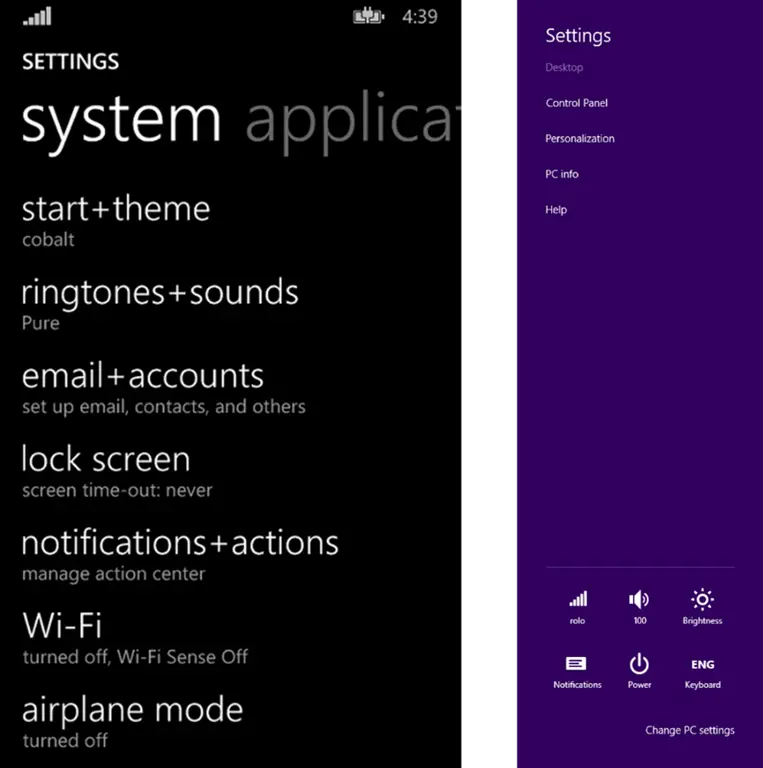
A great example is settings: On Windows Phone, the design style dictates a single settings page accessed from a button in the app bar. For Windows 8.1, the design style suggests not including settings in the app bar—instead, you use the Settings charm and flyouts. In traditional development, this would require totally separate code and UI for settings. Following best practices, however, you can keep the logic once (in shared), break the UI into reusable components (also in shared), and compose them differently per platform. Only the unique composition details would vary.