Do you miss TechEd? Do you miss a big conference where the chance for conversations with the best presenters in the country and around the world can happen? Do you miss having too many choices for topics to attend because they all sound great?
I do. The conference space in SA has shifted a lot over the last few years, with niche events happening but very little broad events focused on networking, skill-building, and the challenges faced by modern developers in South Africa who must wear multiple hats. Together with the Developer User Group, we’re joining forces to fix that!
On 8 March, in Johannesburg, we’ll host a new full-day conference: DevConf. It features multiple tracks packed with content for you, including talks covering programming techniques, tools & frameworks, databases, DevOps, and the softer skills (like teamwork). The event will bring together over 40 speakers—some of the best from South Africa and internationally. Personally, I’m thrilled to see Willy-Peter Schaub from Microsoft in Canada come out to share insights on Agile!
Last night I was able to present at the amazing SIGiST (Special Interest Group in Software Testing) meeting, run by the IITPSA (Institute of Information Technology Professionals South Africa), and spoke about the changes in Microsoft’s development vision and the tools available from Microsoft for software testing. It was a great event—if you’re in software testing, this is definitely a group you should attend.
Ever notice how you’re always on 2G (Edge) mobile networks when you need some data on your phone? A while back, I stumbled on this odd trick that seems to always work (at least it did for me & a few other Windows Phone users in South Africa).
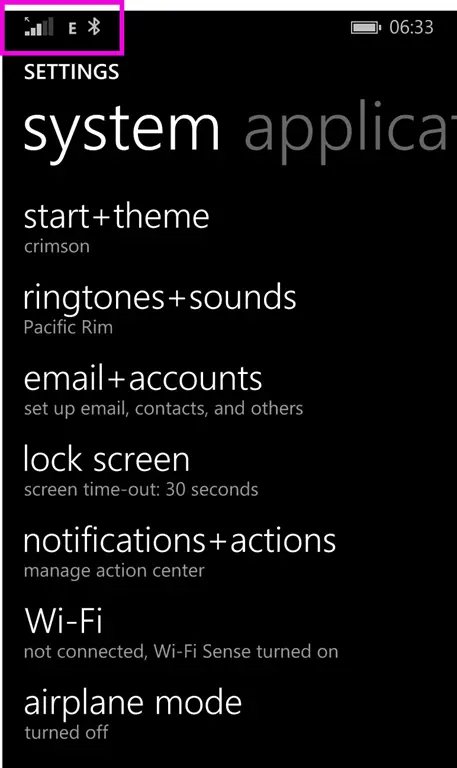
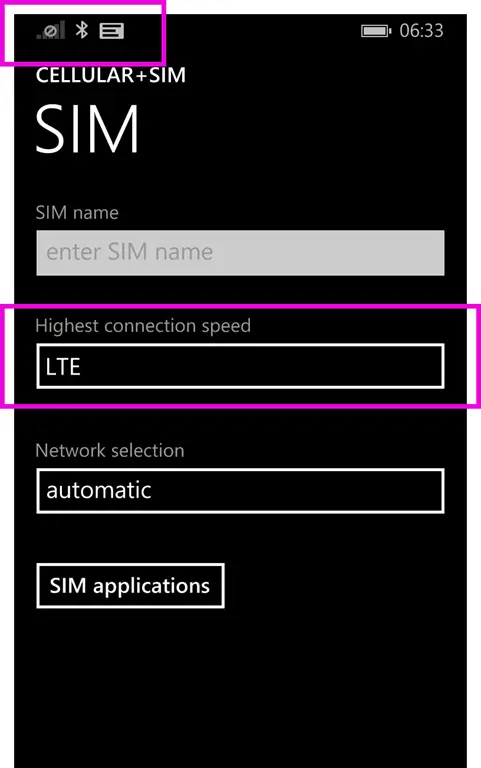
Step 1: Go to the settings on the phone—note the E in the status bar at the top, for extremely shitty network.
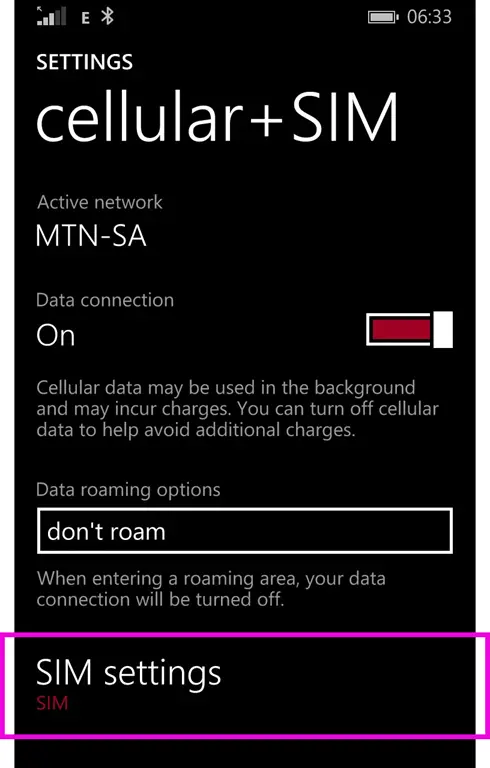
Then, on Windows Phone, go to Cellular + SIM and click SIM Settings.
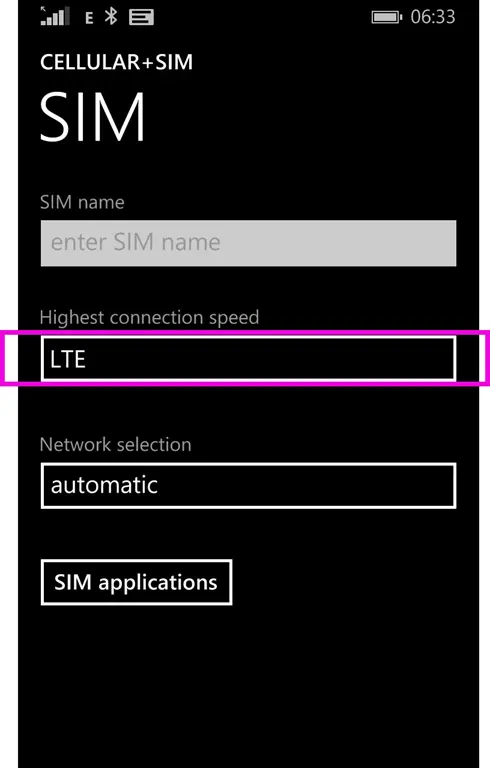
Currently, it’s set to LTE (because speed!).
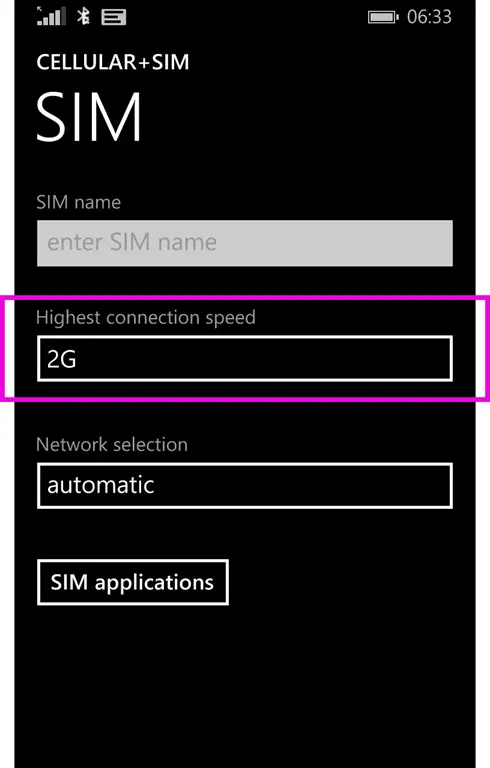
So, you force it to 2G.
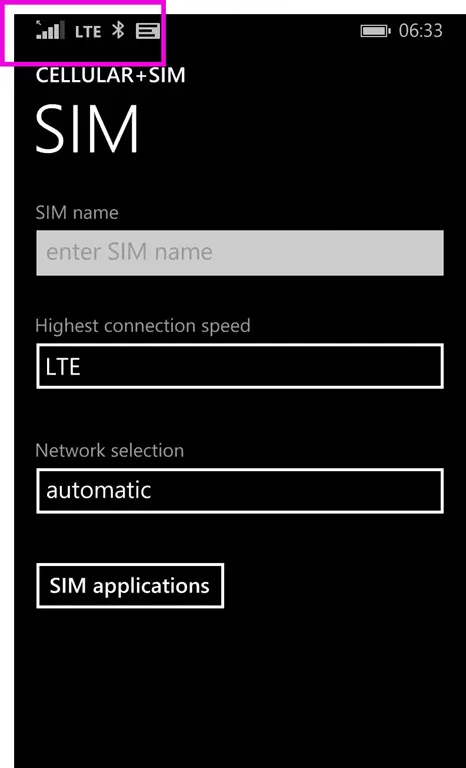
Now, give it a few seconds and change it back to LTE. After about 2 seconds, you should lose all network access.
After another few seconds, it will reconnect—and it’ll be on LTE (or sometimes 3G).
If you have Visual Studio 2015 and you have installed Update 2, you may run into a painful bug when trying to build for the Windows 10 Store, where the builds fail with the following errors:
1>MakeAppx : error : The mapping file can't be parsed. The error occurs at line 3. [app\platforms\windows\CordovaApp.Windows10.jsproj]
1>MakeAppx : error : Package creation failed. [app\platforms\windows\CordovaApp.Windows10.jsproj]
1>MakeAppx : error : 0x8007000b - An attempt was made to load a program with an incorrect format. [app\platforms\windows\CordovaApp.Windows10.jsproj]
1>MDAVSCLI : error : Error code 1 for command: C:\Program Files (x86)\MSBuild\14.0\bin\msbuild with args: app\platforms\windows\CordovaApp.Windows10.jsproj,/clp:NoSummary;NoItemAndPropertyList;Verbosity=minimal,/nologo,/p:Configuration=debug,/p:Platform=x86
1>  Command finished with error code 2: cmd /s /c "app\platforms\windows\cordova\build.bat --debug --archs=x86 --win --buildConfig=app\build.json"
1>ERROR building one of the platforms: error : cmd: Command failed with exit code 2
1>  You may not have the required environment or OS to build this project.
1>MDAVSCLI : error : cmd: Command failed with exit code 2
The solution to this is twofold:
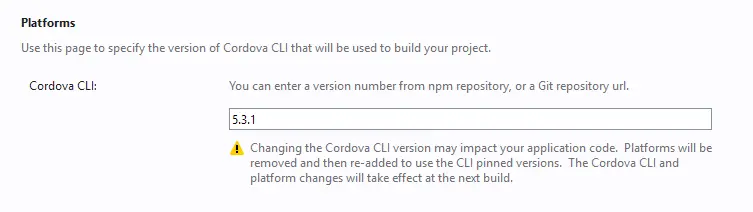
First, change the Cordova version to 5.3.1 in the config.xml.
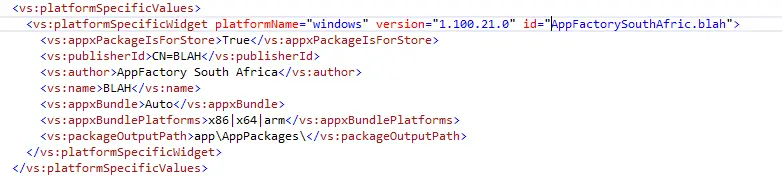
Second, open the config.xml in the XML editor (select it in Solution Explorer and press F7). Near the bottom, you will find the node vs:platformSpecificValues; delete it and all of its contents.
You should now be able to do a Windows 10 build that can be uploaded to the store.
The dev tools team recently released Update 1 for the Visual Studio Tools for Apache Cordova. However, this update can cause Visual Studio (VS) to hang and/or other issues with Cordova projects. This is a known issue—one that impacts early adopters the most, because it requires two conditions:
The update itself
The original Windows 10 SDK
There was an issue with the SDK, which was re-released a few days later with a fix. But anyone with the original bits will still encounter the problem—this includes users who installed VS 2015 from an ISO without internet access (even if you use the ISO while connected, it may still pull the outdated version).
Workaround
If you haven’t installed the tools yet
The fix is simple: open the registry and verify the presence of these keys:
For x86:HKLM\Software\Microsoft\VisualStudio\14.0\Setup\VS\JSLS_MSI\Version
For x64:HKLM\Software\Wow6432Node\Microsoft\VisualStudio\14.0\Setup\VS\JSLS_MSI\Version
If you do not have these registry keys, you’re at risk and should follow these steps:
⚠️ Ensure you have an internet connection BEFORE starting.
Go to Programs and Features, select Visual Studio 2015, and click Change.
In the Visual Studio setup, click Modify.
Deselect the feature "Tools for Universal Windows App Development".
Re-select it and click Update (forcing VS to fetch and install the latest SDK bits, resolving the issue).
If you’ve already uninstalled the tools
ReinstallTools for Universal Windows App Development.
OR, follow these steps to reinstall the JavaScript project system and language service:
Download the Visual Studio installer for your edition (e.g., vs_community.exe).
I recently presented at the fantastic JSinSA conference about some of my favorite JavaScript tools that Microsoft is offering. Below are the slides & my demo notes! I also recorded a video the night before the session, so check it out on YouTube.
This is a follow-up to my post on the man-in-the-middle attack that Telkom continues to use, as well as to the Telkom response in the awesome TechCentral article and new thoughts brought about by the Reddit post.
A real threat
Shortly after I posted my article, I was contacted by someone (let’s call them Person X), who went snooping based on my post and found that Telkom did indeed have a major security flaw in the system. We agreed to hold off sharing the information publicly until Telkom fixed it—or enough time had elapsed to show they didn’t care. Telkom appears to have fixed it, as far as I can tell, so let’s dig into this major attack vector.
Recapping the content served to you is made up of three pieces:
JavaScript – this is appended to other JavaScript to ensure it runs, and the entire modified JavaScript is returned from a specific server. This server is only visible on the Telkom ISP network.
HTML – a bit of HTML is loaded, once again from the same server as above.
Image – the graph showing you usage is a static image served from a server, which is (oddly) available everywhere: http://images.telkomsa.net/
Person X realized that the images came from a folder /ibn and that folder had directory listing enabled—which isn’t a good practice, but normally not a major security concern. What the directory listing showed, besides the files, was the version number of the server, which was (at the time) 2.0.52.
Apache 2.0.52 was released in November 2004—11 years ago—and has numerous security flaws. There’s no reason to run this version at all—it’s insecure and highlights a major security procedure flaw at Telkom. Using one of the flaws, it was possible to replace the specific image on the server with anything you wanted. For example, you could swap the image file with a Flash file that would enable you to use one of the recent zero-day attacks against Flash—and leverage Telkom’s system to deliver said Flash file to the user. This would allow you to own the target machine.
Remember, this popup only shows to people who meet the following three requirements:
Telkom ISP client
At or near their limit
Have not opted out
I would assume that the tech-savvy of Telkom’s users have opted out, and those near their limit are soft-capped, meaning that security patches are slower to reach them. In short, it’s the most vulnerable group who would be targeted. Scary, right?! Let’s hope Telkom fixed all the issues with that server—and all the others.
Comments on Telkom’s choice of wording
I’m really happy Telkom has responded and is fixing things—that’s all I wanted. That said, their choice of wording and delay in commenting until they fixed the issue is interesting. Let’s break down their response, and I’m avoiding nit-picking since I could do a lot of that too.
In technical terms, we refer to it as an HTTP redirect
That’s true. It is an HTTP redirect, but the manner in which it’s used is not in the traditional sense, where the destination server tells the client to go somewhere else. Here, a man in the middle (see what I did there 😜) is doing the telling—and thus I chose the term MITM attack as the description. It’s not an exact description, but it describes the entire scenario, not just one aspect of it.
HTTP redirect is a common mechanism used in service provider networks for content caching and to optimize video streaming.
True again. That said, in those scenarios, service providers don’t change the content—they only alter the destination for better performance for the user. Telkom is changing the JavaScript content, and there’s a fundamental difference there.
does not alter the Web service content
In my previous post, I showed that they are changing the JavaScript content, so that’s pretty incorrect.
is not a security risk
See above—and then realize it was only true when it was said, not the day before.
will not “break” a website
The web is a big place; it’s impossible to know that. I also wonder why “break” is in quotes—is there more than one definition of it?
I have been asked recently about ES6 support in Visual Studio (VS), and I haven’t had a clear answer about how much of it is supported right now (i.e., VS 2015 RC) and what works. The general feeling from those asking is that VS lags significantly in this space, so the only reasonable thing to do was test this thoroughly and share my findings with you.
Using Luke Hoban’s awesome page on ES6 features, I identified a comprehensive list to test. I then evaluated each feature in VS 2015 RC and in VS Code (our new lightweight, cross-platform, free IDE). Ultimately, Visual Studio supports 70% of ES6 features, while VS Code supports 94%. But what does "implemented" mean here? It means no errors are raised, and the IDE provides correct IntelliSense behavior. Both IDEs are actively improving, but this gives a solid baseline for discussion.
I determined support by assigning a score:
1 (fully works)
0.5 (partially works, with noted issues)
0 (doesn’t work).
One feature, the Reflect API, wasn’t included as I don’t yet have a working example to test it. If you spot any errors in my findings, please let me know—I’ll happily update this!
Feature
VS
Code
Arrows
1
1
Classes
0.51
1
Enhanced Object Literals
1
1
Template Strings
1
1
Destructuring
0
1
Default + Rest + Spread
0.52
1
Let + Const
1
0.83
Iterators + For..Of
1
1
Generators
0
1
Unicode
0
1
Modules
0
1
Module Loaders
0.54
0
Map + Set + WeakMap + WeakSet
1
1
Proxies
1
1
Symbols
1
1
Subclassable Built-ins
0.55
1
Math + Number + String + Array + Object APIs
1
1
Binary and Octal Literals
1
1
Promises
1
0.96
Tail Calls
1
1
Total
70%
94%
Footnotes:
No IDE errors, but IntelliSense is incomplete.
No IDE errors, but IntelliSense is lacking.
An extra (misplaced) warning appears, though nothing breaks.
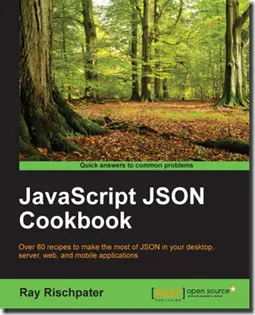
In February this year, I was contacted by the team at PACKT Publishing about being a technical reviewer for a book that was underway. In exchange, I would get a free copy and be listed as one of the reviewers.
I’ve toyed with the idea of writing a book for ages, so this felt like a great opportunity to see what happens behind the scenes without committing to writing one myself. I said yes to them—and today, that book got published! You can get it at: http://bit.ly/json_cookbook (I’m really excited about this).
The book itself is a very interesting mix of content, from the basics of JSON to an introduction to MongoDB and storing data in it. The description—“Quick answers to common problems”—really hits the nail on the head. What I think is especially awesome is how it covers a lot of languages and tools: .NET, Java, Node.js, Android, Objective-C, and more. The examples are great because they work across multiple operating systems, so you can quickly try them out.
I don’t think it’s a book you’d read from cover to cover. Instead, it’s meant to guide you where to start with JSON-related problems.
The reviewing experience itself was interesting—each chapter took a few hours of reading, trying out the code, and responding with details of issues I found. The team at PACKT made the process really pleasant. I never heard from the author or other reviewers, which, in hindsight, is a bit odd—but I think it helped keep my responses focused and unbiased.
If you pick it up, let me know what you think!
Note: I’ve only seen the content I reviewed—I haven’t seen the final book, which may have changed.
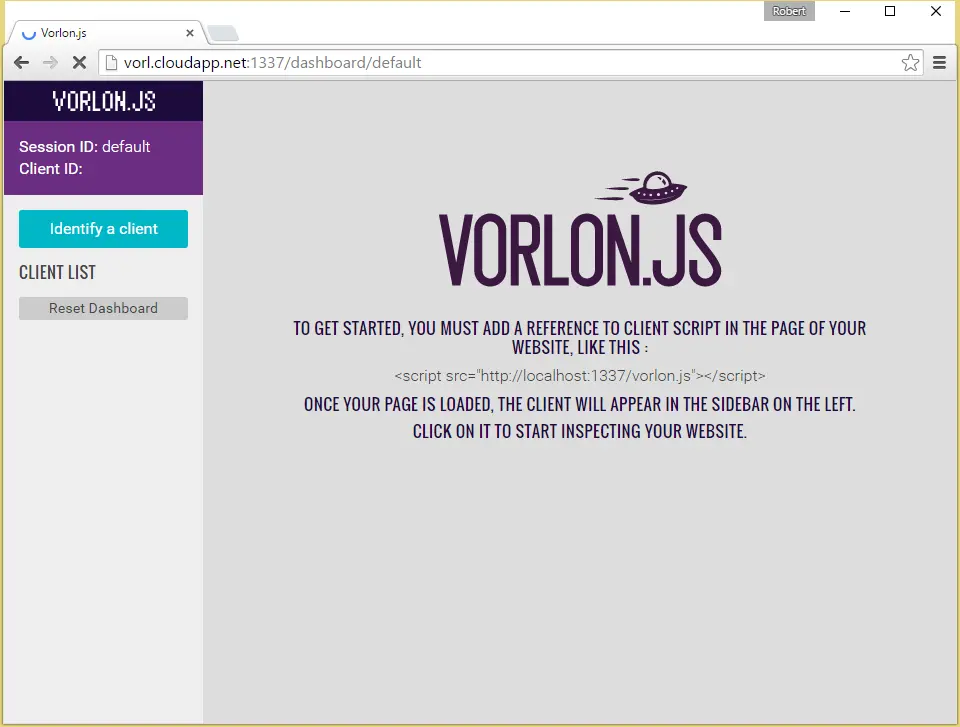
Vorlon.js is an amazing tool for web developers, as it brings the browser developer tools—aka F12—out of the limitations of a single browser and into the cloud. While you can run it on your machine, I believe you really get its full power when you put it on a dev server somewhere. The broader the reach, the more useful it becomes. With that mindset, here’s how to run it on an Ubuntu server—I’m using Azure to host the VM for this example. I went with the Basic A2 (2 cores, 3.5 GB) machine, which is more than enough for Vorlon and keeps costs low.
Step 1: Get NPM
Vorlon uses NPM (Node Package Manager) for distribution, so you’ll need it to get started. Before you begin, ensure you’re up to date:
sudo apt-get update
Once that’s done, install NPM with:
sudo apt-get install npm
If you didn’t run the update first or encounter issues, try the command again with extra parameters.
Step 2: Get Node.js
Vorlon is built with Node.js, so you’ll need that too. This took me longer to figure out than expected, but thanks to this page, I finally got it right. Run these commands:
With the machine set up correctly, install Vorlon via NPM:
sudo npm i -g vorlon
Step 4: Run Vorlon
Running Vorlon is simple—just type:
vorlon
For Windows users, ensure it’s all lowercase. It takes about 30 seconds, and you’ll see the command output appear.
Once that appears, you can access it!
Node.js Missing Error
Initially, every time I ran Vorlon, I got this error: /usr/bin/env: node: No such file or directory
This happened because I hadn’t installed Node.js—I only had npm, which doesn’t include Node.js. In hindsight, it’s obvious, but at the time, it took me an hour to figure out.
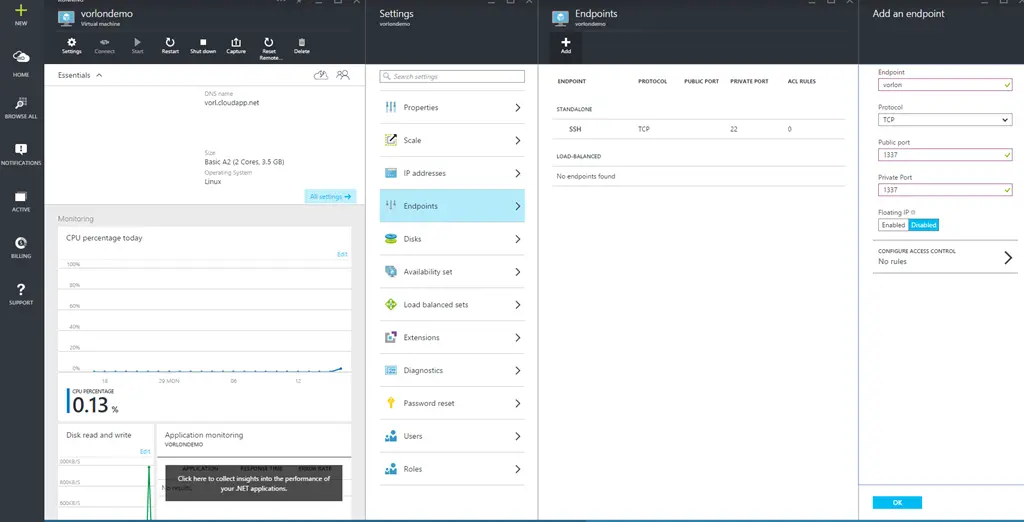
Azure Endpoint Setup
If you’re using Azure, you’ll also need to set up endpoints to allow VM access. Go to the portal, open your VM, click All Settings, then Endpoints, and add a new one. Map the public endpoint to the private one—I kept both as 1337, but you could choose different ports.