This post is one in a series about stuff formally trained programmers know—the rest of the series can be found here. # Binary Tree
In the previous post, we looked at the tree pattern, which is a theoretical way of structuring data with many advantages. A tree is just a theory though, so what does an actual implementation of it look like?
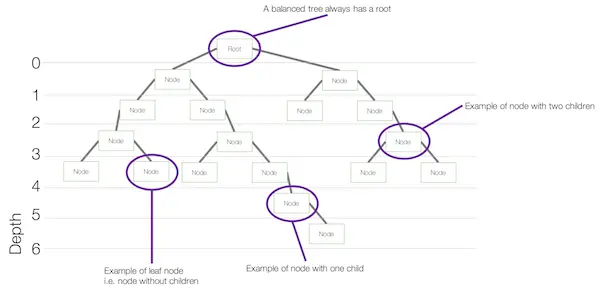
A common data structure implementation is a binary tree. The name binary tree gives us a hint to how it is structured: each node can have at most 2 child nodes.
Classifications
As a binary tree has some flexibility in it, several classifications have emerged to discuss a binary tree consistently. Common classifications are:
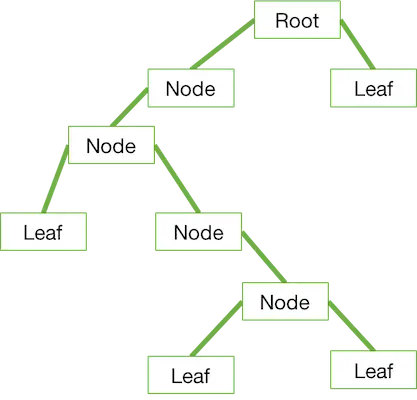
Full binary tree: Each node in a binary tree can have zero, one, or two child nodes. In a full binary tree, each node must have either zero or two child nodes.
Perfect binary tree: This is a full binary tree with the additional condition that all leaf nodes (i.e., nodes with no children) are at the same level or depth.
Complete binary tree: The complete binary tree is where each leaf node is as far left as possible.
Balanced binary tree: A balanced binary tree is a tree where the height of the tree is as small as possible (ideally, logarithmic in relation to the number of nodes).
Implementations
While a binary tree is more than just a pattern, there are no out-of-the-box implementations in C#, Java, or JavaScript for it. The reason is that it is a very simple data structure—so if you need just the data structure, you could implement it yourself. More importantly, you likely want more than the simple structure—you want a structure that optimizes for traversal or data management.
This post is one in a series about stuff formally trained programmers know—the rest of the series can be found here.
Trees
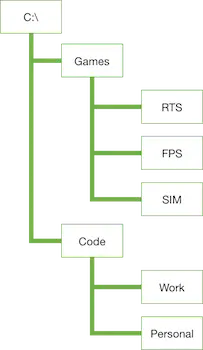
This post will look at the mighty tree, which is more a pattern than a specific data structure. The reason to understand the pattern is that so many of the data structures we will look at in the future use it—that a good understanding of it provides a strong basis to work from. As a computer user, though, you already have seen and used a tree structure—you may have just not known it. The most common form of it is the file system, where you have a root (i.e., / or C:\) and that has various folders under it. Each folder itself can have folders, until you end at an empty folder or a file.
This is the way a tree structure works too: you start with a root, then move to nodes, and finally end with leaves.
In the basic concept of a tree, there are no rules on the nodes and the values they contain—so a node may contain zero, one, two, three, or a hundred other nodes. What makes a tree really powerful is that it really is a collection of trees. That is, if you take any node, it is in itself a tree, and so the algorithms used to work with a tree work with each node too. This enables you to work with a powerful computer science concept: recursion.
Recursion
Recursion is a concept that lacks a real-world equivalent and so can be difficult to grasp initially. At its simplest, for these posts, it is a method or function that calls itself until instructed to stop. For example, you might write a function called getFiles that takes a path to a folder and returns an array of filenames. Inside getFiles, it loops over all the files in the folder and adds them to a variable to return. Then it loops over all the folders in that folder and, for each folder it finds, it calls getFiles again.
functiongetFiles(path) {
var result = [];
fs.readdirSync(path).each(file => result.push(file)); // get all files using Node, and push them to the result array.var directories = fs.getDirectoriesSync(path); // not a real Node call—for example.
directories.each(directory => {
var files = getFiles(directory); // calling itself.
files.each(file => result.push(file));
});
return result;
}
IEnumerable<string> GetAllFiles(string path) // changed to GetAllFiles so it doesn't get too confusing with the built-in GetFiles
{
  var result = new List<string>();
  result.AddRange(Directory.GetFiles(path));
  foreach (var directory in Directory.GetDirectories(path))
  {
    result.AddRange(GetAllFiles(directory)); // recursively calling itself
  }
  return result;
}
Implementations
It doesn’t make sense to talk about coding implementations at this point since this is more a pattern than a structure—and we would need a lot more information on what we want to achieve to actually go through a code implementation. That said, it is interesting to see where trees are used:
This post is one in a series about stuff formally trained programmers know—the rest of the series can be found here. #Linked List
In the previous post on Array, we saw that all read operations are Θ(1), which is awesome. An important reality of programming is that everything is a trade-off, so when you get fast reads with an array, adding items when you don’t know the collection size is expensive.
Array Growth Issue Example
Let’s say you create an array of ints, named X, and set the length to 5 (currently, that is using 20 bytes). Now we want to add a 6th item, so the solution is to create a second array, named Y, with a larger length. If we just want to handle one more item, it means Y is now taking up 24 bytes of memory. Then we need to do a bunch of copy operations as we copy items from X to Y, which is really slow. By the end of the process, just adding one item was really expensive.
Linked List to the Rescue
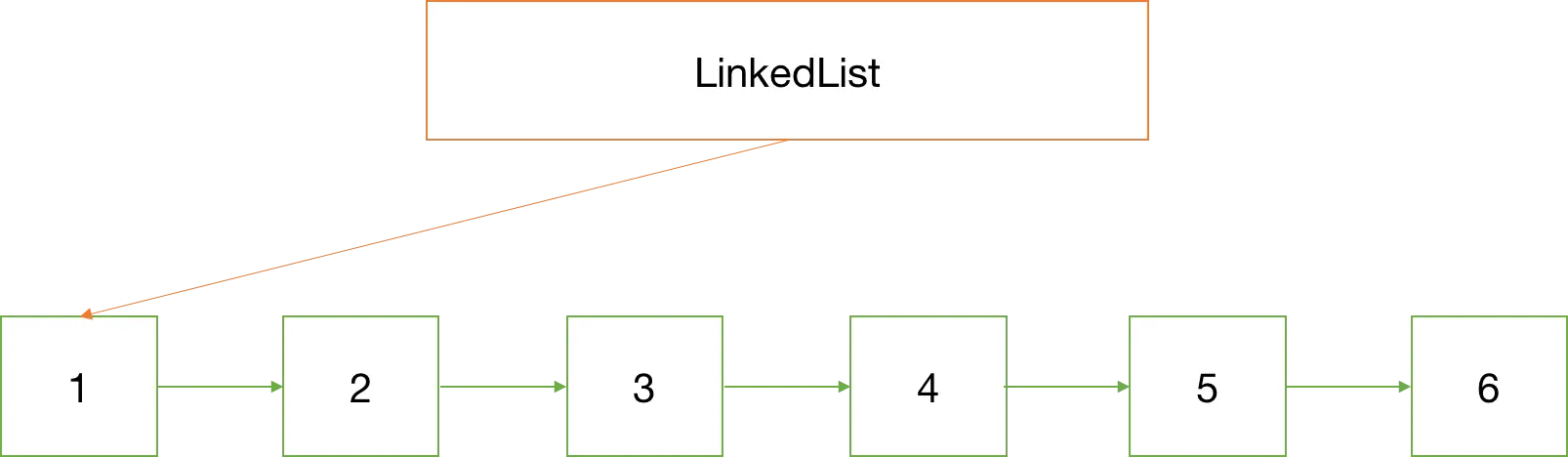
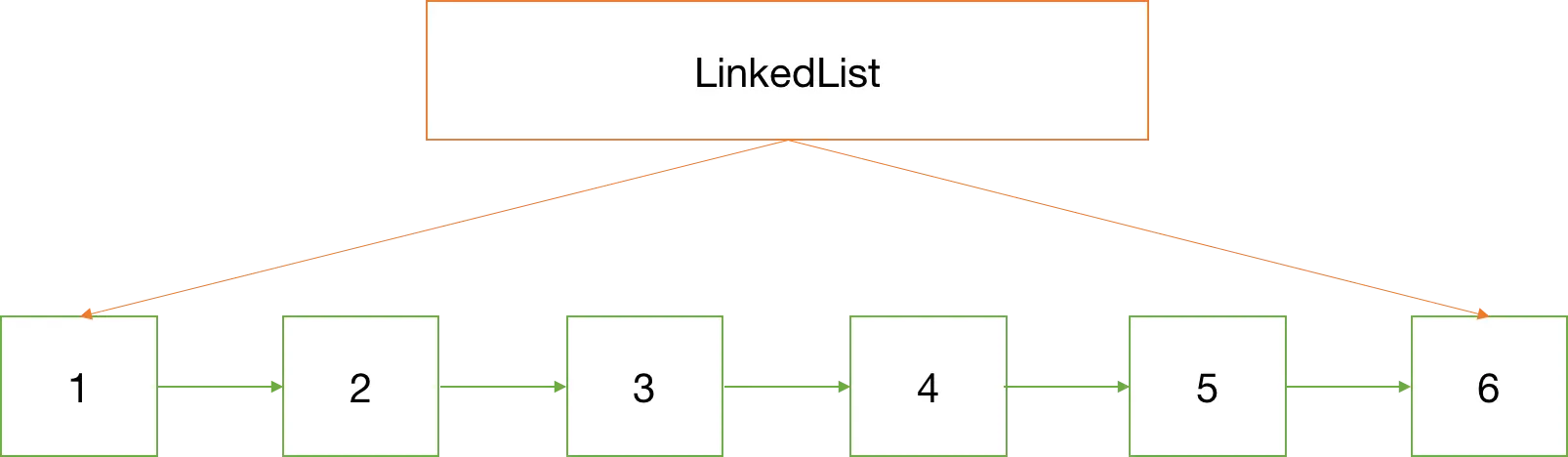
The solution is to change the way we store the data structure in memory. With a linked list, each value is wrapped with metadata and stored separately in memory (compared to an array, which stores all values in a single continuous block of memory). The reason each item is wrapped is that it then gets a pointer to the next item in the collection, so that you can still navigate through the collection.
Pros and Cons
The big advantage of a linked list is that since the values can go anywhere in memory, the collection can be expanded indefinitely until you run out of memory for very little cost, either Θ(n) or Θ(1). The difference is whether the collection implementation keeps a pointer to the final item or not: if it does not, then it needs to navigate through each item (Θ(n)), and if it knows the location of the last item, it just needs to go directly to it and set its pointer to the next item.
Removing and reordering items is also much faster than with an array, since you just need to find the items before/after and change where their pointers point to.
What is the downside then? Navigation through the collection is slower than with an array. For example, if we create an integer array and want to access the fifth item, we can do it with simple math: (start of array in memory) + (int size in memory * offset)—that will give us the location of the integer value we want to read, basically an Θ(1) operation. With a linked list, however, I need to ask the first item where the second is; then ask the second where the third is; then ask the third where the fourth is; then ask the fourth where the fifth is. So it’s a Θ(n) operation for reading.
Linked lists also use more memory since you aren’t just storing values; you are storing the values and one or two pointers with each value. This is marginal when storing types without a constant size (like a class), since an array then needs to store the pointers to the values—but it’s worth remembering.
Structures
The interesting thing about linked lists compared to arrays is that they are very flexible in their implementation. The simplest version is to just have a pointer to the first item, and each item in the collection needs to point to the next item. This is known as a singly linked list, as each item is linked to one other.
The linked list may also store a pointer to the last item to make adding faster.
Doubly Linked
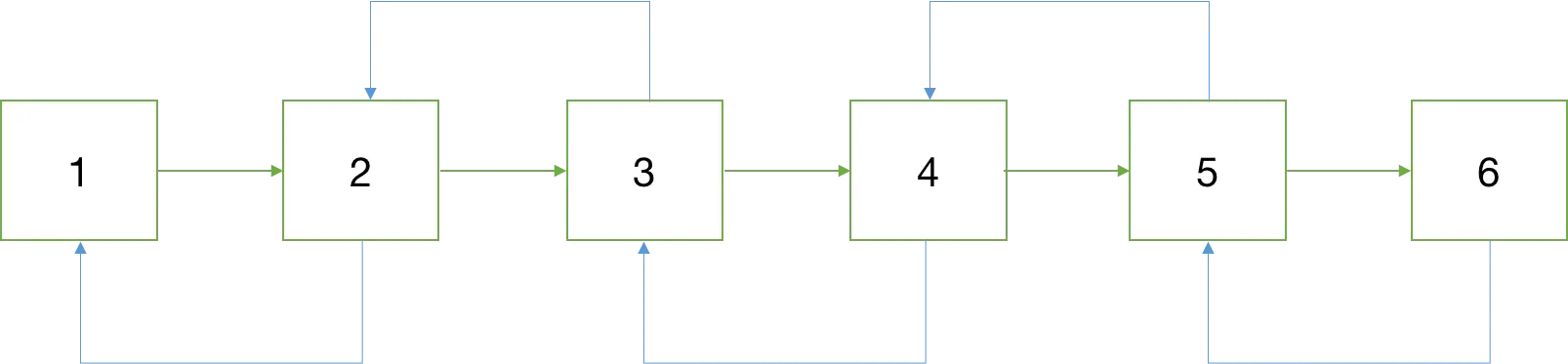
Most common implementations, however, use a doubly linked list, where each item in the collection not only points to the next item in the collection but also points to the previous item in the collection. At the trade-off of memory (for the extra pointer) and potentially more expensive operations (like an insert now impacting two items and not just one), you gain the ability to navigate forward and in reverse.
Implementations
Java has a doubly linked list implementation with LinkedList, and .NET also has a doubly linked list implementation with LinkedList. JavaScript has no native implementation of it, but there are plenty of articles on how to implement it.
This post is one in a series about stuff formally trained programmers know—the rest of the series can be found here.
Array
This is the first in the data structure reviews and likely the simplest: the humble array. The first issue is the term array—it differs depending on who uses it 🙁, but we’ll return to that later.
Generally, I think of an array like this:
An array is a container object that holds a fixed number of values of a single type. The length of an array is established when the array is created. After creation, its length is fixed. — Oracle Java Documentation
Seems simple enough. There are two limits placed on our container: single type and fixed length, and both relate to how the array is handled in memory. When an array is created, it looks at the type and length to calculate how much memory is needed to store all of it. For example, if we had an array of 8 items, we’d get a block of memory allocated for the array like this:
In some systems, arrays can grow by allocating more memory at the end—these are called dynamic arrays. However, many systems do not allow this because the way memory is handled means there might not be any space after the last item to grow into. Thus, the array length is fixed as there isn’t any additional memory allocated for that array instance.
This has a major advantage for read performance, since I can quickly calculate where an item will be in memory—thus skipping having to read or navigate all other items. For example:
If my array’s values start at position 100 in memory and I want the 4th item in an int[], it would be 4 (for the position) multiplied by 4 (for the int size) plus 100 (for the start address), and boom—value!
What happens when we can’t know the size of the items in the array—for example, if we created an Object[], which can hold anything?
In this scenario, when the array is created, rather than allocating memory based on length multiplied by type size, it allocates length multiplied by the size of a pointer. Instead of storing the values themselves in the array memory, it stores pointers to other locations in memory where the value is.
Obviously, this has a slightly worse performance than an array where we can store the values directly—but only slightly. Below is some output from BenchmarkDotNet comparing sequential reads of an int[] vs. an Object[] (code here)—and the difference is minimal:
Method
Median
StdDev
IntArraySequentialReads
52.2905 us
4.9374 us
ObjectArraySequentialReads
58.3718 us
5.4106 us
Associative Arrays/Dictionary
As mentioned above, not every array is an array—some languages (PHP and JavaScript, for example) do not allocate a block of memory like described above. These languages use what is called an associative array, also known as a map (PHP refers to it this way) or a dictionary.
Basically, these all have a key-value pair, and you can look up the value using the key. However, implementation details differ from platform to platform.
For example, in C#, Dictionary<TKey, TValue> is handled with an array under the covers, while in JavaScript, it is a normal object. When an item is added to the array in JavaScript, it merely adds a new property to the object, and that property serves as the index in the array.
Associative arrays do take up more memory than a traditional array (good example here of PHP, where it was 18 times larger).
Multi-dimensional Arrays
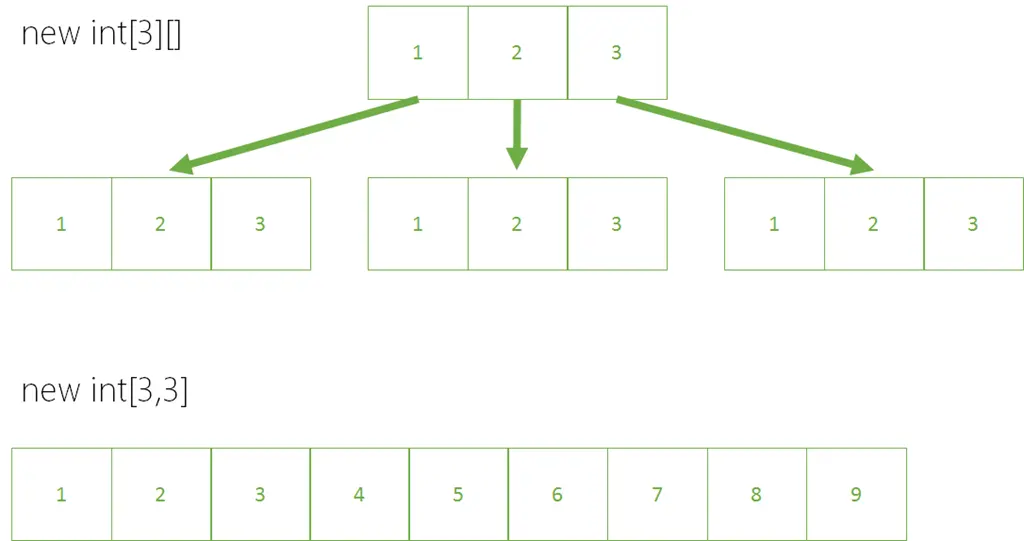
Multi-dimensional arrays also differ by platform. The Java version of them is an array of arrays, which achieves the same goal but is implemented similarly to how Object[] was described above. In C#, these are known as jagged arrays.
C# and other languages have proper multi-dimensional arrays, which work differently—they take all the dimensions, multiply them together, and use that for the length of an array. The dimensions simply provide different offsets.
Example:
Jagged arrays do have one benefit over a multi-dimensional array: since each internal array is independent, they can be different sizes, whereas all dimensions in a multi-dimensional array must be the same size.
C# – List<T>
If you’re working in C#, you might be wondering what List<T> is and how it relates to an array since it can grow indefinitely. List<T> is essentially an array with an initial size of 4. When you call .Add to add a 5th item, it does the following:
Creates a second array with a length double the current array.
Copies all items from the first array to the second array.
Uses the second array moving forward.
This is very expensive, which is why there’s an optional constructor where you can override the initial size, improving performance significantly. Once again, using BenchmarkDotNet, you can see the difference (code):
Method
Median
StdDev
DefaultConstructorUsed
701.7312 us
38.5573 us
ConstructorWithSizeUsed
548.5436 us
13.1122 us
JavaScript Arrays
As mentioned above, the standard JavaScript array is an associative array. However, JavaScript (from ES5) supports typed arrays. The supported methods differ, so this isn’t an easy replacement, and it only supports a limited set of numeric types. However, it might make sense to use these for performance reasons since they are implemented as actual arrays by JavaScript runtimes that support it.
GitHub has introduced a flat-rate structure for unlimited private repositories, and I wanted to understand how it compares to the Visual Studio Team Services (VSTS – previously Visual Studio Online (VSO)) pricing, where you already get that for free. I drew up a quick comparison and tweeted it:
I’ve had mostly positive feedback, but there has been some confusion around it.
Date
Yes, it says 2017. I’m too lazy to change it to 2016—really. If it bugs you, just look away. Or pretend I’m a time traveler.
VSTS is cheaper yet more confusing
The title summarizes the pricing difference, but people have interpreted it in many ways—including that I meant VSTS is a more confusing platform (ignoring the fact that this is about price). I only meant the pricing is confusing. For example, here’s the math for GitHub vs. VSTS at 10 users:
GitHub
VSTS
Price
$70
$30
Math
(10-5)*9 + 25
(10-5)*6
At this point, it seems simple: GitHub charges $25 for the first five users, then subtracts 5 from the total and multiplies the remainder by $9. VSTS is even simpler—your first five users are free, so you subtract them and multiply the rest by $6.
The problem? VSTS is tiered pricing, while GitHub is flat. At 1,500 users, GitHub’s math stays the same, but VSTS becomes far more complex:
GitHub
VSTS
Price
$13,480
$5,350
Math
(1500-5)*9 + 25
5*6 + 90*8 + 900*4 + 500*2
Here, the VSTS math changes drastically. First, I skip the free tier entirely (1,495 total users). The first five pay $6/month, the next 90 pay $8, the next 900 pay $4, and the remaining 500 pay $2. Summing these gives the total.
And it gets more complex: if you have an Enterprise Agreement (EA) with Microsoft (a special contract for bulk licensing), none of that applies—it’s a flat $4 per user/month (source).
GitHub is also simpler in user types: one category (paid users). VSTS has three (my informal naming—not official):
Dev: Paid users (the ones we’ve been discussing).
MSDN: Paid users, but with a TFS on-prem CAL (local TFS license) or an MSDN subscription that includes VSTS.
Stakeholder: Free—but limited to work item management (e.g., a client who needs to prioritize backlog but doesn’t need code/build access).
How do these types affect cost? Let’s look at an example.
Example
Pretend we have a dev team of 40 people, split into 5 feature teams (1x PM, 1x tester, 6x devs each). In each team, 2 devs are consultants, and the tester & PM lack MSDN (the company only has it for devs).
Your first guess might be 40 licenses → $270/month (using the calculator). But the reality is:
5 PMs use free Stakeholder licenses.
5 testers also get free licenses (assigned as Stakeholders).
20 devs have MSDN, so they don’t need extra licenses.
To address the trolls: Is VSTS more confusing than GitHub? If you’re coming from GitHub, yes—VSTS offers more features, so there’s more to learn. But the core Git repo functionality remains the same. If you know Git, you can adapt to VSTS over time. In the long run, it’s not inherently more confusing.
The series post, which contains more stuff formally trained programmers know, can be found here.
Big O Notation
This has always confused me and seemed out of my reach. It’s actually simple once I worked through it. Let’s start with the syntax:
O(n)
The "O" is just an indicator that we’re using Big O notation, and the n is the cost. Cost could mean various things—memory, CPU cycles—but most people think of it as the number of times the code will execute. The best cost is code that never runs (i.e., O(1)), though that likely has no practical value. To explain it, let’s look at a simple example:
Console.WriteLine("Hello 1");
The cost for that is 1, so we could write O(1). If we put that in a for loop like this:
Instead of being explicit with numbers (like 10 above), we can use shorthand notation. The common one is n, meaning it runs once per item. For our loop example, that means it could be written as O(n), so whether we loop 10 times or 100 times, the relative cost is the same and can be referenced the same way. From this point on, it’s just about adding math to it.
If we had a loop inside a loop—like this, running 100 times (10 × 10)—we could write it as O(n²).
var n = 10;
for (var outerCounter = 0; outerCounter < n; outerCounter++)
{
    for (var counter = 0; counter < n; counter++)
    {
        Console.WriteLine("Hello " + counter);
    }
}
Another common term used with Big O notation is log, i.e., logarithm, written like this: O(log n). Here, the cost per item decreases (relative to earlier items) as we add more.
This is going to be a series of posts where I intend to dive into the stuff which "formally trained" programmers seem to know. # What do I mean by "formally trained"? The easy way to think of it is programmers who have a university education, or something similar, where the focus is on theory. It also feels to me that the old & wise programmers all just know this, but the upcoming generation seems not to have this knowledge. I don’t put myself in that group of formally trained programmers, and even after 20 years, I don’t know these things well enough to hold a conversation about them. What topics will I be covering? (These will be linked as the posts go up.)
Languages
The biggest pain for me in 20 years of programming is that not everyone speaks the same language. I’m not referring to C# or JavaScript—rather, the terminology we use. Is an Array always an array? How do we talk about measuring performance?
Algorithms are ways of working with data and data structures in a consistent way. The advantage of knowing them is twofold: first, it helps communication since we can all use the same names, and second, it expands our thinking about programming.
August 2015, I decided I needed to lose some weight and get healthier. I wasn’t happy with my image, and I wasn’t happy that my son kicked my ass in soccer when I got tired after 10 minutes. At that point, I was about 105 kg—today I’m 71 kg 😊
I’ve had a few people ask how I did it, so here are the steps I took and why I went this route rather than following a specific diet.
My scrum board
I started off by just tracking what I ate. I had a Windows Phone at the time and found some apps for it. They were pretty good. What I found useful was having rough data to compare different foods, help understand my choices, and ensure that the data correlated day to day—so I could get a feel for whether today was a good or bad day in comparison to my history. I moved to a Samsung Galaxy S7, which comes with S Health, and that’s what I use now—it’s way better than any Windows Phone option.
Every single meal was tracked just so I could understand how much was going into me, where the calories, carbs, etc., were coming from, and to start finding ways to improve.
Iterative improvement
The next step happened naturally—I started picking what I ate differently because I had more knowledge. My portions also got smaller. This really brought me down to about 90 kg just by making smarter eating choices.
I’m also not shying away from certain foods. To me, there are no bad foods—there are only bad amounts, and what that amount is depends on the food and varies from person to person. You can’t take what works for you and assume it will work for others.
That said, personally I feel better now that I’ve lowered the following foods in my diet:
Wheat
Dairy
Sugary drinks
The difference isn’t about saying no—it’s about moderation. Instead of two pieces of toast, I take one because it makes me feel healthier. This applies to cheat days too. They’re kinda smart for helping with willpower management, but they just don’t work for me. If I want cake, I eat cake—I just need to work it into the plan for the day.
Remove technical debt
Next was cleaning up my house. No snack foods. No sugary drinks. sigh
This was hard, but my willpower at 11 p.m. is low. I know my weaknesses, so I remove the issues when I’m strong so I don’t make mistakes when I’m weak.
Cycles
This isn’t just about weight loss—although that’s what I’ve covered so far—it’s equally about fitness too. For me, it meant starting to cycle again. This brought up my fitness and helped with about 20 kg of weight loss too. It isn’t easy, but it’s essential for me. As McDonald’s reminds you—it’s what you eat and what you do.
Diets don’t work
The problem with diets is that as you lose weight, your body needs fewer calories, yet your mind and life don’t change—which leads to fast drops and fast gains. Willpower is hard to maintain all the time, but when you have data to assist you, it’s not so much about raw willpower as it is about thinking. I approach this like I would a dev project—learn, implement, review, improve (LIRI).
One role I have often had in companies is assisting teams to prepare for a conference, and with DevConf being next week—and my team attending—I needed to build a survival guide for them. If you are attending DevConf, then this guide may help you as well!
I’ve been using Drupal for 9 years and 1 month for this blog, and it has served me well—except when working with Windows Live Writer. Every time I reinstalled Windows, I had to go through the stupid jumps to get it working again. But thankfully, people had documented the process, so it was never an issue.
With the introduction of Open Live Writer, everything changed again. So this is a guide for you (and me for my next reinstall) on how to configure it.
Drupal
On the Drupal side, you need to install the BlogAPI module.
This provides a bunch of additional features that are needed for it to work.
Make sure the BlogAPI is configured to use MetaWeblog mode.
Open Live Writer
Once Drupal is set up, this becomes much simpler:
When adding a blog, select "Other services."
Set your web address to be similar to this:
http://EXAMPLE.COM/blog/1
< The important part here is /blog/1. blog should refer to the content type name, and 1 should refer to the blog ID.
Open Live Writer (OLW) won’t auto-detect Drupal, so you need to select Movable Type API from the list of options.
Next, set the remote posting URL to:
http://EXAMPLE.COM/blogapi/xmlrpc
Finish the process. A word of note: it might work to fetch the theme for the blog at this stage, though this largely depends on your Drupal configuration and other modules.
Fix the theme loading
I have Taxonomy set up on my blog, and it’s a required field. The test post done to detect the theme would post with a category ‘Uncategorized’—which I don’t have.
The second step was once I had set up the blog in Open Live Writer, I had to make a registry change to:




 ]
]