Windows Store app Development Snack: Dealing with Async warnings


In this post, I’ll look at a side effect you often encounter when using the new async modifiers: compiler warnings. While this post is part of my Windows Store app development series, it applies equally well to development on .NET 4.5 with ASP.NET, WCF, WPF, and anywhere else you use async.
CS1998
warning CS1998: This async method lacks
'await'operators and will run synchronously. Consider using the'await'operator to await non-blocking API calls, or'await Task.Run(...)' to do CPU-bound work on a background thread.
Cause: You’ve marked a method as async, but you’re not using the await keyword anywhere in its body.
This warning deserves your attention—it appears for one of two reasons:
- You don’t need
asyncon the method—so remove it. - You do need
async, but you forgot to use theawaitkeyword—so fix the code.
CS4014
warning CS4014: Because this call is not awaited, execution of the current method continues before the call is completed. Consider applying the
'await'operator to the result of the call.
Cause: You’re calling an async method that returns a Task, but you’re not awaiting it.
This might indicate you forgot the await keyword—so check it carefully. But sometimes you intentionally don’t await a call because the method runs asynchronously, and your subsequent code doesn’t depend on its result. In those cases, suppressing the warning could be appropriate.
Microsoft has a detailed guide on this warning, including considerations around exceptions—worth a read.
You might think suppressing the warning is the best approach:
#pragma warning disable 4014
    AwesomeAsync();
#pragma warning restore 4014
This isn’t a terrible solution—it clearly signals your intent—but it’s risky. Forgetting to restore the warning or using the wrong number could suppress large parts of your codebase.
A better solution is to assign the returned Task to a variable:
var ᛘ = AwesomeAsync();
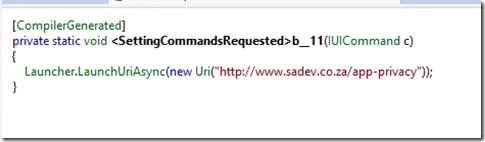
You might dislike extra variables cluttering your code—but the compiler is smart enough to remove unused ones during compilation. The following screenshots show my example code and its compiled form (using Reflector), where the temporary variable is indeed gone!

You might wonder why I used ᛘ as a variable name—because it’s hard to type! I want to ensure developers don’t accidentally reuse it unless they have a good reason. The odd character forces them to rename it intentionally. It’s also one character, so it doesn’t waste space, and its uniqueness makes its purpose clear in the code. If you have feedback, I’d love to hear it in the comments below!