Windows Phone 7: Professional Tips - Press and hold
Published on Estimated reading time: 1 minutes


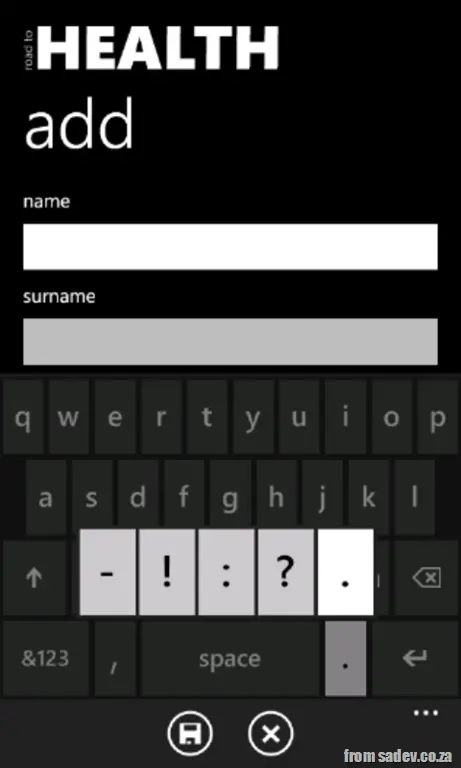 The keyboard on WP7 is an amazing area you’ll often encounter, so it’s no surprise it contains some hidden gems to improve your experience—like double tap.
Today’s hidden gem is the ability to press and hold keys to reveal pop-ups with additional options, which can save you from navigating to the symbols or numbers section—or even grant access to features you’d never find elsewhere.
If you look at the screenshot, you’ll see the dot key has been pressed and held, revealing a pop-up with dash, exclamation mark, colon, question mark, and dot—much easier than digging through the symbols menu.
Other keys with this behavior also work on uppercase (where applicable):
- e → ê è ë é
- t → þ
- y → ý ÿ
- u → ù ú û ü
- i → ì í î ï
- o → ò ó ô ö ø œ
- a → ä á â à å æ
- s → ß §
- d → ð
- c → ç ©
- n → ñ
- m → ɥ
- 1 → ⅓ ¼ ½
- 2 → ² ⅔
- 3 → ¾ ³
- 0 → °
- £ → $ ¢ € ¥ ¤
- ( → < { [
- ) → > } ]
- - → _ ~ ¬ ·
- ! → ¡
- ’ → ´ `
- " → « » “ ”
- ? → ¿