What's in Microsoft.VisualBasic for C# Developers: Part 7 - File System


[This blog is part of a larger series. To find more parts in the series, please see the Series Index].
The FileSystem class is what originally brought me to explore this assembly because there are some very interesting options in the class that aren’t available elsewhere. To add to the confusion, there are two FileSystem classes in the Microsoft.VisualBasic namespace 😵💫:
- Microsoft.VisualBasic.FileSystem
- Microsoft.VisualBasic.FileIO.FileSystem
The one I am interested in—and this post covers—is the second one, which has some fantastic options. Unfortunately, there are way more functions in it than a single blog post can cover (27 methods, not counting overloads), so I am going to focus on just two of them, which bring new features—i.e., not just wrapping some other .NET API.
DeleteDirectory
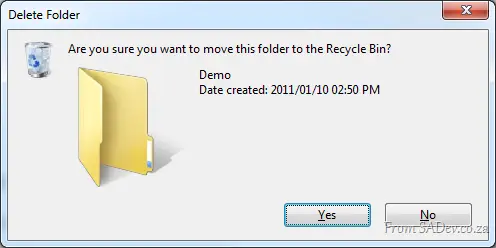 The first I want to look at is the DeleteDirectory method, which allows you to easily delete a directory. What makes this fantastic is that it can empty the directory of files first (i.e., it handles non-empty directories). Second, it supports deleting to the recycle bin, and finally, it supports a nice, pretty UI for the deletion action, including a confirm dialog and progress bar dialog.
string testFolder = FileSystem.CombinePath(Environment.GetFolderPath(Environment.SpecialFolder.Desktop), "Demo");
FileSystem.CreateDirectory(testFolder);
FileSystem.DeleteDirectory(testFolder, UIOption.AllDialogs, RecycleOption.SendToRecycleBin, UICancelOption.ThrowException);
The code above uses a few options from FileSystem:
- CombinePath: This provides an error-checked and normalized concatenated path using
System.IO.Path.Combine. - CreateDirectory: This does some error checking and wraps
System.IO.Directory.CreateDirectory. - DeleteDirectory: This is what we are talking about, with the display of UI and "send to recycle bin" enabled.
There are similar methods to DeleteDirectory, such as MoveDirectory & CopyDirectory, and similar items for files: CopyFile, MoveFile, etc…
FindInFiles
This is a very useful function that allows you to search files on your machine for specific content (i.e., search in the file, not just the filename). This is not wrapping any functionality behind the scenes (for a change):
string myDocs = Environment.GetFolderPath(Environment.SpecialFolder.MyDocuments);
var result = FileSystem.FindInFiles(myDocs, "MVP", true, SearchOption.SearchTopLevelOnly);

MessageBox.Show(result.Aggregate((c, n) => { return c + Environment.NewLine + n; }));
The above code shows me searching the My Documents folder for any file containing the letters MVP (in any case—controlled by the third parameter). It can be filtered using standard wildcards and can search sub-directories too 😊