What's in Microsoft.VisualBasic for C# Developers: Part 6 - Networks


 [This blog is part of a larger series; to find more parts in the series, please see the Series Index]
The Network class is an interesting set of wrappers around other classes in .NET, which is useful for simplifying certain actions:
- DownloadFile & UploadFile
- Ping
- IsAvailable
DownloadFile & UploadFile
These two methods are interesting in that they wrap the WebClient class, which makes it much easier to use while still giving a lot of flexibility. This isn’t the most robust way to work with HTTP (download) and FTP (upload), but it is very useful. For example, the easiest way to download a file:
Network network = new Network();
network.DownloadFile("http://www.bing.com", @"c:\bing-index.html");
It includes 10 overloads, with the most complex being:

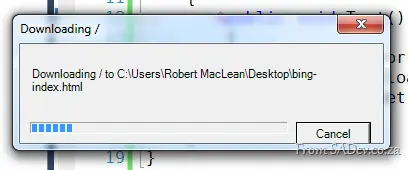
One of the interesting parameters I wanted to highlight is the showUI parameter, which, when set to true, gives you a dialog box with a progress bar and cancel support. It’s not pretty, but—like a lot of this Network class—it is functional:
Ping
Just like DownloadFile & UploadFile, Ping wraps other functions in the framework—namely, the Ping class from System.Net.NetworkInformation. It really just takes two lines of code if you used the Ping class and makes it two lines using the Network class—not really that helpful:
Network network = new Network();
string message = network.Ping("www.bing.com") ? "Bing is up" : "Bing is down";
IsAvailable
The last in the Network trilogy is the IsAvailable property, which tells you if you are connected to a network. All it does is call NetworkInterface.GetIsNetworkAvailable.
Why you’d want to write two lines for this when you could use the one-line alternative is confusing—but it’s there:
Network network = new Network();
string message = network.IsAvailable ? "Network up" : "Network down";

// I prefer this:
string message2 = NetworkInterface.GetIsNetworkAvailable() ? "Network up" : "Network down";