What's in Microsoft.VisualBasic for C# Developers: Part 4 - Computer Info
Published on Estimated reading time: 1 minutes


[This blog is part of a larger series; to find more parts in the series, please see the Series Index]
For today, we will be looking at a very useful class, ComputerInfo, which provides a small set of information about the computer. It doesn’t provide a lot of details, but the information it does provide is key:
- OSFullName: The "nice" name for the OS—like Windows 7 Ultimate
- OSVersion: The OS version number
- OSPlatform: The OS platform
- TotalPhysicalMemory, AvailablePhysicalMemory, TotalVirtualMemory, AvailableVirtualMemory: Memory usage information
- InstalledUICulture: The culture used during installation—this is identical to System.Globalization.CultureInfo.InstalledUICulture
ComputerInfo info = new ComputerInfo();
Console.WriteLine("You are running {0} ({1})", info.OSFullName, info.OSVersion);
Console.WriteLine("\tthis is built on the {0} platform.", info.OSPlatform);

UInt64 usedPhysical = info.TotalPhysicalMemory - info.AvailablePhysicalMemory;
UInt64 usedVirtual = info.TotalVirtualMemory - info.AvailableVirtualMemory;

Console.WriteLine("Memory Information in Mb (Available | Used | Total)");
Console.WriteLine("\tVirtual: {0} | {1} | {2}", info.AvailableVirtualMemory / 1048576, usedVirtual / 1048576, info.TotalVirtualMemory / 1048576);
Console.WriteLine("\tPhysical: {0} | {1} | {2}", info.AvailablePhysicalMemory / 1048576, usedPhysical / 1048576, info.TotalPhysicalMemory / 1048576);

Console.WriteLine("You are running the following culture: {0}", CultureInfo.CurrentCulture.EnglishName);
if (CultureInfo.CurrentCulture != info.InstalledUICulture)
{
    Console.WriteLine("BUT you installed with {0}", info.InstalledUICulture.EnglishName);
}
else
{
    Console.WriteLine("and you installed with that culture too");
}
This gives us:
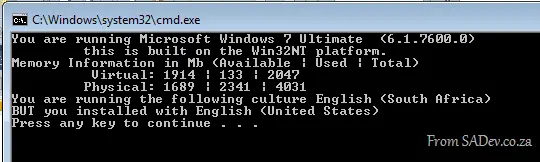
This isn’t the only way to get computer information; there is plenty available elsewhere in the framework—for example, the System.Environment class from the mscorlib assembly includes:
- Environment.Is64BitOperatingSystem
- Environment.Is64BitProcess
- Environment.MachineName
- Environment.OSVersion
- Environment.ProcessorCount
- Environment.Version