What's in Microsoft.VisualBasic for C# Developers: Part 3 - Financial


[This blog is part of a larger series; to find more parts in the series, please see the Series Index].
Yesterday’s post covered some interesting, yet very simple features in Microsoft.VisualBasic, so today I thought I would cover some more complex code: financial.
This is a class with 13 static methods, all returning a Double. And if financial code wasn’t complex enough, the method names are as cryptic as you can get. I’ve broken them into three groups: cash flow, general, depreciation, and annuity-based.
Cash Flow
These calculations look at investments and cash flows:
- IRR: Provides the internal rate of return for a series of periodic cash flows.
- MIRR: Provides the modified internal rate of return for a series of periodic cash flows.
- NPV: Provides the net present value of an investment.
Example of using the above methods:
// Need to place to store profit/loss
// Must have at least one negative and one positive value in it
IList<double> values = new List<double>();

values.Add(-100000); // startup costs - costs money to make money
values.Add(10000); // income in first year
values.Add(15000); // income in second year
values.Add(17500); // income in third year
values.Add(75000); // income in fourth year - got govt. contract that year😉

double[] valuesArray = values.ToArray();

double loanRateGuess = 0.1; // start guessing loan at 10%
double rateIRR = Financial.IRR(ref valuesArray, loanRateGuess) * 100;

double reinvestmentRate = 0.12; // MIRR also includes the reinvestment rate 12%
double rateMIRR = Financial.MIRR(ref valuesArray, loanRateGuess, reinvestmentRate) * 100;

// Working out net present value needs a fixed rate
double fixedRate = 0.08; // 8%
double netPresentValue = Financial.NPV(fixedRate, ref valuesArray);

Console.WriteLine("Net present value: {0:0.00}", netPresentValue);
Console.WriteLine("Rate of return is:");
Console.WriteLine("\t{0:0.00}% (Calculated using IRR)", rateIRR);
Console.WriteLine("\t{0:0.00}% (Calculated using MIRR)", rateMIRR);
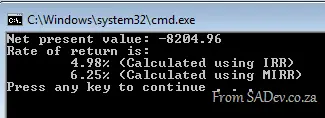
Gives us:
Depreciation
I understand depreciation as: how much value an item loses over time.
- DDB: Allows you to work out depreciation using the double-declining balance method (DDB) or a custom method. The DDB calculation per period is: Depreciation / Period = ((Cost – Salvage) × Factor) / Life
- SLN: Provides a value specifying the straight-line depreciation of an asset for a single period. SLN is calculated using: (Cost – Salvage) / Life
- SYD: Provides a value specifying the sum-of-years’ digits depreciation of an asset for a specified period. This is similar to DDB but calculated differently.
Example of using all the above methods to figure out how much you lose on an iPhone over two years:
double iPhoneInitialCost = 10000;
double iPhoneResale = 3500;
double yearsUntilNextUpdate = 2;

// Work out depreciation per year
double depreciationPerYear = Financial.SLN(iPhoneInitialCost, iPhoneResale, yearsUntilNextUpdate);
double sydValue = iPhoneInitialCost;
double ddbValue = iPhoneInitialCost;

for (int year = 1; year < yearsUntilNextUpdate + 1; year++)
{
    double syd = Financial.SYD(iPhoneInitialCost, iPhoneResale, yearsUntilNextUpdate, year);
    double ddb = Financial.DDB(iPhoneInitialCost, iPhoneResale, yearsUntilNextUpdate, year);
    sydValue -= syd;
    ddbValue -= ddb;

    Console.WriteLine("In year {0} you will lose", year);
    Console.WriteLine("\t {0:0.00} (Calculated using SYD)", syd);
    Console.WriteLine("\t {0:0.00} (Calculated using DDB)", ddb);
    Console.WriteLine("Phone value");
    Console.WriteLine("\t {0:0.00} (Calculated using SYD)", sydValue);
    Console.WriteLine("\t {0:0.00} (Calculated using DDB)", ddbValue);
    Console.WriteLine();
}
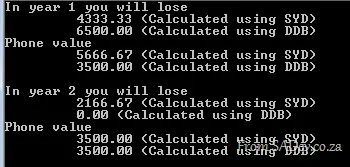
Which gives us the painful realization of how quickly value is lost:
Annuity-Based
An annuity is a series of fixed cash payments made over time. An annuity can be a loan (such as a home mortgage) or an investment (such as a monthly savings plan).
If you are working out annuities, there is a number of calculations around those:
- If you have the payment, period, and interest, you can work out the future value using FV over a period.
- If you have the future value, payment, and period, you can work out the interest using IPmt over a period.
- If you have the future value, payment, and interest, you can work out the period using NPer over a period.
- If you have the future value, period, and interest, you can work out the payment using Pmt over a period.
Other methods around annuities:
- PPmt: Calculate the principal payment of an annuity.
- PV: Calculate the present value of an annuity.
- Rate: The interest rate per period for an annuity, calculated by iteration.
Example of using FV to work out savings:
double monthlySavings = 1000;
double interestRate = 8;
double yearsYouWillSave = 10;
double deposit = 0;

// Specifies if you save at the start or end of the month
DueDate dueDate = DueDate.EndOfPeriod;

if (interestRate > 1)
{
    // Must be expressed as a percentage
    interestRate = interestRate / 100;
}

// Converted to interest per month
interestRate = interestRate / 12;

// Figure out how many months that is
double months = yearsYouWillSave * 12;

// Note: savings and deposit are converted to negative as we are saving
// If we were paying off, they would be positive
double savings = Financial.FV(interestRate, months, -monthlySavings, -deposit, dueDate);
Console.WriteLine("In {0} years, you will have saved: {1:0.00}", yearsYouWillSave, savings);
Gives us:
