What is a Universal app?


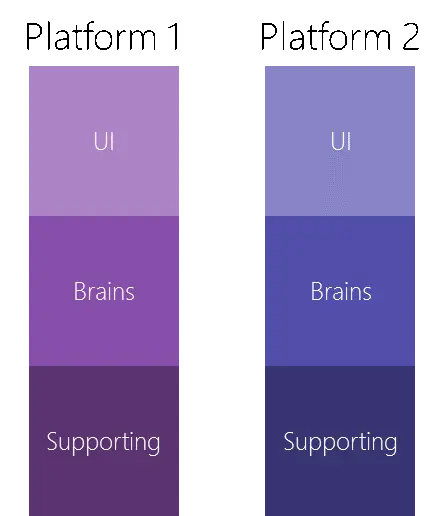
A universal app (in regards to the Microsoft platform—as Apple uses this same term for something similar but different enough) is made up, at a very high level, of three areas. The first area, the User Interface (UI), is what you see, and for a universal app, it is built either with XAML or HTML. The second is the logic that powers the UI—the logic can go by many names (code behind, controller, view model, and more), and we will refer to the logic in this document as the brains. The UI and brains work together: the brains provide the raw data to the UI, which handles laying out and styling the data, and the UI provides input to the brains in the form of user interactions. The third piece is supporting code that the brains and UI use—for example, code that talks to an API or a database. This third piece is sometimes very separate and sometimes tightly mixed with the brains.
Traditionally, if you wanted to build an app that targets multiple platforms, you had to create a custom UI for each platform, and traditional software development tied the brains and the UI tightly together, meaning you often had to rewrite the brains or copy and paste code between different platforms. This leads to duplication in everything: cost, time to add features, bugs, etc.
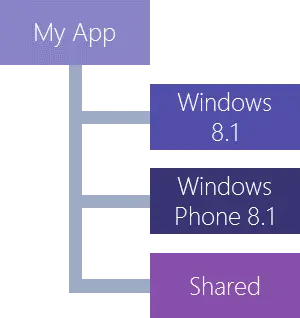
Microsoft has introduced a concept called Universal Apps, which allows for creating a single core app that can run on Windows Phone 8.1, Windows 8/8.1/10, and Xbox One (coming soon). The way this works is by partitioning the app into multiple pieces—one for each target platform and an additional Shared piece. For this article, we’ll focus on building an app for Windows Phone 8.1 and Windows 8.1, meaning we’ll have three pieces in our project.
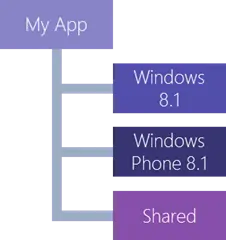
Microsoft does offer other technologies for greater code reuse, such as Portable Class Libraries (PCL), and there are industry patterns—like Dependency Injection (DI)—that can help, but none are essential or directly relevant here. The takeaway? Achieving maximum code reuse requires careful planning, an understanding of software development, and skilled developers.
The core idea in a Universal app is to place as much code as possible in the shared partition, allowing each platform to reuse the exact same UI, brains, and supporting code. Modern technologies in XAML and CSS 3 (for HTML) enable the UI to adapt intelligently to different screen sizes and devices, ensuring a single UI can work across all platforms. For the brains, proven practices like MVVM allow the logic to be decoupled from the UI, maximizing reuse.
In an ideal scenario, you’d get 100% of the code in shared—but in reality, it’s typically 75% to 95% (based on my experience and the app’s features/platform targets). The issue is that even with today’s best technology, some UI elements don’t work across all platforms, some features exist only on specific platforms, and optimizations can improve performance or user experience. In these cases, the relevant code or UI is moved out of the shared partition into the platform-specific section—with minimal duplication at worst.
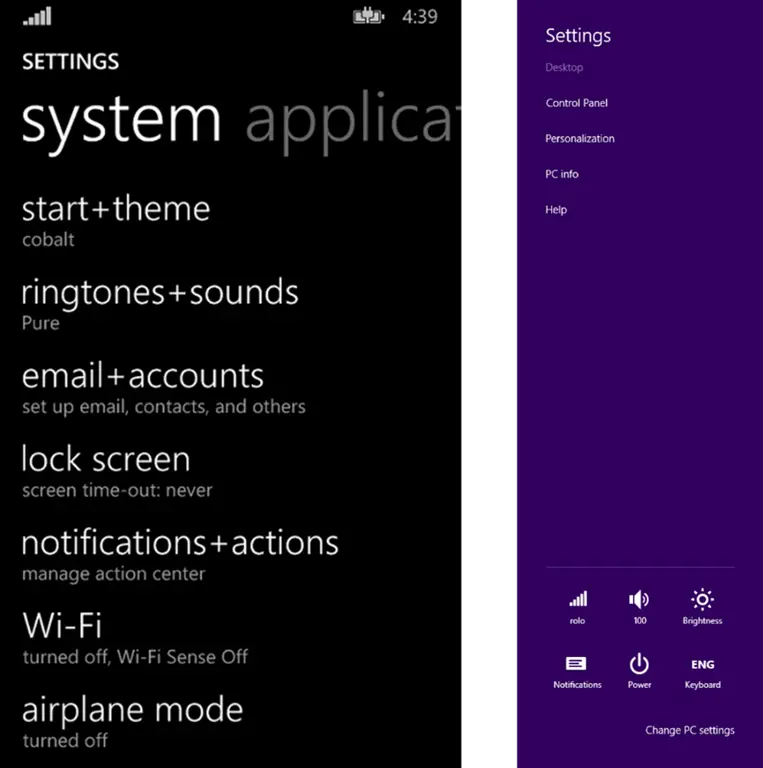
A great example is settings: On Windows Phone, the design style dictates a single settings page accessed from a button in the app bar. For Windows 8.1, the design style suggests not including settings in the app bar—instead, you use the Settings charm and flyouts. In traditional development, this would require totally separate code and UI for settings. Following best practices, however, you can keep the logic once (in shared), break the UI into reusable components (also in shared), and compose them differently per platform. Only the unique composition details would vary.