VS/TFS 11 Announcement Crib Notes
Published on Estimated reading time: 4 minutes


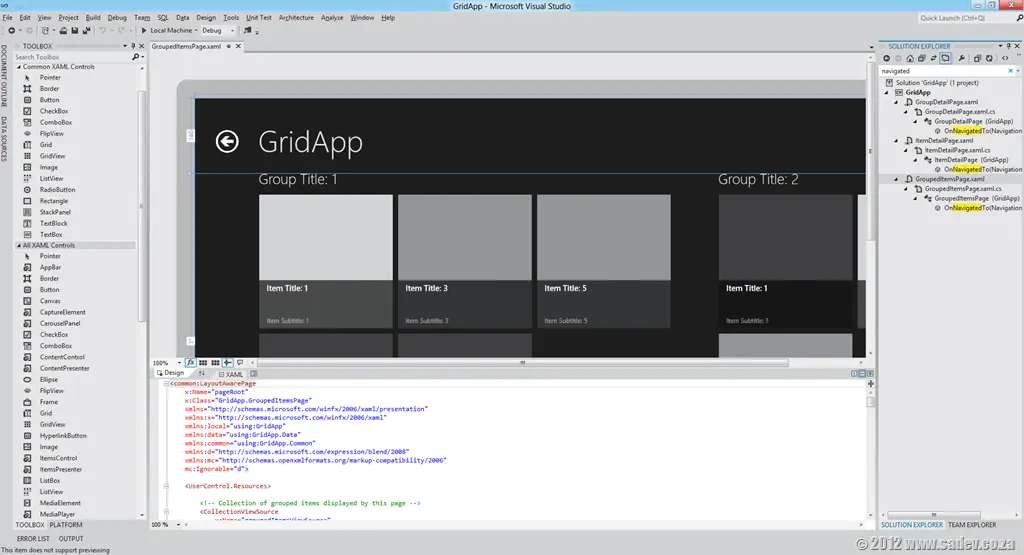
The last few hours have been a buzz of excitement for .NET developers as the covers have been lifted on the next releases of TFS, Visual Studio, and .NET 4.5—however, there is a problem. There is so much information wrapped in nice marketing and business talk that you will spend hours trying to get through it all. Here are the crib notes. Following each note is a number in braces; this is the number of the source, so you can go to it for more information if you wish:
- .NET 4.5, Visual Studio 11, and TFS 11 betas will be available on the 29th of February [1].
- You can use the products in production from beta (technically called a go-live license) [2].
- Visual Studio 11 has had a UI polish: a similar layout but with fewer toolbars by default, less color (icons are monotone), and a touch of Metro-like design (white space and typography) [2].
- Five editions (or SKUs) of Visual Studio will ship: Express, Test Professional, Professional, Premium, and Ultimate—same as we have in 2010 [3].
- TFS will have at least two editions: Express (think TFS Basic but FREE) and another edition. We may have more than that [8].
- Visual Studio Professional and up will include LightSwitch! [3].
- The architecture tool diagrams can now be read in the Professional and Premium versions too (in 2010, it was Premium only). Creation still requires Ultimate [4].
- IntelliTrace is supported in production (still an Ultimate-only feature) [4].
- Windows Phone 7 tools are included with Professional and higher editions of Visual Studio 11 [4].
- Express will have two versions: Windows (WPF, WinRT, etc.) and Web (ASP.NET, MVC, etc.) [5].
- There are two themes for Visual Studio: Light (pictured above) and Dark, which feels like Expression Blend’s style [6].
- Quick Launch is a new search feature that allows you to search for any command or option in Visual Studio [6].
- Search has been added to most used tool windows, like Solution Explorer [6].
- ASP.NET MVC 4 has a bunch of evolutionary improvements—nothing to get overly excited about, IMHO [7].
- ASP.NET Web API is a big new feature for both MVC and WebForms for building APIs for the web. Think services like WCF but built for the modern web [9].
- Visual Studio 11 is a code name—expect a name change by release [10].
- Workflow hubs in Visual Studio 11 allow you to focus on a task in a single place rather than having to move around multiple windows [11].
- Preview tabs allow you to sneak a peek at documents without needing to actually open them [10].
- C# 5 (yes, it’s version 5 of C# shipping with .NET 4.5—who says this isn’t confusing?) has support for async [10].
- A new code compare tool and UI that doesn’t suck [11].
- New code review tool support in TFS and Visual Studio [12].
- A new mockup design tool ships with Visual Studio/TFS, allowing you to build mock user interfaces in PowerPoint. Think Sketchflow without the code or Balsamiq [13].
- New Visual Studio Metro-themed logo [14]:

Sources:
- http://blogs.msdn.com/b/somasegar/archive/2012/02/23/the-road-to-visual-studio-11-beta-and-net-4-5-beta.aspx
- http://blogs.msdn.com/b/jasonz/archive/2012/02/23/sneak-preview-of-visual-studio-11-and-net-framework-4-5-beta.aspx
- http://www.microsoft.com/visualstudio/en-us/products/beta-products
- http://www.microsoft.com/visualstudio/en-us/products/features-chart
- http://www.microsoft.com/visualstudio/en-us/products/beta-express
- http://blogs.msdn.com/b/visualstudio/
- http://weblogs.asp.net/scottgu/archive/2012/02/19/asp-net-mvc-4-beta.aspx
- http://blogs.msdn.com/b/bharry/archive/2012/02/23/coming-soon-tfs-express.aspx
- http://weblogs.asp.net/scottgu/archive/2012/02/23/asp-net-web-api-part-1.aspx
- http://www.microsoft.com/presspass/features/2012/feb12/02-23VisualStudioBetaPreview.mspx
- http://www.microsoft.com/presspass/ImageGallery/ImageDetails.mspx?id=2c8135ad-fefd-48c2-888f-83b6987a4e87
- http://www.microsoft.com/presspass/ImageGallery/ImageDetails.mspx?id=2a0b1cf8-9d74-4603-a2d1-03d8ef989a8c
- http://www.microsoft.com/presspass/ImageGallery/ImageDetails.mspx?id=240cbb53-9dd5-4262-b0cc-cdb9a57485d3
- http://www.microsoft.com/presspass/imagegallery/images/products/developer/vs/logo_vs11beta_print.jpg
