Visual Studio Tools for Cordova + Update 2 + Windows 10 = The mapping file can't be parsed.
Published on Estimated reading time: 1 minutes


If you have Visual Studio 2015 and you have installed Update 2, you may run into a painful bug when trying to build for the Windows 10 Store, where the builds fail with the following errors:
1>MakeAppx : error : The mapping file can't be parsed. The error occurs at line 3. [app\platforms\windows\CordovaApp.Windows10.jsproj]
1>MakeAppx : error : Package creation failed. [app\platforms\windows\CordovaApp.Windows10.jsproj]
1>MakeAppx : error : 0x8007000b - An attempt was made to load a program with an incorrect format. [app\platforms\windows\CordovaApp.Windows10.jsproj]
1>MDAVSCLI : error : Error code 1 for command: C:\Program Files (x86)\MSBuild\14.0\bin\msbuild with args: app\platforms\windows\CordovaApp.Windows10.jsproj,/clp:NoSummary;NoItemAndPropertyList;Verbosity=minimal,/nologo,/p:Configuration=debug,/p:Platform=x86
1>  Command finished with error code 2: cmd /s /c "app\platforms\windows\cordova\build.bat --debug --archs=x86 --win --buildConfig=app\build.json"
1>ERROR building one of the platforms: error : cmd: Command failed with exit code 2
1>  You may not have the required environment or OS to build this project.
1>MDAVSCLI : error : cmd: Command failed with exit code 2
The solution to this is twofold:
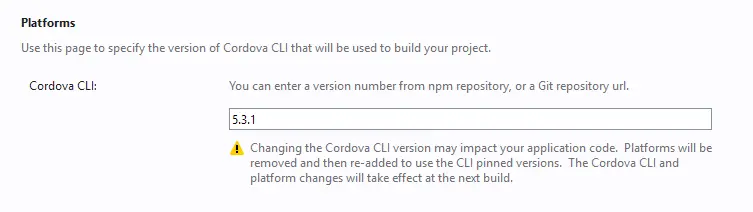
First, change the Cordova version to 5.3.1 in the config.xml.
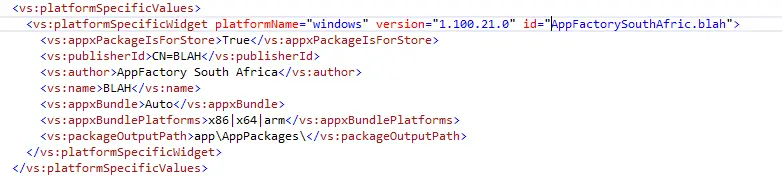
Second, open the config.xml in the XML editor (select it in Solution Explorer and press F7). Near the bottom, you will find the node vs:platformSpecificValues; delete it and all of its contents.
You should now be able to do a Windows 10 build that can be uploaded to the store.