Tripping over logs: A story of Unity - Part 4


Recap + Intro
In part 1, we looked at the problem with just adding logging code and how it quickly gets messy. We also explored how the more loosely coupled the code is, the easier it is to effect changes painlessly. Then, in part 2, we took that code and added Unity, giving us control via a config file over what class our logging should use. In part 3, we saw some benefits of dealing with this overhead, but now, dear reader, we get into the real issue I wanted to solve: having logging be more elegantly applied.
Note you can get Unity with the Enterprise Library from the p&p group.
As I said in part 1:
What I am going to do is look at a practical approach to using Unity. I will not be going into DI or IoC—those topics have been covered far better by people smarter than me. If you want the theory, look elsewhere. If you want to get running with Unity, this is for you.
This is a multi-part series, so here is the series guide in case you are looking for the rest:
- Part 1 - Introduction to the problem
- Part 2 - Changing the code to use basic Unity functions
- Part 3 - Lifetime management
- Part 4 - Changing the code to use interception
- Part 5 - Interception supplementary
- Part 6 - Wrap up
Works better than Vader’s interceptor
(Once again, I shine my knowledge of Star Wars in a title… which maybe is why my friends and family think of me as a geek. I see myself as cool, but anyway, it’s not important to the post.)
The Mary Poppins bag-like magic that is happening with Unity is not just limited to controlling the lifetime of objects—it’s actually about controlling the objects themselves. There’s an invisible layer there that allows us to do something very smart called Interception. In this scenario, we intercept calls to classes or methods and apply additional code to them! Importantly, we can only do this with objects that Unity manages, so for our example, we can’t directly intercept the main method or the DoSomething method. However, we can refactor DoSomething into its own interface and class and have Unity own it, as shown below. The key changes from our previous code are:
- We create an instance of
IWorkerand call itsDoSomethingmethod, passing it the logger (lines 14 and 15). - We introduce a new interface,
IWorker, and a new class based on it, calledWorker(lines 43 to 55). - We’ve removed the
Lolzcat’s constructor from the logging (it’s no longer relevant).
class Program
{
    static IUnityContainer container = new UnityContainer();

    static void Main(string[] args)
    {
        UnityConfigurationSection section = (UnityConfigurationSection)ConfigurationManager.GetSection("unity");
        section.Containers.Default.Configure(container);

        ILogger logger = container.Resolve<ILogger>();

        logger.LogThis("Application started");

        IWorker worker = container.Resolve<IWorker>();
        worker.DoSomething("Robert", logger);

        Console.ReadKey();
        logger.LogThis("Application Completed");
    }
}

public interface ILogger
{
    void LogThis(string Message);
}

public class DebugLogger : ILogger
{
    public void LogThis(string Message)
    {
        System.Diagnostics.Debug.WriteLine(String.Format("{0}: {1}", DateTime.Now, Message));
    }
}

public class ConsoleLogger : ILogger
{
    public void LogThis(string Message)
    {
        Console.WriteLine("{0}: {1}", DateTime.Now, Message);
    }
}

interface IWorker
{
    void DoSomething(string Username, ILogger logger);
}

public class Worker : IWorker
{
    void IWorker.DoSomething(string Username, ILogger logger)
    {
        logger.LogThis("DoSomething Called with Username Parameter set to:" + Username);
        Console.WriteLine("Hello {0}", Username);
        logger.LogThis("DoSomething Completed");
    }
}
This runs nicely, but we’re still explicitly using the logger everywhere, and it’s not much better than before.
Setup the Interception
So to fix this, we’ll use interception—meaning we need to add two more references to our solution:
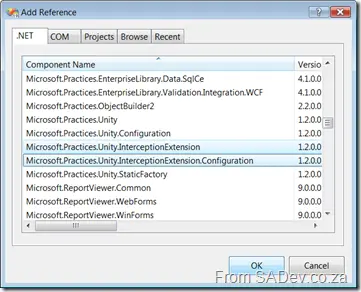
Next, we add a new using to our code:
using Microsoft.Practices.Unity.InterceptionExtension;
using System.Reflection;
Yes, that’s System.Reflection. We’ll use reflection to figure out values at runtime.
Now, we’ll add code to allow us to attribute our methods so that logging happens automatically. For those unfamiliar, I’m referring to the Decorator Pattern, which is familiar to anyone using WCF or LINQ, even if they didn’t know it by name.
To implement this, we first create another new class derived from HandlerAttribute. It simply provides the attribute to decorate our code with (lines 1 to 7 below). It returns a LoggingHandler (via the container), and LoggingHandler is the other new class. Here, we have a constructor that takes an instance of ILogger (lines 13 to 16) and an Invoke method (starting on line 18). The Invoke method is the core logic—it runs when we call our method. It starts by using reflection to determine parameters (lines 20 to 25), then calls the logger to write a pre-method message (line 27). Next, it calls getNext to get the next handler in the stack (in our case, there’s none). Note that the order of handlers is controlled via the Order parameter (line 34). After all handlers finish their pre-method processing, the method executes, and after getNext, we can perform post-method logging (line 29).
public class LoggingAttribute : HandlerAttribute
{
    public override ICallHandler CreateHandler(IUnityContainer container)
    {
        return container.Resolve<LoggingHandler>();
    }
}

public class LoggingHandler : ICallHandler
{
    ILogger _logger;

    public LoggingHandler(ILogger logger)
    {
        _logger = logger;
    }

    public IMethodReturn Invoke(IMethodInvocation input, GetNextHandlerDelegate getNext)
    {
        string parameters = string.Empty;
        for (int counter = 0; counter < input.Inputs.Count; counter++)
        {
            ParameterInfo parameterInfo = input.Inputs.GetParameterInfo(counter);
            parameters += parameterInfo.Name + " = " + input.Inputs[counter].ToString() + Environment.NewLine;
        }

        _logger.LogThis(String.Format("About to call {0} with the following parameters: {1}", input.MethodBase.Name, parameters));
        IMethodReturn msg = getNext()(input, getNext);
        _logger.LogThis(String.Format("Call completed to {0}", input.MethodBase.Name));

        return msg;
    }

    public int Order { get; set; }
}
One thing I want to highlight—it’s super cool! Note that I never explicitly specify what to pass into LoggingHandler’s constructor (it requires an ILogger parameter). Unity is smart enough to recognize that there’s an ILogger in the container and a matching constructor, so it automatically wires them together for you! 🎉
Now, how does this affect our other code? Our DoSomething method now looks like this:
[Logging]
void IWorker.DoSomething(string Username)
{
    Console.WriteLine("Hello {0}", Username);
}
If you think that, in a massive system, the ability to simply annotate methods to inject functionality is amazing—it cleans up the code and allows developer X to change logging without any code changes. Rock on!
Configuration for Interception
Our code doesn’t run yet because we need to add some details to the app.config file for the system to use configuration. First, we add an alias for our chosen method of interception on line 14. Then, we extend the Unity config (similar to how we extended the .NET config with a config section) on lines 28 to 30. Finally, we configure the extension we added. The most important part is how we link an interceptor to a class (lines 35 and 36). This allows us to enable or disable interception via configuration.
<?xml version="1.0" encoding="utf-8" ?>
<configuration>
    <configSections>
        <section name="unity" type="Microsoft.Practices.Unity.Configuration.UnityConfigurationSection, Microsoft.Practices.Unity.Configuration" />
    </configSections>

    <unity>
        <typeAliases>
            <typeAlias alias="Logger" type="BigSystem.ConsoleLogger, BigSystem"/>
            <typeAlias alias="ILogger" type="BigSystem.ILogger, BigSystem"/>
            <typeAlias alias="singleton" type="Microsoft.Practices.Unity.ContainerControlledLifetimeManager, Microsoft.Practices.Unity" />
            <typeAlias alias="Worker" type="BigSystem.Worker, BigSystem"/>
            <typeAlias alias="IWorker" type="BigSystem.IWorker, BigSystem"/>
            <typeAlias alias="transparentProxy" type="Microsoft.Practices.Unity.InterceptionExtension.TransparentProxyInterceptor, Microsoft.Practices.Unity.Interception" />
        </typeAliases>

        <containers>
            <container>
                <types>
                    <type type="ILogger" mapTo="Logger">
                        <lifetime type="singleton" />
                    </type>
                    <type type="IWorker" mapTo="Worker">
                        <lifetime type="singleton" />
                    </type>
                </types>

                <extensions>
                    <add type="Microsoft.Practices.Unity.InterceptionExtension.Interception, Microsoft.Practices.Unity.Interception" />
                </extensions>

                <extensionConfig>
                    <add name="interception" type="Microsoft.Practices.Unity.InterceptionExtension.Configuration.InterceptionConfigurationElement, Microsoft.Practices.Unity.Interception.Configuration">
                        <interceptors>
                            <interceptor type="transparentProxy">
                                <default type="IWorker"/>
                            </interceptor>
                        </interceptors>
                    </add>
                </extensionConfig>
            </container>
        </containers>
    </unity>
</configuration>
And that’s it! It’s been a long post, so I won’t go into specifics of the interception type here. I’ll cover that in a supplementary post next.