Three tweaks and a tip for getting WCF to work with Silverlight


If you create a standard WCF service, it does not work with Silverlight—it needs a few tweaks to get it to work. First, Silverlight only supports connecting to a basicHTTP service and not a wsHTTP service, so you need to enable a second service or change your primary to basicHTTP. You can find out why by reading: Accessing SOAP Services
Second, you need to attribute your class with: [AspNetCompatibilityRequirements(RequirementsMode = AspNetCompatibilityRequirementsMode.Allowed)]. For example:
namespace SilverlightApplication1Web
{
   [ServiceContract(Namespace = "")]
   [AspNetCompatibilityRequirements(RequirementsMode = AspNetCompatibilityRequirementsMode.Allowed)]
   public class CustomerService
   {
      [OperationContract]
      public int CountUsers()
      {
         return 2;
      }
   }
}
The third tweak is the biggest: Normally, your WCF service and Silverlight application do not sit in the web application (either in Visual Studio or on the server), and due to the security measures in place to prevent cross-site attacks, your service calls will fail. Obviously, creating a web application with everything in it is a solution, but if you haven’t, you must add a security file to the WCF service web application. There are two files you can create in the root of your website. The first is crossdomain.xml. This format was created by Macromedia, but I do not recommend it for Silverlight scenarios, as Silverlight only supports a subset of the functionality. If you need to deal with Flash-based clients, however, this is the route you must follow. Your other option is the Microsoft way: create a file called clientaccesspolicy.xml. A clientaccesspolicy.xml file to allow all methods, from all clients, to all URLs looks like this:
<?xml version="1.0" encoding="utf-8"?>
<access-policy>
    <cross-domain-access>
        <policy>
            <allow-from http-request-headers="*">
                <domain uri="*" />
            </allow-from>
            <grant-to>
                <resource path="/" include-subpaths="true" />
            </grant-to>
        </policy>
    </cross-domain-access>
</access-policy>
That is not normally what you want in production due to security issues, but for early development, it can help. Note: You can use both files to allow Silverlight and Flash clients to work together seamlessly. More details on both files can be found at: http://msdn.microsoft.com/en-us/library/cc197955(VS.95).aspx
The last tip is about the usage of WCF in Silverlight. Since it’s still WCF, you are required to open and close your service connection. However, because Silverlight makes web calls using async methods, you need to chain up commands using events. For example, you would create an event handler for when the connection is opened, then open the connection. In the open event handler, you would do the work, and once that completes, you would close the connection.
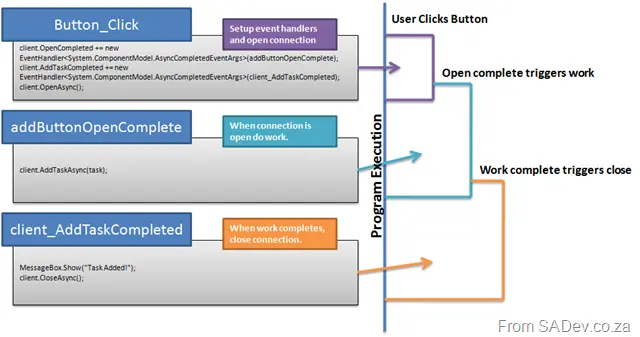
Chaining event handlers for Silverlight + WCF in code and program flow.
Special thanks to Herman (the delegator) and Willy-Peter Schaub for prompting me to write this post—especially since Herman won’t blog on this.