TCP servers with .NET: Scenario 4 & Non-blocking servers with .NET 4.5


This post is part of a series, to see the other posts in the series go to the series index.
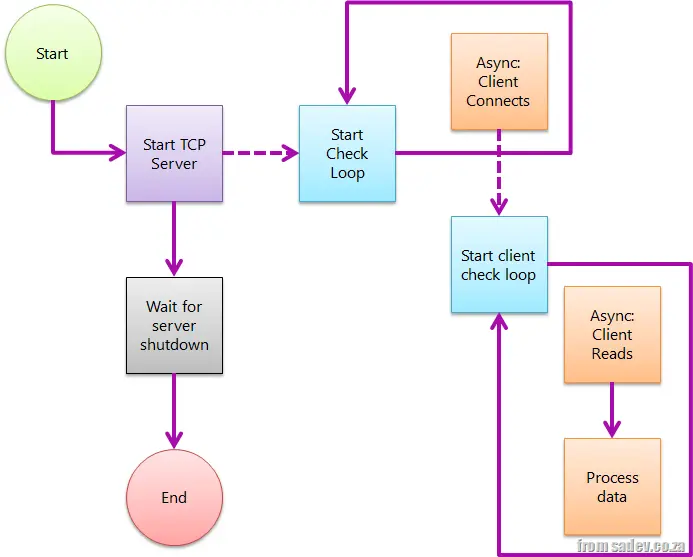 Scenario 3 is a great solution to the problem, but the issue was that its complexity far exceeded that of scenario 1 or scenario 2. We were calling other methods, using recursive-like behaviors, and all sorts of non-obvious things that were difficult to grasp.
Fortunately, Microsoft addressed this issue, and with .NET 4.5, we gained some help through its new async features, particularly the _async_ and _await_ keywords.
In short, async informs the compiler that a method will spawn an asynchronous process and will return to the caller at some point, while await designates the point in the code where execution pauses asynchronously.
Using these, I was able to modify the code to closely resemble the structure of scenario 1 (including the Boolean continueRunningServer flag). However, the two methods are enhanced with the async keyword and use await with _AcceptTcpClientAsync_ and _ReadAsync_—new methods in the TCP stack that return Task<T>, a fundamental requirement for async calls.
I think this is a fantastic improvement, and I cannot wait for .NET 4.5 to ship! 😊
class Program
{
    private const int BufferSize = 4096;
    private static bool ServerRunning = true;

    static void Main(string[] args)
    {
        var tcpServer = new TcpListener(IPAddress.Any, 9000);
        try
        {
            tcpServer.Start();

            ListenForClients(tcpServer);

            Console.WriteLine("Press <kbd>Enter</kbd> to shut down");
            Console.ReadLine();
        }
        finally
        {
            tcpServer.Stop();
        }
    }

    private static async void ListenForClients(TcpListener tcpServer)
    {
        while (ServerRunning)
        {
            var tcpClient = await tcpServer.AcceptTcpClientAsync();
            Console.WriteLine("Connected");
            ProcessClient(tcpClient);
        }
    }

    private static async void ProcessClient(TcpClient tcpClient)
    {
        while (ServerRunning)
        {
            var stream = tcpClient.GetStream();
            var buffer = new byte[BufferSize];
            var amountRead = await stream.ReadAsync(buffer, 0, BufferSize);

            var message = Encoding.ASCII.GetString(buffer, 0, amountRead);
            Console.WriteLine("Client sent: {0}", message);
        }
    }
}