Source Code Management for the Individual SharePoint Developer


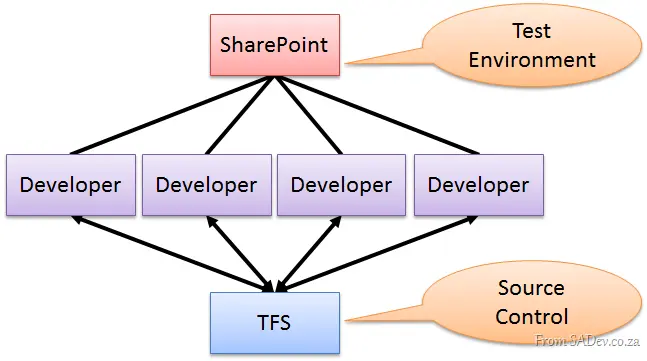
With SharePoint 2010 and Visual Studio 2010, the ability to be a productive developer was key—and there’s tight out-of-the-box integration. This means that SharePoint developers can easily put code into source control. Hilton Giesnow covers this brilliantly in a video he made: http://bit.ly/g71Gnb.
Imagine a number of dedicated SharePoint developers: they might use an enterprise ALM solution like TFS and have SharePoint 2010 Developer and VS2010 installed on their own machines—life is good. But what about the individual or ad-hoc developer?
The problem for them is that installing SharePoint 2010 is resource-intensive, and you may not want it running all the time (what Hilton calls "9-to-5 development"). What if you’re switching between projects—how do you switch SharePoint? The solution I found is to use a virtual machine (VM) with SharePoint and dev tools installed, doing all work on the VM. This is great because the overhead is only present when needed, and you can easily switch between different virtual environments. The downside: source code management.
Sure, you can connect the VM to the network and manage code via source control as usual—but this isn’t always easy or possible. Recently, I faced this problem: source control was on one domain, while my development was on another. I chose to use Mercurial, a Distributed Version Control System (DVCS), and I’d like to share my experience with you.
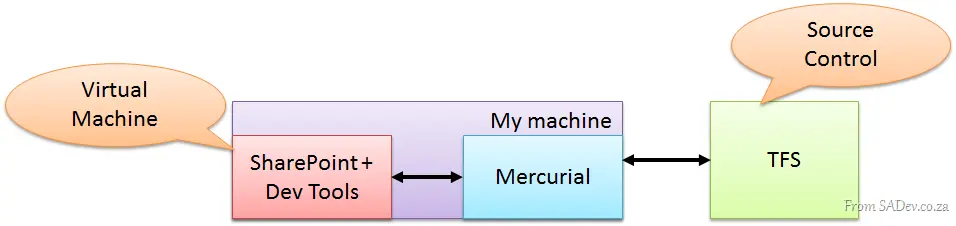
DVCS differs from “traditional” source control like TFS or Subversion, which follows a client/server model. In DVCS, every developer acts as their own server, performing pushes and pulls (like syncs) with other developers.
This setup means you only need lightweight tools alongside SharePoint and dev tools on the VM. At the end of each day, I could run Mercurial on my machine and pull the source code down to my local machine. This way, the VM had the code, and my “real” machine also had it. Then, the code could be easily checked into the corporate source control system—adding another backup and ensuring compliance with source management policies!
This has been an exciting project, and this configuration made source code management smooth and seamless.