Resolving the AppFabric: ErrorCode:SubStatus


AppFabric Caching has one error you’ll learn to hate:
ErrorCode
:SubStatus : There is a temporary failure. Please retry later. (One or more specified Cache servers are unavailable, which could be caused by busy network or servers. Ensure that security permission has been granted for this client account on the cluster and that the AppFabric Caching Service is allowed through the firewall on all cache hosts. Retry later.)
This message could mean a variety of different things, such as:
- Client vs. Server security is wrong
- Disposing the factory too soon
- Not enough physical memory
- Corruption of the cache
However, none of those were my issue. My problem was:
Copy & Paste Stupidity
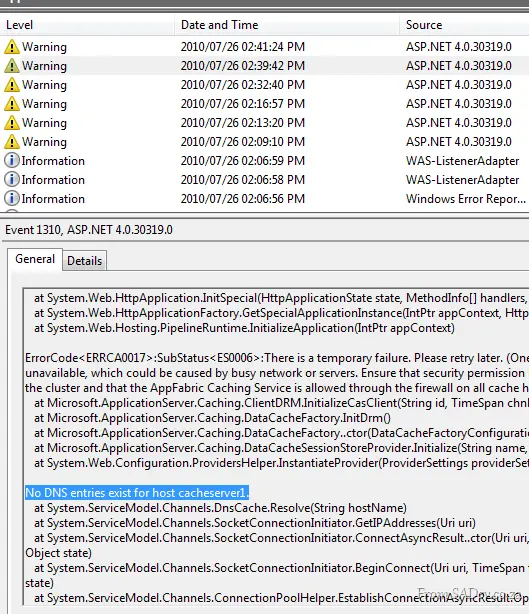
I copied and pasted the settings for my deployment, leading to this config issue:
<dataCacheClient>
    <!-- cache host(s) -->
    <hosts>
        <host name="cacheServer1" cachePort="22233"/>
    </hosts>
</dataCacheClient>
But my server was DEMO-PC, so I needed to update it to:
<host name="DEMO-PC" cachePort="22233"/>
The only way I found this was to dig into the event log and scroll through the error message. About halfway down was the culprit—clear as day.