Pull - November 2010 Release


The third stable release for Pull, the simplest podcast downloader in the world. This release has fewer front-end features than the October 2010 release, but that doesn’t mean there hasn’t been a lot of work done under the hood to make this the best release ever.
Major Features in this Release
Download System Rewritten
I’ve said it many times, but a podcast tool is really just a download tool that knows how to parse RSS & ATOM. That means it should do those two things fantastically. In this release, the download system was completely rewritten from scratch to incorporate many new features and improve performance.
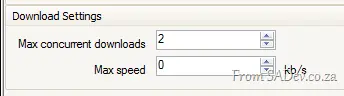
In the last release, we supported canceling a download, but now we can also pause a download. This becomes even more important with another new feature: you can limit the number of concurrent downloads. Add to this the third feature in the trifecta of download management: speed limiting—you now have full control over your bandwidth, download performance, and how and when you want to download.
The other major feature introduced in the downloads was a number of checks before downloading to determine if the download is needed. For technical users, this is done via a HEAD request, checking the ETag and Last-Modified date. What this means is that in the October release, you would download ~10 KB to refresh a podcast, regardless of whether it had changed. Now, we can tell in less than 200 bytes and only pull that ~10 KB if it has actually changed.
Ability to Disable Automatic Episode Downloads
Previously, if you subscribed to a podcast, you were at the mercy of the podcasters because when they published a new episode, it would download automatically. Now, in Pull, you can disable this behavior—the podcast will still update, but new episodes won’t download automatically.

BTW, this came directly from the community via the discussions, so if you want a feature—LET US KNOW!
Minor Features in this Release
New Version Checking
A feature you’ll see in December is a small text block that appears when a new version of Pull is available. It will appear next to the "Give Feedback" link:

Shutdown Confirmation Options
In the settings, you can now control the close confirmation prompt. You can set it to:
- Always confirm (as before),
- Confirm only if an active download is in progress, or
- Never confirm.

Backstory: Rudi Grobler (my unofficial product owner) originally asked for confirmation during beta because he kept accidentally closing Pull. During the last sprint, guess who was complaining about it always asking? 😉
Refresh Individual Podcasts
You can now easily right-click on a podcast (or multiple podcasts) and select "Refresh Selected Podcasts" to manually refresh only the chosen ones.

Future
December is the planned timeline for the next release, and in the plan (plan = no promise) is the ability to fix broken feeds. Many feeds are broken because authors make mistakes, but Pull gets blamed for not handling them. So, there will be a "fix-up engine" to address those issues.
I’m also considering adding sync-to-device support, likely in a basic—folder/drive-style—format.
Additionally, I want Pull to be a better Windows citizen by:
- Adding a manifest so Windows knows what to expect,
- Better support for battery-powered devices,
- Improved integration with Windows Error Reporting, and
- Optimizing download settings based on your CPU count.