MythBusters: Arrays versus Collections


Code now available at https://github.com/rmaclean/ArrayFighter. If you wish to suggest a flaw or make a suggestion to improve it, please create a pull request OR give me a detailed comment explaining what is needed, why it will help/hinder, etc. Ideally with links.
The myths I want to tackle are:
- Arrays are not collections
- Arrays are faster than collections
These are two statements I’ve heard recently and I initially felt were wrong, so I decided to research this myth myself. I am assuming when people say "collections," they mean classes in System.Collections or System.Collections.Generic.
Arrays are not collections
In computer science, an array type is a data type that is meant to describe a collection of elements.
Source: http://en.wikipedia.org/wiki/Array_data_type
So we’ve established that arrays are collections—but how do they compare to .NET collection classes like List<T>, ArrayList, and LinkedList<T>?
List
Official Documentation: http://msdn.microsoft.com/en-us/library/6sh2ey19.aspx
What it implements
The first aspect is what interfaces are implemented in each. Both arrays and List<T> implement the same interfaces for collections and lists. Note that since List<T> is generic, it implements both generic and non-generic interfaces.
Array implements: ICloneable, IList, ICollection, IEnumerable, IStructuralComparable, IStructuralEquatable.
List
implements: IList , ICollection , IList, ICollection, IReadOnlyList , IReadOnlyCollection , IEnumerable , IEnumerable.
Where is the data?
Where does List<T> store data? In an internal field: _items, which is just an array of T.
So List<T> is just an array? Yup! How does it handle inserting new items? It increases the array size when needed by creating a new array and copying pointers to the items into it.
Complexity of the operations
- Add: O(1) operation. If the capacity needs to increase, it becomes O(n), where n is
Count. - Insert: O(n)—where n is
Count. - Remove: O(n)—where n is
Count.
ArrayList
Official Documentation: http://msdn.microsoft.com/en-us/library/system.collections.arraylist.aspx
Let me warn you about ArrayList: if you are using .NET 2.0 or higher and this class, I have the full right to smack you across the face with a glove. There is no reason to use it anymore! Use List<T> instead—it is faster and safer.
What it implements
Both Array and ArrayList implement interfaces for collections and lists:
- Array implements:
ICloneable,IList,ICollection,IEnumerable,IStructuralComparable,IStructuralEquatable. - ArrayList implements:
IList,ICollection,IEnumerable,ICloneable.
Where is the data?
Where does ArrayList store data? In an internal field: _items, which is just an object[].
So ArrayList is just an array? Yup! It handles inserts the same way: it increases array size when needed by creating a new array and copying pointers.
Complexity of the operations
- Add: O(1) operation. If capacity increases, it becomes O(n), where n is
Count. - Insert: O(n)—where n is
Count. - Remove: O(n)—where n is
Count.
Did you copy and paste List<T> for ArrayList?
Yup—because they’re virtually the same. The only core difference is internal storage: object[] vs. T[]. Side effects include Add accepting object vs. T, but that’s it.
LinkedList
Official Documentation: http://msdn.microsoft.com/en-us/library/he2s3bh7.aspx
Now we’re onto something different. Arrays (and ArrayList, List<T>) assign a continuous block of memory (number of items × item size), storing items at offsets.
This is great for reading—for example, to get item 6, you calculate 6 × item size + start of array. But when space runs out, List<T> and ArrayList must allocate a new, larger array and copy all items. The cost is high: two arrays, copying, cleanup.
LinkedList<T> works differently. It tracks the first item (head), which holds a reference to the next item, and so on. This allows infinite growth—just append to the last node. Inserts are faster too: no need to shift elements like in arrays. Instead, adjust neighboring node references.
But reading is slower. To get item 6, you traverse from head to item 1 → 2 → 3 → 4 → 5 → 6. No direct access. Backward movement, however, is faster because each node has a Previous pointer. Arrays, by contrast, require recalculating offsets from the start.
Performance depends on direction: sometimes arrays win; other times, LinkedList<T> excels.
What it implements
Both arrays and LinkedList<T> implement collection-related interfaces (but not all list interfaces):
- Array implements:
ICloneable,IList,ICollection,IEnumerable,IStructuralComparable,IStructuralEquatable. - LinkedList
implements: ICollection<T>,IEnumerable<T>,ICollection,IEnumerable,ISerializable,IDeserializationCallback.
Where is the data?
LinkedList<T> stores the first item in the head field (LinkedListNode<T>), which links to subsequent nodes.
Complexity of the operations
- AddFirst: O(1).
- AddLast: O(1).
- AddBefore: O(1).
- AddAfter: O(1).
- Remove: O(n).
- RemoveFirst: O(1).
- RemoveLast: O(1).
Myth Outcome?
BUSTED! Arrays are collections, both in computer science and .NET definitions.
Arrays are faster than collections
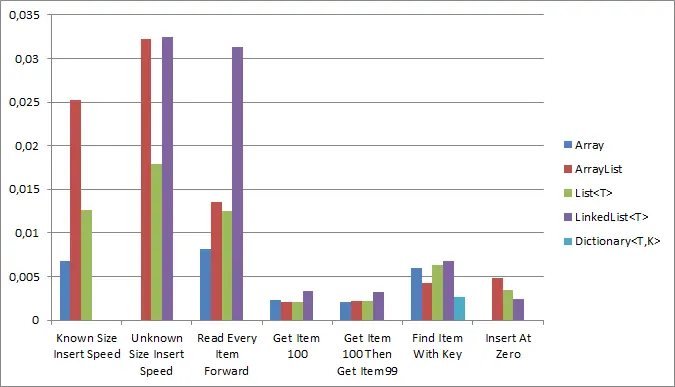
Let’s test this with micro-benchmarks. Code is here if you want to dispute results.
I ran six tests across Array, ArrayList, List<T>, LinkedList<T>, and Dictionary<T,K>:
- Preallocated inserts: Optimize and insert 1,000
ints into a known-size collection. - Dynamic inserts: Insert 1,000
ints without preallocating (min capacity = 4). - Forward read: Read every item in a 100-item collection and validate.
- Access item 100: Retrieve the 100th item.
- Access items 100 and 99: Fetch and validate those items.
- Key-based lookup: Retrieve an item by key.
- Insert at position 0: Add an item at the start.
Results (9 July 2012)
All tests were rerun after adding a new one—rankings remained unchanged.
Preallocated inserts?
Winner: Array (no surprises).
Disqualified: LinkedList<T> (no preallocation), Dictionary<T,K> (requires keys).
Dynamic inserts?
Winner: List<T>. LinkedList<T> was slower due to needing to traverse to the end before inserting. ArrayList trailed List<T>.
Disqualified: Array (cannot expand dynamically), Dictionary<T,K> (key requirement).
Forward read?
Winner: Array. Disqualified: Dictionary<T,K> (key requirement).
Get item 100?
Winner: ArrayList. Arrays were close, but results were noisy.
Disqualified: Dictionary<T,K> (key requirement).
Get items 100 then 99?
Winner: Array. LinkedList<T> should’ve won but was outperformed due to noise.
Disqualified: Dictionary<T,K> (key requirement).
Key-based lookup?
Winner: Dictionary<T,K> (by design).
Insert at position 0?
Winner: LinkedList<T> (ideal for this case).
Disqualified: Array (no mid-insertion), Dictionary<T,K> (key requirement).
Raw Numbers
| Test | Array | ArrayList | List | LinkedList | Dictionary<T,K> |
|---|---|---|---|---|---|
| Known Size Insert Speed | 0.0067952 | 0.0251845 | 0.0125625 | - | - |
| Unknown Size Insert Speed | - | 0.0322676 | 0.0178365 | 0.0324339 | - |
| Read Every Item Forward | 0.0081916 | 0.0135402 | 0.0124702 | 0.03132 | - |
| Get Item 100 | 0.0023351 | 0.0021007 | 0.0021014 | 0.0033034 | - |
| Get Item 100 Then Item 99 | 0.0020214 | 0.0021889 | 0.002163 | 0.0032026 | - |
| Find Item With Key | - | - | - | - | 0.0026851 |
| Insert At Zero | - | 0.0047753 | 0.0034568 | 0.0024224 | - |
Myth Outcome?
BUSTED! Arrays are fast—winning half the speed tests—but they’re not universally the fastest. Other options (like Dictionary<T,K> for lookups or LinkedList<T> for inserts at position 0) excel in specific scenarios. Performance differences are often negligible, so functionality should drive choice over speed alone.