LightSwitch: Passing data between screens - Example 4: Passing a database item without JavaScript


For other posts in this series, see our series list.
In our last example, we passed data from one screen to another using a bit of JavaScript. However, there are two issues:
- If you do not select an item before clicking the button—it errors.
- It requires code, and LightSwitch is about making the drudge work easier, so how can it help here?
This post, and the rest in the series, will be a bit shorter as we are covering the same theme but applied in different ways—so make sure you read the preceding parts or you may feel a bit lost.
As with each part of this series, the code can be found on GitHub.
Example 4: Passing a database item without JavaScript
On the BrowseAnimals screen we already have, we once again add a button to the screen in the command bar with the following properties:
- Choose an existing method:
showWeasel - data:
AnimalsSet.selectedItem.Name
What we are doing here is having the Weasel_screen shown, and because we added a parameter, we can use the built-in tools to set that parameter to a data item on the screen.
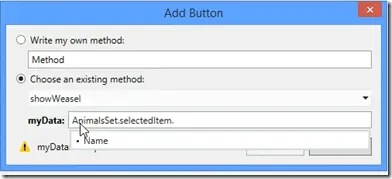 (In the above image, the parameter is labeled
 myData—for our example, it will bedata.)This is it! It is far simpler than example 3 and also doesn’t have the issues we mentioned at the start, so you should always use this option if you can.
- Choose an existing method: