How to get the mouse to stop waking up Windows?


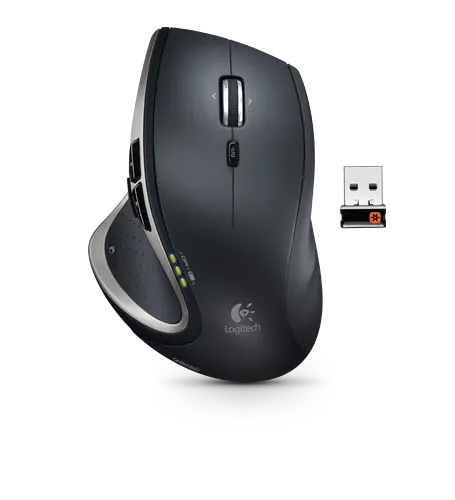 My old Logitech V450 mouse had an odd issue: if Windows was put to sleep and I pulled the dongle out, Windows woke up. This never bothered me much since I got into the habit of doing that before putting Windows to bed.
However, with my new Performance MX Mouse (aka the mouse Batman would use), it does something similar—but a change of habit can’t fix it.
The new mouse has a tiny dongle designed to be left in all the time, and I do that. However, any mouse movement or button press wakes up a sleeping Windows. So if I forget to turn the mouse off and toss it in my laptop bag, it turns the laptop on and starts converting my laptop bag into an oven.
The solution to both issues is to disable this wake-up feature.
Step 1) Right-click the Computer item in the Start menu (or the My Computer icon on your desktop) and select Manage.

Step 2) Click Device Manager (under System Tools).
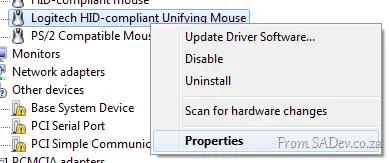
Step 3) Expand Mice and other pointing devices, right-click your mouse, and select Properties.
Step 4) Go to the Power Management tab, uncheck Allow this device to wake the computer, and click OK.
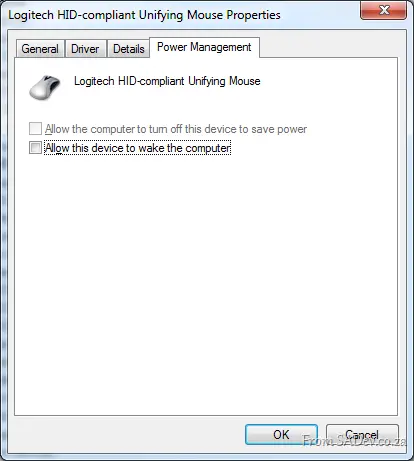
This will prevent both the dongle and mouse actions from waking up your computer.
Footnote: How porn does that last line sound?