Glimmer - jQuery IDE



jQuery is fairly easy to use if you understand CSS or have been working with HTML for a while, but what if you are a drag-and-drop developer? Who never has done that? Or if you want to whip up a nice effect quickly? Well, the guys from Microsoft have recently launched Glimmer, which is a free jQuery effects IDE.
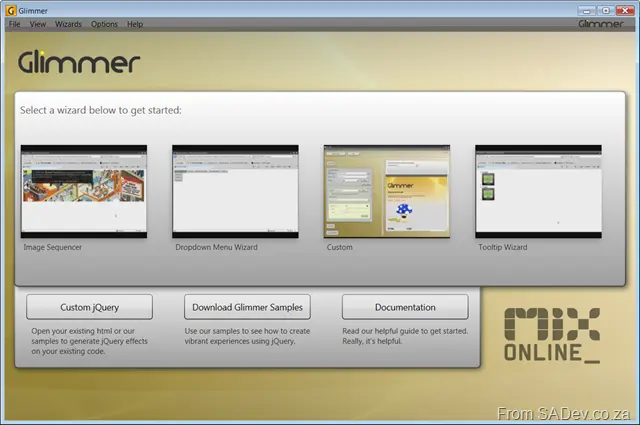
When you launch the very good-looking WPF application (read: SLOW), you get four templates, three of which have a wizard interface to set them up.
Image Sequencer ([click here for the demo of this effect](/files/glimmerpostsamples/image rotate/sequence.html)): This creates a rotating image box. Think of use for banners where you want to have each image link to a different URL or for a picture rotate/slide show. This one has four steps:
- Description (where the “Do not show this again” checkbox lives)
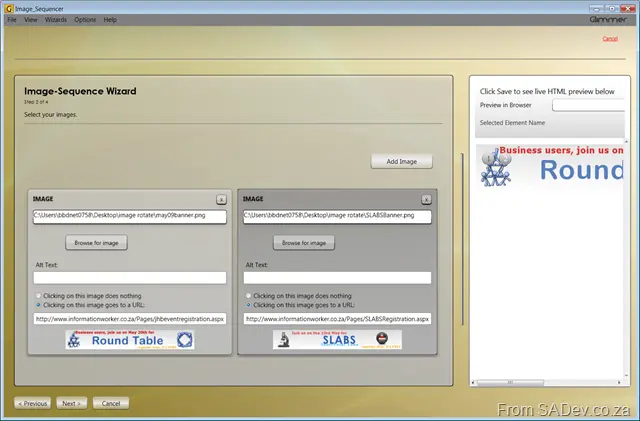
- Select the images and set the URL for them
 . What’s nice here is the live preview window on the right-hand side.
 - Set how long to delay between images and what the image size should be (e.g., if you need to resize)
- Lastly, the save page. The UI is a little odd here, since there’s no finish button. You need to use the (large) save button. When you save, you get a folder with an
imagessubfolder (containing your images), a CSS file, an image for the button (to manually switch between images), jQuery 1.3.2, a minified JS file of the effect you’ve created, and an HTML page for testing/usage.
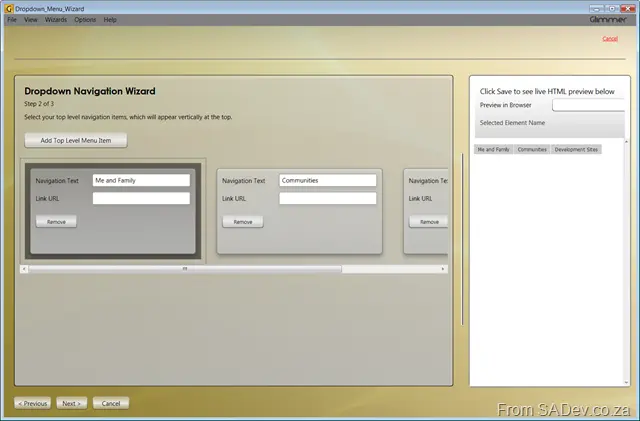
Dropdown Menu Wizard ([click here for the demo of this effect](/files/glimmerpostsamples/image rotate/dropdown.html)): This creates a dropdown menu. It has three steps:
- Description (no “Do not show this again” checkbox, by the way)
- Set up the top-level menu options
- Add second-level options and save. The output is pretty much the same as with the Image Sequencer—a minified JS file of your effect, jQuery, and an HTML page.
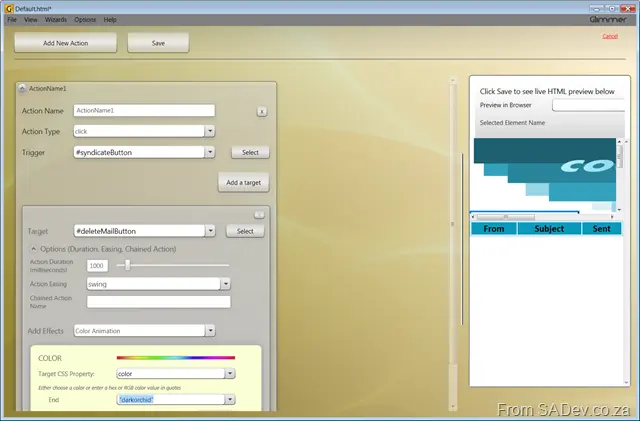
Custom: The non-wizard of the group. This one is powerful and will let you build a lot of effects together, but you need to have an HTML file to start with, as it will give you a list of the tags/IDs available. No page? No tags? Nothing to work with.
 It gives you a single page to wire up the events, and I think this would be useful for people needing something special.
Tooltip Wizard ([click here for the demo of this effect](/files/glimmerpostsamples/image rotate/tooltip.html)): Two-step wizard to add tooltips to text/images.
- Description (again, no “Do not show this again” checkbox)
- On step two, you put in the text/image and the tooltip, then save it.
I also like the menu option “Clean Code Mode” (under the options menu), which disables the minification of the code it generates. This will be very useful for people using this to learn from.
Overall, this is a good first drop—although it should be viewed as beta. The performance is terrible, there’s so much more you could do with jQuery that it doesn’t cover, it’s unaware of plugins (which is important for jQuery), and the UI has many things that aren’t logical (e.g., there’s no hint that the Custom option needs an HTML page to actually do anything). However, as a tool to train people or give designers a way to work with jQuery, this will be very valuable, and I’ll be demoing it at my jQuery talk.