Exception Filtering (C# 6)


Want to learn about other C# 6 features? Check out the full list of articles & source code on GitHub
Many of the other C# 6 features I’ve covered are implemented using syntactic sugar—exception filters aren’t. This has been in the deep parts of .NET for some time, and in C# 6 it is finally being surfaced. This is a very basic introduction to exception filtering, and I have another post with advanced topics that I’d love for you to read.
Catching Exceptions
Catching exceptions today uses the exception type as the condition for the catch block.
try
{
    // code which could throw exception
}
catch (HttpException ex)
{
    // catching only HttpExceptions
}
In the above code, any HttpException will be caught, but any exception of any other type won’t.
try
{
    // code which could throw exception
}
catch (HttpException ex)
{
    // catching only HttpExceptions
}
catch (Exception ex)
{
    // catching everything except HttpExceptions
}
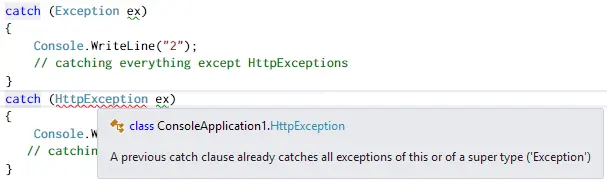
We can catch everything by catching the base Exception class. Order matters here, but the compiler will help prevent you from shooting yourself in the foot:
Today, if you want more fine-grained control over what a catch block responds to, you need to do it inside the catch block itself. For example, handling an exception differently based on values in the exception:
try
{
    // some code
}
catch (HttpException ex)
{
    if (ex.HttpCode == 401)
    {
        // need to do an authenticate
    }
    else
    {
        // some other HTTP error we need to handle
    }
}
Another good example is logging, based on a setting you might want to log or not log exceptions:
try
{
    // some code
}
catch (HttpException ex)
{
    if (loggingTurnedOn)
    {
        // log it
    }

    throw;
}
Exception Filters
Exception Filters add a way to impose additional requirements on a catch block in the form of a boolean expression, which we append with the when keyword. We can now rewrite the two examples as follows:
// example 1
try
{
    // some code
}
catch (HttpException ex) when (ex.HttpCode == 401)
{
    // need to do an authenticate
}
catch (HttpException ex)
{
    // some other HTTP error we need to handle
}

// example 2
var loggingTurnedOn = false;
try
{
    // some code
}
catch (HttpException ex) when (loggingTurnedOn)
{
    // log it
    throw;
}
The when clause can evaluate any boolean expression. You can chain conditions with && or ||:
when (loggingTurnedOn && ex.HttpCode != 401)
You can also pass methods into the when condition:
public static bool ThrowException()
{
    // elided
}

public static void OldPain2()
{
    try
    {
        // some code
    }
    catch (HttpException ex) when (ThrowException())
    {
        // do something
    }
}
When Isn’t If
Lastly, the language choice for this feature is important: it’s not an if statement, because it isn’t conditional branching—it is a filter condition. One of the key distinctions is that an if statement supports else, whereas when does not.