App.Config Transformations: The community shines where Microsoft drops the ball


Last year in May, I spoke at DevDays Durban about what’s new in ASP.NET 4. One of the highlights of that talk was a feature called Web.Config transforms. In short, you have a base web.config and then a file per compiler target (e.g., RELEASE, DEBUG). These extra files contain rules on how to transform your web.config when it is published.
For example, you might have your web.config set up to use your local SQL Server when in Visual Studio, but when you publish a DEBUG build to testing, it changes the config to use the test SQL Server. Or when you publish to production, it turns off a bunch of logging and shows friendly error messages.
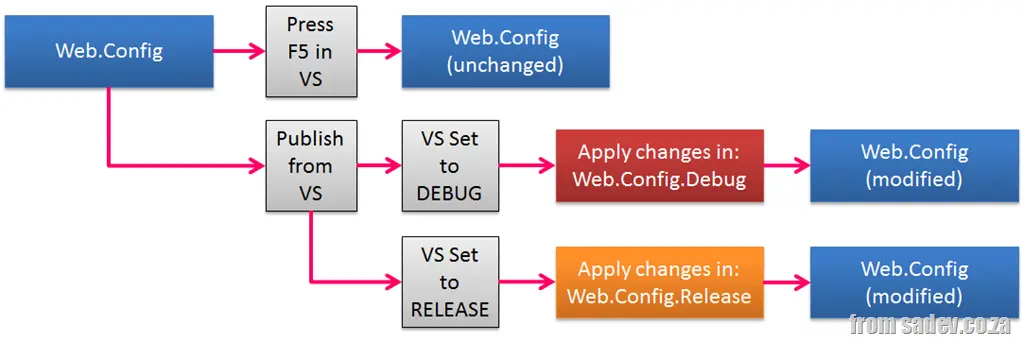
There are two caveats in this process:
- It only works for ASP.NET projects, as this is something the ASP.NET team built into their publishing tool support.
- It only works for publishing—if you have an ASP.NET project and hit F5, nothing happens. 🙁
(Note: ASP.NET here refers to ASP.NET Core and systems built on top of it—like WebForms, MVC, and WebPages—all get this feature.)
This is something we need in every project type, and we need it with F5. Thankfully, some bright people solved this for us with the VS add-in Slow Cheetah.
Now, you get the full experience on any project type, plus a brilliant feature missing in the ASP.NET version—preview. You can see what the resulting config will look like!