AD Lookup Control in Request Tracker


So my double header post on getting this funky AD lookup control with Perl (post 1 & post 2) was actually prep work for getting it to work in a product called RT (or Request Tracker from BestPractical), which is built on Perl. I had never worked with it before, so I was slightly (read: exceptionally) ignorant of how to do this. Effectively, I wanted a lookup to include AD users.
The First Option
The first thing I saw was the Include Page option when creating a field, which is described as:
RT can include content from another web service when showing this custom field. Fill in this field with a URL. RT will replace
__id__and__CustomField__with the record ID and custom field value, respectively. Some browsers may only load content from the same domain as your RT server.
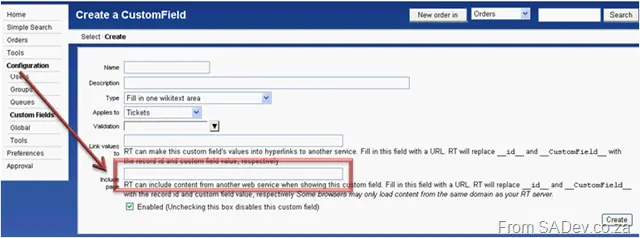
It sounds perfect—but, turns out, there is no knowledge of how this works. I tried various forums and newsgroups, even emailing people who asked about it before… no answers were available! The documentation is useless!
The Second Option
Another option is that once you have created a field, a new option appears: Field values source:
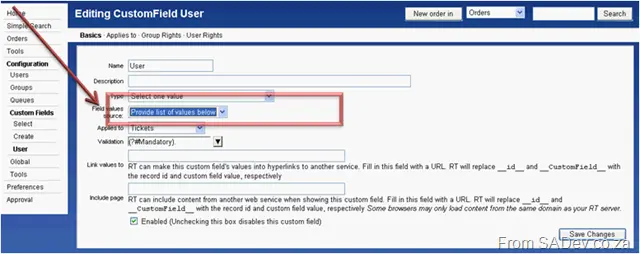
But how do you actually use this without typing in the options yourself?
Custom Perl Module
Well, in the /opt/rt3/lib/RT/CustomFieldValues/ directory is a file called Groups.pm, which allows you to provide the names of the groups as a field source. This is a possible solution—but first, you need to create the module. The module has two methods:
- SourceDescription – which needs to return a string containing the name of what you are returning.
- ExternalValues – which needs to return an array of objects containing the values. These objects must have a
_nameproperty (the name you want to show) and two optional properties:_description(I honestly don’t know where it’s used—don’t think it is)_sortorder(used for sorting).
Taking the AD code from the previous posts and combining it into the right format, we end up with this code:
package RT::CustomFieldValues::AD;

# Start of user configurable settings

my $DomainController = "<SERVER>";
my $Username = "<USERNAME@DOMAIN>";
my $Password = "<PASSWORD>";
my $BaseOU = "<SEARCH OU>";

# End of user configurable settings

# ------------------- DO NOT CHANGE FROM HERE ---------------
# Start of system settings

my $Attributes = "sAMAccountName,sn,displayName";
my $Filter = "(objectCategory=User)";

# End of system settings

use strict;
use warnings;
use Net::LDAP;
use Net::LDAP::Control::Sort;
use HTML::Entities;

use base qw(RT::CustomFieldValues::External);

sub SourceDescription {
    return 'Active Directory Users';
}

sub ExternalValues {
    my @res;
    my $i = 0;
    my $ad = Net::LDAP->new($DomainController)
        or die "Could not connect!";

    $ad->bind($Username, password => $Password, version => 3);

    my $sort = Net::LDAP::Control::Sort->new(order => "displayName");

    my $results = $ad->search(
        base => $BaseOU,
        filter => $Filter,
        attrs => $Attributes,
        control => [$sort]
    );

    if ($results->count == 0) {
        die "No results returned";
    } else {
        for (my $counter = 0; $counter < $results->count; $counter++) {
            my $user = $results->entry($counter);
            if (defined($user->get_value("sn"))
                && length($user->get_value("sn")) > 0
                && defined($user->get_value("sAMAccountName"))
            ) {
                push @res, {
                    _name => encode_entities($user->get_value("displayName")),
                    _description => encode_entities($user->get_value("sAMAccountName")),
                    _sortorder => $i++,
                };
            }
        }
    }

    $ad->unbind;

    return \@res;
}
Then we bundle that nicely into AD.pm and dump that into the folder.
Configuration
How do we use that module? Well, you need to go to /opt/rt3/etc/ and edit the RT_SiteConfig.pm file, adding the following line:
Set(@CustomFieldValuesSources, "RT::CustomFieldValues::AD");
Next, restart Apache (the command I used was: apache2ctl restart), and go back to the field properties. You should be able to select it.
Tips and Tricks
A few things about building these that I learned along the way:
- If, after restarting Apache, there is no dropdown for the field source, it means you have a bug in your module, and you need to fix it.
- Use the
diecommand excessively. When you select the field source and click save changes, it will test your code. Onlydiewill cause it to show error messages! If you get the UI, it won’t give you errors. - The autocomplete options may seem the coolest, but they use a (poorly, at least compared to jQuery) written piece of JavaScript. This struggles to run with more than 25 results returned (slows down, doesn’t work, errors, freezes the browser). I would recommend working with the select one or select many (combo boxes) first and trying to change to autocomplete later.
- If you change the code after setting the field, you need to restart Apache and then reconfigure the field by setting the field source to something else, saving, and then setting it back. It seems there is some caching that can prevent your changed results from appearing.
Hopefully, this helps you develop with RT, and that this (overcomplicated) process is easier.