AD Lookup Control with Perl and JS - Day 2


So Day 2 started with growing the control further, but first I wanted to set the code up to run in IIS.
Perl + IIS 7
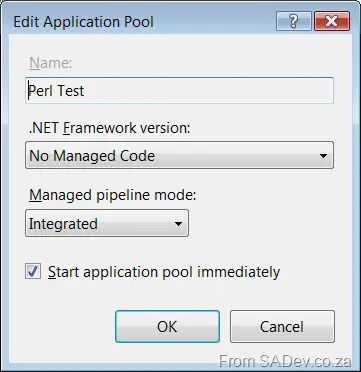
First, I created a simple application pool for this site to run in. One of the nice things is setting it to not run .NET Framework code, which just lowers your attack surface.
Next, I created a simple website to use that app pool. However, there was no handler setup (odd—I thought ActivePerl’s install did this—but maybe it’s IIS 6 only). To fix that, I clicked on Handler Mappings:
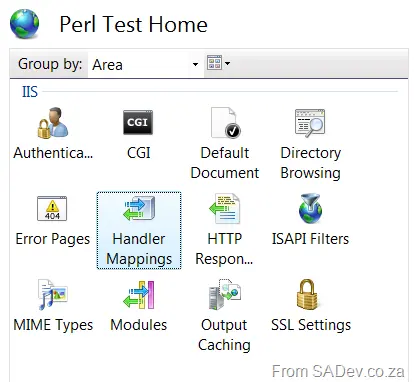
In there, I added a Script Handler with the following settings:
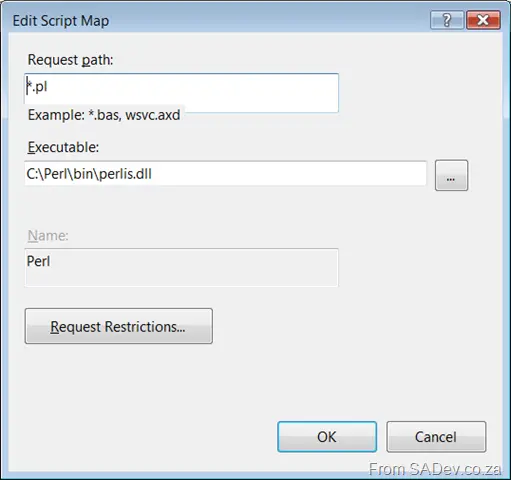
Note: I would leave Request Restrictions on the default unless you have a good reason to change it.
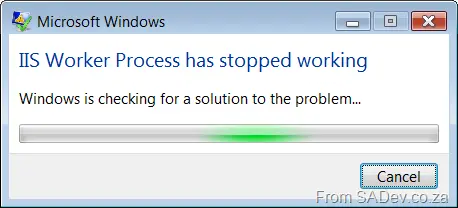
After that brief config, my Perl worked for a while, until I started getting this error (IIS Worker Process has stopped working) when browsing to the web page:
I had just changed code before that, so here’s a quick test to try and find the fault. The snippet of Perl code looks like the following:
print "<html>
<head>
<script src='jquery.js' type='text/javascript'></script>
<script src='jquery.simplemodal.js' type='text/javascript'></script>
<script src='test.js' type='text/javascript'></script>
</head>
<body style='font-family: Calibri'>

Username <input type='text' id='result' readonly='readonly'/><span id='test' style='color: #0000FF; text-decoration: underline; cursor: hand'>Select User</span>

<div id='listContent' style='padding: 5px; background-color: #000000; color: #FFFFFF; border: thin solid #C0C0C0; width: 450px; overflow: scroll; height: 450px;'>
<div style='font-size: x-small; color: #C0C0C0; text-align: right; cursor: hand;padding-right: 20px;' class='simplemodal-close'>Cancel</div>
<span style='text-transform: capitalize; font-weight: bold; padding-bottom: 3px'>Select a user by clicking on their name</span>
<hr />
Filter <input type='text' id='filter' />
<hr />";
If you’re stuck, here’s a hint: Line 14.
...
...
Ok, if you got it, good. If not, well, it’s because the HTML I was outputting had " in it and that caused the string to close and some garbage (from the compiler’s POV) to follow it. Why this had to kill the process, I don’t know—what’s wrong with a proper error message like we get from .NET?!
Filtering
I added a text box to the popup dialog so I could filter using jQuery .show() and .hide() methods. This isn’t that impressive, but it led me to needing the jQuery documentation a lot (mainly for selectors, but I was also getting weird results with hide()… until I realized I had <br/> tags there and those weren’t getting hidden). Checking with the slow internet here wasn’t great.
I found (read: I went to the jQuery Alternative Resources page) a cheat sheet I could print and stick on the wall in front of me. There are two listed there: one Excel and one Image. The image one looks nicer and is more verbose, but I went with the Excel one because it has examples—and I can figure out more from the examples than the verbose text in the image gives me.

One of the other things about filtering is that I wanted it to be case-insensitive, but I was using :contains for the filtering, which is case-sensitive. I found a great thread on adding an extension method to it with a case-insensitive version of :contains. I recommend copying and pasting that if you’re stuck.